
What Needs Review and What Does Not: Three Kinds of Change
Monday, 09:10, at Harbourview Clinic. Dev, two months into the job, asks Anya whether he needs to "put a change in" for the new printer in reception. "No," says Anya, "it's a printer." Dev nods, then asks about the DNS entry for the printer, and Anya pauses for long enough that both of them notice. The week before, nobody had put a change in for renewing the certificate on the patient-booking site, because a renewal is routine. It was a wildcard certificate. It also covered the staff portal, which spent Tuesday morning behind a browser warning that told forty nurses the site was unsafe. Nobody had asked what else used it, because nobody had been asked to ask.
Both mistakes are the same mistake: there was no rule for which changes get a second look. A review, in this series, is one other person reading what you plan to change before you change it. They ask a few fixed questions. What needs review is the question of which changes earn that glance, and the answer is a sort into three kinds. A standard change is pre-approved as a type and done without a review. A normal change is reviewed before it happens. An emergency change is done now and reviewed after. This article is part of our Lightweight Change Management series, and it is about the sort.
It covers the three kinds in plain words, then the pre-approved list and how to build one from the last three months. Next come the five risk questions that sort everything else, and the sort as a picture. We cover the arguments you will hear and what to say back, then what is not a change at all. We move on to keeping the sort honest with a monthly count. We finish with a short war story and the classification table to copy, in that order.
Three Kinds of Change in Plain Words
A standard change is one the desk has agreed, once and in writing, meets four conditions. It is low risk, has been done many times, is done the same way each time, and has a known way back. Adding a user account. Adding someone to a group. Swapping a printer for the same model. Building a laptop from the standard image. Nobody reviews each one, because the type was reviewed when it went on the list. It is still recorded, in one line, because knowing what changed applies to boring changes too, and the boring ones are the majority.
A normal change is everything not on the list. A firewall rule, a server patch, a DNS change, a new switch, a mail flow rule, a scheduled task, a certificate that covers more than one thing. It is written up on one page before it happens and read aloud at the weekly review. There, someone who is not making it asks the risk questions. "Normal" does not mean large. It means "not yet proven safe by repetition", which covers most of what a desk does to its servers and almost none of what it does to its users.
An emergency change cannot wait for the review because waiting would cause harm now. A service is down, an attack is under way, or data is being damaged. The person making it tells one other person first and makes the smallest change that stops the harm. They write the record within a working day and bring it to the next review for a look after the fact. Emergency is a speed, not a size, and the full rules are in Emergency Changes.
The names are not the point; the sort is. If your tool has only "ticket", the kind lives in a subject prefix or a field. If it has a change module the kind is a drop-down. Either way, every change lands in exactly one of three bins. The bin decides what happens next: no review, review before, or review after. A fourth bin called "it depends" is where process goes to die.
The Pre-Approved List
The pre-approved list is the written set of change types that the desk has reviewed once and agreed need no further review per instance. The word "pre-approved" refers to the type, not to any particular change. The review happened on the day the entry was written, and every change that matches the entry inherits it. An entry has a name, the conditions under which it counts, a link to the written procedure, the rollback, and who may do it. If any of those is missing, the entry is a wish rather than an approval.
A change type earns a place on the list when all of the following are true. The list is short on purpose; it is a bar, not a form.
- It has been done this way at least five times without causing an incident.
- A written procedure exists and the last three people to do it followed it.
- The rollback is known, written down, and takes the same person under fifteen minutes.
- It affects one person, one device, or a group that has agreed to it in advance.
- It touches nothing that everything else depends on: the directory, DNS, the firewall, mail flow, backups, shared storage, the hypervisor, or the help desk tool itself.
Build the first list from history rather than imagination. Pull three months of tickets and whatever change notes exist. List every change the desk made, and sort by how often each one came up. The frequent, dull ones at the top are the candidates. Write an entry for each, read the entries at one review, and the list is live. A first list usually has eight to fifteen entries, which is enough to take most of the week's changes out of the review. That leaves the fifteen minutes for the ones that matter.
The list changes in both directions. A standard change that causes an incident comes off the list the same day, until the procedure is fixed, and returns through the review. A normal change that has been waved through in ten seconds at three reviews running is a candidate for the list. Once a quarter, read the whole list and strike any entry nobody has used, because an entry nobody uses is a procedure nobody remembers. The entry below is the shape to copy. Keep the completed entries together, in the knowledge base or at the top of the change log.
PRE-APPROVED LIST — ONE ENTRY
Change type: _________________________________   Entry number: ____
Counts as standard only when: ____________________________________
   (example: same model, same site, one device at a time)
Procedure: ____________________________   (link or page name)
Rollback: _____________________________   takes about ____ minutes
Who may do it: __________________________
Record as: one line in the ticket or change log, kind = STANDARD
Added on: ________   Reviewed by: ________   Last used: ________
Remove from list if: it causes an incident, or goes unused for a quarter
The Five Risk Questions
Everything not on the list is normal by default, so the risk questions do not decide whether a change is reviewed. They decide how much attention it gets at the review and whether it should wait for a better time. There are five, each with a low answer and a high answer, and the reviewer asks them aloud in order. The table is the whole method. It fits on an index card, and on some desks it lives on one.
| Question | Low-risk answer | High-risk answer |
|---|---|---|
| How many people notice if it goes wrong? | One person or one device | A department, a site, or everyone |
| Can it be undone, and how fast? | Yes, in minutes, by the same person | Hours, a restore from backup, or nobody is sure |
| Has this exact change been made here before? | Yes, more than once, the same way | First time, or first time on this system |
| Does it touch something everything else depends on? | No | Directory, DNS, firewall, mail, backups, storage, hypervisor, the help desk tool |
| Is there a worse time to do it than the time planned? | No; any working hour is fine | Yes: month end, payroll, peak trading, an exam week, a Friday evening |
There is no arithmetic. One high answer means the change gets its one-page record read aloud and the questions answered on it. Two or more means a named second person is present when the change is made and a test is written down before it starts. Four or five means it waits for a window. In that case, the review asks whether it can be split into smaller changes that each score lower. Resist the matrix with weights and colours. A desk of five does not need a risk score; it needs "who notices if this goes wrong?" asked out loud by someone who is not doing it.
The fourth question is the one that catches the Harbourview certificate. "Does it touch something everything else depends on?" is answered by naming the things that depend on it. A wildcard certificate is a dependency with a list attached. The question does not need the reviewer to know the answer. It needs the person making the change to go and find out, which is the point of asking it a day before rather than a morning after.
The Sort as a Picture
The picture below is the sort as two questions. A proposed change is asked, first, whether it is on the pre-approved list and will be done the written way. If yes, it is standard, and it goes left to the green card. If no, it is asked whether waiting for the weekly review would cause harm right now. If yes, it is emergency, and goes to the orange card. If no, it is normal, and goes to the amber card. Each card gives the risk, the review, the lead time, the record and some examples. So the three columns are the three kinds side by side.
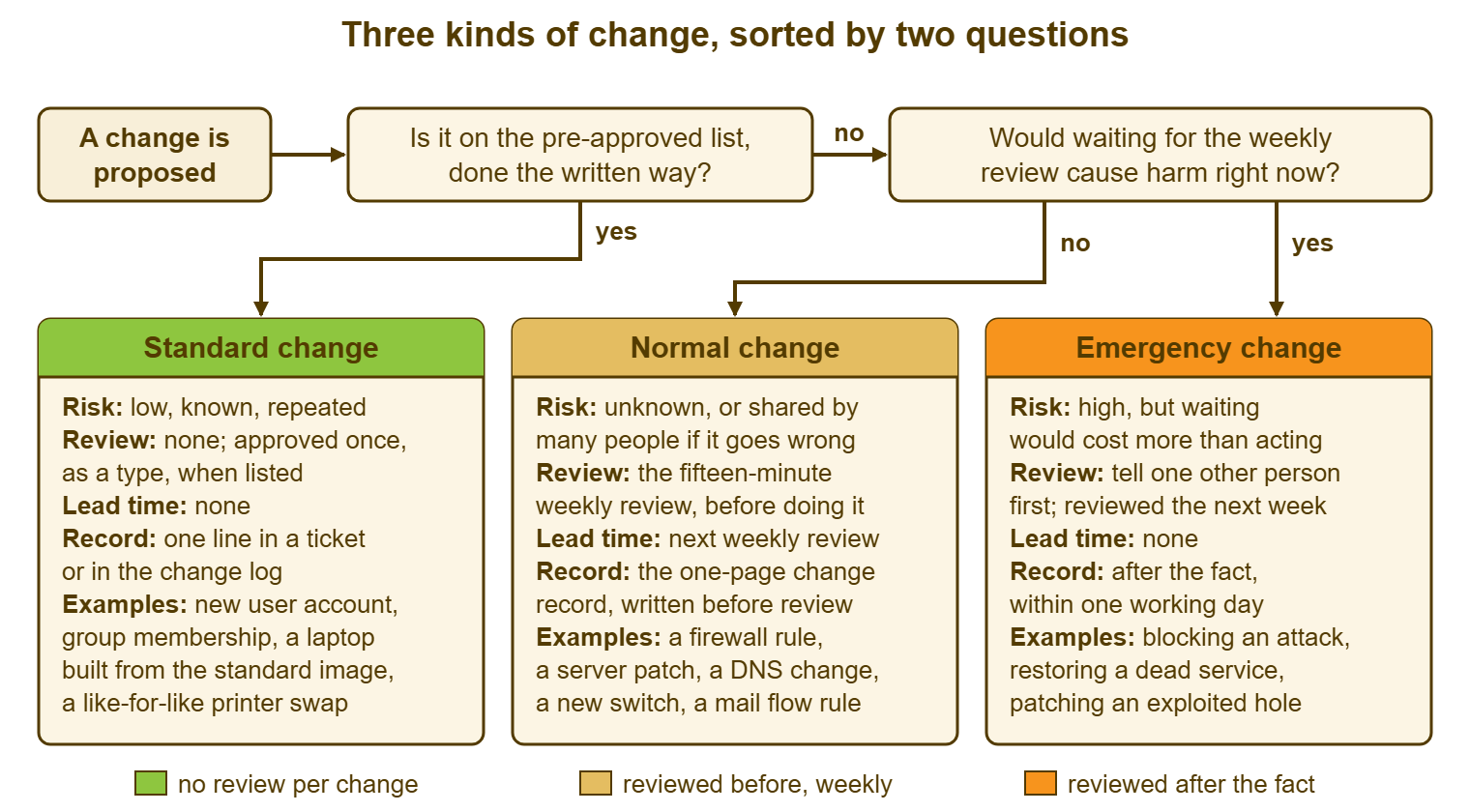
The order of the questions matters. The list is asked first because most changes are standard, and the list is where most of the time saving lives. A desk that asks the emergency question first ends up arguing about urgency over a printer. The harm question is asked second because an emergency that waits for Thursday is harm. And a normal change that claims to be an emergency is impatience. The two deserve to be told apart in daylight.
The Arguments You Will Hear
"It's only a small change." The size of a change is not the size of its effect. A one-character edit to a firewall rule is small to type and can take a site offline. A four-hour server rebuild is large to do and affects one machine that nobody uses until Monday. The reply is a question: small to make, or small if it goes wrong? Only the second one counts, and it is the first risk question in different words.
"I've done it a hundred times." Then it belongs on the pre-approved list, with the procedure written down. From then on it is standard and nobody will ask again. Until it is written, it has been done a hundred times inside one head. The desk has no way to tell the hundred-and-first from the first. Offer to write the entry together. People who have done something a hundred times are usually glad to stop being asked about it.
"There isn't time to wait for Thursday." Then is it an emergency? Ask the harm question, straight: what gets worse between now and the review? If the answer is a service down, an attack, or data being lost, do it as an emergency, tell one person, and record it today. If the answer is "the user is waiting" or "I'm here now", it is a normal change, and Thursday is at most six days away. Most of the time it is Wednesday.
"The supplier did it, not us." A change made by a supplier, by an automatic update, or by the finance system's own administrator is still a change to a system people depend on. And the desk still wants to find it later. Record what you know when you know it. The supplier's maintenance window goes on the calendar in advance. A line goes in the log afterwards saying "booking system patched by supplier, their reference 4471". You cannot review what you did not make. You can still write it down.
"It's not an IT system." Consider the finance system's administrator changing a workflow or HR altering the feed that creates accounts. Or consider the marketing team changing where the website points. If it changes how a shared system behaves, invite it to the review. You cannot compel another department to use your process, and trying will cost more than the outage. You can make it easy, by offering the one-page record and a slot on Thursday. And most departments say yes the first time their change breaks something of yours.
What Is Not a Change at All
Three kinds of work get mistaken for changes and should not be sorted. Sorting them clogs the review with things that were never going to be reviewed. The first is fixing one person's problem inside existing settings: resetting a password, reinstalling an application, re-joining a laptop to the domain. That is incident work, and it leaves its own ticket. The second is changing data rather than behaviour: updating a record, moving a folder, correcting a name. The third is routine operation on its own schedule. Examples are backups running, reports generating, and the nightly reboot that was approved as a scheduled task when the task was created.
The test is a single question. Does the work alter how a system behaves for more than one person, or for one person in a way the desk would want to find in the log later? If yes, it is a change, and it gets a kind. If no, it is one of the other three work types, and The Four Work Types in Plain Words says which. The edge cases are bulk operations. Moving one folder is data. Moving every folder on a share to a new structure is a change, because forty people will notice.
One shape confuses new desks: a request fulfilled by a change. A new starter is a request. Creating the account inside it is a standard change. Both live in one ticket. The request is the ticket and the change is a one-line entry in it with the kind on the line. Nobody opens a second ticket to record that an account was made. How a request moves through approval and fulfilment is covered in Requests, Approvals and Fulfilment. Here the rule is only that the change inside the request is still recorded as one.
Emergency Is a Speed, Not a Size
The emergency test is harm from waiting, and nothing else. Not the size of the change, not the seniority of the person asking, not the day of the week. A tiny change that stops an attack in progress is an emergency. A large migration that a director wants finished before a board meeting is a normal change with a deadline. The deadline goes on the calendar, where the review can see it. The person who gets to call something an emergency is the person who can name the harm. And the harm must be happening or about to.
On a small desk, the emergencies come in three shapes. A service is down and the fix is a change. An attack or a leak is under way and a change stops it. Data is being damaged and a change halts the damage. Everything else is a normal change wearing a hat. The count at the end of each month will tell you which the desk has more of. And a desk with more hats than fires has a problem with its calendar rather than its environment.
Remember: every change lands in exactly one of three kinds. Standard changes were reviewed once, as a type, and get a one-line record. Normal changes are reviewed before they happen. Emergency changes are reviewed after, within a day. The list and the two questions do the sorting, and a change with no kind on it has not been sorted.
Keeping the Sort Honest
Once a month, count the changes by kind. If the kinds are written on the records, the count takes five minutes; if they are not, start writing them. Three patterns mean the sort has drifted. If almost everything is standard, the list has grown to include things that are not. Usually that is because someone added an entry to avoid a review rather than because the type earned it. If nothing is standard, the list is not being used. That usually means it is hard to find or the review has become so quick that nobody bothers to skip it. If there is more than one emergency a week on a desk of five, there are two possibilities. Either the environment is on fire or the word is being used to mean "I'm here now". The monthly count is where you find out which.
Two other checks belong in the same five minutes. Any standard change that caused an incident this month comes off the list, if it has not already. Any normal change that was waved through without a question three reviews running goes on the list of candidates. The sort moves, slowly, in both directions, and it is meant to. A list that has not changed in a year is either perfect or unread, and I have only ever met the second kind.
A Short War Story: The Saturday Push at Northgate Retail
Northgate Retail's desk had an entry on its pre-approved list that read "till configuration update, single store, like for like". Malik had used it without incident for over a year. On a Saturday at 11:00, the busiest hour of the trading week, he pushed a new card-terminal timeout to all forty-one stores in one go. He reasoned that a change that was standard for one store was standard for all of them. The timeout was fine on the head-office link he had tested from and too short for the nineteen stores on slower rural connections. There, card payments began failing within minutes and did not recover until the push was reverted ninety minutes later. The cost was a Saturday morning of cash-only trading at nineteen stores, two technicians' weekend, and a very quiet Monday meeting with the retail director. The entry was rewritten that week with the words "one store at a time, never on a Saturday". A new normal change was recorded for anything touching more than three stores. The lesson Northgate kept was that a standard change is standard at the scale and in the way the entry says. And a change to forty-one stores is not the same change as a change to one.
The Classification Table
The table below is the sort on one page, filled in for a typical desk of three to ten people. Copy it into the knowledge base and change the examples to your own systems. Fill in the review day and the names, and read it at the first review. Every column is a decision the desk has already made, so that nobody makes it again at 17:30 on a Friday.
| Kind | What it is | Examples | Review | Record | When it may happen | Who may do it |
|---|---|---|---|---|---|---|
| Standard | On the pre-approved list and done the written way | New user account; group membership; like-for-like printer or laptop swap; laptop built from the standard image; routine workstation patching by the written procedure | None per change; the type was reviewed when it joined the list | One line in the ticket or change log, kind marked STANDARD | Any working hour; outside hours only if the entry says so | Anyone named on the entry |
| Normal | Any change not on the list, with time to wait for the review | Firewall rule; server patch; DNS or certificate change; new switch or access point; mail flow rule; scheduled task; a change to the help desk tool itself | Read aloud at the weekly review; the five risk questions answered; a second person named if two or more answers are high | One-page change record, written before the review, closed with the outcome | The window agreed at the review; never inside a freeze period | The person named on the record, with the second person present if required |
| Emergency | Waiting for the review would cause harm now: a service down, an attack, data being damaged | Blocking an address under attack; restoring a dead service from backup; patching a hole being exploited; reverting a change that broke something | Tell one other person before acting; reviewed after the fact at the next weekly review | Emergency record written within one working day, linked to the incident | Immediately, as small a change as stops the harm | Any technician on duty, having told one other person |
At Harbourview, the reception printer went on the pre-approved list the same week, with "and its DNS entry" written into the procedure. Dev wrote the entry. The wildcard certificate became a normal change with a line on its record. The line reads "also used by: staff portal, intranet, three internal tools, the car-park system". Discovering that took Anya twenty minutes and would have taken nobody anything on Tuesday morning. The next renewal was done on a Wednesday afternoon with the portal team told in advance. Nobody saw a browser warning, which is what a reviewed change looks like from outside: nothing.
Frequently Asked Questions
How long should the pre-approved list be?
Who approves an entry on the pre-approved list?
Is patching a standard change or a normal one?
What happens when a standard change goes wrong?
Does the risk assessment need a score?
Our tool has no change type field. Where does the kind go?
From the QuerySolv team: we build self-hosted help desk software for Windows. QuerySolv runs as one Windows service on your own network. It takes requests by web form, e-mail, live chat, social messages and REST API. It is licensed once per installation rather than per agent per month. The free trial runs the full product for 30 days.