
Avoiding Alert-Ticket Floods: Dedup, Grouping and the Breaker
Monday, 07:30, at Meridian Parts. Kasia opens the queue and the counter says 412 new tickets. On Sunday night the core switch at the main site had rebooted itself three times. Each time it did, every one of the forty-one monitored devices behind it became unreachable. Every service on those devices stopped answering. Every one of those conditions raised an alert, which the integration turned, correctly, into a ticket. When the switch came back, the alerts cleared and the tickets resolved. When it fell over again twenty minutes later the whole thing happened again. Somewhere in the 412 are six tickets from real people who had problems on Sunday. Kasia will find them at about eleven. The integration told the truth four hundred and twelve times, and the desk could not hear a word of it.
An alert flood, or alert storm, is a burst of alerts that arrive faster than anyone can read them. Usually that is because one cause has many symptoms and the monitoring system reports each symptom separately. A flood of alerts becomes a flood of tickets the moment the integration opens one ticket per alert. And a flood of tickets is worse than the flood of alerts it came from, because the tickets stay. This article is about the controls that stop the second flood, in the order you should add them. It is also about what to do on the morning they were not enough. It is part of our Monitoring-to-Ticket Integration series, and it builds on the dedup key from the mechanics article.
It covers how floods happen; dedup as the first wall; grouping many alerts into one ticket for the cause; the storm threshold; the circuit breaker; maintenance windows. Next come the monitoring system's own controls and the morning with four hundred tickets. A short war story and the flood controls table to copy follow, in that order.
How Floods Happen
Floods have three shapes, and each needs a different control. The first is the shared dependency: one switch, one power strip, one site link, one storage array, and behind it forty things that all go quiet at once. Every one of the forty is genuinely unreachable, so every alert is true, and every true alert makes a ticket. Dedup does nothing here, because each device has its own key. The second shape is the flap: one device crossing the line and coming back, dozens of times, each crossing a fresh alert. That one belongs to closing tickets when the alert clears, where the clear delay and the flap counter live. This article leaves it there.
The third shape is the mass change. Patch night reboots sixty servers between ten and midnight. Every one of them stops answering. Every service on them stops. The monitoring system, which was not told, reports all of it. The alerts are true and every one of them is expected. And an integration that cannot tell expected from surprising opens three hundred tickets about a Saturday that went exactly to plan. Underneath all three shapes sits one more multiplier. Most monitoring systems re-send an unresolved alert on an interval, every fifteen or thirty minutes, until it clears or someone acknowledges it. A forty-device outage that lasts two hours is not forty alerts. It is forty alerts, eight times.
A flood is not more information than a single alert. It is the same information repeated, and the repetition is what destroys the queue. The controls below are all ways of saying the thing once. (The monitoring system, left to itself, prefers to say it until someone makes it stop. It is not being difficult. It was built to be heard.)
Dedup Is the First Wall
Dedup is the rule that one problem on one device opens one ticket and that repeats become notes on it. It is the first wall against a flood and the subject of opening tickets from alerts. It stops the re-send multiplier completely. The forty-device outage that lasts two hours becomes forty tickets with eight notes each instead of three hundred and twenty tickets. And that is the difference between a bad morning and a lost one. If your integration has no dedup key, stop reading this article and go and add one. Everything below assumes it.
Dedup does not stop the dependency flood, because forty devices are forty keys, nor the mass change, because sixty servers are sixty keys. It reduces each of those floods to its true size, which is still too big to read. Kasia's 412 with dedup would have been about 123, three cycles of forty-one. And 123 tickets about one switch is a smaller catastrophe but a catastrophe all the same. The next three controls are about turning forty-one true alerts into one true ticket.
Grouping: One Ticket for the Cause
Grouping is the rule that alerts arriving together about related things become one ticket, with the members listed inside it, rather than one ticket each. There are three ways to decide what "together" and "related" mean, and a small desk usually uses the first and grows into the second. Grouping by time puts every alert that arrives within a short window of the first, a few minutes, into the same ticket as a line. Grouping by dependency uses what the monitoring system knows about which devices sit behind which. If the switch is down, everything behind it is a child. In that case, the children are suppressed or listed under the parent rather than opened on their own. Grouping by site puts everything from one location into one ticket during the window. It makes the reasonable guess that forty alerts from the warehouse in two minutes are one problem at the warehouse.
The grouped ticket's subject names the suspected cause or the place, not the first symptom. "[ALERT GROUP] site B: 41 devices unreachable since 23:40, first: core-sw-01" tells the technician what to look at. "[ALERT] printer-07 unreachable" followed by forty siblings tells them nothing until they have read all forty. The body lists every member with its own key and the time it joined. As each member clears, the integration notes it against the line rather than closing anything. The group ticket closes when the last member clears, or when a person closes it. The closing note says how many devices were affected and for how long. That is a record of an outage. Forty-one separate tickets are a record of forty-one separate guesses.
Where the monitoring system already understands dependencies, let it do the grouping, because it knows the topology and the integration does not. Most monitoring systems can be told that the forty-one devices depend on the switch. They will then raise one alert for the switch. They mark the rest as unreachable-because-parent rather than alerting on each. If yours can, that one setting removes most of the dependency flood before it reaches the integration at all. If yours cannot, the time window in the integration is the fallback, and it works well enough that many desks never need more.
The Storm Threshold
The storm threshold is a count of alerts in a short window above which the integration stops opening individual tickets and opens one storm ticket instead. Pick the numbers from your own history: look at the busiest ordinary quarter-hour the integration has seen, and set the threshold at several times that. For a small desk with a dozen alert types connected, ten alerts in five minutes is a common starting point. Three on a normal evening is busy; ten is a switch. When the count crosses the line, the integration opens a single ticket at high priority with a subject like "[ALERT STORM] 37 alerts in 5 minutes, first: core-sw-01 unreachable". From then on every alert that arrives is appended to that ticket as a line, grouped or not. That continues until the rate falls back below the line for a while.
The storm ticket is the desk's one record of the night. And it is also the strongest hint the integration can give that a major incident is under way. It should land in front of a person immediately, by whatever route the desk uses for the alert types it considers urgent. And the person who opens it reads the first line and decides whether to declare. The first fifteen minutes of that decision, and who does what in them, are in declaring and the first fifteen minutes. The storm ticket's job is to make sure those minutes start at 23:41 rather than at 07:30. It also holds the list of what fell over so the review has it.
The threshold is a judgement and you will get it wrong in one of two directions. Too low, and a busy patch evening trips it and the technician learns to ignore storm tickets, which is the worst possible training. Too high, and the storm has already put eighty tickets in the queue before the integration notices anything unusual. Start on the low side, watch what trips it for two months, and raise it only when every trip was a false alarm. A threshold that has never tripped is not a threshold that is set right. It is a threshold nobody has tested.
The Circuit Breaker
The circuit breaker is the control that stops the integration writing to the help desk at all. It acts when the rate stays high enough for long enough that even one storm ticket growing by a line a second is doing harm. It is named after the thing in the fuse box for the same reason. It trips. It stays tripped until someone resets it. While it is tripped nothing gets through. The integration keeps receiving alerts and writes every one of them to its own log file with the time. But it opens no tickets and adds no notes. It opens exactly one ticket at the moment it trips, reading "integration breaker tripped at 23:52 after 120 alerts in 10 minutes; alerts are being held in the log; a person must reset". Then it is quiet.
The breaker protects two things the storm threshold does not. It protects the help desk itself, whose database and mail pipeline were not sized for a thousand writes an hour from one address. The help desk's human tickets are still arriving underneath. And it protects the technicians' attention during the one night of the year when they need all of it for the switch and none of it for the queue. A storm ticket with four hundred lines in it is still a ticket somebody has to scroll. A breaker that trips at line one hundred and twenty says: enough, go and fix the switch, the log has the rest.
Resetting is a decision, and the first version of the breaker should make it a person's. When the switch is back and the rate is normal, the technician resets the breaker. The integration then reconciles the held alerts. For every key in the log, it asks the monitoring system or the next check whether the condition is still active. It opens a ticket now for each one that is. It writes a one-line log entry for each that cleared while held. The ones that are still active are the real finding of the night, the two servers that did not come back. And they are the reason the held alerts are reconciled rather than discarded. A later version can reset itself after the rate has been normal for a set number of minutes; make sure it still reconciles. Test the breaker by tripping it on purpose, once a month, with a flood of test alerts. Yes, on purpose. A breaker that has never been tripped is a hope with a name.
The ladder below puts the controls in one picture, using Kasia's Sunday as the example. There is one switch, forty-one devices behind it, two hours down, and a monitoring system re-sending every unresolved alert every fifteen minutes. Read it top to bottom. Each row is the queue on Monday morning with that control in place. And the count on the right is what the desk would have had to read. The two lower rows are the controls for the night when grouping is missing or the rate will not fall. The footnote is the control that keeps expected alerts out of the picture entirely.
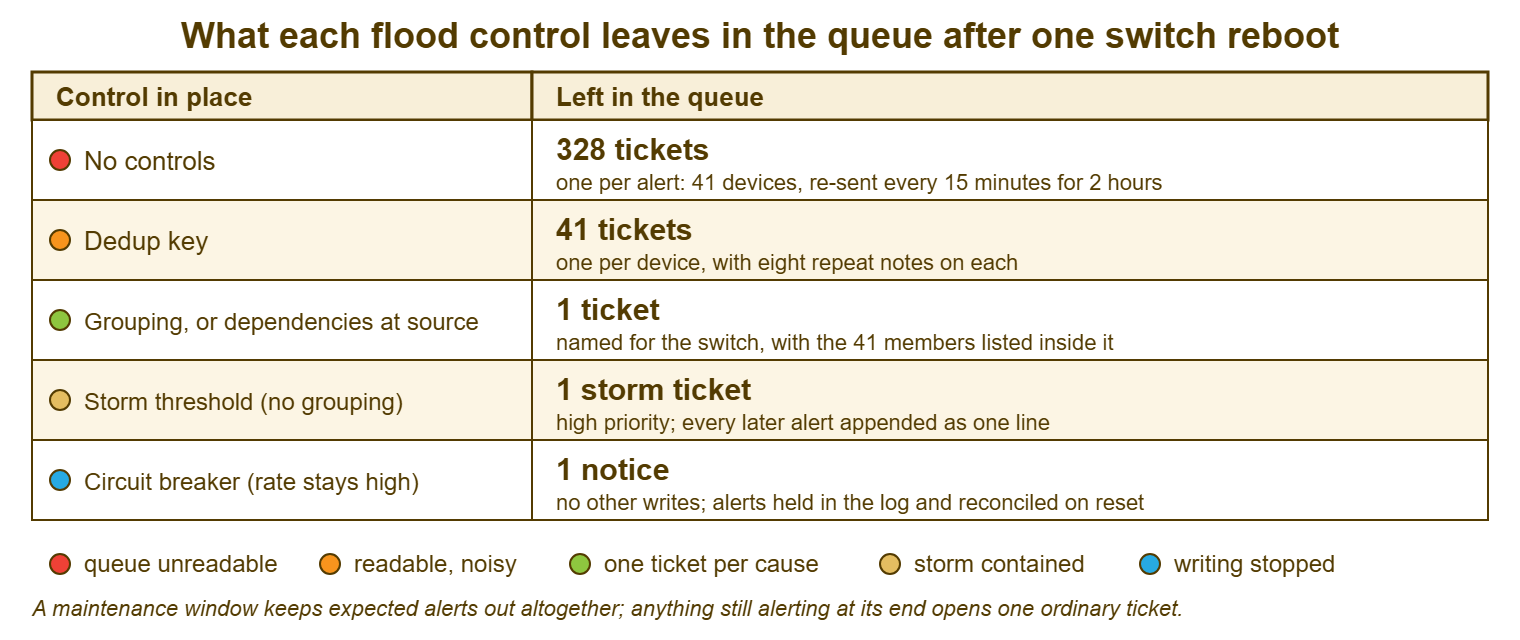
Remember: the controls stack. Dedup makes one alert one ticket; grouping makes one cause one ticket. The storm threshold makes one bad night one ticket; the breaker stops the writing altogether and holds the rest in a log to be reconciled. Add them in that order, and test the last two deliberately.
Maintenance Windows
A maintenance window is a declared period in which a named set of devices is expected to alert, because somebody is working on them. During that period the integration should not open tickets for those devices. The window is declared in advance, by whoever is doing the work, as part of the change record. It names the devices, the start and the end. The integration reads a simple list of current windows, a few lines in a file or a page the relay can fetch. And any alert whose device is inside a window is logged rather than ticketed. A single low-priority ticket per window keeps the count for the record: "[MAINTENANCE] patch night, 60 servers, 22:00-00:00, alerts suppressed: 184". It gives the technician one place to look if something seems off.
Suppress in the monitoring system as well, where it can be done, because an alert that never fires is cheaper than one that is caught. Most monitoring systems have a way to schedule downtime for a device or a group. And a desk that uses it has a quiet dashboard on patch night instead of a red one. But keep the integration's own window too, as the second line. That is because the person doing the work will forget to schedule the downtime about one time in four. The integration's list is the one the change checklist makes them fill in. Two layers, one of which is on a checklist, is how you get to zero.
The alert that matters on patch night is the one that is still firing after the window closes. And the window's end is where the integration must become strict again. At midnight the list expires. Any device still alerting at 00:05 opens a ticket at ordinary priority. The note says the device was inside the window until midnight and has not recovered. Those are the two servers that did not come back, and on a night without a window they are indistinguishable from the fifty-eight that did. A maintenance window is not a courtesy to the monitoring system. It is the thing that makes the two alerts that matter visible. Telling the people who use the servers is a separate job, with its own notice, in planned maintenance notices. The integration only needs the list.
The Monitoring System's Own Controls
Most of the controls above exist inside the monitoring system too, under different names, and you should use those first and the integration's second. Dependencies, which stop children alerting when the parent is down. Flap detection, which stops a bouncing condition alerting on every bounce. Notification intervals, which decide how often an unresolved alert is re-sent, and which you can set to "once" for anything the integration will dedup anyway. Scheduled downtime, which is the maintenance window at source. Every alert these controls stop is an alert the integration never has to handle. And a control at the source is a control that also keeps the dashboard honest.
The integration's controls are still needed, for two reasons. The monitoring system's controls are configured per device and per check by whoever set it up. And they will be missing on the device that was added last Tuesday. And the monitoring system's controls cannot see the help desk. They do not know that the queue has six human tickets drowning. Nor do they know that the breaker's whole purpose is to protect a database the monitoring system has never heard of. Set the source controls where you can. Build the integration's controls as if the source had none. The two together cover each other's gaps. Which gaps exist depends on your monitoring system, and the honest advice is the usual one: check yours.
The Morning With Four Hundred Tickets
When the controls were not enough, or were not yet built, the morning has a procedure. The first step is to stop the inflow before touching a single ticket. Trip the breaker by hand, or pause the integration, or in the worst case block the monitoring address at the mail pipeline for an hour. Nothing else you do that morning holds if tickets are still arriving faster than you close them. Then find the human tickets and protect them. Filter the queue by requester and exclude the monitoring address. The six real people appear. Reply to each of them within the hour with an honest line, claim them, and get them out from under the pile before anything else. They are the desk's actual work, and they waited all night.
Then find the cause. The earliest alert ticket of the storm is nearly always the parent. And its device, the core switch, is where the technician who is not doing the queue should already be. Everything else in the pile is a child of it. Once the cause is known, close the children in bulk with one note that names the parent ticket and the cause. Keep the parent as the record of the night with the count of children in its closing note. Most tools can update many tickets at once. Where yours cannot, the API can. Where neither is available, accept the hour of clicking and write down that the hour happened. It is the cost that justifies the breaker. In a tool where tickets can be linked and merged, as they can in QuerySolv, the children can be gathered under the parent before they are closed. That turns four hundred identical closing notes into one.
- Stop the inflow first: trip the breaker, pause the integration, or block the monitoring address for an hour.
- Filter the queue by requester, exclude the monitoring address, and find every human ticket.
- Reply to each human ticket within the hour and claim it.
- Find the earliest alert ticket of the storm; its device is the cause.
- Link or merge the children under that parent where the tool allows.
- Close the children in bulk with one note naming the parent and the cause.
- Keep the parent open as the record until the cause is fixed, then close it with the count.
- Within the week, name the control that was missing and add it.
The last step is the one that stops the morning recurring. And it is the one most often skipped, because by Friday the queue is clean and the switch has a new power supply. Everyone would rather not think about Sunday. Think about Sunday. Name the control—dedup or grouping or the threshold or the breaker or the window—that would have made the 412 into one. Add it before the next patch night. A storm that happens twice is a storm nobody learned from. The shape is familiar from a different corner of the desk. An auto-reply loop in the mail pipeline floods the queue in the same way for the same reason. And the controls in loops and auto-reply storms are cousins of the ones here.
A Short War Story: Patch Night at Wessex Timber
At Wessex Timber, Jun scheduled the monthly patching of sixty servers for ten o'clock on a Saturday night. Jun did it properly with a change record and a notice to the users. Jun did not tell the integration, because nobody had thought to build a way to tell it. Every server rebooted. Every service on every server stopped for a few minutes. Every alert fired and opened a ticket. Because the integration auto-resolved on recovery, by midnight the queue held 318 resolved tickets and looked, at a glance, fine. Two of the sixty servers had not come back. One was the payroll database host, whose disk controller had chosen patch night to fail. The other was a print server nobody missed until Tuesday. Their two tickets were open, correct and indistinguishable from the 316 resolved ones around them. The person on call, scrolling a queue of green, did not find them. Payroll's Monday run did not happen. 140 staff were paid a day late with an apology from the finance director. The desk spent most of Monday explaining the cause to the integration's owner. A tool that was working exactly as designed had cost the company its reputation with every employee at once. Wessex added the maintenance window list to the change checklist and made the window's end strict. The next patch night produced one maintenance ticket, one suppressed count of 190, and at 00:04 one ordinary ticket reading "still alerting after window: payroll-db-01". A window is what lets the alert that matters be the only alert in the queue.
The Flood Controls Table
The table below is the controls in this article as a single sheet, in the order a small desk should add them. It shows where each one lives, what it stops, a setting to start from, and what the desk looks like when the control is missing. Copy it, fill the "yours" column with your own setting or with "not yet", and keep it with the integration's record. A desk with "not yet" in the first two rows has not finished the mechanics article. A desk with "not yet" in the last three has not yet had its Sunday, and this table is cheaper than the Sunday.
| Control | Where it lives | What it stops | Setting to start with | Without it | Yours |
|---|---|---|---|---|---|
| Dedup key | Integration | Re-sent alerts opening new tickets | Device plus check; nothing that changes | One outage, eight tickets per device | ______ |
| Notification interval | Monitoring system | The same alert re-sent every few minutes | Once, or the longest interval offered | Dedup absorbs it, but the log fills | ______ |
| Dependencies | Monitoring system | Children alerting when the parent is down | Every device behind a switch or link | Forty true alerts for one switch | ______ |
| Grouping window | Integration | Related alerts opening separate tickets | A few minutes; group by site | The dependency flood, if the source has none | ______ |
| Storm threshold | Integration | Individual tickets during a storm | Several times the busiest normal quarter-hour | Eighty tickets before anyone notices | ______ |
| Circuit breaker | Integration | All writes while the rate stays high | Trips above a higher count over ten minutes; manual reset; reconcile | A storm ticket with a thousand lines; a strained help desk | ______ |
| Maintenance window | Both; list on the change checklist | Expected alerts during planned work | Named devices, start, end; strict at the end | Hundreds of tickets about planned work | ______ |
| Flap controls | Both | One device alerting dozens of times | Persist for several checks; clear delay; flap counter | Five-minute tickets nobody reads | ______ |
| Monthly breaker test | The review | A breaker that has never tripped | Trip it on purpose with test alerts | An untested breaker, found out on the night it is needed | ______ |
Kasia's Monday, with the table filled in, is a different Monday. The switch's first reboot at 23:40 trips the storm threshold at the twelfth alert. One storm ticket opens, high priority, and reaches the on-call phone. The technician on call reads "41 devices behind core-sw-01" and knows where to go. The second and third reboots append lines to the same ticket. The six human tickets sit in the queue with nothing on top of them. At 07:30 the counter says seven. One of them has a list of forty-one devices in it and a closing note that says how long they were gone. That is the whole of Sunday night, in one ticket, which is how many it was.
Frequently Asked Questions
We have a dedup key. Why do we still get floods?
What number should the storm threshold be?
What is the difference between the storm threshold and the circuit breaker?
What happens to the alerts held while the breaker is tripped?
How do we tell the integration about patch night?
Should alert tickets be excluded from our ticket volume reports?
From the QuerySolv team: we build self-hosted help desk software for Windows. QuerySolv runs as one Windows service on your own network. It takes requests by web form, e-mail, live chat, social messages and REST API. It is licensed once per installation rather than per agent per month. The free trial runs the full product for 30 days.