
Opening Tickets From Alerts: The Mechanics
Wednesday, 08:02, at Harbourview Clinic. Lena opens the queue and finds fifty-eight new tickets, every one of them titled "ALERT: Service state changed". The monitoring system had noticed at 01:15 that the print service on the reception server had stopped. It had e-mailed the desk's address to say so. It had kept saying so every seven minutes until the morning, because nobody had told it to stop. The desk's mailbox had turned each e-mail into a ticket, as it was built to do. The name of the server is in each ticket, on line thirty-one of the body, under a block of headers. Lena finds it and restarts the service. She spends the next forty minutes closing fifty-seven tickets one at a time while the reception queue forms on the other side of the glass. The integration had worked exactly as configured. That was the problem.
The integration, in this series, is whatever sits between the monitoring system and the help desk and turns an alert into a ticket. There are three routes it can take, by e-mail, by webhook and by API. Whichever route you use, the same four things decide whether the result is Lena's morning or a single clear ticket with the server's name in the subject. Those are what the alert carries, which ticket fields it fills, how it recognises an alert it has already seen, and where that logic lives. This article is about those four things. It is part of our Monitoring-to-Ticket Integration series. It assumes you have already decided, using the first article, which alerts deserve a ticket at all.
It covers the three routes in and what each can do, then the payload the alert must carry and the ticket fields it must fill. Next comes the dedup key, with a picture of the whole path, followed by the relay where the logic lives. Testing before you switch it on, a short war story and the alert ticket template to copy follow, in that order.
Three Routes In
The e-mail route is the monitoring system sending a message to the desk's intake address. The desk's mail pipeline turns that message into a ticket the way it does for any other sender. The e-mail route is the cheapest route and the one that works with every monitoring system ever built, because every monitoring system can send mail. One weakness is that the alert's details arrive as text in a body rather than as fields. The subject line is the only thing the desk can easily match on. And the route is one-way: the desk cannot tell the monitoring system anything back. How a mailbox becomes a queue, and what the pipeline does with a message, is in how a mailbox becomes a queue. All of it applies to mail from a machine.
A webhook is a message the monitoring system sends to a web address when something happens. It carries the alert as a set of named fields rather than as prose. Think of it as the monitoring system filling in a form and posting it, instantly, to wherever you point it. The receiving end reads the fields and creates the ticket. The strength is structure: the device name arrives as a device name, not as line thirty-one. The weakness is that something has to be listening at the address, either the help desk itself, if it accepts incoming webhooks, or a small relay you run.
An API, short for application programming interface, is the set of addresses a program can call to make the help desk do things. Through it, a program can create a ticket, read one, add a note, and change its status. A REST API is the common style of API that works over ordinary web requests. On this route a script, or the monitoring system itself, calls the help desk's API directly. This is the only route that is two-way. Before opening a ticket it can ask whether one already exists. After the alert clears it can add the note and resolve it. A help desk's REST API may be able to open a ticket and later find it again and add to it, as QuerySolv's can. In that case, a few dozen lines of script can do the whole job without anything cleverer than a lookup and a write. The cost is that someone has to write and own those lines.
| Route | What arrives | Can it find an existing ticket? | Can it close the ticket later? | Best for |
|---|---|---|---|---|
| Subject and body text | Only by matching the subject | Only by a reply that the desk treats as a close | The first five alerts; any monitoring system | |
| Webhook into the desk | Named fields | If the desk supports a key field | If the desk supports a clear message | Desks that accept inbound webhooks |
| Webhook into a relay, relay calls the API | Named fields | Yes, by lookup | Yes, by note and status change | A desk with someone who can keep a script alive |
| API called by the monitoring system | Whatever the monitoring system can send | Depends on the monitoring system | Depends on the monitoring system | Monitoring systems with a built-in ticket connector |
Start with e-mail unless you have a reason not to, and the reason is usually the dedup problem described below. Mail is the route you can set up in an afternoon, test by pressing send, and explain to the next person in one sentence. Move to a webhook or the API when the first month shows that the subject line is not enough to keep one alert in one ticket. Many desks never need to move. The ones that do will know, because they will have met Lena's fifty-eight tickets.
The Payload
The payload is the content the alert carries, by whichever route. The rule for it is that nothing a technician needs at two in the morning should exist only in the monitoring system. The technician will have the ticket open. They may not have the monitoring system open, or remember its password, or be on a network that can reach it. Everything they need to understand what is wrong and where to start belongs in the ticket. That means it must be in the payload first.
The minimum payload is seven lines. It starts with the device, by the name people actually use for it, then the check that failed, in words. Next come the current state, such as down or critical or warning, and the measured value, where there is one. Then comes the time the condition started, not just the time this message was sent. A stable alert key, which the next section is about, follows. The last line is a link back to the alert in the monitoring system for whoever wants the graph. Here is what one looks like, written as plain lines so that it reads the same whether it arrives as mail or as fields.
device: fs-02.example.com
check: free space on drive D
state: CRITICAL
value: 4 percent free
since: 01:15
key: fs-02/disk-d
link: the alert's page in the monitoring system
Two things are missing on purpose. The payload carries no runbook link, no owner and no recent history, because those are added by the desk, not sent by the monitoring system. Adding them is the subject of enriching the alert ticket. And the payload carries no fifty-line block of headers, raw counters or internal identifiers, because every line that is not for the technician is a line the technician has to read past. The monitoring system will offer you all of it. Decline politely.
Most monitoring systems let you shape what they send, through a template for the e-mail body or a set of fields in the webhook. Shape it once, to these seven lines, and keep the same shape for every alert type. That way, a technician who has read one alert ticket can read them all. The shape matters more than the route. A beautifully structured webhook that sends forty fields is harder to read than a plain e-mail that sends seven.
The Fields the Ticket Must Fill
The subject line does most of the work, because the subject is what the technician sees in the queue before they open anything. Make it a fixed prefix, the device, and the check, in that order: "[ALERT] fs-02: free space on drive D". The prefix lets the eye separate machine tickets from human ones in a glance. The device is next because when two alerts arrive about the same server, the technician should see that before anything else. The check is last. The monitoring system's default subject, which is usually some variation of "Alert notification", goes in the bin.
The requester is a dedicated address for the monitoring system, such as monitoring@example.com, never a technician's own address and never a shared team box that people also read. The requester field is who the desk talks to, and nobody should be talking to the monitoring system by e-mail. A fixed address keeps the automatic replies out of a person's inbox and makes the source visible in every list. The department is the one that owns infrastructure, if the desk has more than one. A help desk that gives each department its own intake address lets you route the monitoring mail straight into the right queue without a rule. The priority is set per alert type, by a table you write once: a user-facing service down opens high, and a certificate with weeks to go opens low. The choice of levels is the business of priority tiers that are realistic. The integration only needs to pick one per type and let the first human adjust it.
| Ticket field | Filled from | Example |
|---|---|---|
| Subject | Fixed prefix, then device, then check | [ALERT] fs-02: free space on drive D |
| Requester | A fixed address for the monitoring system | monitoring@example.com |
| Department or queue | Fixed per integration, or per alert type | Infrastructure |
| Priority | A table of alert type to priority | Service down: high; certificate: low |
| Body | The seven payload lines, nothing else | device, check, state, value, since, key, link |
| Alert key | The payload's key, in a field the desk can search | fs-02/disk-d |
| Source or channel | Whatever marks the ticket as machine-opened | "monitoring", or the prefix itself |
The alert key needs somewhere to live that the integration can search. Where the help desk offers a custom field, put it there. Where it does not, put it in the subject in a fixed position, in square brackets at the end, so that a search for the exact text finds it. Where neither is possible, the body's first line will do, as long as it is always the first line. The key is the one field that the integration itself must read back, which is why it must be somewhere boring and predictable.
The Dedup Key
Deduplication, dedup for short, is the rule that one problem on one device opens one ticket, however many times the monitoring system mentions it. The dedup key is the piece of text that identifies the problem: the device plus the check, and nothing else. "fs-02/disk-d" is a key. "fs-02/disk-d at 01:15" is not, because the next alert will be at 01:22 and will have a different key. And "fs-02/disk-d 4 percent" is not, because the next reading will be 3 percent. A key contains only what stays the same for as long as the problem does. The moment the key contains a time or a value, every alert is unique, and every unique alert is a new ticket. That is the whole of Lena's morning in one sentence.
With the key in hand, the rule is a lookup before a write. When an alert arrives, the integration asks the help desk whether an open ticket already carries this key. If it does, the alert becomes a note on that ticket: the time, the state and the value, one line. If it does not, a new ticket is opened with the key in its field. When the problem clears and the ticket is closed, the key is free again, and the next time that disk fills it gets a fresh ticket, which is correct, because it is a fresh occurrence. The rule is three sentences. Implementing it is most of the integration.
On the e-mail route, the lookup is the mail pipeline's threading, and it works only as well as the subject line does. Most desks thread a reply onto an existing ticket by a ticket number in the subject, which the monitoring system does not know. Or they use an exact subject match within some window. The monitoring system can manage that if the subject is "[ALERT] fs-02: free space on drive D" every single time and never "[ALERT] fs-02: free space on drive D (4%)". How threading decides where a message lands, and where it goes wrong, is in threading replies to the right ticket. For alerts the lesson is to make the subject the key and keep the changing numbers in the body. Test whether your pipeline threads on subject at all. Some do; many thread on the ticket number alone; check yours before you rely on it.
On the webhook and API routes, the lookup is a search for the key in whatever field holds it. This is the reason desks move off e-mail: a search is exact, and a subject match is a hope. The picture below shows where the key sits in the whole path. Read it left to right along the top row, then the bottom. The alert fires and meets two gates before any ticket exists. One is a flood breaker, which belongs to a later article. The other is the dedup key check, which either adds a note to an open ticket or lets a new one be opened. The bottom row is the ticket's life from there. Every step of it depends on the top row having let through exactly one ticket.
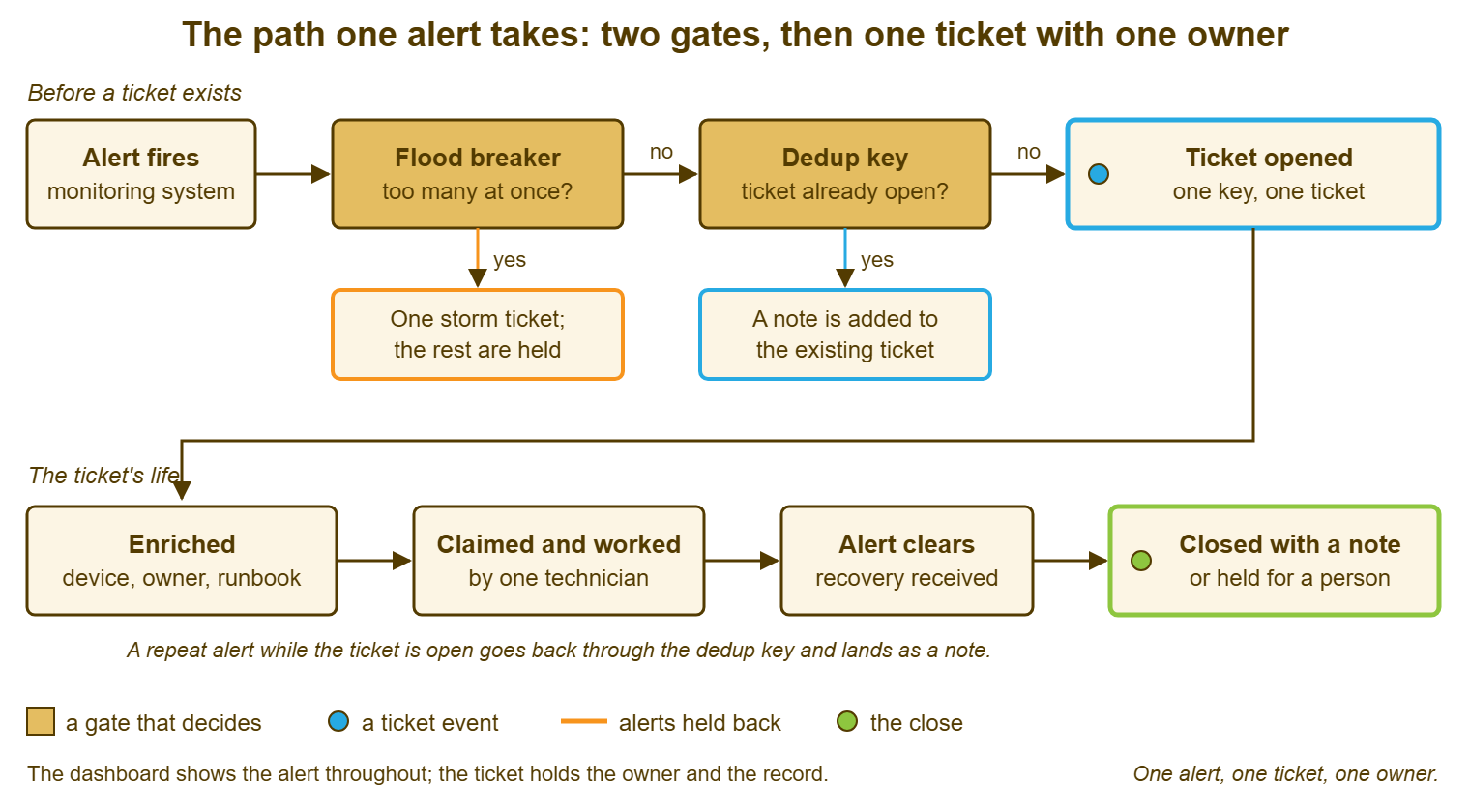
A repeat alert while the ticket is open goes back through the same gate and lands as a note, which is the behaviour you want. The ticket's history then shows that the disk was at 4 percent at 01:15, 3 percent at 01:22 and 2 percent at 01:29. That is in one place, under one owner, instead of as three tickets nobody has linked. Do not be tempted to bump the priority automatically on every repeat. A repeat says the problem is still there; it does not say it got more important. The technician who reads the notes can decide that.
Remember: the dedup key is the device plus the check, and nothing that changes. One key, one open ticket. Repeats become notes on it, and the key is free again only when the ticket closes.
The Relay: Where the Logic Lives
Something has to hold the rules, and there are three places it can be. The monitoring system may have a built-in ticket connector that knows how to call a help desk's API. In that case, the rules live in its settings and you configure rather than write. The help desk may accept inbound webhooks and apply its own matching, in which case the rules live there. Or you run a relay: a small program of your own, a few dozen lines in a shell or scripting language built into the operating system. It listens for the webhook, looks up the key, and calls the help desk's API to open the ticket or add the note. The relay is the most work and the most control. On most small desks it is also the most common, because it is the route that works when neither end quite speaks the other's language.
If you write a relay, give it three habits from the first day. It logs every alert it receives and every call it makes, with the time and the result, to a plain text file. That is because when a ticket is missing the first question is whether the alert ever arrived. It never crashes on a malformed alert. It logs the alert and moves on, because the monitoring system will send you shapes you did not expect, usually at a weekend. And it is safe to run twice on the same alert. That means if it receives the same message again it finds the ticket it already opened and adds a note rather than opening a second. That last property has a name, idempotent, which you do not need to remember as long as you remember the behaviour. A relay that opens two tickets when it is asked twice is a relay that will one day open two hundred.
Decide what happens when the relay is down, because it will be. The dashboard still shows the alert, which is the first safety net. The monitoring system can usually be told to send e-mail as well as the webhook. The e-mail route, with its weaker dedup, is a reasonable fallback that at least gets the alert into the queue. Write down who owns the relay, where it runs, and how to tell it is alive. A relay with no owner is the monitoring equivalent of the ticket assigned to someone who left. (It is also, in my experience, the single most common reason an integration quietly stops working in its second year, and nobody notices until a disk fills.)
Testing Before You Switch It On
Test with a real alert against a test device, in daylight, with the team watching, before any production alert is allowed to open a ticket. Most monitoring systems can fire a test notification on demand, or you can make a disk full on a machine nobody minds. Then read the ticket that arrives as if you were the technician on call. Is the subject readable in the queue? Is the device in it? Do the seven lines say what is wrong? Is the key where it should be? Is the priority the one the table says? And did it land in the right department? A ticket that fails any of those questions in daylight will fail them at three in the morning, with less patience available.
Then test the parts that only show under repetition. Fire the same alert twice and confirm the second one became a note, not a ticket. Fire the clear and confirm what happens, which is the subject of closing tickets when the alert clears. But at minimum confirm the clear does not open a third ticket. Stop the help desk, or block the relay's path to it, and fire an alert. Confirm the alert still reaches a human somewhere and that the relay recovers without a restart. Finally fire an alert outside business hours and check what the desk's clocks did with it. The aim is that the first time a Saturday alert opens a ticket is not also the first time you learn how your tool counts a Saturday.
- The subject in the queue shows the prefix, the device and the check without opening the ticket.
- The body holds the seven payload lines and nothing the technician must read past.
- The key is in a searchable field and reads the same on every alert for the same problem.
- A second identical alert became a note on the first ticket.
- The clear did not open a new ticket.
- With the help desk unreachable, the alert still reached a person and the relay recovered.
- An alert outside business hours landed with the expected priority and due time.
- The requester is the monitoring address and no real person received a reply.
Keep the test device and the test alert after you go live, because you will want them every time something changes. That could be a new version of the monitoring system, a moved help desk, or a relay rewritten by its new owner. A five-minute test that can be run on demand is the cheapest insurance the integration will ever have. The alternative is to find out from Lena.
A Short War Story: The Precise Key at Bellweather Logistics
At Bellweather Logistics, Theo built a webhook relay in an afternoon. Wanting the ticket subjects to be informative, he made the dedup key the device, the check and the current reading: "wh-sql-01/disk-e/91%". It worked beautifully on the Tuesday he tested it, when the reading did not change. Over the month-end weekend the warehouse database server's drive filled slowly from 88 percent to 97 percent, one percent at a time. Because each reading made a new key, each reading made a new ticket. And because the monitoring system re-sent every unresolved alert every fifteen minutes, by Monday there were 240 open tickets about one drive, interleaved with the real queue. Two technicians spent the morning closing them. A driver's handheld-scanner ticket raised on Saturday was found on Wednesday. The depot manager asked, reasonably, whether the new system was supposed to make things slower. Theo changed the key to "wh-sql-01/disk-e". The readings moved into notes, and the next month-end produced one ticket with eleven notes in it. The key names the problem, never the measurement, and a key that changes when the number changes is not a key at all.
The Alert Ticket Template
The template below is the shape every alert ticket should take when it lands, whichever route opened it. Use it two ways. Give it to whoever configures the monitoring system's notification format, so that the mail body or the webhook fields produce exactly these lines. Give it to whoever triages, so that they know what a correct alert ticket looks like and can spot a malformed one. The upper block is the subject and the fields the ticket carries; the lower block is the body. The lines under "added by the desk" are left blank by the integration and filled by enrichment, which the next article covers. They are here so that the shape is complete.
ALERT TICKET — THE SHAPE EVERY ONE SHOULD HAVE

Subject:     [ALERT] ____________ : ______________________________
                     (device)       (check, in plain words)
Requester:   monitoring@example.com
Department:  ______________________
Priority:    ______ (from the alert-type table; first technician may adjust)
Alert key:   ____________/____________   (device/check; no time, no value)

BODY
  device:  ______________________________
  check:   ______________________________
  state:   ______________   (down / critical / warning)
  value:   ______________   (the reading, if there is one)
  since:   ____:____  on ______________
  key:     ____________/____________
  link:    the alert's page in the monitoring system

REPEATS (one note per repeat alert, added by the integration)
  ____:____  state ________  value ________

ADDED BY THE DESK (see the enrichment checklist)
  owner of the device:   ______________________
  location:              ______________________
  runbook:               ______________________
  last change:           ______________________
  recent tickets, same key: ____  (last on ____________)
Once the template is in place, the ticket that arrives at 08:02 says "[ALERT] rcpt-01: print service stopped", with the server and the state in the first two lines. There is one of it. Lena restarts the service and closes one ticket. The integration is doing exactly what it was configured to do, which is now the point rather than the problem.
Frequently Asked Questions
Which route should a small desk start with?
What is a dedup key, in one sentence?
Our help desk has no custom field for the key. Where do we put it?
Who should write and own the relay script?
Should the integration raise the priority when the same alert repeats?
What happens to alerts while the help desk or the relay is down?
From the QuerySolv team: we build self-hosted help desk software for Windows. QuerySolv runs as one Windows service on your own network. It takes requests by web form, e-mail, live chat, social messages and REST API. It is licensed once per installation rather than per agent per month. The free trial runs the full product for 30 days.