
Open Source vs Commercial: The Real Trade-offs, Not the Slogans
Tuesday, 14:05, in the small meeting room at Meridian Parts. Dana has run the support desk for eleven days. That is nine days longer than she expected to when she was asked to "keep an eye on the queue" while a replacement was found. The old ticketing tool is being retired by the company that made it, and Dana has until the end of the month to name its successor. Two colleagues have come to help. Rob, from finance, opens with "Why would we pay for something you can download for free?" Kieran, the network administrator, answers before Dana can: "Because you get what you pay for." Both nod, satisfied. Both have said something true. Neither has said anything about Meridian's desk. It has four people, forty tickets a week, one Windows server with room on it, and nobody whose job includes looking after a ticketing system.
An open-source ticketing tool is one whose source code is published for anyone to read, change and run. It is usually free to download and install on a server of your own. A commercial help desk is one you pay a company for. That can be a subscription to a service the company hosts, which is a cloud help desk. Or it can be a licence for software you install on your own server, which is a self-hosted commercial help desk. The two slogans in the meeting room are about those two words, free and paid. The words are the least interesting part of the decision. This article is part of our Open Source vs Commercial Helpdesk Tools series. It is about the trade-offs underneath the slogans.
It covers the four categories you are actually choosing between, then licence cost against time, with a picture. Next come vendor support against a community, control against convenience, and longevity, which is the question of who will still be here. The trade-offs that are not trade-offs at all, a short war story and the trade-off table to copy and fill in for your own desk follow, in that order.
Four Categories, Not Two Camps
The decision is between four categories, and the free-versus-paid framing hides two of them. The first is the open-source ticketing tool, which you host yourself. The second is the cloud help desk, a commercial tool the vendor runs on their servers and you reach through a browser, paid for by subscription. The third is the self-hosted commercial help desk, a commercial tool you install on your own server under a licence, paid once per installation or by subscription depending on the vendor. The fourth is the ITSM suite. ITSM is IT service management, the formal discipline of running IT as a set of defined services. A suite is a large product that implements many of its processes at once: incidents, requests, changes, assets and more. It is sold mostly to organisations with a department for each. The edges blur. Some open-source projects have a company behind them selling hosting and support, and some cloud tools can be bought to install on your own server. The category is how you will run it and pay for it, not the badge on the box.
The categories matter because each slogan is about one axis and the decision has four. "It's free" is a statement about money. "You get what you pay for" is a statement about support. Neither is a statement about hosting, which is where most of the hours go, or about what happens in five years, which is where most of the regret goes. A desk that compares two tools on the axis each slogan favours will pick the tool whose champion spoke last. The badge on the box tells you who to invoice. It does not tell you who will be upgrading it at eleven on a Thursday night.
One disclosure before the comparison. The publisher of this library sells a commercial, self-hosted help desk, QuerySolv, which sits in the third of those four boxes. Read what follows knowing that, and check every claim against your own desk rather than taking it on trust from a vendor or from a forum. The arithmetic in this article works the same whoever does it, which is the point of writing it down.
Licence Cost Versus Time
The first trade-off is money against hours, and you cannot compare them until they are in the same unit. The unit to use is the hour, because a four-person desk has a fixed number of them and no slogan can add more. Take the desk's loaded hourly rate, which is what one hour of a technician costs the organisation once salary, employer costs and overheads are added together. The finance team has this figure or can produce it in ten minutes. Divide every licence fee, subscription and consultant invoice by that rate, and the money becomes hours. Now a licence is "two hundred hours of our time" and an upgrade weekend is "sixteen hours of our time". The two can sit on the same page without anyone having to argue about which kind of cost is more real.
The hours fall differently in each category, and the pattern is more useful than any single number. An open-source tool costs nothing to license and a great deal to run. That includes installing it, configuring it, learning it, backing it up, reading release notes, testing upgrades, applying security patches, and fixing whatever the upgrade broke. A cloud help desk costs a subscription that grows with the number of people who use it, and very little time beyond setup and the occasional administrative task. That is because the vendor hosts, patches and upgrades it. A self-hosted commercial tool costs a licence up front or a subscription, plus the hours to run the server it sits on and to apply the upgrades the vendor ships ready-made. An ITSM suite costs the most money of the four and, for a small desk, usually the most configuration time too. That is because it arrives expecting processes the desk does not yet have.
The picture below puts a worked example on the page for a fictional four-person desk, with every cost converted to hours at that desk's loaded rate. Each year has three bars. Bar A is an open-source tool, self-hosted. Its cost is almost all desk time, with a taller year three where a major upgrade and a broken add-on had to be dealt with. Bar A comes to 570 hours over five years. Bar B is a cloud help desk on a per-agent subscription. The subscription segment grows every year as the desk adds a seat and the renewal rises. Bar B comes to 740 hours. Bar C is a commercial tool licensed once and self-hosted. It has a tall first year for the licence, the setup and the migration in, then low flat years. Bar C comes to 590 hours. The numbers are invented for the example and will not be yours. The shapes very likely will be.
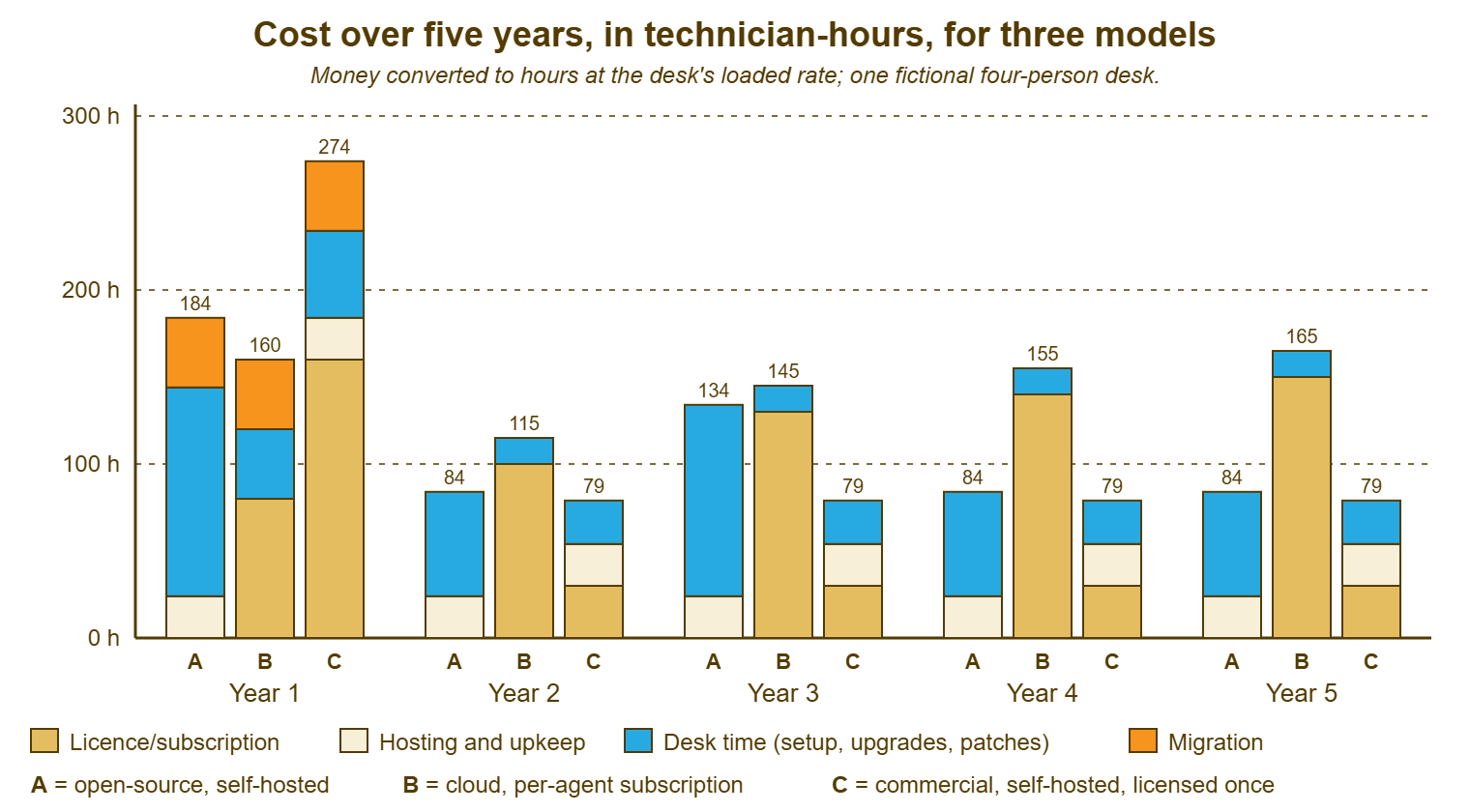
Read the shapes, because the totals depend on three things the picture cannot know about your desk. Bar A assumes the hours exist and that somebody on the desk can do that kind of work, which is the whole of the next article, The Hidden Costs of Free. Bar B's amber segment buys the vendor's hosting and the vendor's support, so the hours it saves are real. Bar B is the only bar that climbs on its own every year. That is the whole of The Hidden Costs of Commercial. Bar C assumes you already have a server and somebody keeping it patched, because if you do not, its cream segment grows and its appeal shrinks. Double the hourly rate and the amber segments halve while the blue ones stay put. Halve the desk's spare time and bar A doubles. The picture is a shape to recognise, not a verdict to quote.
Support Versus Community
Vendor support is a contract, and the contract is the valuable part. When you pay for a commercial tool, somebody is obliged to answer you within an agreed time, in office hours or around the clock depending on what you bought. That person knows the product because answering questions about it is their job. They do not know your network, your mail server or the setting Kieran changed in the spring. The first twenty minutes of most support calls are spent establishing that. But they are on the hook. Support is a person whose job it is to care about your problem. Community is a person who might.
Community support is forums, issue trackers, chat rooms and documentation written by volunteers. For the common problem it is frequently faster than any vendor, because somebody had your problem last month and wrote down the fix. For the uncommon problem it is nothing at all, and it is nothing at all on your schedule, because nobody is obliged to read your post. The answers can be wrong, out of date or for a different version. You have to be able to apply them. That means reading a log, editing a configuration file or restarting a service without breaking the thing next to it. Some open-source projects offer paid support, from the maintainers or from a company that specialises in them. That middle ground is worth costing on its own row. I will give an honest opinion here: for a desk with one capable administrator, community support is usually enough; for a desk with none, it is not support.
The question that settles this axis is a name. For each candidate, write down who you will contact when ticket e-mail stops arriving at 16:40 on a Friday, and what they are obliged to do about it. "The vendor, within four business hours, under the contract" is an answer. "Kieran, if he is in" is an answer too, and an honest one, and it has a cost that belongs in the hours column. "The forum" is also an answer. A forum thread marked solved is solved for the person who posted it.
Control Versus Convenience
Control means deciding where the data lives, when upgrades happen, what you can change and what you can connect it to. Self-hosting, in either flavour, gives you all four. The database is on a server you can point at. Upgrades happen when you schedule them, which includes the right not to upgrade this month because month-end is next week. You can change what the tool allows and, with an open-source tool, anything at all, if someone can read the code. You connect it to your directory, your monitoring and your mail server over your own network. Every one of those is a decision you get to make, and every one of them is a decision you have to make.
Convenience means not having to make them. A cloud help desk has no server to buy, patch or back up, no certificate to renew, no database to tune. Upgrades arrive while you are asleep. The cost is that they arrive whether you wanted them this week or not, sometimes moving the buttons your team learned. Your desk is also offline when the vendor is. Your data lives where the vendor keeps it. For a parts distributor that is a shrug. For a clinic or a bank it may settle the whole decision before a demo is booked. Do check whose job the backup is. The statements "the vendor has backups" and "we can restore last Tuesday's tickets" are different sentences, and the second one is the one you want to hear.
The two self-hosted categories sit at different points on the line. An open-source tool gives the most control and the least convenience: you can change anything, and you must look after everything. A self-hosted commercial tool keeps the data and the timing on your side and hands the code and the upgrade packaging to the vendor. You run the server, and they ship the releases. If you run a self-hosted tool such as QuerySolv, the ticket database sits on a Windows server you own, which answers the data-location question in one sentence and makes the backup of that database your job in the next. An ITSM suite is usually the most configurable of the four and, for that reason, the most work. That is because every configurable thing is a decision somebody has to take and then maintain.
Longevity: Who Will Still Be Here
Every category can die on you, and the slogans pretend otherwise in both directions. Open-source projects go quiet: the maintainer changes jobs, the releases stop, and the issue tracker fills with questions nobody answers. The dependencies underneath, the language runtime, the database engine, and the web server, reach the end of their own lives one by one. Vendors get acquired, retire products, move cloud-only, change licensing models and raise fees at renewal. Neither side is immortal. The useful question is not "which one lasts" but "what are the signs, and what do I do when I see them".
For a project, the signs of health are regular releases, issues that get answered, more than one person with the keys, and a changelog that is kept up. They also include a published way to report a security problem. For a vendor, they are a product that is the company's main business rather than a side line, and a release history that goes back years. They also include an export you can run yourself, and a straight answer to "what happens to my data if you close". None of these is proof. A healthy project can lose its maintainer next year and a healthy vendor can be bought next quarter. The signs tell you how much warning you are likely to get, which is what you are really buying.
The protection against both is the exit plan, written before you sign and tested before you need it. The test is simple: can you get every ticket, with its notes, history and attachments, out of the tool in a readable form on an ordinary Tuesday afternoon without asking anyone's permission? For a self-hosted tool, the database is on your server and the export is your work. For a cloud tool, the export is whatever the vendor provides, and you find out what that is during the trial, not at the exit. How to keep the history once the old system is gone is its own subject in Keeping History Without the Old System. Every tool you choose will one day be the old system. Choose one that will be easy to leave.
The Trade-offs That Are Not Trade-offs
Security is claimed by both camps and belongs to neither. "Open source is more secure because anyone can read the code" and "commercial is more secure because a company stands behind it" are both marketing. Both skip the only thing that matters, which is who applies the patch and how long after it is published. An open-source tool with a maintainer who ships fixes fast and an administrator who applies them that week is secure. A commercial tool whose vendor patches promptly and whose customer never installs the update is not. The axis is patching, and patching is hours, and hours are already on your table.
Feature count is a slogan in both directions. "It has everything" and "it does one thing well" are both appeals to a number. A four-person desk uses perhaps a dozen features of any ticketing tool ever made. Those are a queue, ownership, statuses, a priority, replies and internal notes, a mailbox that creates tickets, a knowledge base, and three or four reports. Judge any candidate on whether those dozen are present and sound, which is what the evaluation method in Requirements Before Demos is for. A feature nobody on the desk will use is not a benefit. It is a menu item with a maintenance cost.
Scale is the third false axis. "It scales to thousands of agents" is a fine property and an irrelevant one for forty tickets a week. And "it's lightweight" is a compliment unless lightweight turns out to mean "has no reporting". Ask instead whether the tool handles twice your current volume without changing how the desk works. That is because twice is the growth a small desk can actually imagine, and anything beyond that is a problem you will be delighted to have. Nobody has ever been promoted for buying capacity they did not use. Several people have been asked about the invoice.
Remember: compare the four categories on four axes, in one unit, hours, over the life you expect the tool to have, with the cost of leaving included. A slogan compares one axis at one moment; the other three are paid for later.
A Short War Story: The Slogan Meeting at Meridian Parts
Meridian Parts had chosen its previous ticketing tool in a single meeting, on the strength of one sentence from Gareth, the network administrator at the time: "It's free and I can have it running by Friday." He did, and for two years it ran well. Then Gareth left for a larger company, and Kieran inherited a system nobody else had ever upgraded. It had three years of parts-return tickets inside it and an add-on for the returns form that stopped working with the next version. Kieran kept a log. The log said he spent about ninety hours over four months getting the system to a state he could export from. At Meridian's loaded rate, that was more than three years of a modest commercial licence would have cost. The tool had never been the problem. The decision had been made on one axis of four, and the other three had simply waited to be paid.
The Trade-off Table
The reference table below is the four categories against the axes this article has walked through, with the honest generic answer in each cell. It is a map of where the costs tend to sit, not a scorecard. It names no products because the answer for a particular product belongs in your own table, filled in from your own trial.
| Axis | Open-source, self-hosted | Cloud help desk | Self-hosted commercial | ITSM suite |
|---|---|---|---|---|
| Licence cost | None for the software; paid support optional where offered | Subscription, usually per agent, rising with seats and at renewal | A licence per installation or per agent; sometimes a yearly maintenance fee | Subscription or licence, usually the largest; often a partner's fees too |
| Hours to run | Highest: install, configure, upgrade, patch, back up | Lowest: account administration and learning | Server upkeep plus applying upgrades the vendor ships | Configuration and process design, often continuing |
| Who supports you | The community; paid support where a company offers it | The vendor, under contract | The vendor, under contract | The vendor and, commonly, an implementation partner |
| Control | Full: data, timing, code | Least: the vendor decides upgrades and data location | Data and timing yours; code the vendor's | High, at the cost of configuring everything |
| Convenience | Least | Most | Middle: no code to maintain, a server to keep | Least for a small desk |
| Longevity risk | The project goes quiet; dependencies age out | The vendor changes terms, is acquired or retires the product | The vendor retires the product; the installed copy keeps running | The suite outgrows the desk, or the desk never grows into it |
| Exit | The database is yours; the export is your work | Whatever export the vendor provides; test it in the trial | The database is on your server; the export is the vendor's to provide | Export usually possible; the process design is the real lock-in |
| Typical fit | A desk with a capable administrator and hours budgeted for the tool | A desk with no server and no administrator time to spare | A desk with a server already and a budget that prefers a one-off cost | A larger organisation running several formal processes |
Now the one to fill in. Use one copy per candidate category, put hours in every cell that takes a number, and leave a cell blank rather than guess. The blanks are findings. Keep the hourly rate on the sheet so that whoever reads it in a year can see how the money became hours.
THE TRADE-OFF TABLE — YOUR DESK
Desk: ______________   People on the desk: ____   Horizon (years): ____
Loaded hourly rate used for conversion: ______   Filled in by: ________

Candidate category:  [ ] open-source, self-hosted   [ ] cloud help desk
                     [ ] self-hosted commercial    [ ] ITSM suite
Candidate (internal reference): ______________

Axis                           Year 1 (hours)   Years 2-5 (hours each)
Licence or subscription        ______           ______
Hosting and server upkeep      ______           ______
Desk time: setup and learning  ______           ______
Desk time: upgrades, patches   ______           ______
Migration in (and out, later)  ______           ______
Five-year total (hours)        ______

Support: who answers ______________  obliged to what ______________
Control: data location ________  upgrade timing ________  changes ________
Convenience: what the desk stops doing itself
  ______________________________________________
Longevity: signs of health checked on ________  by ________
  releases [ ]  issues answered [ ]  more than one maintainer/owner [ ]
Exit: export tested on ________  format ________
  notes [ ]  history [ ]  attachments [ ]  knowledge base [ ]

Still unknown (the blanks above): ______________________________
Who confirms the admin hours exist: ______________  by ________
Reading Your Own Table
Fill one table per category, not per product, the first time through. The point of the first pass is to find out which categories are even possible for your desk. That is decided by two rows: whether the hours in the desk-time rows exist, and whether the budget shape in the licence row can be signed. A desk with no administrator time cannot choose the first column however good the tool is. A desk whose finance team cannot approve recurring spend without a procurement round cannot easily choose the second. Those two rows eliminate categories before anyone has watched a demo, which saves the demos for tools you could actually run.
Then compare the five-year totals, and distrust any that differ by less than the uncertainty in them. If the open-source column comes to 570 hours and the self-hosted commercial column to 590, the honest reading is that they cost about the same. In that case, the decision is being made on another axis: support, control or longevity. If one column is double another, the hours are telling you something. In that case, the something is usually either an administrator you do not have or a seat count you have not been honest about. The hosting and licensing models themselves, and which of them suit which desk, are laid out in Hosting and Licensing Models. The table in this article is the sheet you take into that conversation.
Finally, read the blanks. A table with the exit row empty is a decision that has not been made yet, because nobody has tested whether you can leave. A table with the support row saying "Kieran" is a decision that depends on one person, which is fine as long as everyone signing it knows that. Dana's two colleagues each had one row of this table right. She filled in the other six, took it back to the room the following Tuesday, and the meeting took twenty minutes. Nobody used a slogan. There was nowhere on the sheet to write one.
Frequently Asked Questions
Is open source the same as free?
Can a commercial help desk be self-hosted?
What does community support actually give me?
How do I convert a licence fee into hours?
Is an ITSM suite ever right for a small desk?
Which category is safest to leave later?
From the QuerySolv team: we build self-hosted help desk software for Windows. QuerySolv runs as one Windows service on your own network. It takes requests by web form, e-mail, live chat, social messages and REST API. It is licensed once per installation rather than per agent per month. The free trial runs the full product for 30 days.