
A Status Page for a Small Organisation: One Page, Kept Current
Thursday, 14:20, at Redbrook Engineering. Every engineer in the building opens the shared drawings folder forty times a day. It has stopped opening. Tomas on the desk sends a first notice at 14:25 and an update at 14:45 saying there is no change. Both are good messages. Between 14:25 and 15:50 the desk phone rings twenty-six times. Tomas keeps a tally on a sticky note because he cannot believe it. Four callers have not seen the notice. The other twenty-two have seen it and know the folder is down. They are phoning to ask whether it is still down. The e-mail is now somewhere under forty others, the chat channel has scrolled, and phoning is quicker than looking. Nothing has changed since 14:25 except the number of people who have asked.
A status page is one place people can look, at any time, to see whether the services they rely on are working. If not, it says what is known and when the next update is coming. Every other outage message is pushed at people. The status page is pulled by them, when they want it. That is why it answers the one question the pushed messages cannot: "is it still down?" For a small organisation the page does not need to be a web page. A pinned message, a shared document or a whiteboard in reception can all be the status page. They must be in a known place and kept current. This article is part of our Outage Communication series. It is about having one without a budget, and about the one way it goes wrong.
It starts with why pushed messages are not enough, and what the page is for and what it is not for. Next come three cheap ways to have one and what goes on it, with a picture. Then come what stays off it, keeping it current, and the page that lies by being stale. After that: whether the page is public or internal, a table of states, and a short war story. It ends with the status-page entry to copy.
Why Messages Are Not Enough
Pushed messages reach the people on the list at the moment they are sent, and nobody else, and not later. The person who was in a meeting at 14:25 arrives at 15:10 to a problem and no context. The manager who deleted the first notice because it did not seem to apply to them discovers at 15:30 that it did. The engineer working from home hears from a colleague and has no idea where to look. The customer who was never on an internal list phones the main number. And everyone who did get the message, twenty minutes later, wants to know whether anything has changed and cannot find the e-mail. Each of them phones. Each call is answered by the one person who could be fixing the problem.
A page turns those calls into a glance. The person arriving late looks at it and is caught up in ten seconds. The one who wants to know whether it is still down looks and sees "no change, next update 15:05". The customer-facing colleague looks before picking up the phone to a customer. The desk's phone goes quiet, not because people have stopped wanting to know, but because they can find out without asking. The status page does not replace the pushed messages. The first notice still goes out at minute five by the doors described in Choosing the Channels for Outage Messages. The page is where the messages stay after they have scrolled away.
The page also protects the desk from its own silence. Between two scheduled updates nothing is sent, deliberately. The gap reads as absence to anyone who does not know the schedule. A page that says "last updated 14:45, next update 15:05" fills the gap with a fact. The desk has not gone to lunch; it has said when it will speak next. Twenty-six phone calls is what a twenty-minute gap sounds like when there is nowhere to look.
What the Page Is For, and What It Is Not For
The page answers three questions and no others. Is the thing I rely on working? If not, what is known and what should I do? When will I hear more? Anyone who reads it for thirty seconds should be able to answer all three for every service they care about. That is the whole specification. Everything else that could be put on a status page should be tested against it. A fact that does not help a reader answer one of the three questions is a fact that belongs somewhere else.
The page is not the incident log or the ticketing tool. The incident log is the desk's internal timeline of what was tried and when. The desk's record of the outage lives in the incident ticket, with the linked tickets from everyone who reported it. It is written for the desk and the review. The page is written for the person at the counter. The two documents overlap by about four lines: the start time, the current state, the workaround, and the next update time. Everything the desk knows and the reader does not need stays in the log. The page is the public face of the log, with most of the face removed.
It is also not a monitoring dashboard. A dashboard shows what the monitoring system believes about forty servers and updates itself every minute. It is read by people who know what the tiles mean. A status page shows what the desk is prepared to say about five services and updates when a human changes it. It is read by people who do not know what a server is. Pointing users at the dashboard is tempting because it already exists. It hands them forty tiles and no sentence. The tiles will be read in the way an unfamiliar instrument panel always is: as a reason to phone someone.
Three Cheap Ways to Have One
The cheapest status page is a pinned message in an announcements channel that everyone is in. The desk posts the service list and current state, pins it, and replaces the pin with every update. That way, whoever opens the channel sees the current state first. It costs nothing, needs no permission beyond the ability to pin, and is already where desk-based staff look. Its limits are the ones of the chat tool itself. It is invisible to anyone not in the channel and disappears with the network. If the organisation has not decided who is in the chat tool, the answer is "not reception".
The second is a shared document with a short, known address. One page, the service list at the top, the current incident below it, newest entry first, with a timestamp on every line. Most organisations already have a document tool that produces a link anyone with an account can open. That link can go on the login screen and in the desk's e-mail signature. It can also go in the automatic reply from the desk mailbox and on a card by every phone. The document survives the chat tool being down and can be opened from a phone on the way in. Its weakness is that documents are edited by whoever has the link, so restrict editing to the desk and leave reading open.
The third is a single plain web page, hosted somewhere that is not the server most likely to be down. A status page that lives on the main web server reports that server's outages by vanishing, which is accurate and unhelpful. A page on a different host, a hosted document service, or a service built for status pages stays up when the building's systems do not. There are several services built for status pages. A small organisation needs none of them to begin with. For a public-facing service this is the version that customers can see. For internal use alone, the pinned message or the document is enough. The whiteboard in reception is the version for the day the network goes.
Whichever you choose, tell people the address before the outage. A page nobody knows about has the same reach as no page. The day of the outage is the one day the announcement cannot go by the usual route. Put the address in the first notice template so it is repeated every time. Also put it in the three or four places people look when something is wrong: the login screen, the desk's auto-reply, the intranet front page, the card by the phone. After two outages most people will have found it. After four, the ones who have not will be told by the ones who have.
What Goes On It
The page has four parts, in a fixed order: the last-updated line, the service list, the current incident, and how to reach the desk. The last-updated line comes first because it is how the reader judges whether to trust the rest. "Last updated 10:07 by the help desk. Next update 10:27." is the sentence that makes the page believable. The service list is five to ten services in the users' words, each with a one-word state. Where the state is not "working", add a since-when. The current incident is the first notice's three lines and the updates beneath it, newest first. Each has a time and the time of the next one. The last part says how to reach the desk about anything not listed, and asks people not to reply to the page itself.
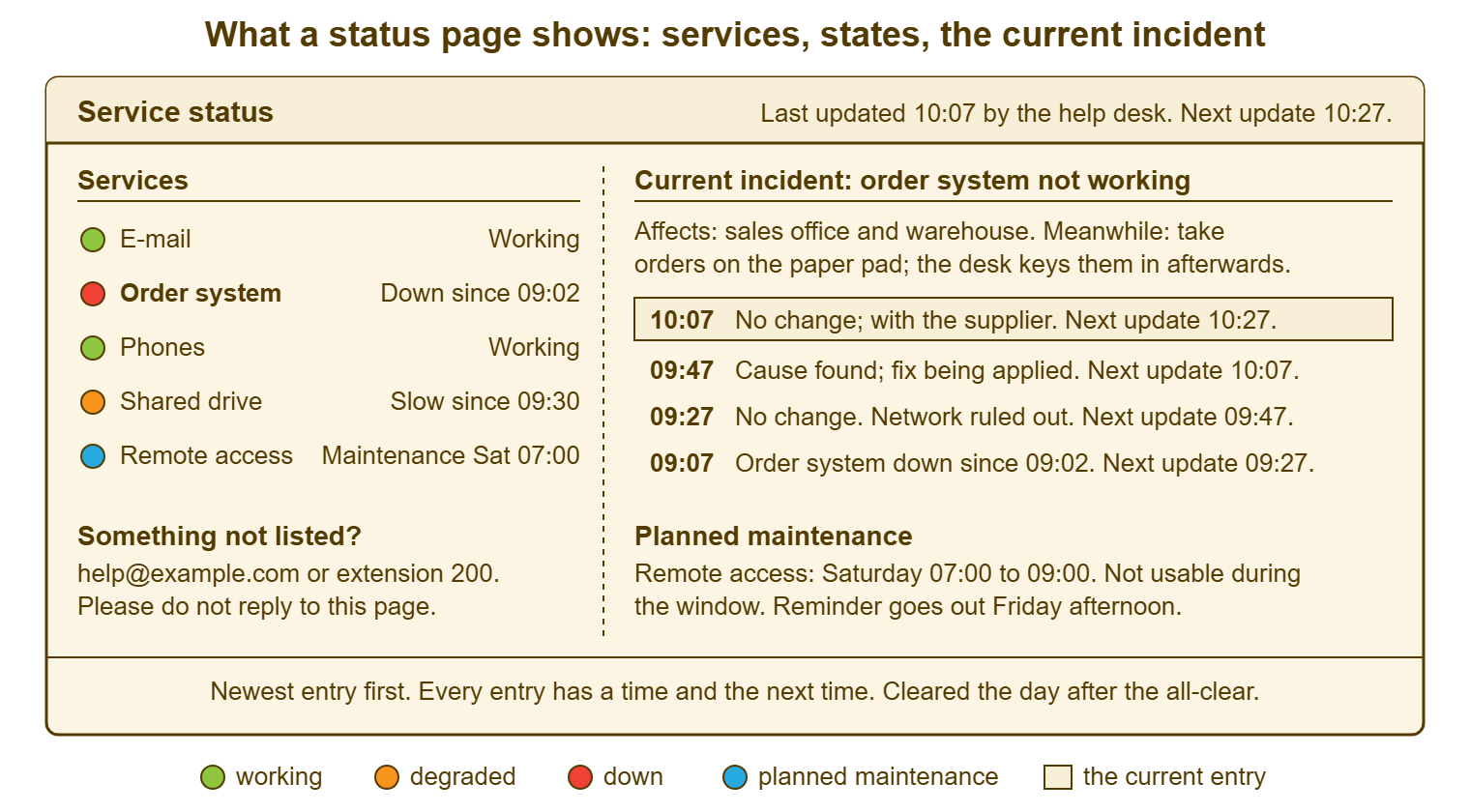
The picture below is a status page for an organisation with five services and one incident. It is drawn as a single page the desk could keep in a shared document. The left column is the service list, each service with a coloured state. The right column is the current incident, with the workaround at the top. The updates are in time order with the newest first, each ending with the time of the next. Below both is the planned-maintenance line and the footer rule that every entry carries a time. Nothing on the page is a technical term. The whole thing can be read in the thirty seconds it takes to decide not to phone.
Keep the service list short and in the users' words, for the same reason the first notice does. "E-mail", "the order system", "phones", "the shared drive", "remote access" are services people recognise. "Mail cluster", "ERP-APP-01" and "VPN concentrator" are the desk's names for the same things. A reader who does not find their problem in the list phones to ask about it. Five to ten entries covers what most small organisations rely on daily. If the list reaches twenty, it has become the monitoring dashboard again, with the tiles replaced by words. Nobody will read to the bottom.
Planned maintenance gets its own line, with the date, the window and what will not work. Someone who finds remote access down on Saturday morning then finds the explanation on the page rather than in an e-mail from Tuesday. The notices for planned work, and the timing of them, are the subject of Planned-Maintenance Notices People Actually Read. The page carries the summary line so that the two never disagree.
What Stays Off It
The cause stays off the page until it is certain, which usually means until the all-clear. A probable cause written on a status page becomes the official explanation the moment someone reads it. If it changes, the page has been wrong in public. "We are investigating" is a true sentence for the whole of the first hour and the reader does not need more. When the cause is known and the fix is being applied, say that, in those words, without naming the component unless the reader would recognise it. The page is read by people who want to know when they can work, not what a certificate is.
Server names, team names, supplier names and anyone's name as the reason stay off it as well. A public page in particular is read by customers. An internal one is read by people who will quote it. So a sentence that would be unwise in a customer e-mail is unwise on the page. The count of tickets raised stays off, because it reads as a scoreboard and tells the reader nothing about when they can work. Internal chatter, apologies longer than a clause and anything that resembles a joke stay off. The page is the organisation's most formal document for exactly as long as something is broken.
Old incidents come off after a day or so. A page that still shows last month's outage, resolved, under the current state has to be read carefully. The whole point is that it does not. Clear the resolved incident the day after the all-clear. Leave one line in a short history section if the organisation wants one. Keep the full record in the incident ticket where it belongs. The page shows the present. The ticket keeps the past. If you run QuerySolv, the incident ticket's event history already holds the time of every update you sent. So the page's timeline is copied from the ticket rather than remembered, and the two will agree.
Keeping It Current
The page is updated on the same clock as the pushed messages, by the same person, as part of the same act. When the 10:07 update goes out by e-mail and chat, the page is edited before the sender moves on. The "last updated" and "next update" times change with it. The interval, and how it varies with the severity of the outage, is the subject of Update Cadence During an Incident. The page simply follows whatever the cadence is. Making the page part of the sending act, rather than a separate chore, is the only reliable way to keep it current. A separate chore is the first thing dropped at minute forty.
One person owns the page during an incident, and it is the person sending the messages. Two people editing a shared document during an outage produce a page that says two things. A page that says two things is read as saying nothing. Outside incidents, the page is owned by whoever owns the outage playbook. It is checked once a day, at the same time, for the one thing that goes wrong on quiet days: it still says something is down. Thirty seconds at 09:00 to confirm the page says "all working" is the whole routine. It is the routine that keeps the page believed.
The all-clear clears the page. The service goes back to "working", the incident entry gets its final line with the time, and the next morning the entry comes off. A page that says "resolved" for a week is a page that was not finished. A reader who sees it learns that the page lags. That is the first step towards the page being ignored. The all-clear message itself, and what it must contain before it is sent, is in The All-Clear and the Follow-Up. Its last step is the page.
Remember: a status page is believed exactly as often as it has been right. Every entry carries a time and the time of the next one. The page changes with every message sent. A page that cannot be kept current is taken down rather than left to lie.
The Page That Lies
A stale status page is worse than none, because it is believed. A page that says "all working" while the order system has been down for an hour tells every reader that the problem is theirs. They will restart, reinstall and phone a colleague before they phone the desk, exactly as if no notice had been sent. The added cost is that they now distrust the page. A page that says "investigating" at 11:00 about something fixed at 09:30 tells the reader not to bother trying. Some of them will not until lunch. Both pages were right once. Neither was finished.
The automated page lies in its own way. It is tempting to feed the page from the monitoring system so that it updates itself. For a page of green tiles that is fine until the morning the monitoring checks the login page. The login page is up, while the application behind it is down. The page says green to forty people who can see with their own eyes that it is not. An automated state is only as true as the check behind it. The readers do not know what the check is. If the page is automated, a human must still be able to override it in a minute, and the first notice must change it. If it is manual, it says what the desk is prepared to say, which is the standard a status page should meet.
A page the desk cannot keep current should be taken down, honestly, rather than left up as a decoration. It is a hard call because the page was somebody's project and it looks professional on the intranet. It is still the right call, because a page that is wrong once a quarter teaches the organisation to phone. A desk that has taught the organisation to phone has lost the only thing the page was for. Put the page back when the routine exists to keep it. Until then, the pinned message in the chat channel, replaced on the clock, is a status page that tells the truth. The polished one that does not is a screensaver with a web address.
Public or Internal?
An internal page serves staff and says more; a public page serves customers and says less. Most small organisations need only the first until a customer-facing service goes down. If the organisation runs anything customers log into, a public page for those services is worth having. That includes a web shop, a booking system, or a portal. Host the page away from the services it describes. Use the customer-facing names, with no internal detail and the same three questions answered. Whoever takes customer calls reads the public page before picking up, so that every caller hears the same sentence the page shows.
Keep the two pages from disagreeing by writing the public entry from the internal one, removing rather than adding. The internal page says "the order system is down since 09:02; take orders on the paper pad; next update 09:27". The public page says "online ordering is currently unavailable; orders can be placed by phone; next update at 09:27". Same facts, same time, fewer words. The table below lists the states a page uses and what each one means to the reader, which is the only meaning that counts.
| State on the page | What it means to the reader | When to use it | What the entry must carry |
|---|---|---|---|
| Working | Use it normally; if something is wrong, it is probably local, so raise a ticket | The default; confirmed each morning | Nothing beyond the word |
| Degraded | It works, but slowly or partly; expect delays, and here is what to do | Slow, intermittent, or one function out of several failing | Since when; what is affected; the workaround; next update time |
| Down | Do not try; use the workaround; here is when you will hear more | The service is unusable for the people who rely on it | Since when; who is affected; the workaround; next update time |
| Maintenance | Unavailable on purpose, in a known window; nothing is wrong | Planned work, from the advance notice until the window closes | The date and window; what will not work; the reminder date |
| Watching | Fixed, but the desk is checking it stays fixed; tell the desk if it misbehaves | After a fix that is temporary, or one the desk is not yet sure of | Since when it has been working; what to report; when it returns to Working |
A Short War Story: The Green Page at Stonebridge Insurance
Stonebridge Insurance had a status page built by a previous administrator and fed automatically from the monitoring system. It had been green for so long that the claims team lead, Farah, had come to treat it as the truth. On a Tuesday at 10:40 the claims system stopped accepting new claims while its login page stayed up. That was the only thing the monitoring checked, so the page stayed green through the whole outage. Farah told her forty agents that the page said everything was fine and the problem must be their machines. The agents spent the next half hour restarting, re-logging and swapping desks. Meanwhile, the desk had sent a first notice at 10:48 by e-mail to a list the claims floor did not read during calls. The desk wondered why nobody was using the paper form. At about 11:20, the agents stopped trusting the page and started trusting each other. By then, the review counted twenty hours of agent time spent fixing machines that were not broken. It also counted a queue of callers who had been told to try again later. The review also recorded a status page that nobody in claims looked at again for a year. Stonebridge now updates the page by hand, puts the time on every line, and lets the monitoring colour nothing. A page that is sometimes wrong is read as a page that is always wrong. It takes a very long time to be read as anything else.
The Status-Page Entry
The template below is the page itself, as plain text. It can be pasted into a pinned message, a shared document or a web page without reformatting. The top block is fixed and changes only when a service is added. The incident block is filled from the first notice and extended with each update, newest line first. It is cleared the day after the all-clear. The words outside the blanks are deliberately dull. A status page is read by people who are already having a bad morning and do not need the desk to be interesting.
SERVICE STATUS — ____________________ (organisation)
Last updated __:__ by the help desk.   Next update __:__.
How to reach the desk: ____________________ (address / extension)
Please do not reply to this page; raise a ticket for anything not listed.

SERVICES (in the words people use for them)
  ____________________   [ ] Working  [ ] Degraded  [ ] Down  [ ] Maintenance  [ ] Watching
  ____________________   [ ] Working  [ ] Degraded  [ ] Down  [ ] Maintenance  [ ] Watching
  ____________________   [ ] Working  [ ] Degraded  [ ] Down  [ ] Maintenance  [ ] Watching
  ____________________   [ ] Working  [ ] Degraded  [ ] Down  [ ] Maintenance  [ ] Watching
  ____________________   [ ] Working  [ ] Degraded  [ ] Down  [ ] Maintenance  [ ] Watching
  Any state other than Working carries "since __:__" after it.

CURRENT INCIDENT: ____________________ not working since __:__
  Affects: ____________________
  Meanwhile: ____________________________________________________
  Updates, newest first:
  __:__  ____________________________________________  Next update __:__
  __:__  ____________________________________________  Next update __:__
  __:__  First notice: down since __:__.               Next update __:__

PLANNED MAINTENANCE
  ____________________ : ________ (date) __:__ to __:__.
  Not usable during the window. Reminder goes out ________.

DAILY CHECK (quiet days)
  [ ] At __:__ each day: every service reads Working, or has a current entry
  [ ] Yesterday's resolved incident removed; one line kept in history if wanted
  [ ] "Last updated" time changed, even when nothing else did

CLEAR-DOWN (the day after the all-clear)
  [ ] Service back to Working
  [ ] Incident entry removed; final line and time kept in the incident ticket
  [ ] Watching state removed when the desk is sure, with a date
Tomas built Redbrook's page as a shared document the week after the twenty-six calls. It listed the five services the engineers use, with the address printed on a card by every phone. The drawings folder failed again two months later, for longer. The desk phone rang five times. Four were in the first ten minutes before the first notice went out. One was at 15:40 from an engineer who wanted to say the page was useful. Tomas says it is the only call of that kind he has ever received. He kept the sticky note with the tally on it. It is pinned above the desk, next to the card with the address.
Frequently Asked Questions
Do we need special software to run a status page?
Should the status page be fed automatically from monitoring?
How many services should be listed?
Where should the status page live if our main server is the thing that goes down?
How long should a resolved incident stay on the page?
What do we put on the page when we do not yet know what is wrong?
From the QuerySolv team: we build self-hosted help desk software for Windows. QuerySolv runs as one Windows service on your own network. It takes requests by web form, e-mail, live chat, social messages and REST API. It is licensed once per installation rather than per agent per month. The free trial runs the full product for 30 days.