
Measuring the Drop and Keeping It Down: The Before/After Sheet
Thursday, 10:15, at Acme, four months after self-service reset went live. Nadia runs the desk. The e-mail from Hugo, the finance director who sponsored the project, is two lines long: "Is the password thing finished? What did it actually save us?" Nadia knows the honest answer is "a lot" and that "a lot" is not a number a finance director accepts. She opens the ticket reports, finds the monthly totals, and realises that she can see the queue is smaller and cannot say by how much. That is because the reset tickets were never tagged. The before month was counted once on a sheet she cannot now find. Lockouts and resets were lumped together from the start. The Mondays are quieter. She can feel it. Hugo did not ask how it felt.
Measuring the drop is comparing reset tickets per month before self-service with reset tickets per month after it, by source, beside the enrolment number. The comparison runs for long enough to be sure the fall is real and to see what is left. The before number is the case the project was approved on. The after number is the only proof it worked. The residual, the resets that still arrive, is the reading that says what to do next. This article is part of our Password Reset Self-Service series. Measuring the drop is the last step of the project and the one that never ends, because a number nobody watches drifts back up.
It covers reconstructing the before number if nobody kept it. Then comes the after, month by month, with a picture of what the drop should look like. Next come lockouts counted apart from resets and the residual tickets and what each kind says. After that come the enrolment line beside the reset line and the expiry-policy conversation the numbers make possible. Then comes keeping the drop down after the project team has gone back to the queue. Last come a short war story and the before/after sheet to copy.
The Before Number, and Reconstructing It
The before number is one month of reset and unlock tickets, split by source, taken before anything changed. If the project started properly it is on the reset-volume worksheet from Why Password Resets Dominate the Queue. If it is not, reconstruct it now, the same way, from closed tickets. Search a month from before go-live for the words that resets announce themselves with in the subject, "locked", "lock out", "password", "expired", "can't log in", "reset". Read each hit for ten seconds, and tag it reset, unlock, shared account or not-a-reset. It is an afternoon. Nadia's afternoon produced 388 resets and unlocks in the month before go-live. That is the number Hugo had seen in the spring and forgotten. She wrote it at the top of a new sheet in pen.
Use the same method for the after months that you used for the before month, or the comparison is between two different counts. Suppose a desk counted the before month by hand from subject lines and the after months from a new category it set up at go-live. It will find the after number lower partly because the category misses the tickets that arrived by phone and were logged as "account issue". The rule is dull and absolute: same search, same reading, same tags, same person if possible. A before/after comparison is only as good as the worst of its two counts. The worst one is always the one done later, in a hurry, by someone who wants the answer to be good.
Pick comparable months. A before month that held a public holiday and the expiry wave, compared with an after month that held neither, overstates the drop. The reverse understates it. Where you can, compare the same calendar month across the two years, or average three before months against three after months. Say in the sheet which you did. The sponsor will not check. The sponsor's successor, in two years, asking why the desk still has three people, will.
The After, Month by Month
The drop does not arrive on go-live day; it arrives with enrolment, one month behind it. The first month after go-live is usually the worst month to measure. In that month the desk is still doing manual resets for the unenrolled. It is also getting "the new page does not work" tickets from the newly enrolled. It may see the total rise slightly before it falls. Count it, write it down, and do not report it as the result. Report three months after go-live as the first honest reading, and six months as the settled one, with the enrolment number beside each. A project judged on its first month is a project judged on its pilot.
The picture below shows the shape to expect, drawn for the Meridian Parts desk from the first article in this series, over twelve months. The bars are reset and unlock tickets per month; the line is the share of staff enrolled and tested. For four months the bars sit around four hundred. The enrolment campaign starts in month four and the line begins to climb. Self-service goes live in month five, and the bars fall as the line rises, month by month, not in a step. By month nine, with enrolment near ninety, the bars have settled under a hundred. The residual eighty-odd tickets are the stragglers, the exceptions, the lost phones and the shared accounts. The two curves are mirror images because they are the same thing seen from two sides.
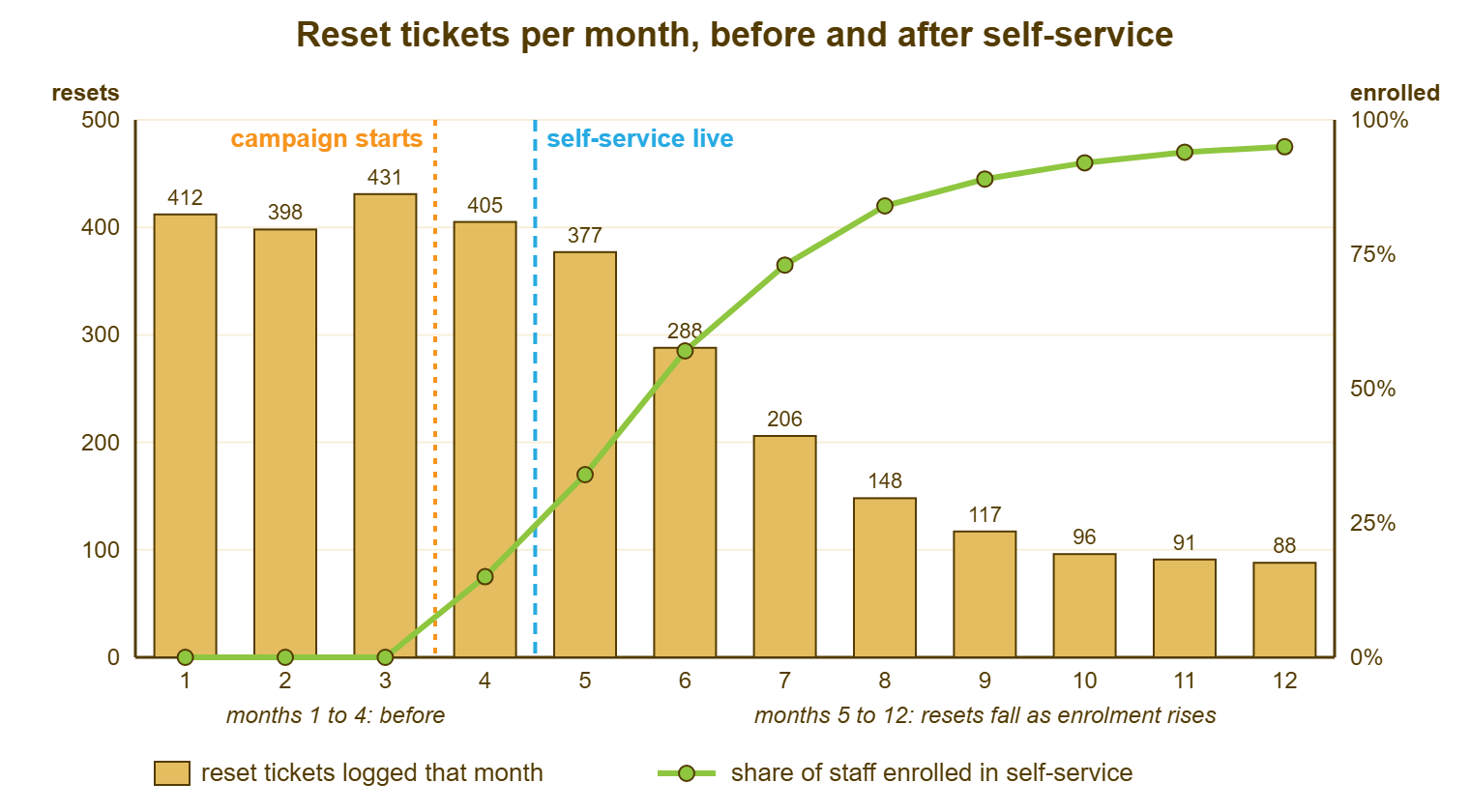
Three things in the picture are worth saying aloud to the sponsor. The fall tracks the enrolment line, which is the argument for the campaign made in a single glance. The fall is gradual, so any month taken alone understates or overstates it, which is why the sheet holds twelve months and not two. And the bars do not reach zero, which is not a failure but the residual, and the residual is the subject of the section after next. A sponsor who sees this picture understands the project in about four seconds. A sponsor who sees a paragraph about it asks what the paragraph means.
Lockouts Counted Apart From Resets
Count unlocks on their own line, because self-service may not remove them and because their cause is different. A lockout is the directory refusing an account after too many wrong attempts. The password is usually still known, and the fix is an unlock. Some self-service approaches let the user unlock their own account. Some only reset the password, which also clears the lock but makes the user choose a new password they did not need. And a large share of lockouts are not caused by the user at all. Instead, they are caused by a phone, tablet, mapped drive or scheduled task still holding the old password and trying it every few minutes. No self-service page fixes that, because the user unlocks themselves and the device locks them again before lunch.
So a desk whose resets fell and whose unlocks did not has not failed. It has found the second project. The second project is the stale-device sweep. Every lockout ticket gets the question "what else is signed in with the old password?" The answers go on a short list. The list usually says the same three things. The how-to article then tells people to check those things when they change a password. Where the directory can report the source of failed attempts, the directory owner can find the device without asking. Where it cannot, the desk asks, every time, and the unlock line falls over two or three months as the devices are found. If the unlock line is flat after that, the self-service approach does not do unlocks and the count is saying so.
Keep the two lines separate on the sheet forever, not just for the project, because they move for different reasons afterwards. Resets rise when enrolment decays or the login-screen link disappears. Unlocks rise after a password-change wave, when every device in the building is briefly wrong, and after any change to the lockout policy. A single "password tickets" line hides both signals inside one number that looks stable. That is how a desk can be doing a hundred unnecessary unlocks a month while reporting that the project is working. It is, for resets. The unlocks have a different story, and the sheet needs to be able to tell it.
The Residual Tickets and What They Say
The residual is the reset and unlock tickets that still arrive once self-service is live and enrolment has settled. It is the most useful number on the sheet, because every residual ticket is a reason. The reasons sort into six kinds that each belong to someone. Read each residual ticket for ten seconds, the way the before month was read, and tag it with its kind. The table below is the six kinds, what each one says about the project, and who acts on it. A residual that is mostly unenrolled people is an enrolment problem. One that is mostly lost phones is a handset-refresh problem. One that is mostly "the page did not work" is a bug, and the most important ticket type on the desk that month.
| Residual ticket kind | How to spot it | What it says | Who acts |
|---|---|---|---|
| Not enrolled | User has no factor registered; the technician enrols them on the call | The campaign has not reached this person or department | The enrolment owner, through the manager nudge |
| Cannot enrol | User is on the exceptions list | Expected; the exceptions route is working | Nobody, unless the list is growing |
| Second factor lost or changed | "New phone", "code goes to old number" | Normal churn, or a handset refresh nobody told the desk about | Whoever issues phones; the desk re-enrols |
| Self-service failed | User tried and it did not work: no code, page missing from login screen, PIN forgotten | A defect in the system or the how-to; the most important kind | The directory owner, same day |
| Shared or service account | Account has no single owner | Policy gap; self-service cannot help | The security owner and the account's named owner |
| Did not know it existed | User is enrolled and phoned anyway | The login-screen link or the message is not visible at the moment of need | The desk: the how-to, the auto-reply, the technician's walk-through |
Report the residual by kind each month, not only as a total. The total is the same number whether it is eighty unenrolled people or eighty broken attempts. The two call for opposite responses. The "self-service failed" kind deserves its own rule. Any month in which it is more than a handful means something changed: a login-screen image, a page, a certificate, a phone app update. In that case, the directory owner finds out what before the month ends. The "did not know it existed" kind is the one the desk itself fixes. The desk uses the auto-reply on reset tickets that carries the link and the habit of walking the caller through the page rather than doing the reset for them. Both kinds shrink when someone reads the tags. Neither shrinks on its own.
The Enrolment Line Beside the Reset Line
The enrolment number goes on the sheet beside the reset number every month, from two different systems, because the gap between them is the project. The reset count comes from the ticketing tool. The enrolment count comes from the directory or the reset tool's report. Someone writes both into the same row by hand. That is the twenty minutes a month on which the whole measurement rests. If you run QuerySolv, the volume reports give the ticket side by month without any arithmetic. The enrolment side will always come from wherever the password lives. The sheet is where the two meet. When resets are falling and enrolment is rising, the project is working. When enrolment is rising and resets are not, something between the two is broken, and the residual tags will say what.
Watch the enrolment line for decay as closely as you watched it for growth. It falls when new starters are not enrolled on day one, and when leavers are not removed from the count. It also falls when a handset refresh leaves a hundred people with a factor registered to a phone in a drawer. The mechanics of keeping it up are in Enrolment Is the Whole Project. The measurement here is simply that the line is on the sheet, every month, with its direction noted. An enrolment line that nobody has looked at since the campaign ended is the usual reason a desk's resets have crept back to half their old level without anyone being able to say when.
Resist converting the drop into hours and money on this sheet. The drop is a count: so many fewer tickets, so many fewer unlocks, this share of staff enrolled. Turning the count into technician hours saved and user time recovered is a separate piece of arithmetic with its own traps. It is the subject of Deflection Math Without Fooling Yourself, which belongs beside this sheet rather than inside it. Counts first, honestly, for twelve months. The money can wait until the counts are believed.
Remember: count the after months the same way you counted the before month. Keep unlocks on their own line. Tag every residual ticket by kind. Write the enrolment number beside the reset number every month. The residual by kind is the list of what to do next. The enrolment line is the early warning that the drop is coming back.
The Expiry-Policy Conversation
Once the resets are counted by source for a few months, the desk can see, for the first time, exactly how many of them the expiry policy is causing. That number makes possible a conversation that has usually been had on opinion. The expiry policy is the directory rule that forces a new password every so many days. It exists to limit how long a stolen password stays useful. It produces a reset wave every cycle from the people who ignored the warning. Self-service makes those resets cheap for the desk and leaves them expensive for the user, who still loses ten minutes and a thread of thought. The sheet now says how many users and how often.
Whether to keep, lengthen or drop expiry is the security owner's decision, not the desk's, and both positions are respectable. One view holds that regular expiry limits the damage from a password that leaked without anyone noticing. The other holds that forced change pushes people toward predictable patterns. That view also holds that a leaked password is used within hours rather than months. It holds that a second factor and monitoring for known-leaked passwords do the protective job better. Organisations with different regulators, different data and different second-factor coverage land in different places. The desk's role is to bring the count, not the conclusion. The count is: this many expiry resets a month, this many of them manual, this many user-minutes, and what the compensating controls would be if the policy changed.
Have the conversation after self-service has settled, with the sheet, in the terms described in Explaining Technical Things to Management: the number, what it costs, the options, and what each option needs. Do not have it before self-service, when the desk's motive looks like wanting fewer tickets. Do not have it as an argument, because the security owner will decide and the desk will support the decision either way. What the desk gains from the conversation is not a policy change. It is that the expiry wave is now a known, counted, decided thing rather than a mystery that makes one week in every cycle worse.
Keeping It Down
The drop stays down only if someone keeps measuring it after the project is over. The measuring is one sheet, twenty minutes a month, forever. It comes with a quarterly look at six things that quietly undo the project. New starters enrolled in their first week, which stops the enrolment line decaying. The login-screen link, checked on every machine type after any change to the standard image, because a rebuilt image without the link is the most common way a desk's resets double in a quarter. The how-to article, checked after any change to the reset page, because a picture of a screen that no longer exists is worse than no picture. The exceptions list, reviewed so that it only grows for reasons. The handset refresh calendar, so that the desk is warned before a hundred factors go stale in a week. And the residual by kind, read for the "self-service failed" line, which is the alarm.
Give the sheet an owner by name and a slot in the monthly reporting. That way, it is produced whether or not anyone asks. The month nobody asks is the month the number starts moving. The sheet is three lines on the desk's monthly report: resets this month against the before number, unlocks this month, enrolment this month with its direction. Three lines, every month, for as long as the organisation has passwords. The project team goes back to the queue. The sheet does not. That is what finished looks like for a project of this kind. A desk that cannot show the three lines this month has a project that finished some time ago and does not know it.
When the number creeps up, and it will, read the residual tags before doing anything else. The tags say which of the six quiet failures is the cause. Each has a different fix. Unenrolled new starters is the induction step. "Did not know it existed" after a quiet year is the auto-reply and the walk-through habit, which decay too. "Self-service failed" is a change somebody made. A sheet that holds the tags turns a creeping number into a named problem in ten minutes. A sheet that holds only the total turns it into a meeting.
A Short War Story: The New Laptop Image at Kestrel Marine
At Kestrel Marine, a boat builder with two hundred and twenty staff, self-service reset cut the desk's reset tickets from around three hundred a month to under sixty within five months. The sponsor was shown the chart. Everyone was pleased. The desk lead, Oona, stopped filling in the sheet because the project was done. Eight months later a technician rebuilding laptops rolled out a new standard image that did not include the login-screen link. Nobody noticed because nobody was counting. Over the following half year the reset tickets climbed back past two hundred a month as laptops were replaced one by one and their owners found no link and phoned. The desk absorbed the rise as "a busy patch" and hired a temp for the summer. It only found the cause when a new starter asked why the self-service link on her colleague's machine was missing from hers. The cost was the temp and about nine hundred manual resets that should not have happened. It also cost the sponsor's trust in the chart he had been shown. That chart had been true on the day and was not true a year later. Oona put the sheet back on the monthly report with her own name on it and a line for the image check. The project had not failed. The measurement had stopped, and a project nobody measures ends without telling anyone.
The Before/After Sheet
The sheet below is one page, twelve rows after the before row, three numbers and six tags per row, and a quarterly check at the bottom. The before row is filled in once from the reset-volume worksheet and never changed. Each month's row is filled in by the named owner using the same search and tags as the before month. The enrolment number from the directory side is written in the same row. The residual tags are counts, and the "failed" column is the one that triggers a same-day call to the directory owner when it rises. Copy it into a spreadsheet. Keep the three summary lines on the monthly report. Never let a month go blank, because a blank month is where the creep starts.
RESET BEFORE/AFTER SHEET — ONE PAGE, KEPT MONTHLY
Desk: ______________________   Sheet owner: ____________   Counting method (same every month): ______________________
Self-service live from: ________   Enrolment target: ______ of ______ (exceptions: ______)

BEFORE (one month, from the reset-volume worksheet, never changed)
   Month: ________   Resets: ______   Unlocks: ______   Shared/service: ______   Busiest Monday: ______
   Comparable because: holiday in month  [ ]   expiry wave in month  [ ]

MONTHLY ROWS
   Month | Resets | Unlocks | Enrolled and tested | Residual by kind: not enrolled / cannot / factor lost / FAILED / shared / did not know
   ______|  ____  |  ____   |  ____ / ____     |   ____ / ____ / ____ / ____ / ____ / ____
   ______|  ____  |  ____   |  ____ / ____     |   ____ / ____ / ____ / ____ / ____ / ____
   ______|  ____  |  ____   |  ____ / ____     |   ____ / ____ / ____ / ____ / ____ / ____
   ______|  ____  |  ____   |  ____ / ____     |   ____ / ____ / ____ / ____ / ____ / ____
   ______|  ____  |  ____   |  ____ / ____     |   ____ / ____ / ____ / ____ / ____ / ____
   ______|  ____  |  ____   |  ____ / ____     |   ____ / ____ / ____ / ____ / ____ / ____
   (continue to twelve rows, then keep going)

THREE LINES FOR THE MONTHLY REPORT
   Resets this month ______ against before ______ (down ______ )
   Unlocks this month ______ against before ______ (down ______ )
   Enrolled and tested ______ of ______, direction: up / flat / down

RULES
   FAILED residual above ______ in a month: directory owner told the same day. Date told: ________
   Enrolment down two months running: new-starter step checked. Date checked: ________
   Unlocks flat while resets fall: stale-device question asked on every unlock. Started: ________

QUARTERLY CHECK (tick with date)
   [ ] New starters this quarter ______, enrolled in week one ______
   [ ] Login-screen link present on every machine type, including any new image
   [ ] How-to article matches the current reset page
   [ ] Exceptions list reviewed; grew by ______ for reasons: ______________________
   [ ] Handset refresh planned? Desk warned: yes / no
   [ ] Expiry resets this quarter ______; policy conversation held / scheduled / not due
Nadia's reconstructed sheet went to Hugo on the Friday with four monthly rows under the before row. With it went the picture from this article, redrawn with Acme's numbers: 388 before, 102 in the latest month, enrolment at eighty-seven and rising. Unlocks were down less than resets because the stale-device question had only started that month. Hugo replied with one word, which was "good". He sent a second e-mail an hour later asking whether the same could be done for the shared mailbox requests. Nadia has the sheet on her monthly report now, with her name on it. The three lines have not been blank since. The password thing is finished, in the sense that it is now a number the desk reads every month. That is the only sense in which a project like this is ever finished.
Frequently Asked Questions
How much of a drop should we expect?
We never counted a before month. Is it too late?
Resets have fallen but lockouts have not. What is wrong?
Should the sheet show hours and money saved?
How long do we keep measuring?
The reset count is creeping back up. Where do we start?
From the QuerySolv team: we build self-hosted help desk software for Windows. QuerySolv runs as one Windows service on your own network. It takes requests by web form, e-mail, live chat, social messages and REST API. It is licensed once per installation rather than per agent per month. The free trial runs the full product for 30 days.