
Impact Times Urgency in Practice
It is 09:40 on a Tuesday and Leo has three new tickets, all marked Urgent by the people who sent them. Ticket 4471: "My mouse wheel sticks, can someone look at it urgently." Ticket 4473: "Nobody in dispatch can print labels and the van leaves at eleven." Ticket 4476: "Checkout on the website says error 500, customers are e-mailing." Leo has been on the desk for nine days. He opens them in the order they arrived, which puts the mouse first. He spends the next twelve minutes being very helpful about a mouse wheel while the van loads without labels and the website turns customers away.
Nobody told Leo what Urgent means. The form offered the word, three people chose it, and the queue displayed it as if it were true. A priority is the desk's decision about how much a ticket matters relative to every other ticket in the queue. That decision sets how fast the desk promises to respond and to fix. It is a decision, which means someone has to make it. They need a way to make it the same way every time. This article is part of our Prioritization Frameworks series. And it is about the ten-second version of that decision: two questions, a grid, and five names.
It covers why priority is a decision rather than a feeling. Next comes impact, defined as who is hurt and how many, then urgency, defined as how soon it hurts. The three-by-three grid that combines them follows, then how nine cells map onto five named priorities and six worked examples from an ordinary morning. Next come the questions to ask before you pick a cell and two traps that catch new technicians. Finally, there is the grid with cell definitions, written to be copied onto the wall beside the desk. Designing the targets that hang off each priority is a different job, done once, and it lives in Priority Tiers That Are Realistic. This article is about the decision you make forty times a day.
Priority Is a Decision, Not a Feeling
Every ticket arrives with a feeling attached, and the feeling belongs to the requester. The person whose mouse wheel sticks is annoyed, and annoyed feels urgent from the inside. The person in dispatch is frightened, because the van leaves at eleven. The person watching the website fail is embarrassed in front of customers. All three feelings are real, and none of them is a priority. A priority is what the desk decides after it has heard the feeling and asked two questions of its own.
The two questions are impact and urgency, and they are separate on purpose. Impact is who is hurt and how many: one person, a team, or the whole organisation. Urgency is how soon the hurt arrives: right now, later today, or some time next week. A sticking mouse wheel has low impact and low urgency. A label printer that stops the dispatch bay has medium impact and high urgency. A broken checkout has high impact and high urgency. Separating the two questions is the whole trick, because a requester's feeling mixes them together, and the mix is always labelled Urgent.
The reason to decide rather than feel is consistency. Suppose the same label printer gets Emergency on Tuesday from Leo and Medium on Wednesday from Priya. The dispatch team then learns that priority depends on who is on shift, and they start phoning the technician they like. If the desk decides the same way every time, the dispatch team learns the rule, and the rule starts working before the ticket is even raised. A consistent desk gets fewer arguments, not because people agree with every decision but because they can predict it.
The decision also has a price attached, which is why it cannot be left to the form. Priority sets the targets. A service level agreement, or SLA, is the written promise of how fast the desk will respond and resolve. In a desk with one, each priority carries its own clock. A ticket marked Urgent then starts a short clock the moment it is saved. Fourteen tickets marked Urgent means fourteen short clocks running at once, thirteen of which will breach so that one can be met. The form cannot be trusted with the clocks. The form has never once seen the queue.
Impact: Who Is Hurt, and How Many
Impact is a count of people, with one adjustment for processes that matter more than their headcount. Start by counting. One person who cannot work is low impact. A team of six who cannot work is medium impact. Everyone in the building, or everyone who uses a shared service, is high impact. The count is of people who are blocked or degraded, not of people who have heard about the problem, and not of devices. One printer that eight people share is an eight-person problem. Eight printers in a cupboard are a zero-person problem until somebody needs one.
The adjustment is for the critical process. Some things are high impact even when only one person touches them, because what that person does feeds everybody else. The payroll run on the day before payday. The label printer in the dispatch bay. The interface that sends lab results to the clinic's doctors. If the process is one the organisation cannot do without for a day, treat a failure in it as high impact. In that case, it does not matter how many people are standing at the broken thing. Which processes qualify is a list, and the list is written down in advance, not argued about at 09:40. Building that list is the subject of Making Business Impact Visible; for now, know that the list exists and that "one person" is sometimes the wrong answer.
Three levels of impact are enough. Desks that build five or seven levels spend their time deciding whether something is a four or a five. The targets attached to four and five are never different enough to justify the argument. High, medium and low, each defined by a count and a one-line exception for critical processes, can be applied by a technician in their second week. That is the test of a definition. If Leo cannot apply it on day nine, the definition is for the policy document, not the desk.
Impact also means degraded, not only stopped. A team whose e-mail takes four minutes to send is hurt, less than a team whose e-mail does not send at all, but hurt. Ask whether they can still do their job, and how much slower. "Slower but working" usually drops the urgency rather than the impact. The same number of people are affected, but the hurt is arriving in instalments rather than all at once. Keep the questions apart and the grid will sort it out.
Urgency: How Soon It Hurts
Urgency is a question about time, and the honest answer is almost always one of three. High urgency means the work has stopped and there is no workaround: the hurt is happening now and accumulating by the minute. Medium urgency means the hurt arrives today or there is a workaround that costs something. For example, the dispatch team can hand-write labels for an hour, badly, while cursing. Low urgency means the thing can wait a few days without anyone's work changing. Examples are the request for a second monitor and the report that would be nice to have by month-end.
The workaround, a slower or clumsier way of getting the same job done, is the strongest lever on urgency and the one most often forgotten. A broken laptop with a spare on the shelf is medium urgency. The same broken laptop with no spare is high. Nothing about the laptop changed; the existence of the spare changed how soon the hurt arrives. When you assess urgency, the first question is "can they work another way for now?" If the answer is yes, the second question is "for how long?". A workaround that holds for a day lowers urgency by one level. A workaround that holds for an hour does not.
Urgency has a calendar attached, and the calendar is where most mistakes hide. A ticket that is low urgency on the tenth of the month can be high urgency on the last working day. That can happen because the thing it blocks is the month-end close. "The van leaves at eleven" is a calendar fact that makes a medium-urgency printer problem high at 10:15. Ask when the deadline is, and if the requester says "there isn't one" believe them. A requester with a real deadline has never once forgotten to mention it.
Resist the pull of the word itself. A requester who writes "URGENT" in the subject line has told you about their feeling, which is useful. They have told you nothing about the time, which is what you need. Reply with the time question. "Is anyone unable to work right now, and is there a point today when this becomes worse?" The answer sorts the ticket in one exchange. It teaches the requester what the desk means by the word, which is cheaper than any policy announcement.
The Three-by-Three Grid
Put impact down the side and urgency along the bottom and you have a grid of nine cells. And every ticket lands in exactly one of them. The top-right cell is high impact and high urgency: the whole office is offline, now. The bottom-left cell is low impact and low urgency: one person would like a new mouse at some point. Everything else is somewhere in between, and the position in the grid is the priority. The grid is not clever. That is its best quality.
The picture below shows the grid with a priority name in each cell and a one-line example beside it. Read it from the top right, where the organisation is on fire, down the diagonal to the bottom left, where nothing much is wrong. The cells on the same diagonal share a priority. A team that has stopped working and a whole organisation that is merely slowed down deserve roughly the same place in the queue. The colours carry the priority, and the legend says what each priority means for the order of work.
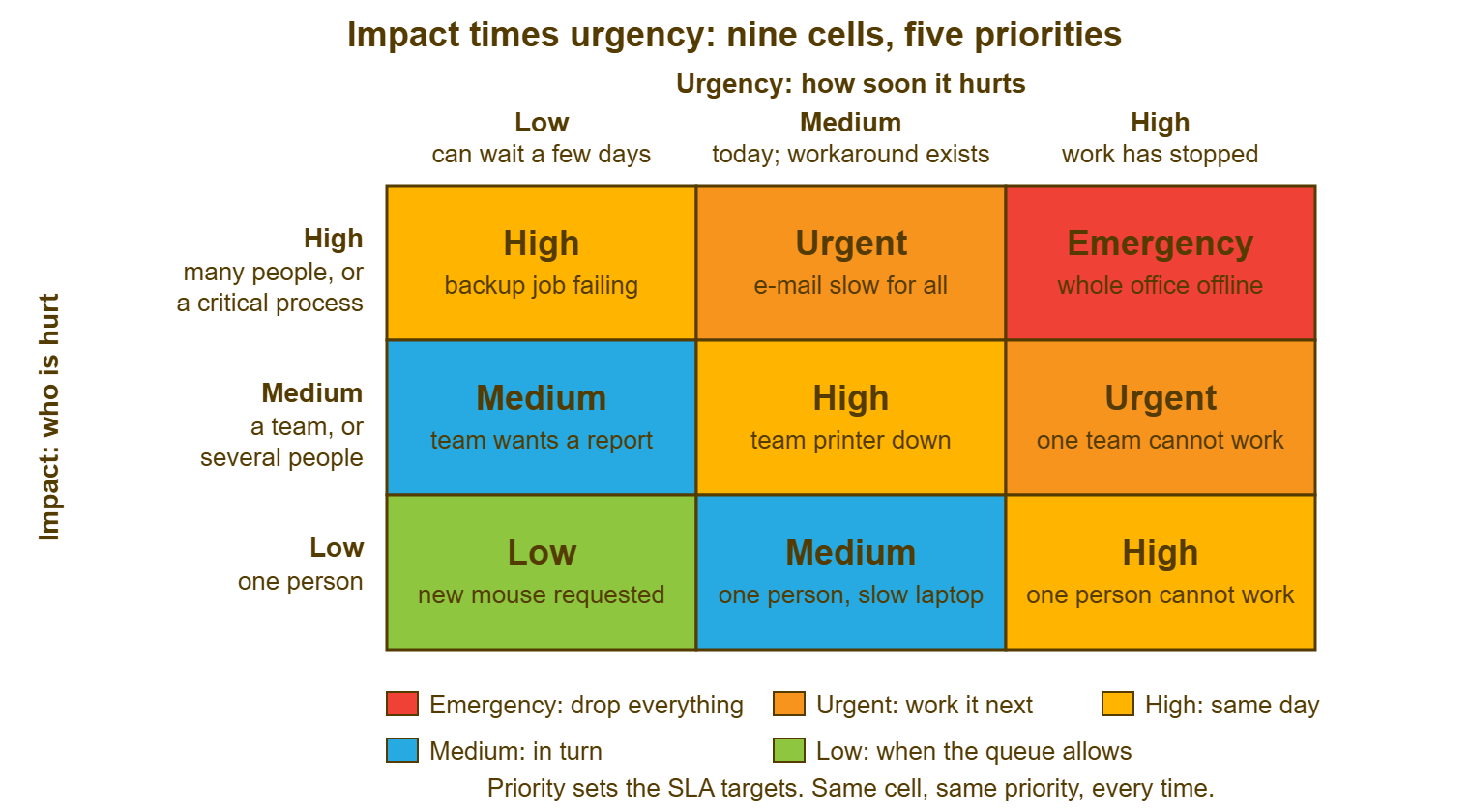
The grid earns its place by removing the argument from the moment. Leo does not have to decide whether a sticking mouse wheel is urgent. He has to decide whether one person or many are hurt, and whether work has stopped. The grid does the rest. The requester does not have to persuade him; they have to answer two questions. If they disagree with the cell, the disagreement is about a fact (how many people, how soon), and facts can be checked. Arguments about facts end. Arguments about feelings do not.
Mapping Nine Cells to Five Priorities
Five named priorities are enough for a small desk, and the five used here are Low, Medium, High, Urgent and Emergency. Many small-team tools ship with a fixed ladder of about that size, often not renameable. Each rung carries its own SLA targets, so the names are not decoration; they are the handles the clocks hang from. If your tool has four levels or six, the grid still works; the mapping below just loses or gains a row. The point is that nine cells collapse onto a short ladder, and that the collapse is written down once.
The table is the mapping. Read the first two columns as the question answers and the third as the priority that results. Nothing in the grid depends on who the requester is, what they wrote in the subject line, or how many times they have phoned. Those things may change what you say; they do not change the cell.
| Impact | Urgency | Priority | What it means for the queue |
|---|---|---|---|
| High: many people, or a critical process | High: work has stopped, no workaround | Emergency | Drop everything; one person works it and one person tells people |
| High | Medium: today, or a costly workaround | Urgent | Next in line after any Emergency; worked before anything else today |
| Medium: a team or several people | High | Urgent | Same as above; a team that cannot work is not kept waiting |
| High | Low: can wait a few days | High | Worked today; a risk to many that is not hurting yet |
| Medium | Medium | High | Worked today; a team slowed down is a team losing hours |
| Low: one person | High | High | Worked today; one person with no way to work is still a person |
| Medium | Low | Medium | Worked in turn, within the normal target |
| Low | Medium | Medium | Worked in turn; a workaround exists, so it holds |
| Low | Low | Low | Worked when the queue allows, and never forgotten |
Two things about the ladder deserve a sentence each. Emergency is one cell, deliberately, so that it stays rare; the day a desk has three Emergencies a week is the day the word has stopped meaning anything, and the long version of that definition belongs to the major-incident series. Low is also one cell, and it is a real priority with a real target, not a place tickets go to be forgotten. A desk that never works its Low tickets has not prioritised them. It has declined them without saying so.
The ladder also fixes something that escalation does not. Pressing an escalate button, in most tools that have one, flags a ticket for attention and badges it so that someone senior looks. In many of them it leaves the SLA clock exactly where it was, and you should test yours before assuming otherwise. Changing the priority is what moves a ticket to tighter targets. The two are different acts for different purposes. And a technician who wants a ticket worked faster changes the priority, with a reason, rather than pressing escalate three times and hoping. Which act fits which situation is the subject of What Escalation Means.
Six Worked Examples From One Morning
Here are six tickets from a single morning at Northgate Retail, a chain of eleven stores with a desk of three, each walked through the two questions. The point of the walk-through is the questions, not the answers; your organisation's answers will differ, and should. Ticket 5108, from the Harbor Street store: "Till two will not take cards since 08:45, four customers waiting." Impact: one till, but it is the store's main till and customers are queueing, so the critical-process adjustment applies and impact is high. Urgency: high; there is a second till but it is a Saturday and the queue is out of the door. Emergency.
Ticket 5111, from the finance team: "The shared drive is read-only for all of us, we can open but not save." Impact: medium; a team of seven. Urgency: high; they cannot save work. There is no workaround beyond saving to the desktop and losing version control, which the finance manager has refused on sight. Urgent. Ticket 5114, from the marketing manager: "The large-format printer has a streak down every print." Impact: medium; four people use it. Urgency: low; the next campaign proofs are due next week and the office printer handles drafts. Medium.
Ticket 5119, from a buyer: "My laptop will not turn on at all. I have the supplier meeting at two." Impact: low; one person. Urgency: high; nothing works, and the desk has no spare that morning. High. (Had there been a spare on the shelf, the urgency would have dropped to medium, the priority to Medium. In that case, the buyer would have been at her meeting with a loaner by ten.) Ticket 5122, from the warehouse: "The wireless in aisle nine drops every few minutes; the scanners keep reconnecting." Impact: medium; six pickers work that aisle. Urgency: medium; they can pick, slowly, and are cursing. High.
Ticket 5125, from the IT desk's own monitoring, logged by Priya: "Overnight backup of the store database failed for the second night." Impact: high; every store's sales data is at risk. Urgency: low in the sense that nobody is blocked and nothing is slower this morning. High. This is the cell new technicians get wrong most often, because nobody is shouting about it. Nobody shouts about a backup until the day they need one, and on that day the shouting is extensive.
Six tickets, six cells, five minutes of questions. The table below is the same morning in one view, with the two answers and the result. That is the form the desk's own log should take once the habit sticks. Note the column for the fact that decided it; the fact is what you would tell the requester if they asked why.
| Ticket | Impact | Urgency | Priority | The fact that decided it |
|---|---|---|---|---|
| 5108 Till will not take cards | High (critical process) | High | Emergency | Customers queueing at the main till, Saturday |
| 5111 Shared drive read-only | Medium (team of seven) | High | Urgent | No acceptable workaround for saving |
| 5114 Printer streak | Medium (four users) | Low | Medium | Proofs due next week; drafts have another printer |
| 5119 Laptop dead, meeting at two | Low (one person) | High | High | No spare on the shelf this morning |
| 5122 Wireless drops in aisle nine | Medium (six pickers) | Medium | High | Picking continues, slowly |
| 5125 Backup failed twice | High (all store data) | Low | High | Nobody blocked today; everybody exposed |
The Questions to Ask Before You Pick a Cell
Four questions, asked in the same order every time, produce the cell. First: who cannot work, or is working slower, right now? Get a number or a team name, not an adjective. Second: is any critical process involved? Check the list; do not rely on memory. Third: is there a workaround, and how long will it hold? Fourth: is there a deadline today, and what is it? The answers to one and two give impact. The answers to three and four give urgency. The grid gives the priority, and you have not had to be clever at any point.
Ask the questions of the ticket first and the requester second. A well-written ticket answers all four in its first three lines. And a good intake form asks them outright, which is a subject for Gathering the Right Information Up Front. Most ticketing tools let a web form carry a custom field or two. So a field asking "how many people are affected?" can sit on the form and arrive with the ticket. The field does not decide the priority, but it saves one round trip. When the ticket does not say, ask, and ask in one message with all four questions in it. Four separate messages to a requester who is already annoyed is a kind of performance art.
Remember: impact is who is hurt and how many; urgency is how soon it hurts. Ask them separately, answer them with facts, and let the grid pick the priority. The requester's word for it is information, not instruction.
Write the two answers into the ticket when you set the priority, even when they are obvious. "Impact medium: dispatch team of five. Urgency high: no labels, van at eleven." Nine words, and they do three jobs. They tell the next technician why the ticket is where it is. They give the requester an answer if they ask. And they make the monthly review possible, because a priority with no reasoning beside it cannot be checked against the grid, only argued about. The two answers are the smallest useful note a desk writes.
Two Traps: Counting Devices and Trusting the Form
The first trap is counting the broken things instead of the blocked people. "One printer" sounds like low impact until you learn that the one printer stamps every pallet that leaves the building. "One server" sounds like one thing until you learn that it is the one the whole clinic signs in through. The fix is to ask who is waiting on the broken thing, not what the broken thing is. Keep the critical-process list where the technician can see it. Devices do not have impact. People waiting for devices do.
The second trap is letting the requester's choice on the form stand because changing it feels like an argument. It is not an argument; it is the desk's job, and the requester usually expected it. A priority left where the form put it is a decision made by whoever was most worried at the moment of typing. That is a strange way to run a queue. Change it, write one courteous sentence saying why, and move on. The sentence and the etiquette are in Who Decides the Priority, and it is a shorter sentence than you fear.
There is a third, smaller trap, which is the ticket that is in the right cell and still feels wrong. A single person who cannot work gets High, same as a team that is slowed. Some mornings that single person is the most junior clerk in the building while the slowed team includes a director. The grid is not wrong; the feeling is just loud. If the feeling turns out to be a fact (the clerk is running payroll, the director is drafting a slide), the fact changes the cell. You then have your answer. If it is only a feeling, the grid holds. The grid is the one thing in the building that is not impressed by anyone.
A Short War Story: The Label Printer at Meridian Parts
Meridian Parts, a distributor of engine components with a desk of two, had no written definition of impact, so each technician brought his own. On a Thursday at 10:20, a ticket arrived from the dispatch bay saying the label printer had stopped. Jonah rated it Medium on the grounds that it was one printer and the bay had two. What the ticket did not say, and Jonah did not know, was that the second printer had been borrowed by goods-in a month earlier. Jonah also did not know that every pallet leaving the building needed a label from the printer that had just died. The ticket had not said that either. The bay stood idle for three hours while the ticket waited in turn behind a password reset and a monitor request. Forty-one pallets missed the afternoon carrier collection. The sales manager spent Friday morning on the phone to customers explaining why Thursday's orders would arrive on Monday. The desk's definition of impact changed that afternoon from "how many devices" to "how many people are waiting, and on what". And the dispatch bay's printer went onto a list of critical processes that both technicians could see without asking. Jonah had done nothing wrong by his own rule. The lesson was that his own rule was the problem, and that a desk of two needs one rule, not two.
The Grid With Cell Definitions
The block below is the grid as a page to copy. Print it, pin it beside the desk, paste it into the knowledge base, and change the examples to ones from your own building. The definitions should survive unchanged for a long while. Each cell carries its priority and the two answers that put a ticket there. That lets a technician in their second week point at a cell and say why.
IMPACT TIMES URGENCY — THE GRID, ONE PAGE

IMPACT (who is hurt, and how many)
  High    many people, or any process on the critical list
  Medium  a team, or several people
  Low     one person

URGENCY (how soon it hurts)
  High    work has stopped; no workaround, or one that holds under an hour
  Medium  work continues with a costly workaround, or a deadline falls today
  Low     can wait a few days with no change to anyone's work

THE GRID (impact down, urgency across)
                      Urgency LOW        Urgency MEDIUM      Urgency HIGH
  Impact HIGH         High               Urgent              EMERGENCY
  Impact MEDIUM       Medium             High                Urgent
  Impact LOW          Low                Medium              High

THE FOUR QUESTIONS, IN ORDER
  1. Who cannot work, or is working slower, right now?  ______________
  2. Is a process on the critical list involved?         [ ] no  [ ] yes: ________
  3. Is there a workaround, and how long will it hold?   [ ] none  [ ] holds ____ hours
  4. Is there a deadline today?                          [ ] no  [ ] yes, at ____

WRITE INTO THE TICKET
  Impact ______ because ______________________
  Urgency ______ because ______________________
  Priority set to ______

CRITICAL PROCESSES (edit for your organisation)
  __________________________   __________________________
  __________________________   __________________________
  __________________________   __________________________
Two adjustments are common. A desk whose tool offers four priorities rather than five drops the Emergency row. That desk treats the top-right cell as its highest level with a major-incident flag beside it. A desk with a customer-facing department as well as an internal one keeps one grid but two critical-process lists. A process that is critical for the shop floor is not the one that is critical for the customers. Most tools that separate departments or queues let each carry its own SLA rules for exactly that reason. The grid itself does not change. It has nine cells, it will always have nine cells, and nine is the right number.
Leo's Tuesday, replayed with the grid, goes like this. The website checkout: high impact, high urgency, Emergency, and Leo tells Priya before he touches anything. The dispatch labels: medium impact, high urgency, Urgent, worked next, with a reply to the bay saying so. The mouse wheel: low and low, Low, with a reply that says "logged, I will get to it this week" and means it. Twelve minutes on the mouse become two minutes on the triage, and the van leaves with labels. Nothing about Leo changed between the two Tuesdays. He was handed a grid.
Frequently Asked Questions
Should impact and urgency be fields on the ticket, or just the priority?
What if the requester is one person but very senior?
How do we handle a ticket that affects one person now but will affect everyone tomorrow?
Does the grid replace the SLA priority definitions?
Our technicians disagree about the same ticket. Who is right?
How often should the critical-process list change?
From the QuerySolv team: we build self-hosted help desk software for Windows. QuerySolv runs as one Windows service on your own network. It takes requests by web form, e-mail, live chat, social messages and REST API. It is licensed once per installation rather than per agent per month. The free trial runs the full product for 30 days.