
Enablement: The Work Behind the Shift, and Who Pays for It
Wednesday, 09:15, at Harbourview Clinic. Marcus, who runs the three-person desk, has the shift-left map from last quarter on the screen for the review. The column headed "moved" is empty. Not one of the six ticket types has gone down a step. He checks each. The runbook for the appointments system's "slot clash" error is half-written in Anika's drafts folder. It has been there since the week she started it and the queue got busy. Jo's request for an account on the appointments console has been "with the supplier" for seven weeks and nobody has chased it. The patient check-in article was drafted by Pat, who then went on leave, and nobody tested it. Everyone agreed to every move at the last review. Nobody had an hour. The map, Marcus realises, was a list of destinations, and he had never written down the journeys.
Enablement is the work that makes a shift-left move possible. It includes the writing, the training, the access and the testing that put a resolution within reach of the step below. It includes the feedback that corrects all of it once the move is made. It is work in exactly the sense that tickets are work. It takes hours. It has an owner or it does not happen. It can be late, and it is the first thing dropped on a busy morning, because no requester is waiting for it. Most shift-left plans do not fail on the strategy. They fail here, quietly, one unstarted runbook at a time. This article is part of our Shift-Left Strategy series. It is about treating enablement as a backlog with hours in it rather than a set of good intentions.
It starts with the four kinds of enablement work and the loop they form. Then it covers documentation, training and tool access, which is the long pole. Next comes the feedback loop from the front line back to the specialists. A worked example covers the time it takes and who pays it. Then it treats the enablement backlog as a real backlog. A short war story and the enablement plan to copy finish the article.
The Four Kinds of Work, and the Loop They Form
Every move down the staircase needs four kinds of work, and they arrive in a loop rather than a list. Documentation is the runbook for the front line and, later, the article for the user. Training is the rehearsal, the shadowing and the reviewed first tickets that turn a document into something a person can do under pressure. Tool access is the permission, the console account, the script or the button that lets them act on it. Feedback is the path back to whoever wrote the document. It brings back the ticket that still escalated, or the article that still produced a call, so that the document changes. The first three move the resolution down; the fourth is the only reason the first three stay true.
The picture below draws the loop for one ticket type. The specialist writes the runbook. The front line learns it, with a limit. The knowledge base publishes the user guide derived from it. Self-service absorbs the ordinary case. The feedback is drawn in blue because it runs against the direction of the shift. It carries what failed at each lower step back up to the person who can fix the document. The loop runs once per ticket type. It runs again whenever the feedback changes the runbook, which for a living system is roughly whenever the system changes. A desk that draws only the forward arrows has drawn a plan that will be wrong by spring.
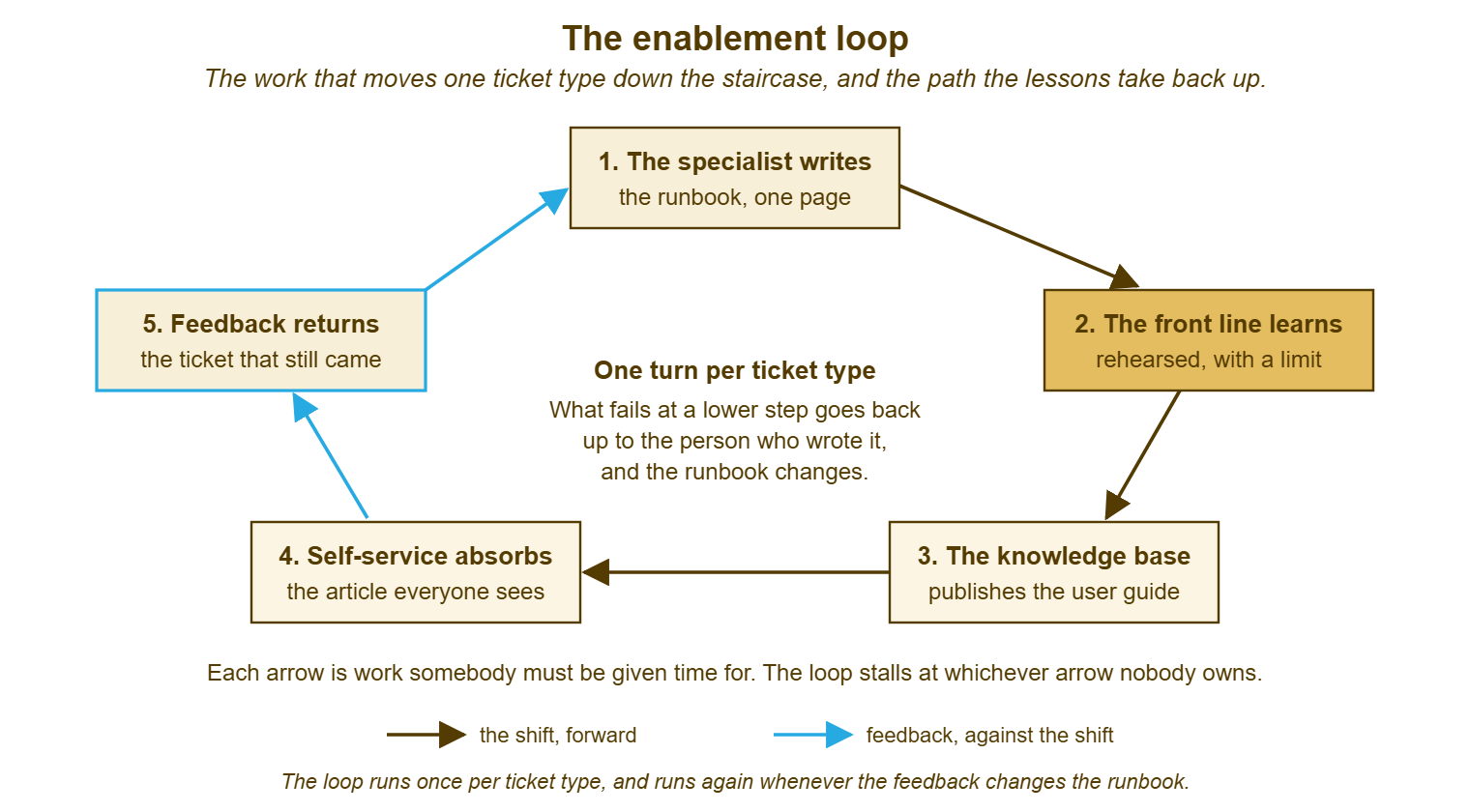
Each arrow in that picture is a task with an owner and an estimate, and the loop stalls at whichever arrow nobody owns. At Harbourview the stalled arrow was different for each type: the writing for the slot-clash runbook, the access for the console, the testing for the check-in article. Three types, three different missing hours, one empty column. The rest of this article takes the four kinds of work in turn and says what each costs, because the cost is the part the map never showed.
Documentation: The Runbook, and the Guide That Follows It
For a one-page procedure on a system the specialist and front-line technician both know, the runbook costs the specialist about an hour of dictating. It costs the front-line technician about two hours of writing and tidying. It costs another hour for the rehearsal that finds what the first draft missed. Call it four hours of people time for the first version, spread over two people and a week. The user guide derived from it costs two or three more, including the test on two real users, and a photograph. Those numbers are Harbourview's, for ordinary ticket types. A procedure with branches, or one on a system only the specialist has ever touched, costs double. The honest estimate is the one made after the first draft, not before. What makes a runbook complete, and what makes the user's version readable, are in their own series and this article only prices them.
The cheapest documentation is written during the ticket, not after it. The habit of capturing the fix while it is on the screen is the subject of The Capture Habit. For shift-left the habit has a specific form. When a specialist resolves a ticket of a type that is on the map, the resolving note becomes the first draft of the runbook. The steps are numbered and the checks stated. That makes the dictation session later an edit rather than a recollection. Anika's half-finished runbook had been written from memory on a quiet Friday. The next version was pasted from a Tuesday's ticket note, and it was finished in forty minutes because it had been mostly finished already.
Documentation is never done, which is the part of the estimate most plans leave out. The runbook changes when the system changes. The article changes when the runbook does. The two must change together or the user's version drifts into fiction. The review that keeps them in step, and how often to run it, is in Keeping the Pair in Sync. Budget an hour a quarter per moved type for upkeep. Put it in the backlog as a recurring item with a date. An upkeep task with no date is a task that happens after the first complaint.
Training: The Rehearsal, the Shadow and the First Five Tickets
Training for a shift-left move is not a course, and a desk that waits for the course has found a reason to wait indefinitely. It is three things, each small. The rehearsal, where the front-line technician runs the runbook with the specialist watching and silent. The shadow is where the technician handles the first real ticket of the type with the specialist beside them. Then the specialist handles one with the technician beside them. Each has seen the other's version of the same four minutes. And there are the first five tickets, which the technician resolves alone and the specialist reads afterwards, as a reviewer of the runbook rather than of the technician. How to shadow without taking over, and how to review a ticket so that the person learns rather than defends, are in the series on training and developing technicians, which this article relies on.
The training also has to deliver the sentence "you are allowed", said aloud. It belongs to training rather than to access because it is a thing the technician learns rather than a thing they are given. A front line may have the runbook, the console and the rehearsal. If it has not been told plainly that it may act without checking first, it will check first, every time, for months. The specialist says it, and the desk lead says it. On the first ticket the technician resolves alone, the specialist says "good" in the ticket where the team can see it. That costs nothing and is the most frequently skipped item in this article.
Count the training hours honestly. The rehearsal is an hour of two people. The shadow is two tickets' worth of two people. The first five reviews are fifteen minutes each of the specialist's time. For one type, that is somewhere between four and six hours spread over a month, and it is mostly the specialist's. The specialist's hours are the ones the desk has least of, which is why training stalls: the person who must give the hours is the person the queue most wants. The knowledge base itself can carry some of the load, as the thing a new technician reads before the rehearsal. The way to use it that way is in The Knowledge Base as a Training Tool. It carries some. It does not carry the sentence.
Tool Access: The Request That Takes Seven Weeks
Tool access is the shortest task on the list in hours and the longest in days, and it is the one to start first. A console account from a supplier can take weeks. A narrower role in a system nobody has customised before takes a conversation with whoever owns it, which takes a meeting, which takes a fortnight to arrange. A script that does one safe thing takes an afternoon to write and a week to get reviewed if the desk does any review at all. A service account for the script to run under needs a name, an owner and a password policy, and the person who creates service accounts is on leave. None of this is hard. All of it is slow. A plan that starts the runbook first and the access request last will have a finished runbook sitting next to an unfinished request for most of a quarter. That is what Marcus found.
Put the access request in on the day the type is chosen, before a word of the runbook is written. Chase it weekly like a ticket with a vendor on the other end, because that is what it is. If the request needs an approval, name the approver on the plan and send the request with the runbook's one-line purpose attached. That way, the approver is deciding about "clearing stuck appointment slots" and not about "console access". Where the access cannot be narrowed to the runbook's steps and the system has no finer roles, the script is the answer. In that case, the script is on the plan as its own item with its own owner. The access item is the plan's critical path. Draw it first and everything else fits behind it.
Record what was granted as a change, lightly, on the runbook's page: the right, the role, the date, the approver, and the runbook it serves. When the type moves again, to self-service, the front line's right stays, because the front line is still the fallback. When the runbook is retired, the right is retired with it. A desk that grants access for shift-left and never records it accumulates rights the way a drawer accumulates cables. Every one of them was needed once.
The Feedback Loop, From the Front Line Back to the Specialists
The feedback is the escalated ticket, and the loop works only if someone reads it. After a type has moved to the front line, every ticket of that type that still goes up to the specialist is one of three things. It is a case the runbook did not cover, a step that did not work as written, or a limit that was set in the wrong place. The specialist who receives it fixes the user's problem and then, before closing, adds the missing sentence to the runbook, or notes on the ticket why they could not. That is the whole loop: fifteen minutes on the ticket, five on the runbook, and the next technician who meets that case does not escalate it. The desk may keep an internal note on the ticket that the requester does not see, as QuerySolv and most tools do. In that case, the note is where the specialist writes "runbook step four assumes one clinic; this user has two". The runbook's owner reads those notes once a month in a filter rather than a hunt.
The same loop runs from self-service back to the front line, one step further down. The ticket that arrives saying "I followed the article and the light stayed red" is the article's feedback. The front-line technician who resolves it writes what the article missed, in the same place, for the article's owner. Then the loop runs again upward. An article that keeps failing on the same step usually means the runbook has the same gap. The runbook's owner hears about it from the article's owner. They may be the same person on a small desk and may not be. Draw the names on the plan. Feedback with no named reader is noise with good intentions.
Make the reading a standing appointment, fifteen minutes a month per moved type, in the calendar of whoever owns the document. A loop that depends on someone noticing will be noticed in the quarter when the queue is quiet and not in the one when it matters. Three escalations of a type in a month, read together, show a pattern that three escalations read on three separate days do not. (The pattern is usually "the runbook is fine and the clinic on the second floor has a different printer.") The feedback loop is the only part of enablement that runs forever, and for that reason it is the only part worth building a habit around rather than a project.
Remember: enablement is work with hours in it. Put every item in the backlog with an owner, an estimate and a date. Start the access request first because it is the slowest. Book the specialist's hours out of the queue before the move, because the saving arrives after the hours are spent and never before.
The Time It Takes, and Who Pays It
Here is Harbourview's arithmetic for one ordinary ticket type, moved from the specialist to the front line, as a worked example that your own desk will differ from. Documentation: about four hours for the runbook, one of them the specialist's. Training: about five hours across the month, three of them the specialist's. Access: one hour of work and six weeks of waiting. Feedback: fifteen minutes a month, indefinitely, mostly the specialist's. The first-month total is somewhere between nine and twelve hours of people time. The specialist pays four to six, the front line three to five, and Marcus one or two for chasing the access and running the review. Consider a type that arrives twenty times a month and costs the specialist half an hour each at the top of the staircase. The enablement hours are paid back within the second month. The desk has a day a month it did not have before. That is the shape: a small lump of specialist time now, in exchange for a stream of specialist time later.
Who pays is the question the plan has to answer out loud, because the specialist's hours come out of the queue, and the queue does not volunteer them. If Anika spends four hours this month on enablement, four hours of specialist tickets wait longer this month. Someone has to have said in advance that this is acceptable and why. The way to buy a regular hour out of a reactive desk, by blocking it, protecting it and reporting what it bought, is in Buying the Time: The Prevention Hour. The enablement hour is bought the same way, from the same place, with the same argument. Say it to the team, say it to the manager, and put the hours on the plan where they can be seen being spent.
The hours are an investment in the plainest sense, which means they are spent before the return. That gap is where shift-left plans quietly die on desks that are already stretched. If the desk has no slack at all, no hour that can be blocked without a requester waiting longer, enablement cannot start. In that case, the honest move is to say so and make the case for the slack. Do that rather than add enablement to a full queue and watch it age. The case, built from the desk's own ticket data and made in hours rather than adjectives, is in The Training and Time Case. A plan that assumes hours nobody has agreed to give is not a plan. It is the empty column at the next review.
| Enablement work (one type, specialist to front line) | Hours of people time (Harbourview's example) | Who pays most of it | Elapsed time | Where it stalls |
|---|---|---|---|---|
| Runbook: dictate, write, rehearse | 3 to 5 | Specialist 1 to 2; front line 2 to 3 | One to two weeks | "When it's quieter"; the draft that stays a draft |
| Training: shadow both ways, review first five tickets | 4 to 6 | Specialist 3 to 4; front line 1 to 2 | The first month of real tickets | The sentence "you are allowed" never said |
| Access: role, console account, or script and service account | 1 to 4 | Desk lead, specialist, sometimes a supplier | Two to eight weeks | Nobody chasing; the approver deciding about "access" rather than the purpose |
| Feedback: read the escalations, correct the runbook | About a quarter of an hour a month, indefinitely | Specialist or runbook owner | Ongoing | No named reader; no calendar entry |
| User guide (the next step down) | 2 to 4 | Front line 2 to 3; two users for the test | One to two weeks, after a quarter on the front line | Drafted, never tested, published anyway |
The Enablement Backlog as a Real Backlog
Put enablement in the ticket tool, as tickets, in a queue of its own, with an owner, an estimate and a due date on each. Review that queue weekly for fifteen minutes the way the ticket queue is reviewed daily. The reason is not tidiness. A task in a document called "Shift-Left Plan" is invisible to every habit the desk already has. A ticket in a queue ages, has a name on it and shows up in the oldest-first view. It can be reported on in the same breath as the rest of the work. If you run QuerySolv, give enablement a department of its own, with its own queue and its own permissions. That keeps the work beside the tickets without mixing it into the requester-facing figures. In any other tool, a separate queue or a tag that can be filtered does the same job. The point is that the work is somewhere the desk already looks.
One ticket per arrow, linked to the ticket type it serves. Use "Runbook: appointments slot clash" with Anika as owner and a date two weeks out. Add "Console account for front line: appointments" with Marcus as owner, the supplier's reference in the first note, and a weekly chase. Then add "Rehearsal: slot clash runbook" with Jo as owner and a date after the runbook's. When the access ticket is the oldest open item in the queue for the third week, the weekly review can see it and act on it. A line in a plan document was never that visible. Enablement tickets rot like any others and for the same reasons. The measure of a rotting backlog, age rather than count, applies to them in full. The reasoning is in What Ticket Age Actually Measures.
Keep the enablement queue short and finish things. Three types in progress at once, each with its four or five tickets, is about what a small desk can hold without any of them stalling. A queue with twelve types started and none finished is the map copied into a different format. Finish the runbook before starting the next. Close the access ticket when the right is granted and recorded. Close the feedback ticket never, because it recurs, and re-date it each month instead. A short queue of finished things beats a long queue of good intentions, and the review will show which one you have.
A Short War Story: The Workshop Plan at Bellweather Logistics
Bellweather Logistics ran a half-day workshop on shift-left for its desk of five. It produced a plan with twelve warehouse-system ticket types to move from the one specialist, Tomas, to the front line. Every line was agreed by everyone in the room, including Tomas, who was pleased. The plan listed the twelve types, the step each would reach, and a quarter by which it would get there. It did not list a single hour, an owner for any task, or where Tomas's time would come from. Nobody chased the console accounts because nobody's name was on them. Two quarters later nothing had moved. Tomas had meanwhile been handling the same forty-odd warehouse tickets a month on top of the plan's good intentions. He resigned for a job with fewer interruptions and left with every runbook still in his head. The desk spent its next two quarters rebuilding what he knew from his ticket notes. The lead put the cost at somewhere between two and three hundred hours across the team. There was also the warehouse's own waiting, which nobody counted. A shift-left plan with no hours in it is a list of things that would have been nice, and the specialist pays for it either way.
The Enablement Plan
The plan below is one page per ticket type, and it is the shift-left map's "what the move needs" column expanded into tickets with hours. Fill in section A on the day the type is chosen and raise the access ticket the same day. Sections B to D are the arrows, each with an owner, an estimate and a date. The estimates are compared with the actual hours at the end. The second type's plan is only as good as the first type's honesty. Section E is the hours answer, agreed before the first task starts, and a plan with section E blank has not started.
ENABLEMENT PLAN — ONE TICKET TYPE, ONE PAGE
Ticket type: _________________________________   Tickets per month: ____
Moving from: ______________  to: ______________   Target date: ____________
Specialist: ______________   Front-line owner: ______________   Desk lead: ______________

A. ACCESS (raise this ticket first; it is the slowest)
   What the front line must be able to do: ____________________________________
   Narrowest right / role / script that covers it: _____________________________
   Approver: ______________   Requested on: ________   Chased weekly by: ______________
   Granted on: ________   Recorded as a change on the runbook's page: yes / no
   Estimate: ____ h     Actual: ____ h     Elapsed: ____ weeks

B. DOCUMENTATION
   Runbook: dictated by ______________, written by ______________, from ticket #______
     Due: ________   Estimate: ____ h   Actual: ____ h
   Rehearsal with the specialist silent: ________   Gaps found and fixed: ____
   Limit written on the runbook's page (not to start / stop / never): yes / no
   User guide (only after a quarter on the front line): owner ______________  due ________
     Tested on two users on: ________   Estimate: ____ h   Actual: ____ h
   Upkeep: ____ h per quarter, recurring ticket dated: ________

C. TRAINING
   Shadow, technician leads, specialist beside: ticket #______  on ________
   Shadow, specialist leads, technician beside: ticket #______  on ________
   First five tickets resolved alone, each reviewed by the specialist: ____ / 5
   "You may do this without asking" said by the specialist and the lead on: ________
   Estimate: ____ h   Actual: ____ h

D. FEEDBACK
   Escalations of this type are read monthly by: ______________  on the ____ of each month
   Where the gap is written: internal note on the ticket, then the runbook
   Article feedback, the ticket that says the article did not work, read by: ______________
   Recurring ticket for the monthly read, dated: ________

E. THE HOURS, AGREED BEFORE STARTING
   Specialist hours this month: ____  taken from: ______________________________
   Front-line hours this month: ____  taken from: ______________________________
   Agreed by: ______________  on: ________
   Hours per month this type costs at its current step: ____
   Hours per month expected after the move: ____   Payback expected within: ____ months
Marcus filled in the plan for the slot-clash type the afternoon of the review and raised four tickets in a new enablement queue. He chased the console account by phone the same day. It arrived the following week, which suggested it had been waiting for the chase rather than the supplier. Anika's four hours came out of the queue with Marcus's name on the decision. Jo ran the rehearsal a fortnight later, and the type moved in the fifth week. The empty column at the next review had one line in it. One line, with hours beside it, was the first real progress the map had shown.
Frequently Asked Questions
We have no slack at all. How do we start enablement?
Should enablement tasks really be tickets in the help desk tool?
How many ticket types can we enable at once?
The specialist keeps postponing the runbook. What do we do?
Who reads the feedback if the specialist leaves?
How do we know whether the enablement hours were worth it?
From the QuerySolv team: we build self-hosted help desk software for Windows. QuerySolv runs as one Windows service on your own network. It takes requests by web form, e-mail, live chat, social messages and REST API. It is licensed once per installation rather than per agent per month. The free trial runs the full product for 30 days.