
What Ticket Age Actually Measures
Monday, 08:50. The IT manager at Bellweather Logistics stops at the desk and asks the simplest question in support: "How old is the oldest ticket?" Three technicians look at the same queue and give three answers. Dev says sixty-one days, because ticket 7731 was opened in the spring and is still open. Carla says four days, because nothing in the queue has gone untouched longer than that. Sam says nineteen, because 7731 has been sitting in Awaiting Reply for nineteen days with no word from the warehouse. All three are right. That is the worst possible outcome for a Monday morning question.
Ticket age sounds like one number and is actually three. A ticket carries a clock that started when it was opened. It carries a clock that restarts every time somebody does something to it, and a clock that restarts every time its status changes. Each clock answers a different question. A desk that uses the wrong one will spend its energy on the wrong tickets, with great sincerity. This article is part of our Ticket Aging & Follow-Up Discipline series, which is about the ongoing hygiene that keeps a queue from quietly turning into a backlog.
This article covers the three clocks and what each one is for, then why "days since opened" misleads on its own. Next come why last-touched is the clock the desk should live by and what time in status tells you that the other two cannot. Then come the working-day question, the age bands and the action each implies, and the one number to give a manager. An age definitions card follows, ready to pin above the desk. A worked example from one queue shows how the same tickets rank differently under each clock.
Three Clocks on Every Ticket
A ticket is the record of one request for help, with a number, a requester, a status and a history of everything done to it. Age is a question about that history, and the three clocks read different lines of it. The first is calendar age, the time since the ticket was opened. The second is time since last update, the time since anyone did anything to the ticket that the history recorded. The third is time in current status, the time since the ticket last changed state, for example from Open to Awaiting Reply. Every ticket has all three, and on a ticket opened this morning they are the same number. By Wednesday they have parted company.
Take 7731, the warehouse ticket from the opening scene, and read its history. Opened sixty-one days ago: "Handheld scanner drops the wireless network in aisle 12." First reply the next day. A site visit on day eight, which found the access point fine and the scanner firmware old. Firmware updated on day fourteen, the ticket set to Resolved with a note asking the warehouse to confirm. The warehouse replied on day twenty that it was still dropping, which reopened it. On day thirty-eight a replacement scanner was ordered. On day forty-two the ticket was set to Awaiting Reply with a question: "Replacement delivered; can you confirm it holds the network for a full shift?" Nothing since, except a one-line internal note on day fifty-seven: "Chased Pat by phone, no answer."
Now read the three clocks on day sixty-one. Calendar age is sixty-one days, and that number is true and almost useless on its own. Time since last update is four days, because the phone chase on day fifty-seven counts as a touch. Time in current status is nineteen days, because the ticket has been in Awaiting Reply since day forty-two. Three numbers, three questions answered: how long has this been a problem, how recently did we do anything, and how long has it been waiting for the same thing.
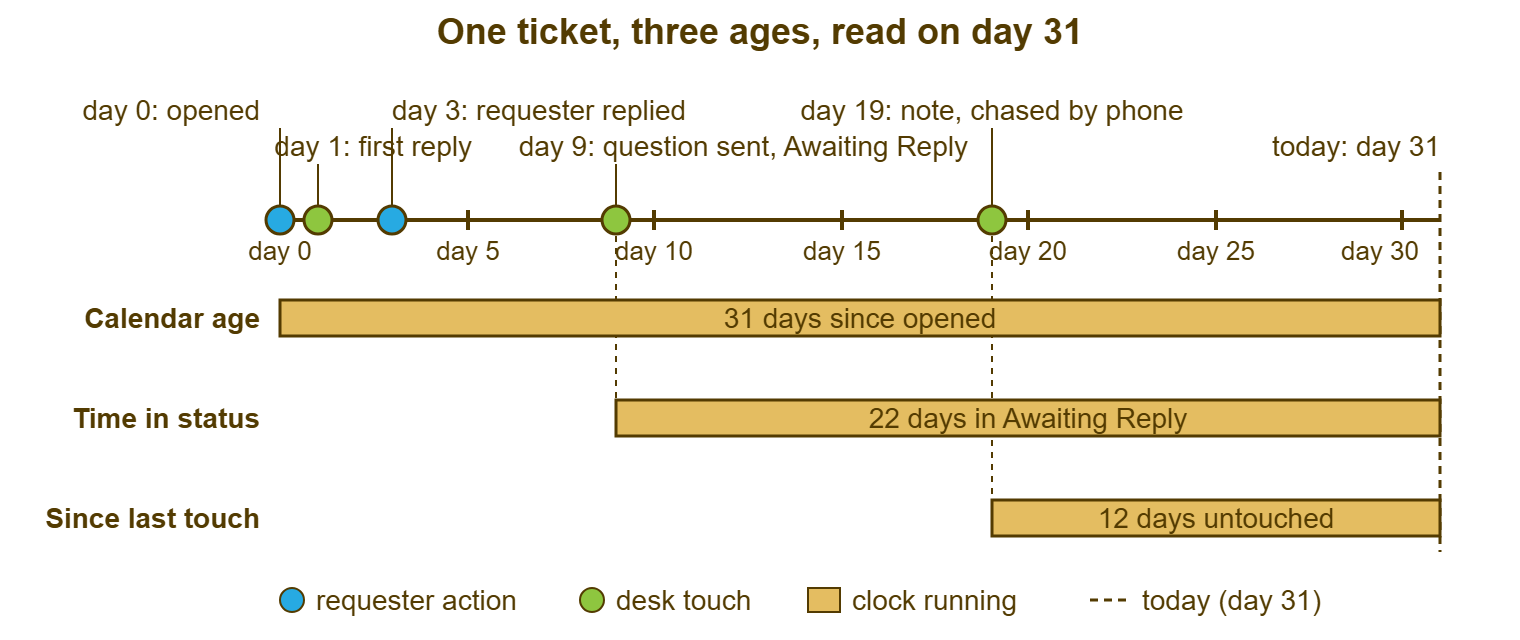
The picture below draws a shorter ticket than 7731 so the three clocks are easy to see. Ticket 4406 was opened on day zero, answered on day one, and the requester replied on day three. On day nine the technician sent a question and set the status to Awaiting Reply. On day nineteen she chased by phone and left a note. Today is day thirty-one. The three bars under the timeline are the three clocks: thirty-one days since opened, twenty-two days in Awaiting Reply, and twelve days since the last touch.
Most tools show the first clock by default, because it is the easiest to compute and the hardest to argue with. The second is usually available as a "last updated" column. The third is the rarest, and often has to be read out of the history by hand or pulled from a report. Some tools order the queue by last update out of the box, so the second clock is what the list shows you without asking. Others default to date opened and need a column or a saved view changed. Almost every tool records status changes in the ticket's history with who made them and when. Some can report how long a ticket spent at each status. That is the third clock read after the fact. Find out which of the three your tool puts in front of you by default, because that is the one the desk will manage by.
Why "Days Since Opened" Misleads
Calendar age answers "how long has this person been waiting?", which is a fair question, and then it stops. It cannot tell you whether anyone is working on the ticket. It cannot tell you whether the ticket is waiting on the desk, the requester or a courier. It treats a ticket that was touched this morning and a ticket nobody has opened since the summer as the same thing, provided they were opened on the same day. Calendar age is the measurement equivalent of asking how long somebody has lived in a house. It tells you nothing about whether the roof leaks.
Sorted by calendar age, the top of the queue fills with the tickets that are legitimately long. A request that turned out to be a small project. A part on order from a supplier that quotes six weeks. A software change that waits on a budget. These are old because the work is long. Every one of them may be in perfect health: touched this week, with a dated next step, with the requester informed. They sit at the top of the list anyway. The technician scanning for trouble looks at them every day and learns to see past them.
That learned blindness is the real cost. When the eye is trained to skip the top ten because the top ten are "the long ones", a ticket that is genuinely abandoned can climb into the top ten and inherit the same immunity. It looks like the others. It is old; they are old. Nobody opens it, because nobody opens any of them. The sort that was meant to surface trouble has built a hiding place for it.
There is a second, worse cost, and it arrives when calendar age becomes a target. Suppose you tell a desk that the oldest ticket must be under thirty days. The desk will, without malice, learn to close long tickets and open fresh ones for the same work. The oldest ticket is now nine days old. The warehouse scanner has been broken for four months. The report is green. A counter that resets when you close and reopen a ticket measures only the desk's fear of the counter.
Why Last-Touched Matters More
Time since last update answers the question the desk can act on: is anybody doing anything? A ticket touched yesterday is alive, whatever its calendar age. A ticket untouched for three weeks is stale, even if it was opened three weeks and one day ago. The second clock is indifferent to how long the work is and interested only in whether the work is moving. That is exactly the distinction a desk needs to make every morning.
A stale ticket is a ticket untouched for longer than its follow-up cadence allows. The cadence, the rhythm of updates each kind of ticket should get, is a subject of its own in Follow-Up Cadences That Keep Tickets Moving. For the purposes of age, the default threshold on a small desk is fourteen days untouched, and seven on a desk that promises faster. Sort by last-touched, look at the bottom of the list, and every ticket past the threshold is stale by definition. No judgement is involved. The clock did it.
Everything depends on what counts as a touch, so define it in writing. A touch is an action recorded in the ticket's history that moves the ticket or informs somebody. That might be a public reply to the requester or an internal note with substance (what was done, what was found, what is next). It might be a status change with a reason, an assignment to a named person, or a hold with a date on it. Opening the ticket, reading it, sighing and closing the tab is not a touch. The ticket does not know you were there.
Be equally strict about the cheap touches that reset the clock without moving anything. A note that says "will look at this" is not a touch; it is a promise to touch later. A bulk re-save that updates a field on forty tickets at once is not forty touches. If your tool counts it as such, the last-touched clock on those forty tickets is lying for a week. "Any update?" from the requester is a touch by the requester, not by the desk. Some tools count it as an update. If yours does, a ticket the requester chases every Friday will never look stale, which is precisely backwards. Check which actor's actions your tool counts, and if it counts both, learn to read the history rather than the column.
Write the definition of a touch down. Yes, all of it. Yes, including the part about the sigh.
Time in Status: The Clock That Explains the Other Two
A status is the ticket's current state, chosen from a short fixed list: for example Open, On Hold, Awaiting Reply, Resolved, Closed. Time in current status is how long the ticket has been in that state. That time answers the question "what has this ticket been waiting for, and for how long?" The first two clocks tell you a ticket is old or stale. The third tells you why, which is the part you can do something about.
Read it by status. Nineteen days in Awaiting Reply means the desk asked the requester something and the requester has gone quiet. So the next move is a nudge with a date, or a close with the door left open. Forty-five days in On Hold means the desk is waiting on a part, a vendor or a date. The question is whether anyone has checked that the thing being waited for is still coming. Twenty days in Open with an assignee and no touch is the dangerous one. Nothing is being waited for except the technician, and the ticket has probably joined the tickets everyone is avoiding.
The third clock is only as honest as the status, which is why status discipline matters more for aging than for anything else. A ticket left in Open while it waits on a supplier reads as "the desk is ignoring this" when the truth is "the courier is". A ticket parked in On Hold because the technician did not want to see it reads as "waiting on something" when the truth is "waiting on nothing". What each status should mean, and how to keep the list short enough that people use it correctly, belongs to What a Status Is For. For age, the rule is simpler: the status must name what the ticket is waiting for, or the third clock measures a fiction.
One quiet trap: statuses themselves go stale. Take a ticket set to Awaiting Reply on day nine, with the requester's answer arriving on day eleven. If the technician read that reply but never acted on it, the ticket has been in the wrong status for twenty days. The third clock says "waiting on the requester". The history says the requester answered three weeks ago. When the two disagree, the history wins, and the ticket is the desk's, and has been for some time.
Working Days or Calendar Days
Decide whether age is counted in calendar days or working days, and write the decision next to the definition of a touch. The two answers differ by two days in every seven. A desk that mixes them will argue about whether a ticket is "really" fourteen days old instead of touching it. There is no right answer, only a consistent one.
The honest argument for calendar days is that the requester lives in them. A person who asked on Friday and hears nothing until Wednesday has waited five days. Telling them it was three is a technicality they will not enjoy. The honest argument for working days is that the desk lives in them. A ticket opened at 17:00 on Friday is not meaningfully older on Monday morning. Most desks count age in calendar days and set their promises in working hours. That is why age and the service level agreement (the SLA, the written promise of how fast the desk responds and resolves) must never be the same number. Age is a fact about waiting. The SLA is a promise about working. They use different clocks on purpose; how the SLA clocks run is explained in Response vs Resolution Targets.
Whichever you choose, say so on the report, in the definition card, and in the first sentence of any conversation with a manager about an old ticket. "Fourteen calendar days, ten working" is a sentence that prevents a meeting.
The Age Bands
An age band is a range of days with a name and an action attached. That way, the desk can look at a count instead of a list. Bands turn "we have 212 open tickets" into "we have 212 open tickets, nine of them untouched for more than two weeks", which is a sentence somebody can act on. Six bands are enough for any desk under ten people. Fewer and the old end blurs together; more and nobody remembers which is which.
The bands below are applied to the last-touched clock by default, because that is the clock the desk acts on. The same bands can be applied to calendar age for a second, slower view (the "how long have people been waiting" view). The two should be reported side by side with their labels, never merged. Reading the bands as a chart, and what a healthy and an unhealthy spread look like, is the subject of Reading an Aging Report by Its Shape.
| Band | Days since last touch | What it usually means | Action |
|---|---|---|---|
| Fresh | 0 to 2 | Normal work in progress | None beyond the cadence |
| Working | 3 to 7 | Still normal for Medium and Low; late for High and above | Check that nothing High or above is hiding here |
| Aging | 8 to 14 | Past most cadences; the requester is starting to wonder | Touch it this week: a reply, a note with a next step, or a dated hold |
| Stale | 15 to 30 | Nobody is driving it | Goes into the weekly sweep; leaves with a next step or a close |
| Old | 31 to 60 | Forgotten, avoided, or waiting on something nobody has checked | Decision this week: fix, date, or close with a reply |
| Forgotten | 61 and over | The desk has stopped believing in it | The desk's manager decides; it never closes silently |
Two things about the table. First, the action column is the point, and a band without an action is decoration. If your desk cannot say what happens to a ticket that enters the Stale band, the band is a colour. Second, the thresholds are defaults, not law. A desk with a two-day promise to every requester will shift every band left. A desk that supports a factory with eight-week lead times on spares will have a legitimate population in Old. That desk should give those tickets a dated hold so they stop appearing there. The bands measure untouched time, and a dated hold with a note is a touch.
Remember: sort by time since last touch, not by date opened. The ticket that needs you is the one nobody has done anything to, not the one that has been open longest.
The Same Queue, Three Ways
Here is a slice of the Bellweather Logistics queue from the opening scene, five tickets out of sixty-eight, with all three clocks read on the same Monday morning. The point of the table is the last column: which ticket each clock would put at the top of the worry list.
| Ticket | Subject | Status | Calendar age | In status | Since last touch | Looks worst by |
|---|---|---|---|---|---|---|
| 7731 | Scanner drops network in aisle 12 | Awaiting Reply | 61 days | 19 days | 4 days | Calendar age |
| 8102 | New starter laptop for Priya | On Hold, delivery due Thursday | 12 days | 12 days | 1 day | Nothing |
| 8044 | Shared drive permissions for finance | Open, assigned to Dev | 23 days | 23 days | 23 days | Last touch and in status |
| 7960 | Monthly report export fails | Awaiting Reply | 31 days | 26 days | 26 days | Last touch |
| 8177 | Password reset, warehouse office | Open, unassigned | 3 days | 3 days | 3 days | Priority, not age |
Sorted by calendar age, 7731 wins and gets the attention, which it does not need. It was chased four days ago and is waiting on the warehouse. Sorted by last touch, 7960 and 8044 come first, and they are the two tickets in the slice that are actually in trouble. 7960 has been in Awaiting Reply for twenty-six days with no nudge, which means the desk asked a question and then forgot it had asked. 8044 has been Open and assigned for twenty-three days with no touch at all. That pattern, an owner and silence, is the signature of a ticket being avoided. 8102 is twelve days old and completely healthy, because somebody put a date on it last Monday.
8177 is the reminder that age is not priority. A three-day-old password reset is a disgrace, not because three days is old but because the cadence for that kind of ticket is measured in hours. Age bands find neglect. They do not find urgency, which is a different instrument, read from the priority and the due time rather than from any of the three clocks. A desk that reads age and thinks it has read urgency will be calm about the wrong things.
Reading the Clocks Each Morning
The daily reading takes two minutes and uses two of the three clocks. First, the due-time view: anything with a response or resolution target due today, sorted so the nearest deadline is at the top. That is urgency, and it is handled first. Second, the last-touched view: filter to the open statuses, go to the untouched end, and read the three or four tickets there. Each one gets a touch today or a reason written down for why not. Calendar age does not feature in the morning at all. It is a weekly and monthly figure, and reading it daily teaches the eye to ignore it.
The tool shapes the habit more than the policy does. If the queue opens sorted by date opened, the desk will manage by date opened, whatever the card on the wall says. Find the setting, the saved view or the default sort that puts last-touched in front of people when they sit down. If the tool cannot be made to do it, make the first act of the morning the one click that does. In a tool whose queue is one list ordered by last update, the stale end is the bottom of the list. In that tool, filter by status and scroll, and the tickets nobody has touched are waiting there in order. In a tool that pages the list or sorts it by date opened, build a saved view for the untouched end once and open it every morning. Whatever the tool, the stale end should be a place the desk visits on purpose, every day, before it gets busy.
I know how strong the default is because I once sorted a queue by created date for a year and congratulated myself on the oldest ticket every Friday. It had been on hold for a part the supplier had quietly stopped making. It was, technically, being handled.
The One Number for the Manager
When a manager asks how old the oldest ticket is, they are asking whether anything is being neglected. The honest answer is two numbers and a sentence. The first number is how many tickets are untouched past the threshold. The second is how long the worst of them has gone. The sentence is what happens to them this week. "Nine tickets untouched over fourteen days, the longest at twenty-six; all nine are in Thursday's sweep and will leave it with a next step or a close." That answer takes ten seconds and settles the question.
Give calendar age too, but give it second and give it with its explanation. "By date opened, the oldest is 7731 at sixty-one days; it is waiting on the warehouse to test a replacement and was chased on Thursday." A manager who hears the number with its reason stops asking for the number. A manager who hears only the number starts a spreadsheet.
Never give an average age. The mean of a queue with fifty fresh tickets and four forgotten ones is a comfortable number that describes nothing in the queue. The count past threshold and the maximum are the two figures that cannot be made to look good without touching tickets. That is the property you want in a figure. If you need a third, use the count over thirty days by calendar age with each of those tickets' next-step date beside it. That is a list rather than a statistic, and all the better for it.
A Short War Story: The Nine-Day Oldest Ticket at Ashgrove Housing
Ashgrove Housing is a housing association with about forty office staff and a desk of two. It reported "age of oldest open ticket" to its operations director every month. For most of a year the number sat between eight and eleven days. Marcus, who ran the desk, had earned it the only way the metric could be earned. Whenever a ticket passed three weeks, he closed it "pending further information" and opened a fresh one with the same subject. A tenant-portal access request for the repairs team, which needed a change from the portal supplier, went through four such renewals over fourteen weeks. Each time it reappeared as a nine-day-old ticket with a short history and no memory of the previous three. The repairs team logged tenant callbacks on paper for the whole fourteen weeks. That came to light when a missed callback became a formal complaint. The director asked why a problem nobody had told her about had lasted a quarter. The desk switched the report to "tickets untouched over fourteen days, with the longest". That read four tickets and thirty-one days on the first run. Marcus could not improve that report by closing anything. The lesson was the one the counter had been hiding: a number that resets when you close a ticket measures what the desk is afraid of, not what the desk is doing.
Marcus was not cutting corners. He was answering the question he had been asked, every month, precisely.
The Age Definitions Card
The card below is the four definitions a desk needs to agree on, filled in once and pinned where the queue is read. It is deliberately short. If the definitions need a second page, the desk will not use them. In that case, the three clocks will go back to meaning whatever the person reading them needs them to mean that day. Fill it in with the team rather than for them, and date the next review.
TICKET AGE DEFINITIONS — ONE CARD
Desk: __________________  Agreed on: __________  Review on: __________

THE THREE CLOCKS
  Calendar age        Days since the ticket was opened.
                      Counted in:  [ ] calendar days   [ ] working days
  Time since touch    Days since the last touch by the DESK (see below).
                      Counted in:  [ ] calendar days   [ ] working days
  Time in status      Days since the status last changed.

WHAT COUNTS AS A TOUCH (desk actions only)
  [ ] Public reply to the requester
  [ ] Internal note stating what was done, found, or is next
  [ ] Status change with the reason in a note
  [ ] Assignment to a named person
  [ ] A hold with a date and what is being waited for
  Does NOT count: opening the ticket; "will look at this"; bulk edits;
  the requester's own replies; automatic system updates.

STALE THRESHOLD
  A ticket is stale after ____ days since touch (default 14).
  High and above are stale after ____ days (default 3).
  Stale tickets go into the weekly sweep on: ____________ (day, time)

THE BANDS (days since touch)
  Fresh 0-2   Working 3-7   Aging 8-14   Stale 15-30   Old 31-60   Forgotten 61+

WHAT WE TELL A MANAGER WHO ASKS "HOW OLD IS THE OLDEST TICKET?"
  Untouched past threshold: ____ tickets, longest ____ days.
  Oldest by calendar: #______, ____ days, waiting on ____________, chased ______.
The card changes less than you would expect. The threshold moves when the desk's promises move. The definition of a touch moves when a new tool counts things differently. The bands almost never move, because they are about what humans notice, and humans notice a fortnight. Fill it in once and argue about it never. The arguing, it turns out, was the expensive part.
Monday, 08:50, the following week. The manager stops at the desk and asks the same question. Carla answers: "Seven untouched over fourteen days, the worst at twenty days; they are in Thursday's sweep. By date opened, 7731 is sixty-eight days and waiting on the warehouse, chased this morning." The manager nods and keeps walking. The three clocks are still on every ticket. The desk just knows which one to read.
Frequently Asked Questions
Which clock should the queue be sorted by every day?
Does a requester's "any update?" reply count as a touch?
Our tool only shows the date a ticket was opened. How do we get last-touched?
Should ticket age count weekends and holidays?
Is an old ticket always a bad ticket?
What stale threshold should a brand-new desk use?
From the QuerySolv team: we build self-hosted help desk software for Windows. QuerySolv runs as one Windows service on your own network. It takes requests by web form, e-mail, live chat, social messages and REST API. It is licensed once per installation rather than per agent per month. The free trial runs the full product for 30 days.