
The Software Request Workflow: From Form to Record
Thursday, 10:05, at Meridian Parts. Dana opens ticket 3318 from Luis in the drawing office. The whole of it reads: "Can I get the CAD plug-in thing installed? Priya has it." Dana does not know which plug-in, which CAD package it plugs into, whether it costs anything, or whether Luis's machine can run it. She does not know who in the drawing office would sign for it if it does cost something. She replies with four questions. Luis answers two of them the next day. The plug-in turns out to be a paid add-on. Priya's copy came with a project budget that has since closed. On day eleven Luis's manager phones the desk to ask why a thing Priya got in an afternoon is taking two weeks. Nobody in this story has done anything wrong, which is the usual shape of a software request.
A software request is a ticket that asks the organisation to put a program on a computer. And it is different from most tickets because nothing is broken. It is a small purchasing decision wearing a ticket. It asks the organisation to spend money, to accept a piece of software it has not looked at, and to do some work on a device. A workflow is the agreed sequence of steps a ticket goes through, with a named person at each step. That way, the ticket moves without anyone having to remember what comes next. This article is part of our Software Installs & Licence Requests series. And it is about the workflow for that one kind of ticket, from the form that asks the right questions to the closed ticket that remembers the answers.
It covers why a software request is three decisions in one ticket, followed by the five questions the form must ask. Then come the standard catalogue and the exception, followed by the approval chain, briefly, since it has its own article. Next are the turnaround promise, the ticket as the record, and the two lanes in one picture. A short war story and the request form to copy come last, in that order.
Three Decisions in One Ticket
Every software request carries three decisions, and the ticket that does not separate them stalls on whichever one nobody has made. The first is money: does the thing cost anything, now or at renewal, and whose budget pays. The second is risk: is the organisation willing to run this program on its network, with its data, from this supplier, under these terms. The third is work: can the desk install it on this machine, in this way, without breaking something else. A ticket that reads "can I get the CAD plug-in thing" has made none of the three. A technician may try to make all three alone, from a one-line ticket. That technician will spend eleven days doing a purchasing officer's job, a security officer's job and their own.
The three decisions have three different owners, which is why a workflow is needed at all. Money belongs to the requester's manager, or whoever holds the budget. Risk belongs to whoever is responsible for security, which on a small desk is often the desk lead wearing a second hat. Work belongs to the desk. A good workflow asks each question of the person who can answer it. It uses an order that does not waste the later answers when an earlier one is no, and records every answer on the ticket. A bad workflow asks the technician, who guesses, and the guess is what the review finds a year later.
The reason to think of it as purchasing rather than support is that purchasing has rules the desk can borrow. Nobody expects a purchase order to be approved by the person who typed it. Nobody is surprised that a purchase has a budget line, a requester, an approver and a date. Software requests want exactly those things, and get them far less often. The request arrives in the support queue, and the support queue is built for things that are broken. The desk's instinct, reasonably, is to fix it. There is nothing to fix. There is a decision to route.
The Five Questions the Form Must Ask
The form asks five questions, and every one of them exists because its absence creates a round of e-mail. What is the name of the program, exactly, as the supplier spells it, and what it is for in one line. "The PDF thing" names three products and "the plug-in" names a hundred. Why is the one-line business reason, which is not justification for its own sake. It separates "I need it to do my job" from "I saw it on a colleague's screen". Both are legitimate reasons that get different answers. For whom names the person or people who will use it, which decides the count, the device and the approver. How many is the seat count, since a request for one copy and a request for the whole department are different purchases. Who pays names the budget. It is the question most forms leave out and the one that most often stops the ticket dead on day six.
Ask them on the form, before a technician sees the ticket. A question asked on the form costs the requester thirty seconds and a question asked by reply costs a day. The design of a form people will finish is its own subject, in A Request Form People Will Finish. And the rule from it that matters here is that every field must be one the requester can answer. "Who pays" is answerable: it is the requester's manager unless they know better. "Licence type" is not; most requesters do not know and should not have to. Ask what they know. Find out the rest yourself.
The table below is each question with the round of e-mail it prevents. That is the honest way to justify a field to a requester who asks why the form is so long. (It is not long. It is five questions. It feels long because the old form was a text box.)
| Question on the form | What it decides | The round of e-mail it prevents |
|---|---|---|
| What, exactly, and what for | Which product; whether the catalogue already has it or an equivalent | "Which PDF editor do you mean? There are three." |
| Why, in one line | Whether the need is a job task, a preference, or a problem better solved another way | "What were you trying to do when you needed this?" |
| For whom, by name | The device, the approver and whether a role bundle already covers it | "Is this for you or the whole team?" |
| How many seats | The size of the purchase and whether existing spare seats cover it | "Just you, or the other four in drawing as well?" |
| Who pays | The approver for cost and the budget line on the licence register | "Can you ask your manager which code this goes against?" |
| By when, honestly | Whether the standard turnaround is enough or the ticket needs the lead's attention | "Is this urgent? It did not say." |
The sixth row is a half-question. "By when" is worth asking because a requester with a real deadline, a client demonstration on Tuesday, will say so. A requester without one will leave it blank, and both answers are useful. It is a half-question because the answer is not a promise. The desk's promise comes from the turnaround, later in this article. The form says so beside the field, so that nobody types "today" and expects it.
The Standard Catalogue and the Exception
The catalogue is the written list of software the organisation has already decided to provide, with the conditions attached to each entry. And it turns most requests from a decision into a lookup. A catalogue entry says the program's name and who may have it (everyone, a role, or named people). It also says whether it costs a seat, who approves it if anyone, and how it is installed. The idea of a catalogue as the list of things the desk has decided to offer, in plain words, with its boundaries, belongs to The Service Catalogue Idea. The software catalogue is the part of that list that happens to be programs. A request for something on the list is a request the organisation has already said yes to. It needs an install and a seat count, and nothing else.
An exception is any request for something not on the list. And the whole point of the list is to make the exception the unusual case. At Meridian Parts, after Dana built the first catalogue from six months of closed tickets, forty-one of the next fifty software requests were for things on it. The other nine were exceptions, and nine exceptions in a quarter is a number a small desk can give proper attention to. That attention means a security look, a manager's signature, a real conversation about whether a tool already in the catalogue does the same job. Fifty decisions a quarter is a committee. Nine is a Tuesday afternoon.
Build the first catalogue from the tickets, not from the organisation chart or the finance system. Pull the closed software requests for the last six months and list every product name. Count how many times each was asked for. The ones asked for more than twice are the first entries. Add the things on the standard image, which is the set of programs every new machine gets. Requesters will ask for those too, not knowing they already have them. The list will be short and slightly embarrassing. It will contain programs the desk has installed thirty times without ever writing down that it was allowed to. That is fine. The catalogue is the desk's past decisions, made visible.
Put the catalogue on the form. The "what" question becomes a pick list of catalogue entries with "something else" at the bottom. And the pick list is where the two lanes of the workflow separate. A catalogue entry goes down the fast lane. "Something else" opens the exception fields: the one-line why, who pays, and a note. The note says this will take longer and needs a decision from someone outside the desk. The requester has chosen their own lane without knowing there were lanes, which is the best kind of process.
The Approval Chain, Briefly
The approval chain is the sequence of people who must say yes before the desk installs. And the rule that keeps it short is that nobody is asked a question they are not the owner of. A catalogue entry with no cost needs nobody. A catalogue entry that costs a seat needs the manager who pays, and only if there is no spare seat already owned. An exception needs the manager for the money and a security look for the risk. Those can be the same person on a small desk. The approval should be two sentences, not a meeting. The design of that chain, who approves what and how to chase an approval that stalls, is the subject of Approvals Without a Committee. This article only places it in the workflow.
Where it sits matters more than how it works. The approval happens after the form and before the install, and the ticket waits with the approver, visibly, with a status that says so. Most small-team help desks have no approval step built in, QuerySolv among them. The convention is a waiting status plus a note to the approver in the ticket, which is enough for a desk of ten. The convention in full is in Approvals Without a Workflow Engine. What the convention gives you is a ticket that is honest about whose desk it is on. A ticket "in progress" for nine days while a manager fails to reply is a ticket lying about the desk. A ticket "waiting for approval, with Marta since Tuesday" is telling the truth, and the truth is what the requester's manager needs to hear on day eleven.
Ask the money question before the risk question, because money is the cheaper no. A manager who says "not from my budget" has saved the security lead an hour of reading supplier terms. A security lead who says "not on our network" has saved the manager nothing, because the manager's time was already spent. Order the chain so that the quickest, most likely no comes first. Then the slow, careful look is only done on requests that have already cleared the easy gate.
The Turnaround Promise
The turnaround is the time from the request arriving to the program working on the requester's machine. The desk promises one for each lane and prints it on the form. The promise has to be made in two parts, because the desk only controls one of them. The part the desk owns is the install. For a catalogue program, where the tools allow it, that is within one working day. For an exception, it is within two working days of the approval arriving. The part the desk does not own is the approval, and the promise there is not a time but a behaviour. The desk will send the request to the approver the same day, chase after two working days, and tell the requester who it is waiting on. Promise what you control; report what you do not.
The two-part promise is what saves the desk from the phone call on day eleven. Luis's manager was not angry that the plug-in took eleven days. He was angry that nobody could tell him why, and a desk with a two-part promise can: "The desk's part took a day. The other ten were waiting on a budget decision, and here is who had it." That sentence is only available if the ticket recorded when it went to the approver and when it came back. That is the record section's job. The craft of a promise you can keep, and the difference between an estimate and a commitment, is in Honest ETAs. And the software request is the ticket type where that craft earns the most, because the requester has nothing to do but wait and watch the calendar.
Make the promise modest and keep it, rather than ambitious and explained. A desk that promises catalogue installs within a day and delivers in four hours is trusted. A desk that promises same-day and delivers in a day and a half is explaining itself every week. The explanations are true, and nobody is listening to them. Requesters remember two things about a software request: how long it took, and whether they were told. They do not remember the reason.
Remember: the form asks what, why, for whom, how many and who pays, before a technician sees the ticket. A catalogue entry needs no decision; an exception needs the owner of the money and the owner of the risk, in that order. The desk promises the install time it controls and reports the approval time it does not. The closed ticket records what was installed, where, on which seat, approved by whom.
The Ticket as the Record
The closed ticket is the organisation's memory of the request, and it holds five facts that nothing else in the building reliably does. They are what was installed, on which device, using which licence seat, approved by whom, and when. Those five facts are what the licence register is built from and what a supplier's audit letter asks about. They are what the offboarding checklist needs when the user leaves. They are what the next technician reads when the same person asks for the same thing again. A ticket closed with "done" has thrown all five away. A ticket closed with "installed the drawing plug-in on LT-0417, seat 7 of 10 on the drawing office licence, approved by Marta in the note above" is a record. It took forty seconds longer to write.
Keep the whole request in one ticket, with the approval inside it. A request that is approved by e-mail outside the ticket has no approval as far as the record is concerned. Ask the approver to reply in the ticket, or forward their reply into it. That way, the yes sits in the history under their name. The ticket may pass through several people: the requester, the approver, the technician who installed it. In that case, the history should show each handoff with its time. If you run QuerySolv, a software department with its own form and mailbox means the five questions are asked by the form before anyone claims the ticket. The complete event history on the ticket keeps the approval, the install note and the requester's confirmation in one place without a separate file. In any tool, the test is the same: could a stranger open this ticket in a year and say who approved what, and where it went?
Link rather than repeat when a request fans out. A request for five seats for the drawing office is one decision and five installs. The clean shape is a parent ticket holding the approval and the seat allocation, with one linked ticket per machine for the install. Each linked ticket is closed with its own install note. Five installs in one ticket means the fourth one is a comment nobody finds. Five separate tickets with no parent means the approval is in one of them and the other four look unapproved. The parent-and-children shape costs a minute to set up and makes every later question answerable from the parent, which is where people look.
The install note itself, what it says and the fields it fills, is the subject of Installing It. The register the closed tickets feed is in Licence Tracking Without a Tool. The workflow's job is only to make sure the ticket arrives at the install step with the answers already on it. It must also make sure the ticket leaves the close step with the facts written down. The ticket is a form on the way in and a receipt on the way out.
The Two Lanes in One Picture
The whole workflow is two lanes with the same first and last steps, and the picture below draws it. The standard lane is for anything not on the catalogue. It goes from the form to an approval by a named person: the manager for the money and a security look for anything new. Then come the install and the record. The pre-approved lane is for catalogue entries. It uses the same form, no approval step at all because the catalogue already decided, the same install, and the same record marked as pre-approved. The strip underneath lists what the record holds on every ticket in both lanes. Only the middle step differs, and the point of the catalogue is to put as many requests as honestly possible in the lane without it.
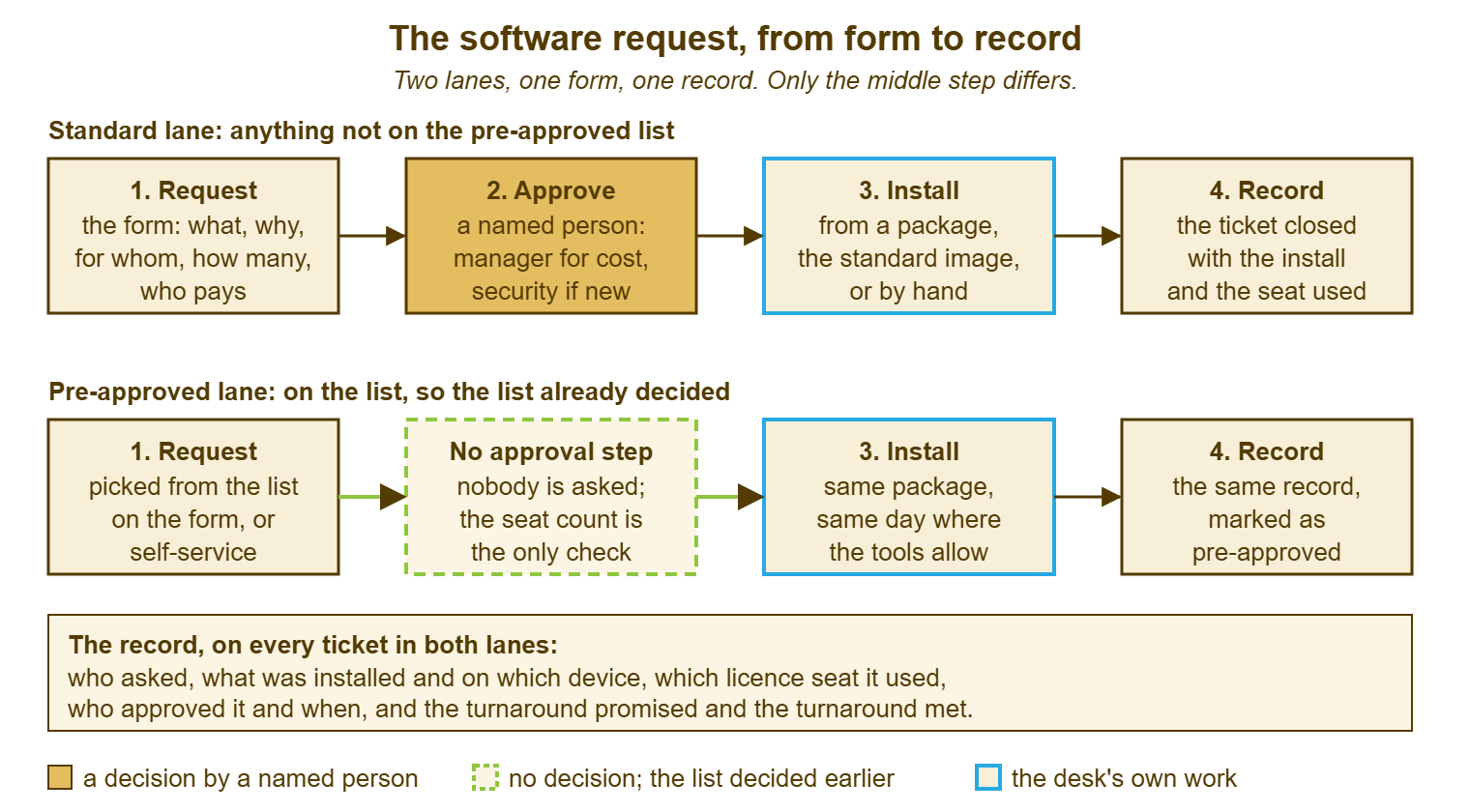
Read the picture as a promise to the requester as much as a process for the desk. In the lower lane the promise is a day, because nobody outside the desk is involved. In the upper lane the promise is the desk's day plus someone else's decision, and the form says so where the requester picks "something else". A requester who knows which lane they are in, and why, raises fewer tickets asking where their ticket is. A requester who does not raises one every other day, and each one is a fair question.
A Short War Story: The Label Program at Tollgate Foods
Tollgate Foods had no software request form, so requests arrived at the desk as one-line e-mails. In the spring a packaging supervisor called Nadia sent one that read "need the label design program, same as the Harlow site". The desk's technician, Owen, spent two days finding out which program the Harlow site used. A further day went on learning that it cost a seat per machine and that the Harlow seats had been bought on a project budget that no longer existed. A fourth day went on waiting for Nadia's manager to say whose budget would pay for three new seats. During that wait, Nadia, reasonably tired of waiting, bought a personal copy on her own card and installed it herself. The desk discovered this when the program would not print to the line printers. The licence turned out to forbid business use. Owen had spent fourteen hours on a request whose honest answer was available on the first morning, had the form asked what, for whom, how many and who pays. That answer was three seats, the site manager's budget, two days. The lesson Tollgate took was that a request without the five answers is not a ticket. It is an invitation to go and find them, one e-mail at a time, while the requester finds a worse way.
The Software Request Form
The form below is the one Dana built after ticket 3318. It is meant to be the fields on the web form rather than a document the requester fills in by hand. It works on paper for a desk that has not got that far, though. The first block is the requester's five answers, with the catalogue pick list as the first question so that most requests never reach the exception block. The second block is for the desk, filled in as the ticket moves. And the last two lines of it are the record that closes the ticket. Keep the explanatory lines beside each field short; the form is read by a requester in a hurry. And every sentence that is not a question is one they will skip.
SOFTWARE REQUEST FORM — ONE SCREEN
Ticket: ________   Requested by: ______________   Date: ________

REQUESTER'S ANSWERS
  1. What do you need?
     [ ] From the list: ______________________  (installed within 1 working day)
     [ ] Something else: name ______________________  supplier ______________
         Not on our list yet, so this needs a decision; allow ____ working days
         after approval.
  2. What will you use it for? (one line) ______________________________________
  3. Who is it for?  [ ] me   [ ] these people: ______________________________
  4. How many copies / seats? ____
  5. Who pays?  Budget holder: ______________  (usually the requester's manager)
  6. Needed by (honest date, if there is one): ________   Reason: ______________

DESK USE
  Catalogue entry:  [ ] yes, entry ______________   [ ] no, exception
  Spare seats already owned: ____   New seats to buy: ____
  Approval:   [ ] none needed (catalogue, no cost)
              [ ] cost: sent to ______________ on ________  answer on ________
              [ ] risk: sent to ______________ on ________  answer on ________
  Install:    device(s) ______________   method: image / package / by hand
              done by ______________ on ________
  RECORD AT CLOSE
  Installed: ______________  on ______________  seat ____ of ____ on licence __________
  Approved by: ______________ (in the ticket)   Turnaround: promised ____ / actual ____
Dana put the form up on a Friday with eleven catalogue entries. Ticket 3318's successor, from a different person in the drawing office, picked the plug-in from the list and named Marta as the budget holder. The plug-in was installed the following morning. Luis's own request was already closed by then, in its eleventh day, with the approval in the ticket. A note from Dana said which ten of the eleven days had been spent waiting on whom. His manager read the note, said "fair enough", and asked for the form to be sent to his whole team. It was, with the catalogue attached. And it was the first time the drawing office had seen a list of what it was already allowed to have.
Frequently Asked Questions
Our requests arrive by e-mail, not a form. Can the workflow still work?
What if the requester does not know who pays?
Should free software go through the same form?
How big should the first catalogue be?
Who owns the ticket while it waits for approval?
What goes on the ticket when the request is declined?
From the QuerySolv team: we build self-hosted help desk software for Windows. QuerySolv runs as one Windows service on your own network. It takes requests by web form, e-mail, live chat, social messages and REST API. It is licensed once per installation rather than per agent per month. The free trial runs the full product for 30 days.