
The Real-Time Queue View: Five Counts in the Right Order
Monday, 08:30, at Harbourview Clinic. Tomasz has been on the two-person desk for eight weeks and today he opens it alone, because Ingrid is at the dentist. The desk finds that funnier than she does. The queue view is already up on his screen: Unassigned 6, Overdue 2, Due in the next hour 4, Waiting on us 9, Waiting on them 31. Thirty-one is the biggest number, so he starts there. He spends twenty minutes reading tickets that are waiting for a requester to answer a question. At 08:52 the practice manager phones. Consulting room four's computer will not start, and clinic begins at nine. The ticket about it, raised at 07:40 by the first nurse in, has been one of the two in the Overdue count since 08:40. Tomasz had read the right numbers. He had read them in the wrong order.
A queue view is the live list of every open ticket on the desk, narrowed to a handful of counts. Each count answers one question about right now. Real-time means the counts are current when you read them, not that anyone is meant to sit and watch them change. The five counts this article uses are unassigned, overdue, due soon, waiting on us and waiting on them. They are the standing views every desk needs with the lists hidden and the numbers left showing. The views themselves are defined and specified in What a Queue Is For, which this article does not redo. This article is part of our Team Dashboards series. This article is about the counts: what each one means and what a number other than zero tells you to do. Above all, it is about the order to read them in, which is the part Tomasz was never told.
It covers why five counts and not fifty, then each count in turn: unassigned, the two clock counts, and the two waiting counts. Next come the order to read them, with a picture, and what real-time does and does not mean. Then come what the view leaves out on purpose and how to set the windows and limits from your own desk's figures. A short war story and the queue view specification to copy come last, in that order.
Five Counts, Not Fifty
The queue view answers one question, "what does the desk need to do next?" Five counts are enough to answer it for a desk of one to ten people. Each count is a filter on the same single list of open tickets. So a ticket can appear in more than one count, and the five together should cover every open ticket on the desk. The reason for five rather than fifty is attention: a view with five numbers is read in half a minute and acted on. And a view with fifty is a spreadsheet standing up. Everything else the desk might want to know about its tickets is a report question with a report answer. That includes how many arrived this month, how fast they were fixed, and how requesters felt. The difference is drawn out in What a Team Dashboard Is For.
A ticket's status is the field that says what state it is in: new, being worked, waiting for somebody, resolved, closed, in whatever words your tool uses. A waiting status is any status whose meaning is "the next step belongs to someone other than the desk", such as Awaiting Reply or Waiting on Supplier. A service-level target is the time promise attached to a ticket, usually by priority: respond within so many working hours, fix within so many more. Those three definitions are all the vocabulary the five counts need. And the table below gives each count with its filter, what zero means, what a rising number means, and who acts on it.
| Count | Filter on the open list | What zero means | What a rising number means | Who acts |
|---|---|---|---|---|
| Unassigned | No owner, any status except resolved or closed; show the age of the oldest | Every ticket has a person's name on it | Arrivals are outrunning the people taking them, or nobody is taking them | Whoever is free takes the oldest; the lead if nobody is |
| Overdue | Past the service-level target, not resolved | No promise is currently broken | Promises are being broken faster than they are being mended | The owner messages the requester within the hour; the lead if the owner is away |
| Due soon | Target inside the desk's window (often the next hour), not yet past | Nothing falls due before the next read | The next hour will produce overdue tickets unless someone moves | The lead confirms each owner knows the time |
| Waiting on us | Owned, in an active status, no desk update for longer than the desk's limit | Everything the desk owns has been touched recently | Tickets are being held rather than worked | The owner touches it today or hands it over |
| Waiting on them | In a waiting status; show how many are past their follow-up date | Nothing is parked, or everything parked is inside its date | Parked tickets are being forgotten, or replies are landing unseen | The owner chases anything past its date; one person reads the whole list weekly |
Unassigned: The Promise Nobody Has Made Yet
An unassigned ticket is one the desk has accepted and no person has claimed. So the requester is waiting for someone who does not exist yet. Every ticket from every channel starts here unless a rule sends it straight to a person. The gap between "we have received it" and "someone has it" is the first promise the desk makes. The count tells you how much is about to land on somebody. The age of the oldest tells you whether the desk has kept its first promise. And the age is the number to show beside the count, because the count on its own is nearly meaningless. Six unassigned at 08:30 on a Monday is the weekend arriving. One unassigned since Thursday is a requester who has been invisible for two working days.
The action is simple and should be written down: whoever is free takes the oldest unassigned ticket. If nobody is free the lead assigns it or takes it. Claiming is the mechanism, and the rule that unassigned means the team's, with what happens when people take too much or too little, is in Team Queues vs Personal Queues. The queue view's job is only to make the count and the age impossible to miss. Tomasz's six were five form submissions from the weekend and the consulting-room ticket. The consulting-room ticket was also one of the two overdue. That is why the order of reading matters and why it comes later in this article.
Overdue and Due Soon: The Two Clock Counts
The overdue count is every open ticket that has passed its service-level target. And it is the only count on the view where any number above zero is a broken promise. Nothing about it is a matter of degree. One overdue ticket is one requester who was told a time and did not get it. The action is the same whether the count is one or nine. The owner, or the lead if the owner is away, writes to the requester within the hour with an honest line and a new time. Not an explanation, not an apology longer than a sentence, a new time. The fix comes after the message, because a requester who has heard nothing assumes nobody is coming, and a requester who has heard a time waits.
The due soon count is every open ticket whose target falls inside the desk's window, usually the next hour, and has not yet passed. It exists so that overdue can stay at zero. Where overdue says "mend this", due soon says "this is about to need mending", and the actions differ. For due soon the lead checks that each owner knows the time and can make it. If they cannot, the requester is warned before the time rather than after. The two counts are kept separate because combining them loses the one distinction that matters, between a promise broken and a promise still keepable. A ticket due in forty minutes is not in trouble. It is in the last stretch, and the count is there so somebody notices.
Whether the clock runs or pauses when a ticket is in a waiting status changes what these two counts mean on your desk. You must find out which you have. Some tools pause the deadline clock while a ticket waits on the requester; many do not; some pause on one waiting status and not another. Test yours by putting a test ticket into each waiting status over a weekend and reading its due time on Monday. If the clock runs, a parked ticket will eventually appear in overdue, which is loud but at least visible. If the clock pauses, parked tickets never go overdue, and the waiting-on-them count becomes the only thing that will ever find them. How the targets themselves are chosen, and what to promise and what never to, belongs to the SLA Design series. The queue view only counts against whatever was promised.
Waiting on Us and Waiting on Them
The waiting on us count is every ticket that is owned, in an active status, and has had no update from the desk for longer than the desk's chosen limit. At Harbourview, that limit is one working day. This is the count that catches the ticket somebody took and then put down. Nothing about such a ticket looks wrong: it has an owner and is not in a waiting status. Its clock may be days from its target or may have no target at all. The only sign is silence, and the count measures the silence. The action is for the owner to touch it today, meaning do a piece of work on it and write a note. Or the owner hands it to someone who can. "I'll get to it" is the status this count was invented to expose.
The waiting on them count is every ticket in a waiting status, where the next step belongs to the requester or a supplier. It comes with a second figure: how many of them are past their follow-up date. The count on its own is the desk's parked tickets. Parked is legitimate for as long as the thing being waited for is still coming and there is a date by which somebody will ask about it. Past the date, the ticket is not parked; it is forgotten. The action is a chase: to the requester, "are you still seeing this?", or to the supplier, "the part was promised for Tuesday". The distinction between waiting on the requester, waiting on a supplier and plain on-hold, and what each status should be used for, is in Pending User vs Pending Vendor vs On Hold.
Check one thing about this count before you trust it, because it is where replies go to die. When a requester answers a question on a ticket in a waiting status, some tools move the ticket back to an active status. Some add the reply and leave the status alone. Some do one for e-mail and the other for the web form. If yours leaves the status alone, a requester who answered a week ago is still counted as "waiting on them". In that case, the technician's own view never shows the reply, and the requester is now waiting on a desk that believes the opposite. Test it with a reply from a personal address. Where the tool does not move the status, the waiting-on-them list has to be read by last update rather than by count. The specification at the end of this article has a line for which behaviour you found.
The Order to Read Them
Read the five counts in a fixed order every time. And the order is by the cost of a minute's delay, not by the size of the number. Overdue first, because every minute is a broken promise getting longer and the action is a message that takes two minutes. Unassigned second, with the age of the oldest, because a ticket with no owner has nobody else looking at it. Due soon third, because it is the overdue count an hour from now. Waiting on us fourth, because a quiet ticket has waited a day already and will survive another ten minutes. Read waiting on them last, because the next step is not yours and the chase is the slowest action on the list. The number is almost always the biggest, which is exactly why a new technician reads it first. The picture below is the order as five cards, with the question each answers and the action it starts.
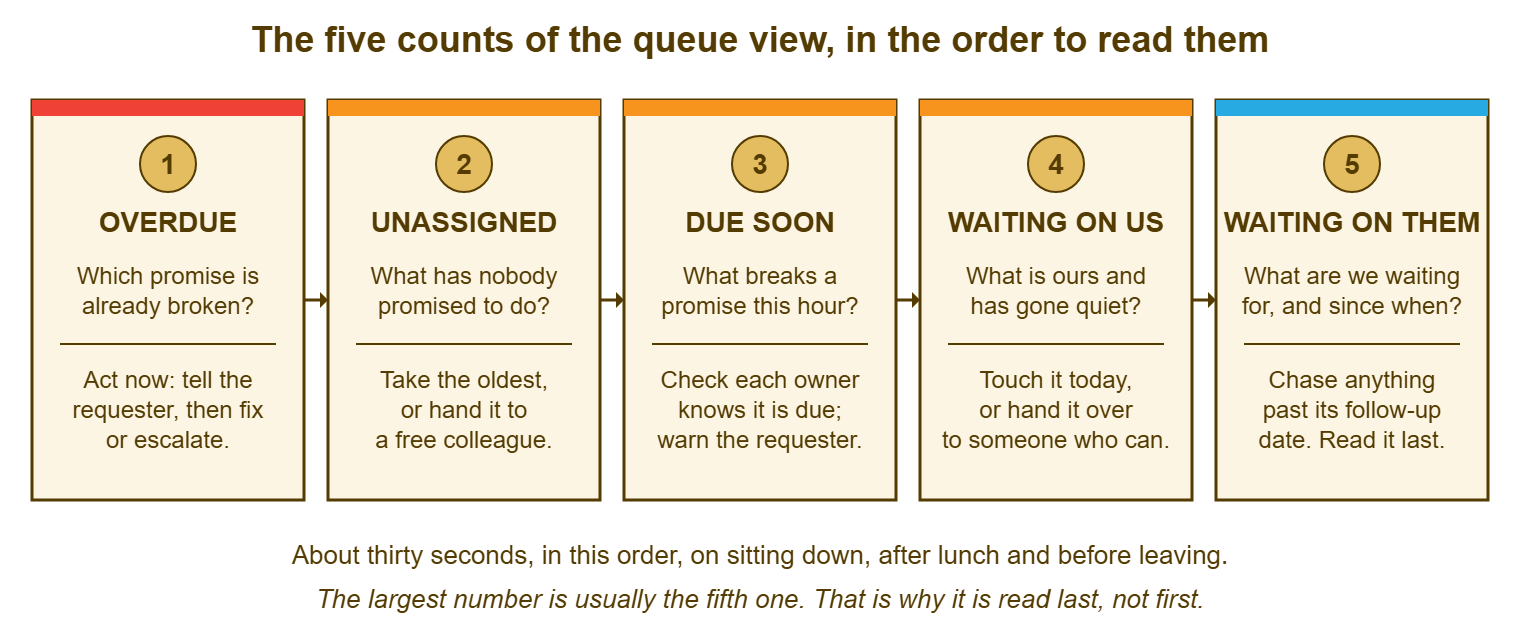
The whole read takes about thirty seconds when all five are small, and about three minutes when one of them is not. In the latter case, you open that view and act before reading the next. That is the only time the order bends: a non-zero overdue count is dealt with before the unassigned count is even looked at. That is uncomfortable when six unassigned tickets are visible on the same screen, and is still right. The consulting-room ticket at Harbourview needed a phone call to the practice manager and a spare machine from the cupboard, both of which were available at 08:31. The thirty-one waiting-on-them tickets had already waited a weekend and would have been fine until ten.
Do the read at fixed times and write the times down, because "whenever I look up" means "when a requester phones". For a small desk, three fixed reads a day by the lead happen on sitting down, after lunch and before leaving. Add a glance at unassigned and due soon by each technician between tickets, and that covers everything. The before-leaving read is the one most often skipped and the one that matters most, because whatever is overdue at five is overdue all night. Read the five, in order, before you put your coat on. The coat can wait thirty seconds. It has been waiting all day.
Remember: read the five counts in a fixed order by the cost of a minute's delay: overdue, unassigned with the age of the oldest, due soon, waiting on us, waiting on them. Act on any count above zero before reading the next one down.
Real Time Means Current, Not Watched
Real-time is a property of the figures, not an instruction to the reader. It means that when you look, the counts reflect the tickets as they are now, within a minute or two. That way, a decision made from the view is made from the truth. It does not mean anyone should sit watching the numbers change. And a desk that does is a desk that has stopped working tickets in order to look at them. The view is read at the fixed times and between tickets, and ignored in between. It is the way a driver glances at the fuel gauge and does not stare at it. (Staring at the fuel gauge has never once put petrol in the tank.)
Find out how your tool keeps the view current, because the ways differ and the difference matters on a quiet afternoon. Some tools refresh the counts themselves. Some refresh them only when the page is reloaded or a key is pressed. Some show figures that were calculated some minutes ago without saying so. Test it: create a ticket from a personal address and watch the unassigned count. If it does not move until you reload, the specification says "reload before every read", and the lead does. Whatever you find, put the time the figures were last updated on the view itself. That way, a display that has stopped updating announces the fact rather than showing yesterday's zero with a straight face. Keeping the figures truthful over months is the subject of Keeping Dashboards Honest.
If you run QuerySolv, the dashboard shows what is waiting and what is overdue without any building. The queue view described here is then a way of reading it rather than something you have to make. The specification at the end is still worth writing. It records what your desk means by "waiting on us" and "due soon", which no tool can decide for you. On any tool, the counts come from the standard filters: owner, status, due time and last update. The only building involved is saving those filters under the five names and agreeing the limits.
What the View Leaves Out on Purpose
The queue view does not show closed tickets, because a closed ticket needs nothing from anybody in the next hour. It does not show totals for the month, averages, trends or satisfaction, because those are report figures and a report figure on a live view teaches the eye to skip the view. It does not show per-person counts, because the shared view shows the team's work. The technician's own figures live in the technician's own view, which is the subject of Personal Workload Views. Every one of those omissions will be questioned by someone within the first month, and the answer to each is the same. What would anyone do differently in the next hour if that number changed?
It also leaves out priority as a count, which surprises people, and the reason is that priority is already inside the clock counts. A high-priority ticket has a short target, so it reaches due soon and overdue faster than a low one. And the two clock counts therefore already order the desk's attention by priority without a separate tile. A count of "high-priority open tickets" adds a number that is either zero or a reason to panic. And the clock counts already provide the second without the first. The exception is a major incident, which some desks mark with a separate flag. The incident deserves a banner across the whole view rather than a count, for as long as it is declared and not a minute longer.
The temptation to add a sixth count should be resisted for a quarter and then considered. Desks that run the five for three months usually find that one of their regular problems has no count. That is the moment to add one, with a definition, a limit and an action written down. Desks that add a sixth in the first week add a seventh in the second. Counts are easier to add than to remove, because removing one feels like admitting it was wrong, and nobody enjoys that, so the view accretes. Five, for a quarter, then argue.
Setting the Windows and Limits From Your Own Figures
Three of the counts need a number from you: the due-soon window, the waiting-on-us limit and the follow-up interval for waiting on them. None of these has a right answer, and any figure you read as a standard is somebody else's desk. The way to set them is to look at your own tickets for a month and choose the figure that catches the problem before it becomes a complaint. Harbourview's figures, which are a worked example and not a recommendation, came out as follows. The due-soon window is one hour, because the desk's shortest target is two hours. A one-hour warning gives the owner time to act or to warn the requester. The waiting-on-us limit is one working day. Reading a month of complaints showed that requesters at the clinic started phoning after about a day and a half of silence. The follow-up interval for requesters is two working days, and for suppliers it is the date the supplier gave plus one day.
Set the limits so that the counts are usually zero and occasionally not, because a count that is always above zero becomes wallpaper. If waiting on us reads nine every morning, either the limit is too short for how the desk actually works, or the desk has nine tickets it is avoiding. In that case, you need to know which; a week of opening the nine and asking will tell you. If overdue is never zero, the targets are wrong for the desk's size. That is a conversation about promises rather than about the view, and belongs with whoever signed the service levels. The view is a thermometer. Moving the limits so it reads comfortably is a popular technique and a poor one.
A Short War Story: The Thirty-One at Bellweather Logistics
At Bellweather Logistics, a haulage firm with a three-person desk, the waiting-on-them count had read somewhere between twenty-five and thirty-five for most of a year. The desk lead, a woman called Marta, had come to read it the way one reads the temperature in a room one is not going to leave. She finally opened the list by oldest update during a quiet week in which she had run out of other things to be worried about. Twelve of the thirty-one tickets had a requester reply on them that the tool had added without changing the status. So the desk had been waiting for answers it already had. One of the twelve belonged to a new dispatcher called Femi, who had asked for a login to the shipment-tracking portal nineteen days earlier. He had answered the technician's question about which depot he worked from the same afternoon. He had been using a colleague's login ever since, which the annual audit later described in a paragraph of its own. The cost was about two hours a day of manual lookups for three weeks, a little over thirty hours in all, and one audit finding. It also cost a quarter in which Marta's desk was asked in every management meeting whether "the waiting list" had been looked at. The desk changed the waiting-on-them count to show tickets past their follow-up date and added a weekly read of the whole list by oldest update. It tested what the tool did with a reply, which it should have done on day one. The fifth count is read last. It is not read never.
The Queue View Specification
The specification below is one page, filled in once and reviewed quarterly. It is what turns five saved filters into a routine the whole desk runs the same way. Section A names the departments the view covers, because a view that covers some departments and not others is counting a subset. Section B defines each count as a filter, with its limit, who acts and what the action is, in the reading order. Section C records what you found when you tested the tool's behaviour, because the counts mean different things depending on the answers. Section D is the reading schedule. Fill in every blank; a blank limit is a limit nobody chose.
QUEUE VIEW SPECIFICATION — ONE PAGE
Desk: ______________________   Prepared by: ______________   Date: ____________   Next review: ____________

A. SCOPE
   Departments covered by every count below: __________________________________________
   Open means any status except: ______________________   (resolved and closed are never counted)

B. THE FIVE COUNTS, IN READING ORDER
   1. OVERDUE
      Filter: open, past the service-level target
      Shown as: count
      Acts: the owner; the lead if the owner is away
      Action within the hour: message the requester with a new time, then fix or escalate

   2. UNASSIGNED
      Filter: open, no owner, departments in section A
      Shown as: count, and the age of the oldest in ____ (minutes / hours)
      Acts: whoever is free; the lead if nobody is
      Action: take the oldest; lead takes it personally when the oldest passes ____

   3. DUE SOON
      Filter: open, target inside the next ____ (window), not yet past
      Shown as: count
      Acts: the lead
      Action: confirm each owner knows the time; warn the requester before the time if it will be missed

   4. WAITING ON US
      Filter: open, owned, active status, no desk update for more than ____ (limit)
      Shown as: count
      Acts: the owner
      Action: do a piece of work and write a note today, or hand the ticket over

   5. WAITING ON THEM
      Filter: open, in a waiting status: ______________________ (list the statuses)
      Shown as: count, and how many are past their follow-up date
      Follow-up interval: requesters ____ working days; suppliers the promised date plus ____
      Acts: the owner for each; one named person reads the whole list weekly: ______________
      Action: chase anything past its date; return to active anything already answered

C. WHAT THE TOOL DOES (tested, not assumed)
   Clock on a waiting status:  [ ] keeps running   [ ] pauses   [ ] depends on status: ______________
   Requester reply on a waiting ticket:  [ ] moves it to active   [ ] adds the reply only   [ ] differs by channel
   Counts update:  [ ] by themselves   [ ] on reload   [ ] with a delay of about ____
   Last-updated time is shown on the view: [ ] yes   [ ] no, and we reload before every read

D. WHEN IT IS READ
   Lead, all five counts in order:  ____:____   ____:____   ____:____
   Each technician, unassigned and due soon: between tickets
   Weekly full read of waiting on them, by oldest update: ____________ (day) by ______________ (name)

E. THE COUNTING TEST (weekly)
   Total open tickets in section A departments: ____
   Covered by the five counts (less double counts): ____   Difference: ____   Where they live: ______________
Tomasz filled in the specification at Harbourview with Ingrid on the Tuesday, after she had finished being amused about the dentist. The reading order went on a card taped to the bottom of each monitor. The test in section C found that the tool left the status alone when a requester replied by e-mail. The tool moved the status when they replied through the portal. Neither Tomasz nor Ingrid had known that distinction. The next time the practice manager phoned, it was to ask whether the desk wanted the leftover biscuits from the staff meeting. The overdue count had been zero for three weeks, which is the only review a queue view ever gets.
Frequently Asked Questions
Our tool has no "due soon" filter, only overdue. What do we do?
Should unassigned tickets count as "waiting on us" too?
How do we handle a ticket that is waiting on a supplier with no promised date?
Does a ticket on hold at the requester's request count as waiting on them?
Our overdue count is never zero. Is the view wrong or are we?
We are a one-person desk. Is a queue view still worth setting up?
From the QuerySolv team: we build self-hosted help desk software for Windows. QuerySolv runs as one Windows service on your own network. It takes requests by web form, e-mail, live chat, social messages and REST API. It is licensed once per installation rather than per agent per month. The free trial runs the full product for 30 days.