
User, Device, Network or Expectation: Isolating the Slow Complaint
Tuesday, 09:40, at Meridian Parts. The ticket says "Internet slow again, please fix", raised from the sales office by Anita, who has eleven quotes to send before lunch. Marcus has been on the desk for three weeks. He walks over. By the time he arrives, Anita's screen holds a web page half drawn and a file transfer window showing the same number it showed a minute ago. A video call in the corner is working perfectly. "It's been like this all morning," she says. "Everyone's saying it." Marcus looks around the sales office. Nobody else is saying it. Two desks away, Tom is streaming a radio station and has not noticed a thing.
Isolating a slow complaint means working out which of four things is actually slow before anyone touches anything. It could be the user (the person, their account and what they are doing) or the device (the laptop or desktop in front of them). It could be the network (everything between the device and the far end: the wireless, the cabling, the firewall and the connection to the internet). Or it could be the expectation (the speed the person hoped for, which nobody promised). "The internet is slow" names none of them. It is a feeling with a ticket number. The first job of the desk is to turn the feeling into one of the four. This article is part of our The Internet Is Slow series, which covers connectivity complaints from the first question to the last ticket. This article owns the isolation frame that the other five articles lean on.
It covers why "slow" is not a symptom yet, the four branches and what each one means, and the three questions that sort most tickets in a minute. Then it covers each branch in turn, with the first question that proves it and what to do when it does. Next come the ticket that is really about one site and writing the branch into the ticket. A short war story and the isolation card to copy finish the article.
Why "Slow" Is Not a Symptom Yet
"Slow" is the requester's summary of an experience, not a description of a fault, and the two are further apart than they look. Anita's experience was a page that would not finish and a transfer that would not move. Her summary was "the internet". Between the two sits every piece of equipment from her keyboard to a server in another country. "The internet" is the word people use for all of it because it is the only word they have been given. The ticket is not wrong. It is unfinished.
Ask what the person was doing when it was slow, and the answer is usually one of five things. A web page was loading. A file was being sent, received or opened. A video or voice call was breaking up. An application that talks to a server somewhere was hesitating between clicks. Or a sign-in was taking longer than it used to. Each of those depends on a different mix of the device, the network and the far end, and each has a different first check. A file opening slowly from a shared drive may not touch the internet at all. A call breaking up cares about delay and steadiness, not raw speed. A page half drawn might be one slow advert on an otherwise fine connection.
So the first move is to get the requester to describe the experience rather than the diagnosis. "What were you trying to do, and what did you see?" is the whole question. The answer tells you which experience you are chasing, and a technician who chases "the internet" will spend an hour chasing everything. The requester has given the desk a word. The desk's job is to give it back as a sentence.
The Four Branches
Every slow complaint lands, in the end, in one of four branches, and naming them is what makes the ticket tractable. The user branch is anything that travels with the person. That includes their account, their habits, the task they are doing, the twenty browser tabs they keep open, and the personal cloud folder quietly uploading a holiday's worth of photographs. Move the person to another desk and another machine, and the slowness comes with them. The device branch is anything that stays with the machine. That includes an old laptop, a wireless adapter with a tired driver, a background update, or an agent of some kind using the connection for its own purposes. Put a known-good device beside it on the same desk, and the known-good device is fine.
The network branch is anything shared. That includes the access point serving that corner of the floor, the switch in the cupboard, the firewall, the connection to the internet itself, or a service on the far side of it. Everyone using the same piece of shared equipment sees the same thing, whether or not they have said so yet. The expectation branch is the one the other three forget. Nothing is broken, the connection is doing what it always does, and the person has arrived with a need the connection was never sized for. The engineer who has just been asked to move a forty-gigabyte model file to a customer by two o'clock is not experiencing a fault. He is experiencing physics, and a conversation is the fix.
The branches are not exclusive, which is the honest complication. A weak wireless signal (network) on an old laptop (device) used by someone uploading photographs (user) who expected it to be instant (expectation) is one ticket. All four branches are true at once. The frame does not promise one cause. It promises an order: find the biggest branch, prove it, fix or hand off that one, and look again. Most tickets have one dominant branch, and the three questions in the next section find it in about a minute. (The fourth minute is spent explaining it, and that is the part the training never covers.)
The Three Questions That Sort Most Tickets in a Minute
The first question is what exactly is slow, and its purpose is to replace "the internet" with one experience. One site, one task, or everything? If it is one site or one service, the ticket has already half-sorted itself. In that case, the dedicated article on one site, one service or everything takes it from there. If it is everything the person touches, the branches are all still open and the next two questions narrow them.
The second question is who else has it. It is the single most powerful sorting question a desk owns, because shared causes produce shared symptoms. One person: user or device. One room or one corner: the network, usually the wireless. One floor or one building: the network, usually something wired or the connection itself. Everyone, everywhere, including people at home: the far end, or a service everybody uses. Ask the requester, but do not stop at the requester. Anita said everyone, and the answer in the room was nobody. Look up from the ticket. Ask the two nearest desks. Check whether anyone else has raised anything in the last hour.
The third question is since when, and compared to what, and it separates faults from expectations. "Since about nine this morning" is a change, and changes have causes. "It's always been like this" is a baseline, and baselines have owners who sized them. "Slower than yesterday" sends the ticket toward the user, device or network branches. "Slower than I need it to be for this job" sends it toward expectation. It also raises the wider question of whether a slow thing is an expectation or a defect, which the slowness series owns for computers and applications as well as connections. Nobody has ever fixed a baseline by restarting it.
| Answer to "who else?" | Answer to "since when?" | Most likely branch | First thing to prove |
|---|---|---|---|
| Only this person, on any machine | A recent change | User | Sit with them and watch the slow task once; look at what else is running under their account |
| Only this machine, whoever uses it | A recent change or gradual | Device | A known-good device on the same desk, same connection, same task, behaves differently |
| Everyone in one room or corner | Any | Network (wireless) | The same task from a wired connection, or from the next room, is fine |
| Everyone on one floor or site | Any | Network (wired or the connection) | A speed check from a known-good wired device, kept as evidence |
| Everyone, everywhere, including at home | Sudden | The far end (one service) | The service's own status page or a second service behaving normally |
| Anyone trying this particular task | Always | Expectation | What the connection is sized for, and whether the task fits it |
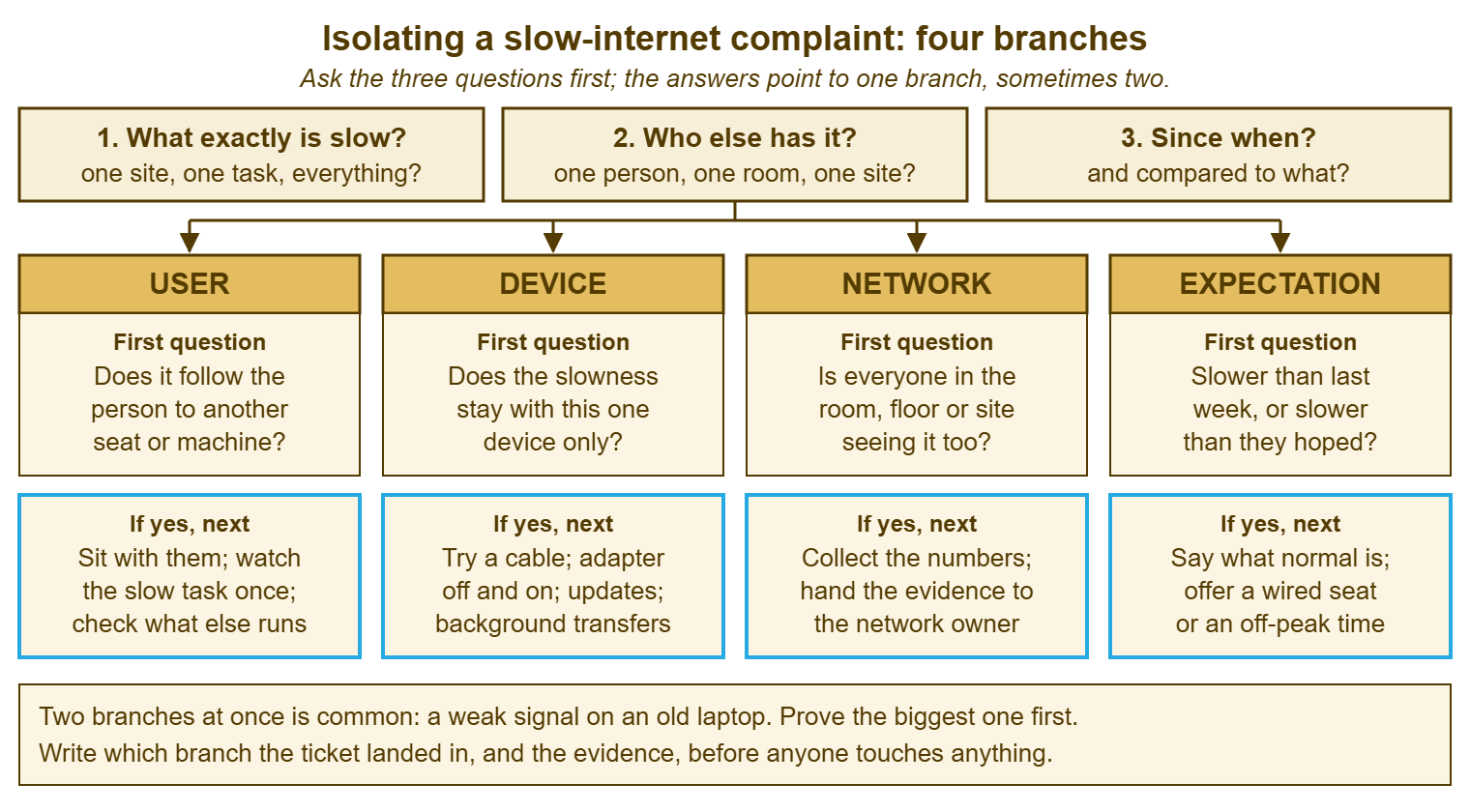
The picture below draws the frame as a single page. It has the three questions across the top, the four branches as columns below, the first question that proves each branch, and the next step when the answer is yes. It is the shape of the isolation card at the end of the article. Most technicians who use the card for a month stop needing it, because the three questions become the way they hear a ticket.
The User Branch: It Follows the Person
The proving question for the user branch is whether the slowness follows the person to another seat or another machine. The cheapest way to answer it is to ask them to sign in at a spare desk and try the same task. If the spare desk is slow too, the device and that corner of the network are out of it. What is left is the person's account, the task itself and whatever the person's account is doing in the background. The last of those is the usual culprit. It is nearly always invisible to the person, because nobody counts the things their own computer does without asking.
Sit with them and watch the slow task happen once. This is not a courtesy; it is the diagnostic. A technician who watches sees the thing the requester did not mention. That might be the personal cloud folder syncing a phone's camera roll, or the browser with thirty tabs and three of them playing something. It might be the "quick" video export that has been running since eight, or the second sign-in on a tablet in the bag doing its own synchronising. None of these is a fault. Each of them is a perfectly healthy use of the connection by something the person forgot was there. The fix is usually a pause, a schedule or a conversation, and none of those needs a cable.
The user branch also holds the task that was never going to be fast, and here it shades into expectation. Downloading a large file over a shared office connection while fourteen colleagues do the same is slow for everyone and a fault for nobody. Say so plainly, and say when it would be quicker. If the person moves large files for a living, the sixth article in this series on reducing slow-internet tickets covers the wired desk and the expectation conversation that stops the ticket coming back every Monday. What the user branch never gets is a reboot. Restarting a computer does not make a person's job smaller.
The Device Branch: The Laptop That Was Already Tired
The proving question for the device branch is whether the slowness stays with this one device only. The cheapest proof is a known-good device on the same desk, on the same connection, doing the same task. "Known-good" means a machine the desk trusts: a spare laptop kept for exactly this, recently used, with nothing strange on it. If the spare is fine beside the slow machine, the branch is proved, and everything in the room, the cupboard and the comms room is innocent. If the spare is slow too, the device is innocent and the network branch opens. One comparison, two minutes, and half the frame is settled.
Once the device is the branch, the slow-internet ticket is really a slow-computer ticket wearing a coat, and the ordering of checks belongs to other articles. The general diagnostic order for a sick machine is in The Diagnostic Order for a Sick Laptop or Desktop. The question of whether an old machine is slow because it is old is in the slowness series. For the connection specifically, four device-side checks earn their place. Try a cable, which takes the wireless adapter out of the argument entirely. Turn the wireless adapter off and on, which clears more oddities than it has any right to. Look for a pending update or a background transfer using the connection. Check whether a security or management agent on the machine is inspecting traffic and struggling to keep up. Do them in that order, because the first one is free and settles the most.
The old wireless driver deserves its own sentence, because it is the device-branch cause that most looks like a network-branch cause. A machine with an elderly driver for its wireless adapter will drop, cling to distant access points, and crawl in rooms where every other device is fine. The person will report "the Wi-Fi in this room is terrible" with complete sincerity. The Wi-Fi complaints article in this series sorts the room from the device in detail. Here, the rule is that one slow laptop in a happy room is a laptop problem until proved otherwise.
The Network Branch: Everyone in the Room
The proving question for the network branch is whether everyone in the same room, floor or site sees it too. The proof is the second question from the strip taken seriously: not "did anyone else say so" but "did anyone else check". Walk to the next desk. Try the same task on the known-good device from the same corner, then from a wired port, then from the next room. The pattern of where it is slow and where it is fine draws a map of the fault. The map is the thing the network owner wants, whether that owner is a colleague down the corridor, a contractor or the organisation's internet provider.
The network owner is whoever is responsible for the shared equipment. On a small desk it may be you on Tuesdays and a contractor on Thursdays. Either way, the desk's job in the network branch is to collect evidence, not to fix the network. The evidence is numbers taken in a repeatable way before anyone touches anything. The fourth article in this series, on measuring slow, owns the method and the evidence sheet. The isolation card points to it rather than repeating it. What the isolation step contributes is the shape: one corner, one floor, one site, or everyone. A single speed check from one laptop proves nothing. Three checks from three places prove a great deal.
Resist the restart here most of all. Restarting an access point, a switch or the firewall during the working day because one person said the internet was slow is how a desk converts a complaint into an outage. If the proof says "this corner", the fix is the wireless article. If the proof says "this site", the fix is the measurement article and a message to whoever owns the connection. If the proof says "everyone, everywhere", the fault is probably not on your network at all. In that case, the far-end article covers the honest message. The network branch is proved by a pattern, handed on with numbers, and touched by the person who owns it. Network equipment, in my experience, does not respond well to being restarted on a hunch, and neither does the person who owns it.
Remember: prove the branch before you touch anything. One known-good device beside the slow one settles user versus device. The same task from the next desk, a wired port and the next room settles device versus network. "Slower than last week or slower than you hoped" settles fault versus expectation. Write the branch and the proof into the ticket first.
The Expectation Branch: Slower Than Hoped
The proving question for the expectation branch is whether it is slower than last week or only slower than the person hoped. The answer comes from "since when". If nothing changed and the connection is doing what it has always done, there is no fault to find. In that case, a technician who goes looking for one will find something eventually, change it, and create the fault they were looking for. The expectation branch is the one where the fix is a sentence. It is the branch most desks are least trained to handle, because nothing in a technician's upbringing prepared them to say "it is working correctly" to someone who is unhappy.
The sentence has three parts: what the connection is sized for, what the task needs, and what the options are. "The office connection is shared by about sixty people and is sized for ordinary web and mail traffic; a forty-gigabyte transfer will take a long time on it whatever we do, and it will take longer at eleven in the morning than at seven. The options are the wired port at the desk by the plant room, which is faster, or starting it before you leave and letting it run overnight." Nobody is blamed, nothing is broken, and the person has two real choices. The art of saying this without sounding like a policy is the subject of the desk-level expectations article. The broader question of when "slow" is a defect and when it is an expectation belongs to the slowness series. This article only needs you to recognise the branch and stop looking for a fault.
Expectation tickets are also the ones that teach the desk about capacity. One person with an unreasonable hope is a conversation. Six people a month with the same hope, in the same team, about the same kind of file, is a sizing question for whoever owns the connection. The desk is the only place that sees the six together. Write the branch into the ticket honestly, as "expectation", and the monthly count becomes an argument. Mislabel it as "network, no fault found" and it becomes a reputation.
The Ticket That Is Really About One Site
A large share of "the internet is slow" tickets are one site or one service being slow while everything else is fine. The requester has generalised, because to them that site is the internet. The first question catches it if you let it. "What exactly is slow?" answered with the name of one system, one page or one call service is the end of the isolation step and the start of a different conversation. The ticket does not need a branch. It needs a check of whether the far end is slow for everyone, which takes a minute, and a reply that says so without blame.
The temptation is to prove the connection innocent at length, with speed checks, and send the requester a wall of numbers. Do not. The requester did not ask whether the connection was innocent. They asked why the thing they need is slow. "That service is slow for everyone at the moment, and we are watching it" answers the question they asked. The third article in this series owns this ticket, including the status page, the provider's problem and the one site a security filter is inspecting. The isolation card simply routes there. One site slow, everything else fine, is a different ticket, and the fastest thing the desk can do is notice.
Writing the Branch Into the Ticket
The isolation step produces three things, and all three go into the ticket before anyone touches anything. They are the experience in the requester's words, the branch with the proof that put it there, and what was tried or handed on. Take this note: "Network (wireless), third-floor east corner: same task slow on the known-good laptop from the same corner, fine from the wired port by the printer and from the west corner; nothing touched; handed to Dana with the measurement sheet". Another technician can act on it tomorrow, the network owner can trust it, and the monthly count can be cut by it. "Slow internet, restarted laptop, user says better" is a note that will be rewritten by the next ticket from the same corner.
Put the branch and the proof in an internal note rather than in the reply to the requester, because the requester needs the plain-words version and the next technician needs the evidence. If you run QuerySolv, that is the ordinary split between a public reply and an internal note. In QuerySolv, the event history on the ticket keeps both in order when the ticket is handed to whoever owns the network. In any tool, the test is whether someone picking the ticket up cold can see which branch it is in and why. A category or tag for the branch, if the tool allows one, is what turns a year of these tickets into a map of where the building is slow. The sixth article uses that map.
Do the writing before the fix, not after, for a reason that has nothing to do with tidiness. A technician who writes "device: known-good laptop fine on the same desk" has committed to a branch. That technician will not drift into restarting the access point ten minutes later when the obvious device fix does not work. The note is a decision. Decisions written down are kept. Decisions kept in the head are renegotiated by every new symptom, and a slow-internet ticket produces a new symptom about every four minutes.
A Short War Story: The Reflex Reboot at Tollgate Foods
A technician called Owen at Tollgate Foods took a ticket from the packing office saying the internet had been unusable all morning. He restarted the office access point from the controller before walking over. That was because the fix had worked twice the week before. The access point came back and the packing office stayed slow, so he restarted the switch in the first-floor cupboard. That took the label printers, the two scanners and the dispatch terminal down for six minutes in the middle of a lorry loading. The internet was still slow in the packing office afterwards, because the cause was a backup agent on the packing supervisor's laptop. It had been uploading the previous night's camera footage since seven. The cause would have been found in about ninety seconds by putting the spare laptop beside hers. The loading ran forty minutes late, and the dispatch manager wrote the incident up. Owen spent the rest of the week explaining that he had been trying to help, which everyone accepted and nobody forgot. The lesson he wrote at the bottom of the ticket was the one this article is built on: prove the branch first. That is because restarting the wrong thing is not a diagnostic step; it is a second ticket.
The Isolation Card
The card below is the isolation step as a single page, meant to be pasted into the ticket as an internal note and filled in before anything is touched. The top half is the three questions with space for the answers in the requester's words. The middle is the proving question for each branch with a tick for the result. The bottom is the branch, the evidence and the handoff. It takes about a minute to fill for most tickets, and about three for the ones that turn out to be in two branches at once. Keep the card joke-free and the requester's words exact, because the next person to read it may be the network owner, and they will act on it.
SLOW COMPLAINT — ISOLATION CARD
Ticket: ________   Requester: ______________   Location: ______________   Time: ________

1. WHAT EXACTLY IS SLOW (requester's words)
   Experience: web page / file transfer / call / application / sign-in / other: ______________
   One site or service: ______________   Everything: [ ]
   If one site or service -> go to the one-site reply; no branch needed.

2. WHO ELSE HAS IT (checked, not just reported)
   Only this person        [ ]   Only this device   [ ]
   One room or corner      [ ]   One floor / site   [ ]   Everyone, incl. home   [ ]
   Checked with: ______________ (named desks, not "everyone")

3. SINCE WHEN, COMPARED TO WHAT
   Started: ______________   Slower than last week [ ]   Slower than hoped [ ]
   What changed around then (new device, new task, move of desk, works done): ______________

PROVING QUESTIONS (tick the result)
   USER        Follows the person to a spare desk?            yes [ ]  no [ ]
   DEVICE      Known-good device on the same desk is fine?     yes [ ]  no [ ]
   NETWORK     Same task slow from the next desk / wired port? yes [ ]  no [ ]
   EXPECTATION Nothing changed; task exceeds what it is sized for? yes [ ]  no [ ]

RESULT
   Branch: user / device / network / expectation / one site
   Evidence (one line): ______________________________________________
   Touched so far: nothing [ ]   other: ______________
   Next: fix here [ ]   hand to network owner with measurements [ ]   expectation reply [ ]   one-site reply [ ]
   Handed to: ______________   Requester told: ______________ at ________
Marcus filled the card at Anita's desk with the spare laptop beside hers. The spare was fine. Her machine was uploading a camera roll from a personal cloud folder she had set up on the Friday, and her quotes went out by eleven. The ticket's internal note says "user: personal sync, paused and scheduled for evenings", which is eleven words. The next time the sales office says everyone is saying it, the desk will know to look up first.
Frequently Asked Questions
We do not have a spare laptop to use as the known-good device. What then?
The requester is remote and I cannot put a device beside theirs. Does the frame still work?
What if the three questions point to two branches at once?
Should I ever restart the access point or switch as a first step?
How do I say "it is working correctly" without sounding dismissive?
Does the branch need its own category in the ticketing tool?
From the QuerySolv team: we build self-hosted help desk software for Windows. QuerySolv runs as one Windows service on your own network. It takes requests by web form, e-mail, live chat, social messages and REST API. It is licensed once per installation rather than per agent per month. The free trial runs the full product for 30 days.