
The Diagnostic Order for a Sick Laptop or Desktop
Monday, 09:05, at Meridian Parts. Owen from the warehouse office is standing at the desk holding a laptop the way people hold a dead pet. "It's gone. It was fine on Friday. I've tried everything." Dana has been on the desk for three weeks. She knows that "everything" has a specific meaning in this building, which is "I pressed the power button several times, with increasing force". She also knows that Owen's shift picks start at half past nine and his pick lists are on that laptop. She has a choice to make in the next thirty seconds about what to touch first. Whatever she picks, she will be picking it in front of a man who is about to be late.
The diagnostic order is the sequence in which you check the possible causes of a hardware fault. And the only sensible sequence is cheapest first. The checks that take seconds and cost nothing come before the checks that take an hour and cost a part. That order holds whether or not the cheap check is the one you privately believe in. It is not a rule about hardware. It is a rule about time, yours and the user's. It holds whether the machine is a laptop, a desktop, or a thin client bolted under a desk in a corner nobody has dusted. This article is part of our Hardware Troubleshooting Workflows series, which covers laptops and desktops from first symptom to retirement. This is the first article because every other one in the series assumes you climb in this order.
It covers why cheapest first is the whole method, then the five questions to ask before anyone touches the machine. Next comes "what changed", which is the question that pays. We cover the six rungs of the ladder from the power cable to the vendor, then reproducing the fault before replacing anything. Writing each rung into the ticket follows, then knowing when to stop diagnosing and swap. We finish with a short war story and the diagnostic order card to copy, in that order.
Why Cheapest First Is the Whole Method
A hardware fault has a short list of possible causes and a very uneven list of costs to check them. Reseating a power cable costs ten seconds. Trying a different dock costs two minutes. Rolling back a driver costs a quarter of an hour. Reinstalling the operating system costs the user their afternoon. Sending the machine to the vendor costs the user a week and the desk a loaner. If you check in cost order, the expected time to a fix is as low as it can be. In that order, you only pay for an expensive check once every cheaper one has been cleared. If you check in order of what you suspect, you are betting your afternoon on a hunch. Hunches about hardware are wrong more often than anyone's pride admits.
The order also protects you from the most common diagnostic mistake, which is replacing something that was never broken. A desk that jumps to "it must be the disk" and swaps the disk has spent an hour and a part. If the real cause was a loose cable the fault will come back the next week with a new disk inside it. The cheap checks are cheap precisely because they rule things out quickly, and ruling out is most of what diagnosis is. The expensive step at the top of the ladder is only justified by the pile of cleared rungs beneath it.
Cheapest first is also fair to the user, which matters more than it sounds. Owen does not care whether his laptop has a bad board or a bad cable; he cares whether he gets his pick lists by half past nine. An order that starts with the ten-second checks gives him the best chance of walking away in five minutes. When it does not, it gives Dana an honest sentence to say: "I have ruled out the easy things; this is going to take longer, so let me get you a loaner." That sentence is only honest if the easy things were in fact ruled out, in order, and written down. I have seen desks that skip the easy things and say it anyway. The users learn, eventually, and then they stop believing the hard things too.
The Five Questions Before Anyone Touches Anything
Before a hand goes near the machine, five questions take two minutes and routinely save an hour. They are the hardware version of the asking-once discipline in Gathering the Right Information Up Front. Get the facts while the user is in front of you, because the moment they walk away the facts walk with them. Ask them in this order, and write the answers into the ticket as you go, because the answer to question three usually changes what you do about question five.
| Question | Why it comes first | What the answer rules in or out |
|---|---|---|
| What exactly happens, and what did you expect instead? | "Dead" means six different things; a blank screen with fan noise is not a machine that will not power on | Separates power faults from display faults from a machine that is on and stuck |
| When did it last work, and when did you first notice? | Fixes the window inside which something changed | A fault that began after the weekend points to an update, a move, or a cable |
| What changed between those two times? | The single most productive question in hardware support | A new dock, a desk move, a dropped bag, an update, a spilled drink; see the next section |
| Does it happen every time, or sometimes? | Decides whether you can reproduce it at the desk at all | Intermittent faults get a different path; see Reproduce Before You Replace |
| What have you already tried? | Avoids repeating the user's steps and tells you what their "tried" means | A machine already restarted twice is past the simplest rung; a battery already drained flat is a clue |
The first question deserves patience, because users describe faults in terms of what they wanted to do, not what the machine did. "It's dead" from Owen turned out to mean "the screen stayed black when I opened the lid, so I held the button until the light went off, and now nothing happens when I press it". That is a machine that was probably asleep, was then forcibly powered off, and now has a lid, a button, or a battery question. That is a different ticket from a machine that was never on. Ask what they saw, what they heard, what lights were lit, and whether the fan ran. Let them finish. The thirty seconds it takes is the cheapest rung there is.
The fifth question needs to be asked without judgement and listened to without flinching. "I took the battery out and put it back in", "I plugged it into the monitor cable instead", "I left it on the radiator to dry". None of these is foolish; every one of them is information, and the user who feels judged for the first one will not tell you about the radiator. (It was the radiator.) The desk gets the truth in proportion to how safely it can be told.
"What Changed?" Is the Question That Pays
A machine that worked on Friday and does not on Monday has had something done to it. And the thing that was done is the most likely cause, before any theory about components. The changes are nearly always one of a short list. It was moved, dropped, plugged into something different, or updated. Or it was left somewhere hot, cold or wet, or somebody else used it. A desk that asks about each of those by name gets better answers than one that asks "did anything change?" The honest answer to the general question is "no". The honest answer to "did you take it home over the weekend?" is "yes, and the dog knocked the bag off the chair".
The changes the user does not know about matter too, and the desk can find those without the user. The operating system keeps a record of updates and of when the machine last started and shut down. Most tools that manage a fleet keep a record of what was pushed to it and when. A driver update that landed on Friday night is a prime suspect for a Monday fault, and it is in the log with a timestamp. The desk's own ticket history is another record. A machine that had a screen ticket last month and a keyboard ticket the month before is telling you something about itself. And the thread of a device's past tickets is the subject of Warranty and History at a Glance.
Then there is the change nobody will mention because they do not think of it as a change: the desk move. Furniture gets shifted, and cables get re-run under the new desk. A power brick that was pushed fully home for two years is now sitting a quarter of an inch proud of its socket because the new desk leg is in the way. The machine runs on battery until the battery is flat, and then it is "dead", a full day after the only change anyone made. Ask whether the desk moved. Ask whether anyone cleaned. Ask whether the building's contractors were in. The machine did not change; its surroundings did, and surroundings are where the cheap rungs live.
The Six Rungs, Bottom to Top
The ladder has six rungs, and each is cleared before the next is climbed. The picture below draws them as steps, with the time each rung costs the desk. It shows whether the user can wait at the desk while it is checked or needs a loaner in their hands first. The green caps are rungs a technician clears while the user waits. The orange caps are rungs where the user should already be working on something else. The red cap is the rung where the machine leaves the building.
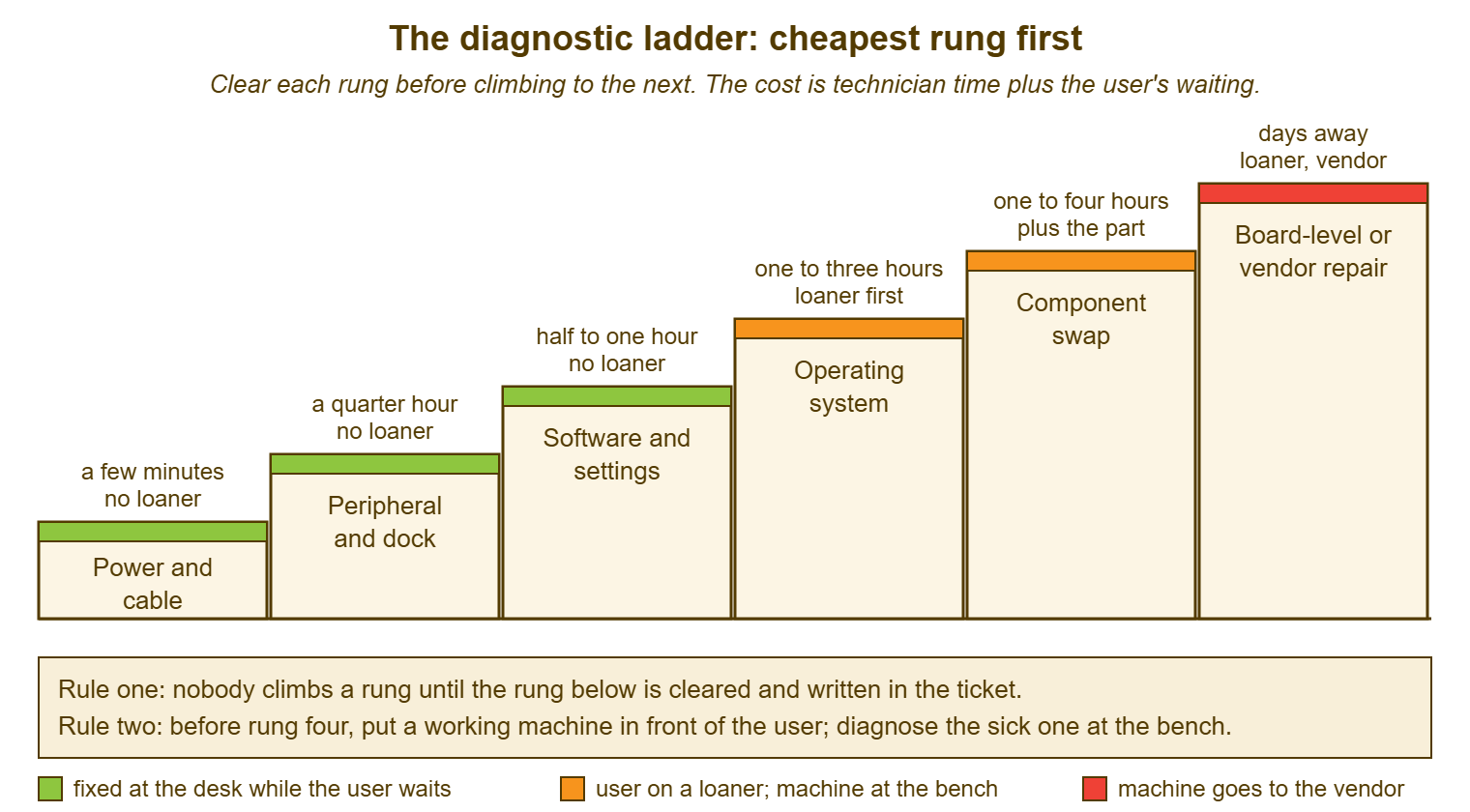
Rung one is power and cable, and it takes minutes. Is the wall socket live? Is the brick seated at both ends and showing its light? Is the cable the right one for this machine and not the near-identical one from the monitor? With a laptop, does it behave differently on mains and on battery? Does the power light do anything at all when the button is pressed, and does the fan spin? Hold the button for a long count to force a full power-off, wait, and try once more. Try a known-good charger from the drawer. Half of the "dead" machines I have met in my life were resurrected on this rung. Usually that was by someone with less experience than the person who had already given up on it.
Rung two is the peripheral and the dock, and it takes a quarter of an hour. Unplug everything except power: the dock, the external screens, the keyboard, the mouse, the headset, the badge reader, the odd little cable the user cannot name. Try the machine bare. A surprising number of faults that present as "the laptop is broken" are the dock, the dock's power supply, or a single failing cable. The dock is the subject of its own article in Docks, Cables and the Things That Break. A machine that is fine bare and broken docked has told you which rung to stay on. A desktop has its own version of this rung: a different monitor cable, a different monitor, the keyboard moved to another port.
Rung three is software and settings, and it takes half an hour to an hour. This is where a recent driver or application update is undone. A power or display setting is put back to the default, and a startup program is disabled. And the machine is started with only the operating system's own drivers so that whatever a third-party program adds is out of the picture. The operating system's own logs are read here, with the window from question two in mind. It is also the rung at which a fault that is really about slowness leaves this ladder and joins the one in The Slow Computer. That is because "slow" is rarely a hardware fault and the slowness series owns its measurement.
Rung four is the operating system itself, and it takes one to three hours of elapsed time, during which the user is working on something else. Reinstalling or resetting the operating system is the point at which the machine is wiped back to the standard image and the fault either survives it or does not. A fault that survives a clean image is hardware. A fault that does not was software all along. In that case, the hour spent on rung three looking for it was well spent even though it failed. The alternative was skipping to rung five and swapping a part that was fine. Before this rung, a working machine goes in front of the user; the rule and its reasons are in the next article, Swap, Repair or Retire.
Rung five is the component swap, one to four hours plus the part: memory, the storage drive, the battery, the screen, the keyboard, the wireless card, or whatever the machine lets you reach. The fault has survived a clean image, so it lives in the metal, and the question is which piece. The operating system's built-in checks for memory and for drive health go first because they are free. Then the swap is of the one component the evidence points to, tested, before anything else is touched. One change at a time, each one written down, each one reverted if it made no difference. Two changes at once is a result you cannot read.
Rung six is board-level or vendor repair, and it is days away. That means the main board, the power circuitry, or the thing you cannot reach without a vendor's tools. It also means anything on a machine under warranty where opening the case would void it. The machine leaves the building, the user is on a loaner for the duration, and the ticket enters the waiting state described in Working With Warranty and Repair Vendors. Nobody arrives at rung six by jumping. They arrive by clearing five rungs, and the clearance is the evidence the vendor will ask for.
Reproduce Before You Replace
You do not replace a part for a fault you have not seen. And the rule exists because the fault the user describes and the fault the machine has are different things more often than you would like. "The screen goes black sometimes" could be the screen, the display cable, or the graphics driver. It could be a power setting that blanks the display after a minute. Or it could be a dock that drops its video when a particular headset is plugged in. Four of those are free to fix. If you order a screen on the strength of the description you have a one-in-five chance of ordering the right thing and a certainty of spending the user's week waiting for it.
To reproduce a fault is to make it happen on demand, at the desk, with the conditions written down. For an every-time fault, that is easy: do the thing, watch it fail, note what was plugged in and what was running. For a sometimes fault, it is work. Ask the user for the pattern: time of day, what they were doing, on mains or battery, docked or not, hot or cold, after sleep or after a cold start. Then set the machine up with those conditions and wait. Or give it to the user with a card asking them to note the time and what was happening at the next failure. An intermittent fault you cannot reproduce is not yet ready for rung five, and the honest ticket says so. The faults-by-symptom patterns are in Common Faults by Symptom, and the intermittent ones have their own section there.
Reproducing also means proving the fix. A part is not confirmed good because the machine started once. It is confirmed good because the thing that used to make it fail no longer does, under the same conditions, more than once. Run the reproduction again after the swap. Then run it again the next morning. A machine that fails after it has been warm for an hour will pass every test you run in the first ten minutes. The user's "it's fine now" is a hope, not a result. Write the result.
Writing the Rung Down
Every rung cleared goes into the ticket as a line, at the time it is cleared. A diagnosis that lives in a technician's head is lost the moment the technician goes to lunch. "Rung one cleared: known-good charger, mains and battery, long power-off; no change. Rung two cleared: all peripherals off, bare machine; no change. Rung three: driver update from Friday rolled back; no change. Suspect storage; running the built-in drive check." That takes four lines, two minutes. The next person who picks up the ticket, or the same person after the weekend, starts at rung four instead of rung one. The discipline of a note somebody else can act on is the subject of Writing Reproducible Steps. Hardware tickets need it more than most, because a hardware ticket changes hands more than most.
The rung record is an internal note, not a reply to the user. The user does not need "suspect storage" at eleven in the morning. They need "I have ruled out the easy causes, you are on loaner L-07, and I will update you by three". The two are different audiences with different needs. A tool that separates public replies from internal notes, as QuerySolv does, lets the technician write both without the user receiving the technician's half-formed theory as a status. The theory may be wrong by lunchtime. The status should not be.
Writing the rung down also stops the ladder being climbed twice. A sick machine that goes to a second technician without notes gets rung one again, and rung two again. And the user, who watched the first technician do exactly those things, draws a conclusion about the desk that is hard to undo. If your tool keeps a complete event history on the ticket, every rung and every handoff is already in order on one page. In that case, the second technician reads for two minutes instead of asking the user to start over. The user has started over enough.
Remember: nobody climbs a rung until the rung below is cleared and written in the ticket, and before rung four a working machine goes in front of the user. Cheapest first, one change at a time, reproduce before you replace.
Knowing When to Stop and Swap
The ladder has a time box on it, and the time box is the point at which the user stops waiting. A desk with a loaner on the shelf should have the user working on it within half an hour of the fault being reported, whatever rung the diagnosis has reached. The user's time is the cost that matters. The diagnosis can continue perfectly well at the bench without them watching. The rungs below the line are the ones a user waits for: power, cable, peripheral, and the first few minutes of rung three. Everything above it happens with the sick machine on the technician's bench and the user back at their desk on something that works.
Half an hour is a working figure from desks I have run, not a standard, and your figure depends on your spares. A desk with no loaners has a much harder time box, because the user has nothing to go to. On that desk, the pressure to keep diagnosing in front of them grows with every minute. The way out is spares, and the argument for them is in The Loaner and Spares Strategy. A desk with a loaner can afford to be unhurried about rungs four, five and six, which is when they are done well. Hurried hardware diagnosis is how a desk ends up on rung five with two parts changed and no notes.
There is a second stop, further up, where the diagnosis itself should end. It is the point at which the hours spent exceed what the machine is worth in hours of the user's time and the desk's. A machine that has eaten four technician hours on rung five without yielding is a machine to send to the vendor or retire. And the decision rules for that, in hours and age rather than feelings, are the whole of the next article. The ladder tells you what to do next. It does not tell you when to stop doing it, and a technician who is enjoying the puzzle needs somebody to tell them. (That somebody is the time written on the loaner tag.)
A Short War Story: The Forty-Minute Charger at Tollgate Foods
At Tollgate Foods, a technician called Marcus was handed a laptop by a dispatcher called Fay at ten past seven on a delivery morning. Fay's words were "it's dead, the routes are on it". Marcus, who was good at hardware and knew it, went straight to the interesting rungs. He held the power button, pulled the battery, and tried the firmware menu. By half past seven he had the case open and was reseating the memory while Fay watched the clock and the drivers waited in the yard. At twenty to eight a warehouse supervisor walking past picked the charger brick off the floor. The supervisor pushed its cable the last quarter of an inch into the socket where the previous night's cleaner had nudged it loose. The machine lit up. The routes went out forty minutes late. Eleven drivers sat idle for the duration. The regional manager asked for a note explaining why a cable had cost the company a morning. Marcus wrote the diagnostic order card that afternoon and pinned it above the bench. He started every ticket after that at rung one, in front of the user, out loud. The cheap check is not beneath anybody; it is the first thing a professional does, precisely because it is cheap.
The Diagnostic Order Card
The card below goes on the bench, in the technician's drawer, and in the knowledge base where the desk can find it. And it is filled in on the ticket as each rung is cleared. The top half is the five questions. The bottom half is the ladder, with a line per rung for what was tried and the result. The two stop rules are written where they cannot be missed. Fill it in order. A rung with a blank line has not been cleared, however sure anyone is.
DIAGNOSTIC ORDER CARD — LAPTOP OR DESKTOP
Ticket: ________   Device tag: ________   User: ______________   Reported: ____:____

A. THE FIVE QUESTIONS (before touching the machine)
   1. What exactly happens?  Lights: ____  Fan: ____  Screen: ____  Sound: ____
      What did you expect instead? ______________________________
   2. Last worked: __________   First noticed: __________
   3. What changed between those times?
      [ ] moved   [ ] dropped   [ ] new dock/cable   [ ] update   [ ] heat/cold/liquid
      [ ] someone else used it   [ ] desk moved / contractors in   [ ] nothing known
   4. Every time / sometimes?  If sometimes: pattern ________________________
   5. Already tried by the user: ______________________________________

B. THE LADDER (clear each rung before climbing; one change at a time)
   Rung 1  Power and cable        tried: ______________________  result: ________
   Rung 2  Peripheral and dock    tried: ______________________  result: ________
   Rung 3  Software and settings  tried: ______________________  result: ________
   --- LOANER IN THE USER'S HANDS BEFORE RUNG 4 ---  loaner tag: ______  at ____:____
   Rung 4  Operating system       tried: ______________________  result: ________
   Rung 5  Component swap         part: ________  reproduced before: Y/N  after: Y/N
   Rung 6  Board-level / vendor   claim ref: ________  sent: ________  due back: ________

C. STOP RULES
   User waiting at the desk no longer than: ______ minutes
   Diagnosis stops and the swap/repair/retire decision is made after: ______ hours
   Fault reproduced before any part was changed:  [ ]
   Fix re-tested under the same conditions, next day:  [ ]
Dana used the card on Owen's laptop, or the first half of it, because she never reached the second. Question one established that the screen had stayed black on waking and that Owen had then held the button down. Rung one, with a known-good charger from the drawer, established that the machine's own charger had a frayed cable that worked only at one angle. That check established that the battery had drained flat over the weekend too. Owen was back in the warehouse office with his pick lists and a replacement charger at 09:19. That left him eleven minutes to spare. That left Dana with a ticket that said exactly what had been checked, in order, in case the laptop came back. It did not. The charger did, two weeks later, in the recycling bin, where it belonged.
Frequently Asked Questions
The user is certain it is the hard drive. Should I skip to that rung?
What if the machine is remote and I cannot touch it?
How long should I spend on rung three before giving up on software?
Do desktops follow the same ladder as laptops?
The fault only happens at the user's desk, never at mine. What then?
Should the user watch while I work through the rungs?
From the QuerySolv team: we build self-hosted help desk software for Windows. QuerySolv runs as one Windows service on your own network. It takes requests by web form, e-mail, live chat, social messages and REST API. It is licensed once per installation rather than per agent per month. The free trial runs the full product for 30 days.