
Turning 'It's Slow' Into a Measurement You Can Act On
Thursday, 10:50, at Ashgrove Housing. Ticket 4471 from Marianne in the lettings team reads, in full: "Computer slow again. Please sort." Dev has nine other tickets open and a strong urge to reply "have you tried restarting it?". That would be the third time this quarter somebody on the desk has sent Marianne that sentence. He also has a stopwatch on his phone and a spare laptop under the bench. It occurs to him that across three tickets nobody has used either. He picks up the phone instead. "Marianne, what were you doing when it was slow?" "Opening a tenancy." "How long did it take?" A pause. "Ages." "Would you mind doing it now while I time it?" Forty-one seconds. On the spare laptop at her desk, ten minutes later, six.
Turning a feeling into a measurement means replacing the word "slow" with four facts before anyone diagnoses anything. They are which task is slow, when it is slow, how long it takes in seconds on a stopwatch, and what that time is being compared with. Until those four are in the ticket the desk has a mood to work with. After them it has a number. A number can be compared, handed over and proved wrong, which a mood cannot. This article is part of our The Vague Slowness Complaint series. The series is about the perception and measurement of slow computers and slow applications. If the four facts point at the connection rather than the machine or the application, the ticket crosses into the isolation frame of the slow-internet series, which owns the network branch. This series does not rebuild it.
It covers why slow is a feeling and not a fault, the four questions in order, and the stopwatch and how to time a task honestly. Next come the before-and-after, the ticket that says only "slow" and how to reply to it, and writing the number into the ticket. Where the number sends the ticket next, a short war story, and the slowness intake questions to copy follow, in that order.
Why Slow Is a Feeling and Not a Fault
"Slow" is a true report of an experience and a useless description of a fault. The desk has to hold both of those in its head at once. Marianne is not exaggerating. Something took longer than she needed it to, at a moment when she had a tenant on the phone, and the whole morning now carries that colour. But "slow" does not say which of the forty things her computer did that morning took too long. It does not say whether it took four seconds or four minutes, or whether it was slower than yesterday or only slower than she would like. A technician who starts fixing from the word "slow" is fixing a mood.
The feeling cannot be compared, and that is the practical problem. Two people with identical machines doing identical work will describe the same eight-second wait as "fine" and "unusable". That depends on what they were doing, who was watching, and what they had for breakfast. A desk cannot act on that. It cannot tell whether the second person's machine is broken or the first person is patient. A number can be compared: with the same task yesterday, with the colleague's machine, with the spare laptop, with what the vendor says the application should take. The whole of this article is about getting from the first thing to the second.
The feeling is also the thing that decides whether the ticket comes back. A requester who was told "I've cleaned it up, should be better now" will judge the fix by feel. Feel is unreliable in both directions. It reports improvements that did not happen and misses ones that did. A requester who was shown a stopwatch going from forty-one seconds to six has something to hold on to. The number is not only the diagnosis. It is the receipt.
The Four Questions in Order
Four questions turn the word into a number, and they are asked in this order because each one makes the next one possible. The first is what exactly is slow: one task, named the way the requester would name it. Not "the computer", not "the system", but "opening a tenancy record", "the morning sign-in", "saving the spreadsheet", "the rent report". If the requester says "everything", ask for the one thing that made them write the ticket, because there always is one. "Everything" is the shape a single bad wait takes after an hour of thinking about it.
The second is when, and it has two halves: what time of day, and since when. Time of day separates the machine that is slow because it is busy doing something scheduled from the machine that is slow all the time. "Since when" separates the thing that changed from the thing that has always been so. "Every morning between nine and ten" and "since the new scanner was installed" are both answers to "when", and either one is half a diagnosis on its own. (The answer "always" deserves a second question, because "always" usually means "since I started here", which may be eight months.)
The third is how long, in seconds, from a stopwatch, and it is the question that makes this article different from a conversation. "Ages" is a feeling. "Forty-one seconds from the double-click to the record being usable" is a measurement that another technician can repeat tomorrow and the application owner cannot wave away. The next section is about taking it properly.
The fourth is compared with what, and without it the number means nothing. Forty-one seconds is terrible for opening a record and quite good for a month-end report. The comparison can be the same task on the same machine last month, if anyone wrote it down. It can be the same task on a colleague's identical machine or on the desk's spare laptop at the same desk. Or it can be the time the application's vendor says to expect. The spare laptop is the best of these because it is the one the desk controls. If the spare takes six seconds where Marianne's machine takes forty-one, the cause lives in her machine, and the ticket already has a direction.
There is a fifth question that belongs to a different series: who else has it. It is the question that sorts a shared cause from a private one. And it is the first move of the slow-internet isolation frame, because shared equipment produces shared symptoms. Ask it, by all means. But when the answer sends you toward the access point, the switch or the line, hand the ticket to the frame in the slow-internet series rather than measuring the network with a stopwatch. That series has better instruments for the branch.
The picture below draws the four questions as a funnel. The wide end is the ticket as written, "everything is slow", and each question narrows it: what exactly, when, how long, compared with what. The narrow end feeds three boxes that the rest of the ticket depends on: a number, a cause and an owner. The strip underneath says why the order matters. Without a number nothing can be compared. Without a comparison nothing has a cause, and without a cause nobody owns the ticket.
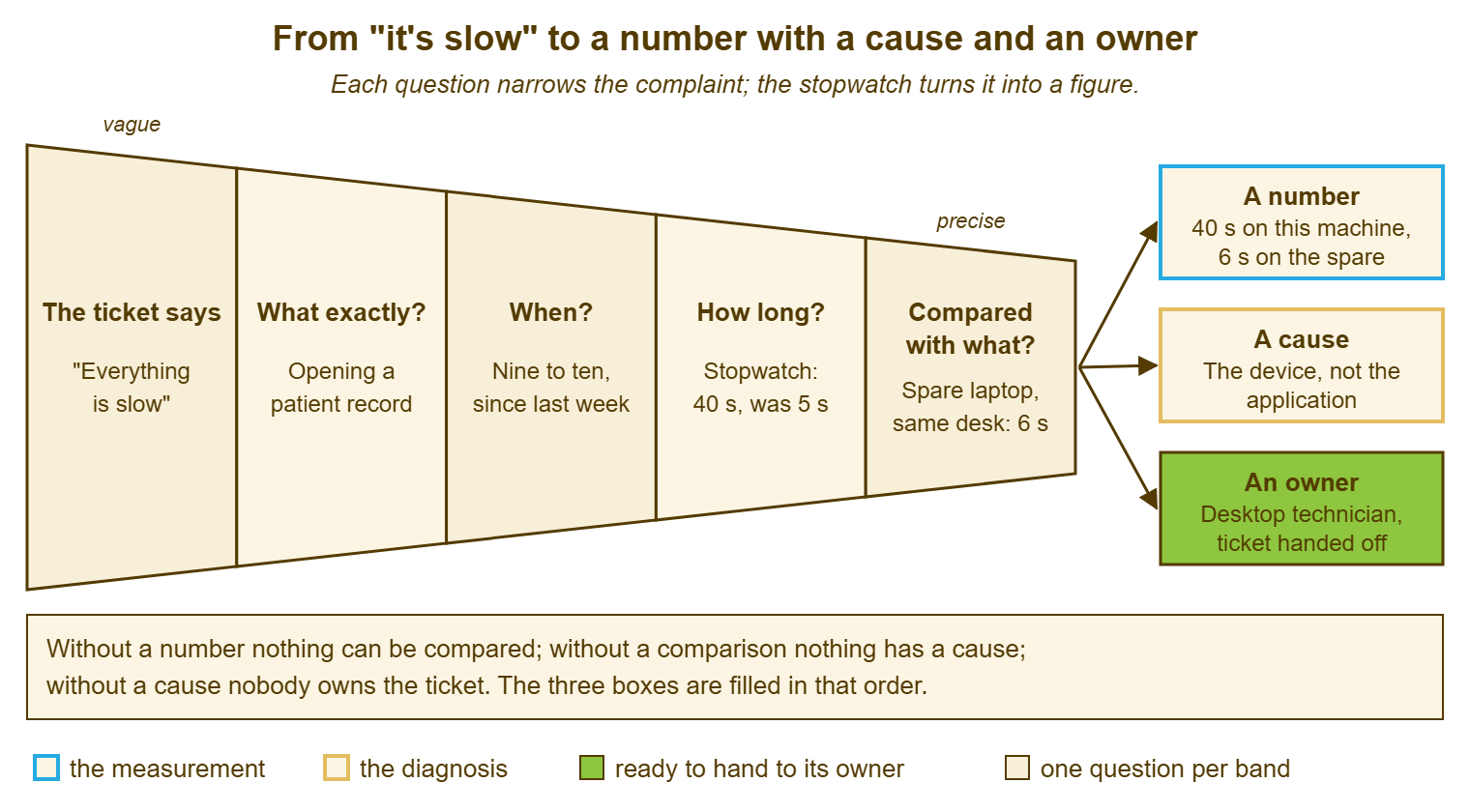
The funnel is also a fair description of how long each stage takes. The first two questions are a phone call, under two minutes. The stopwatch takes as long as the task plus a walk. The comparison is ten minutes with the spare. The whole thing, done well, is a quarter of an hour, which is less than the desk at Ashgrove had already spent sending Marianne the restart sentence three times.
The Stopwatch: Timing a Task Honestly
A stopwatch measurement is only as good as its two ends, so decide what "start" and "finish" mean before pressing the button. Start is the moment the requester does the thing: the double-click, the press of the power button, the click on "run report". Finish is the moment the result is usable. The record is on screen and the cursor responds, the desktop has loaded and a program will open, or the report shows numbers. It is not the moment the window appears, because a window can appear and then sit grey for thirty seconds. It is not the moment the progress bar fills, because progress bars are optimistic. Usable is the only finish that matches the requester's experience.
Time it three times and write down the middle one. A single timing is an anecdote with units. The first attempt after a restart is often slower than the next two because the machine is loading things it will keep loaded. And the third attempt can be faster still because the application has cached what it needs. Three timings, the middle one kept, with the other two in the note, is enough for a desk. Nobody is publishing a paper. Time it at the time of day the requester complained about and, if you can, once at a quiet time too. A task that takes forty seconds at nine and six at eleven has told you something a single reading never would.
Watch the requester do the task rather than doing it yourself, at least once. People have habits the desk does not know about. These include the search that runs across every field, or the view that loads every tenancy in the borough before filtering to one. Another is the report they run "just to check" before the real one. The task the requester does and the task the technician would do are different tasks more often than you would think. Only one of them is the slow one. Sit beside them, or watch over a remote session with the caveat that the session itself adds a little drag, and say nothing until the stopwatch stops.
The phone's stopwatch is enough. The temptation is to reach for a tool that measures the machine's internals, and those have their place in The Slow Computer. But the requester did not complain about a processor figure. They complained about a wait, and the wait is what gets timed. A stopwatch also has the advantage that the requester can see it, hold it and press it themselves. That matters more than it should when the number comes back smaller than they expected.
The table below says where to start and stop the watch for the tasks that fill most slowness tickets. Use the requester's words for the task in the ticket, and these definitions for the two ends. That way, a timing taken by one technician in March can be compared with one taken by another in June.
| Task | Start the watch | Stop the watch | Usual comparison |
|---|---|---|---|
| Morning start-up | Power button pressed | Desktop loaded and a program opens when clicked | The spare laptop; the same machine on a quiet day |
| Sign-in | Password entered | Desktop usable | A colleague's machine at the same time of day |
| Opening the application | Double-click on the icon | Main screen usable | The spare laptop at the same desk |
| Opening a record | Click on the record | Record on screen and editable | The spare laptop; the same record run by the owner at the server if they will |
| Running a report | Click on run | Numbers on screen or file saved | The same report with a narrower date range; the same report last month if timed |
| Saving a file | Save pressed | The application responds again | The same file saved to the local disk instead of the file service |
| Switching windows | Click on the other window | Window responds to typing | A colleague's machine with the same programs open |
The Before-and-After
The number taken before anything is touched is the baseline. And it is the single most valuable thing in a slowness ticket, because every later number is judged against it. Take it before the restart, before the clean-up, before the memory is ordered, before the vendor is called. A technician who restarts first and measures second has destroyed the evidence and will spend the rest of the ticket arguing with a memory. Forty-one seconds on Thursday morning is a fact that survives any amount of fixing. "It was slow before I restarted it" is not.
Then change one thing and measure again. Start-up items trimmed: time it. Disk cleared: time it. Memory added: time it. The after-number beside the before-number is what proves which change worked. A desk that makes four changes at once and declares victory has learned nothing it can reuse on the next machine. One change, one number. It is slower on the day and faster over the year, because the fourth machine with the same symptom gets the one change that mattered instead of all four.
The after-number is also what protects the desk from the "felt faster" trap. A requester who has watched a technician work on their machine for twenty minutes will report an improvement whether or not one happened, out of politeness and hope. And a technician who has done the work will believe them. The stopwatch does not care how long anyone worked. If it says forty-one before and thirty-nine after, the change did not work, however both parties feel about it. In that case, the next change gets tried. If it says six, the ticket has its proof. That proof goes to the requester in the reply, which is the subject of the fifth article in this series, on the perception gap.
Keep the spare laptop as the control. A control is the thing that stays the same while you change the other thing. The spare, at the same desk, on the same connection, doing the same task, is the control for the machine. Its number tells you what "normal" is for that task in that place today. If the spare is also slow, the cause is not in the requester's machine, and the ticket belongs to The Slow Application or to the network frame. The spare has saved more memory orders than any diagnostic tool I have used.
The Ticket That Says Only "Slow"
Most slowness tickets arrive with one word in them. And the reply that gets the four answers fastest is not a list of four questions. A requester who receives a numbered list of questions by e-mail answers two of them, vaguely, two days later. The ticket has aged three days before anyone has a number. The reply that works asks for one thing and offers one time: "Which task was slow when you wrote this, and would ten minutes at your desk at half past two suit? I'd like to time it while you do it." One question, one offer, and the other three answers come out at the desk in the first two minutes.
Better still, phone. A ninety-second call gets what exactly, when and since when, and books the stopwatch visit. It does all that before the requester has decided the desk is ignoring them. The general discipline of getting the right information in one pass rather than five belongs to Gathering the Right Information Up Front. For slowness the pass is shorter than for most tickets, because there are only four things to get and three of them come out of a conversation.
The form can do some of the work before the ticket exists. A request form has a field that asks "what were you doing when it was slow?" and another that asks "roughly how long did it take?". Such a form gets the first and third answers from the people who fill forms carefully. It gets "everything" and "ages" from the rest, which is no worse than now. Do not add a field for every question. A form with four slowness fields that nobody completes is a form that has taught people to pick a different request type. One field for the task, worded in plain words, and the rest at the desk.
Never reply with the restart sentence alone. A restart is a reasonable step and the stopwatch will often show it helped. But sent on its own, as a reply to a one-word ticket, it tells the requester that the desk has not read the ticket. It says the desk does not intend to, and it closes the door on the four questions. If the restart is going to be suggested, suggest it after the baseline: "Could you time the tenancy opening once more, then restart, then time it again, and send me both numbers?" Now the restart is a measurement with a side effect. The requester has become a technician for five minutes, and most people rather enjoy that.
Writing the Number Into the Ticket
The four answers go into the ticket as an internal note, in a fixed shape, before anything is changed. Task, in the requester's words. When, both halves. The three timings with the middle one marked, and the time of day they were taken. The comparison, with what was compared and its number. The device, by its tag or name, and whether the measurement was at the desk or over a remote session. Who measured, and who watched. That is seven lines, and it is the whole handoff. A technician who picks up the ticket tomorrow starts from a number, not from "Marianne says slow".
Keep the number in the internal note and the plain words in the reply. The requester needs "it takes about forty seconds to open a tenancy on your machine and about six on a spare. So the cause is in your machine and I'm working on it". The next technician needs the raw timings, the device tag and the time of day. In QuerySolv those are two different things on the same ticket: an internal note the requester never sees and a public reply they do. The event history keeps both in order. Most tools draw the same line somewhere, and the habit is to use it. (A bare number pasted into the public reply with no sentence around it reads like an accusation, and it is not clear of whom.)
Write the baseline even when the ticket looks trivial, and especially when the fix looks obvious. The ticket that gets closed with "restarted, fine now" and no number is the ticket that comes back in a fortnight with the same word in it. The second technician has nothing to compare against. The pattern across a dozen such tickets stays invisible until somebody counts them, which is what the last article in this series is for. Seven lines in the note, every time, is the price of the pattern being visible later.
Where the Number Sends the Ticket
Once the four answers are in the note, the ticket has a direction, and the direction comes from the comparison. The table below is the sorting. It is deliberately short, because the sort is the easy part once the number exists. The hard part was getting a number at all.
| What the comparison shows | What it means | Where the ticket goes |
|---|---|---|
| This machine slow; the spare at the same desk quick | The cause is in the machine | The slow-computer check, cheapest cause first |
| This machine and the spare both slow on this task | The cause is behind the screen: the application, its server, its data, or the path to it | The slow-application evidence sheet; the slow-connection isolation card if the task crosses the network and everyone at the desk has it |
| Slow at one time of day only, on every machine | Something scheduled is sharing the machines or the server at that time | Find what runs then before touching anything else |
| The same number as last month, and as the colleague's machine | Nothing has changed; the task is as fast as it is | The expectation-or-defect sheet, and a conversation rather than a repair |
| No comparison available | The ticket is not ready to be diagnosed | Take one: the spare, a colleague's machine, or a quiet-time reading |
Three of those rows send the ticket somewhere in this series. The machine that is slow on its own goes to the slow-computer check, which has the usual causes in the order they are cheapest to rule out. The task that is slow on every machine goes to the slow-application evidence sheet. That sheet is about finding out whether the cause is the organisation's own server, the vendor's, or the data. And the number that matches last month's number goes to Expectation or Defect. A thing that is exactly as fast as it has always been is not broken, however it feels. The conversation about that is a different conversation from a repair.
The fourth row, the time of day, is less a destination than a clue, and it is the one most often missed because nobody asked "when". A machine that crawls from nine to half past and is fine by ten is usually running something scheduled, its own or somebody else's. The same is true of an application server. Find what runs at that time before touching anything else. It is a fifteen-minute question that has, on desks I have run, closed more slowness tickets than memory upgrades have.
Remember: no slowness ticket is diagnosed until it has a named task, a time, a stopwatch number and a comparison in the note. Take the baseline before anything is changed, change one thing at a time, and measure after each change.
A Short War Story: The Drawing Office at Kestrel Marine
At Kestrel Marine, a boat builder with a drawing office of eight, a technician called Ruth inherited a run of slowness tickets from the designers. The tickets had been opened, closed and reopened for three weeks under the words "drawings slow" and "still slow". The previous technician had added memory to two machines. The technician had ordered a replacement laptop for the lead designer, Anders, on the strength of his being the loudest. Anders's new laptop opened the hull drawing in seventy seconds, the same as his old one. Ruth did what nobody had done, which was to stand beside Anders with a stopwatch and then beside the spare laptop. The result was seventy seconds on both, from the double-click to the drawing being usable, and four seconds for any other drawing in the same folder. The hull file had grown to carry every revision since the boat was first drawn. And it was the file, not any machine, that was slow. The designers archived the old revisions that afternoon and the drawing opened in nine seconds everywhere. The cost was eleven hours of desk time, two memory upgrades nobody needed and a laptop that went into the spares cupboard unopened. A stopwatch on the first day would have taken two minutes and pointed at the file.
The Slowness Intake Questions
The sheet below is the four questions as a card. It is filled in at the desk or on the phone and pasted into the ticket as an internal note before anything is changed. Section A is the conversation, B is the stopwatch, C is the comparison and D is the sort. It fits on one screen and, with practice, takes about a quarter of an hour including the walk. The time it saves is every hour that would have been spent fixing the wrong thing. Keep a copy in the knowledge base where the whole desk can find it. And give the requester-facing half, sections A and B, to any requester willing to time the task themselves.
SLOWNESS INTAKE — THE FOUR QUESTIONS
Ticket: ________   Requester: ______________   Device: ______________   Taken by: ______________

A. THE CONVERSATION (phone or desk, two minutes)
   1. What exactly is slow? One task, in the requester's words:
      ______________________________________________
      If "everything": the one task that made them write the ticket: ______________
   2. When?
      Time of day: ______________        All day / mornings / after lunch / set time: ______
      Since when: ______________
      What changed around then (install, update, move, new file): ______________
   3. Who else has it?  nobody / same team / same room / everyone: ______________
      If the task crosses the network and others have it: slow-connection isolation card

B. THE STOPWATCH (three timings, middle one kept)
   Start the watch at: ______________   Stop it at: ______________ (usable, not visible)
   Timing 1: ____ s   Timing 2: ____ s   Timing 3: ____ s   Middle: ____ s   Time of day: ______
   Quiet-time timing, if taken: ____ s at ______
   Watched the requester do it: yes / no       At the desk / remote session

C. THE COMPARISON (one of these; more if cheap)
   Spare laptop, same desk, same task: ____ s
   Colleague's machine, same task: ____ s   whose: ______________
   Same task, same machine, earlier: ____ s   when: ______________
   Vendor's or owner's expected time: ____ s

D. THE SORT (tick one)
   [ ] This machine only; the spare is quick ............... slow-computer check
   [ ] Every machine; the spare is slow too ................ slow-application evidence sheet
   [ ] Every machine; task crosses the network ............. slow-connection isolation card
   [ ] One time of day only ................................ find what runs then
   [ ] Same number as before and as colleagues ............. expectation-or-defect sheet
   Baseline written in the ticket before any change: [ ]
Dev filled the card at Marianne's desk at half past two, with the spare laptop beside hers. Section D ticked the first box, which sent the ticket to the slow-computer check. The cause turned out to be a disk with almost nothing left on it and a tenancy application that wanted room to think. Marianne timed the fix herself: six seconds. She has not had to write the word "slow" since, and the desk has not had to write the word "restart". Everyone involved considers this a fair trade.
Frequently Asked Questions
The requester works remotely and I cannot stand beside them. How do I get a timing?
How many timings do I need before the number counts?
The task is quick every time I am there and slow when I am not. What then?
Should I restart the machine before measuring, to rule that out?
What number counts as slow? Is there a threshold?
Can we let requesters do the whole measurement themselves?
From the QuerySolv team: we build self-hosted help desk software for Windows. QuerySolv runs as one Windows service on your own network. It takes requests by web form, e-mail, live chat, social messages and REST API. It is licensed once per installation rather than per agent per month. The free trial runs the full product for 30 days.