
The Two-Minute Rule and Its Limits at the Desk-Side Visit
Thursday, 11:50, at the main reception desk of Harbourview Clinic. Owen has replaced Leah's headset, ticket 5520, tested it on a call to the desk, and written the note. He has a visit in the physiotherapy suite at twelve. "While you're here," Leah says, "could you just plug my second screen back in? The cleaners knocked the cable out last night and I can't reach behind there." That is a two-minute job if ever there was one. Owen reaches behind, finds the cable, plugs it in. The screen stays black. He tries the other port. Still black. He checks the display settings, which show one screen. He swaps the cable for the spare in his bag, which is the wrong connector. He goes to the store cupboard for the right one. At 12:14 the second screen comes on. At 12:16 he arrives in the physiotherapy suite. A therapist has been waiting with a patient's notes open on a frozen machine since noon.
The two-minute rule says that an add-on at a desk-side visit may be done on the spot under strict conditions. It must genuinely be two minutes of work with everything in hand and nothing waiting on it. It is logged as a ticket even then. Everything else is captured and left for the queue. The rule exists because a flat ban on add-ons is wrong, since plugging in a cable really is sometimes a two-minute job. It also exists because a rule of thumb without limits is how a two-minute cable becomes twenty-six minutes and a therapist waiting with a patient. This article is part of our While You're Here series, and it is about the limits, which are where the rule earns its keep.
It covers what the rule says and why two minutes and not five. Next come the four ways two minutes becomes twenty, then certainty rather than hope as the test. Logging it anyway, the rule written down, and the two real exceptions follow. Then come the decision drawn as a flow, a short war story, and the two-minute decision card to copy, in that order.
What the Rule Says
The rule has three conditions and all three have to be true, which is the part people forget. The technician can see the whole task from where they stand: the start, the end and nothing hidden in between. Everything the task needs is already in hand: the cable, the right, the sign-in, the part. And nobody and nothing has to be waited on: no restart, no approval, no colleague, no download. A task that passes all three is done now, logged, and the technician leaves on time. A task that fails any one is captured as a ticket in thirty seconds, in the way the previous article describes. The technician leaves on time anyway.
The rule is a permission, not an instruction. It does not say that two-minute add-ons must be done at the visit; it says they may be, when the three conditions hold and the next appointment is not already at risk. A technician who is already running five minutes behind has lost the permission for that visit, however small the task, because the next user has already paid once. This matters because the rule is often quoted back by users: "it's only two minutes, you said". The honest answer is that the two minutes belong to the schedule, not the task, and the schedule is already spent.
Plugging a cable in is the perfect example of the rule because it is the perfect example of its failure. The task is two minutes if the cable was the fault. Owen could not know that the cable was the fault until he had plugged it in. That is to say, he could not see the end of the task from where he stood. That is to say, the first condition was never met. It looked like a cable. It was a cable, a port, a setting and a trip to the cupboard, and the only way to find that out was to spend the time. "It's just a cable" is a hypothesis. The rule is about tasks, not hypotheses.
Why Two Minutes and Not Five
Two minutes is the length of a task you can see end to end, and five is the length of a task you think you can. That is the whole argument, and it rests on how people estimate. A technician who says "two minutes" is describing a task with no steps in it: plug in, confirm, done. A technician who says "five minutes" is describing a task with steps, and steps are where the hidden dependencies live. I have never once heard a technician say "five minutes" about a task that then took five. I have heard it about tasks that took two and about tasks that took forty, and the forty are the ones the next user remembers.
The number also comes from the schedule. The next article in this series, Protecting the Schedule, argues for a buffer of ten to fifteen minutes between visits. The buffer has to absorb the walk, the note, the capture of whatever add-ons arrived, and at most one genuinely small fix. Two minutes fits. Two fives do not, and the first five is always followed by a second. The user who has had one thing fixed on the spot has just learned what the visit is for. The buffer is a budget. The two minutes is the only line item in it that is optional.
The precise number is arbitrary and that is fine; what matters is that it is written down and the same for everyone. A desk could choose three minutes or ninety seconds and the rule would work as well. What does not work is a rule that lives in each technician's head at a different length. Then the user who has had a ten-minute add-on from one technician will expect it from the next. The next will either break the schedule or look unhelpful by comparison. Pick a number. Two is a good one because nobody can convince themselves that a driver reinstall takes two minutes.
The Four Ways Two Minutes Becomes Twenty
Two minutes becomes twenty in four ways, and knowing them lets a technician spot the trap before stepping in it. The first is the hidden dependency, which is Owen's cable. The task is small, but it sits on top of something that might also be broken. The only way to find out is to do the small task and watch it fail. Ports, cables, adapters, "it just needs re-pairing" and "it just needs the right printer selecting" all live here. The tell is that the task is a test of a guess rather than a known fix.
The second is the restart, and anything that needs one is not two minutes. A restart is two minutes plus the restart plus the sign-in plus the applications opening plus the user saying "while that's restarting, can I ask you about" something else. That last part is the expensive one. The third is the sign-in or approval. The task needs a password the technician does not have, an administrative right that has to be requested, or a manager's say-so. The moment anyone else has to be involved, the two minutes have left the building. The fourth is the second symptom: fixing the small thing reveals a larger thing behind it. The re-added mailbox turns out to be empty, or the re-plugged screen comes on at the wrong resolution. The technician, having started, feels obliged to finish. The table below gives the tell and the answer for each.
| How it grows | What it sounds like | The tell | The answer |
|---|---|---|---|
| The hidden dependency | "It just needs plugging back in" / "it just needs re-pairing" | The task is a test of a guess; you will only know it worked by trying | Capture it; a guess is not a two-minute task |
| The restart | "It'll be fine after a restart" | Any step that involves waiting for the machine | Capture it; a restart is never two minutes |
| The sign-in or approval | "You can just put your admin password in" | Someone or something else has to be involved | Capture it; the queue has the rights and the approver |
| The second symptom | "Oh, and now it's doing this" | The fix revealed a further fault | Stop; log the second symptom as its own ticket; leave on time |
The fourth one deserves a second look because it is the one with the strongest pull. A technician who has started a task feels that leaving it half-done is worse than never having started. In a sense it is, which is why the rule is strict about the first three. The way to avoid leaving things half-done is not to start things you cannot see the end of. When the second symptom appears anyway, the right move is to stop, say so, log it, and go. "I've got the screen back, but it's the wrong resolution and that's a different problem. So I've logged it as 5531 rather than make the physio suite wait any longer." The user would rather have a working screen and a number than a technician who is somewhere else in their head.
Certainty, Not Hope
The test is one question, asked silently before the technician moves: can I see the end of this from here? Not "is this probably quick", not "would this normally be quick", but can I see, from where I am standing, every step between now and done, and are all of them in my hands. If the answer is yes, it is two minutes. If the answer contains the word "probably", "should", "normally" or "unless", it is a capture, and the word itself is the tell. Technicians are optimists about tasks and pessimists about people, and the rule exists to correct the first half of that.
Certainty is rarer than it feels, and that is the uncomfortable truth of the rule: most add-ons fail it. Changing a default printer when the right printer is visible in the list is certain. Adding a shortcut to a desktop is certain. Showing someone where a setting lives, when the technician knows where it lives and it is three clicks away, is certain. Almost everything with a cable, a device, a sign-in, a sync, or the word "sometimes" in it is not. The fact that the uncertain ones are the interesting ones is the technician's problem, not the schedule's.
If this feels ungenerous, remember who the generosity is for. Doing an uncertain add-on now is generous to the user in front of you with time that belongs to the user you have not reached yet. The second user did not agree to the gift. The queue, where the add-on goes when captured, is where the desk is generous to everyone at once, in order. That is a less warm sentence than "let me just have a look", and it is the one that gets the physio suite seen at noon.
Remember: an add-on is done on the spot only when all of these conditions hold. You can see the whole task from where you stand. You have everything it needs in hand and are waiting on nobody. The next appointment is not already at risk. "Probably two minutes" is a capture. Log it even when you do it.
Log It Anyway
The two-minute fix is logged as a ticket even though it is already done. The reason is that work without a ticket did not happen as far as the desk is concerned. It is not in the count of what the desk did this month. It is not in the pattern that would show that six screens on the same floor have been "knocked out by the cleaners" since the desks were moved. It is not on the user's record, so the next technician does not know it was done. And the user has no number to quote when the screen goes black again on Monday, which it may, because the fix was a cable and the fault might not have been.
The ticket for a fix done at the desk is a one-liner and takes the same thirty seconds as any other capture. It has the user's name, the symptom, the location, "done at visit" in the first line, and the visit's ticket number. Say the number out loud as you would for anything else: "I've plugged that back in and logged it as 5530 so there's a record." If you run QuerySolv, the one-line ticket can be linked to the visit's ticket. What gets fixed on the spot is then visible later alongside what got captured, without anyone keeping a separate tally. In any tool, the linked one-liner is what turns an invisible favour into a counted piece of work.
Logging also keeps the rule honest, because a two-minute fix that is logged can be checked. A desk lead looks at a month of "done at visit" tickets. If half were followed by a second ticket for the same thing within a week, the desk lead has learned that the two-minute fixes were not fixes. They were guesses that happened to work for a few days. That is useful to know and impossible to know from memory. The last article in this series is about what the captured and the done-at-visit tickets reveal together, and the done-at-visit ones are the more surprising half.
The Rule Written Down
The rule only works if it is written. A rule that exists in the technician's head is a judgement call made in front of the user. A rule on the desk's scope page is a decision the desk already made. The text is short and belongs in two places. The first is the page where the desk describes what it does and how, alongside the scope boundaries described in Scope Boundaries. The second is the visit card the technician carries. One paragraph is enough. "At a desk-side visit, a technician will work the ticket the visit is for. Anything else you mention will be logged as a ticket there and then and you will be given the number. If it is genuinely a two-minute task with no restart, sign-in or part needed, and the next appointment is not at risk, the technician may do it on the spot. It is logged either way."
Writing it down moves the decision off the technician and onto the desk, which is where the user's disappointment, if there is any, should land. "I'd love to, but the desk's rule is two minutes and this isn't one, so I've logged it as 5531" is a sentence a technician can say without feeling that they are being personally unhelpful, because they are not. They are reporting a rule, and the rule has a reason the user can read. The user who wants to argue with the rule can argue with the desk lead, which is a conversation the desk lead is paid to have and the technician is not.
Written rules also stop drift. Within a year, a desk with an unwritten two-minute rule has a five-minute rule for popular technicians. It has a ten-minute rule on the executive floor and no rule at all on Friday afternoons. Every one of those is a user's reasonable expectation that will be disappointed by the next technician who follows the original. Put the paragraph on the page, point at it, and change it only in writing. A rule is only a rule if two technicians apply it the same way to the same cable.
The Two Real Exceptions
There are two exceptions to the rule, and they are both written down in advance. An exception invented at the desk is just the rule being broken with a better excuse. The first is the thing unsafe to leave: data at risk, a person unable to work at all, or a security concern, such as a machine showing something it should not. These are not add-ons in the ordinary sense; they are new, urgent tickets that happen to have been reported in person. The right response is to deal with it now, log it immediately afterwards, and let the next appointment know you are running late and why. Nobody who waited ten minutes because the technician was stopping a document from being lost has ever complained about it.
The second exception is the written exception list: a short, agreed set of people or occasions. For those, the desk has decided, in advance and for stated reasons, that an add-on is handled differently. On most desks this is a handful of named executive roles and a few occasions: a board day, a site visit, a public event. In those cases, the cost of a small fault is out of proportion to the time it takes to fix. The list is written, short, and agreed by the desk lead, never assembled on the spot from whoever seems important. What that list should contain, and why it must not become a hidden service level for people with corner offices, is the subject of What VIP Support Is and Is Not and No Shadow SLA. This article only says that the list exists, that it is short, and that an add-on for someone on it is still logged. The point of the list is to be deliberate, not to be invisible.
Everything else is not an exception, however much it feels like one at the desk. The user who is very nice is not an exception. The user who is very cross is not an exception, and the library's series on working with frustrated users is a better guide to that moment than any rule about minutes. The task that is interesting is not an exception, and neither is the task the technician is personally embarrassed not to be able to do in two minutes. I have invented exceptions on the spot for all four of those. The physio suite waited for every one.
The Decision as a Flow
The picture below draws the decision as five questions asked in order, with an outcome on the right for each one that leaves the middle. Is it unsafe to leave? If so, do it now and log it afterwards. Is it on the written exception list? If so, the same. Are you certain it is two minutes, with everything in hand and nobody to wait on? If not, capture it. Does it need a restart, a sign-in, an approval or a part? If so, capture it. Is the next appointment at risk? If so, capture it. Only an add-on that gets through all five reaches the green box at the bottom, which says to do it now and log it anyway. The note under the picture says the thing all three outcomes have in common.
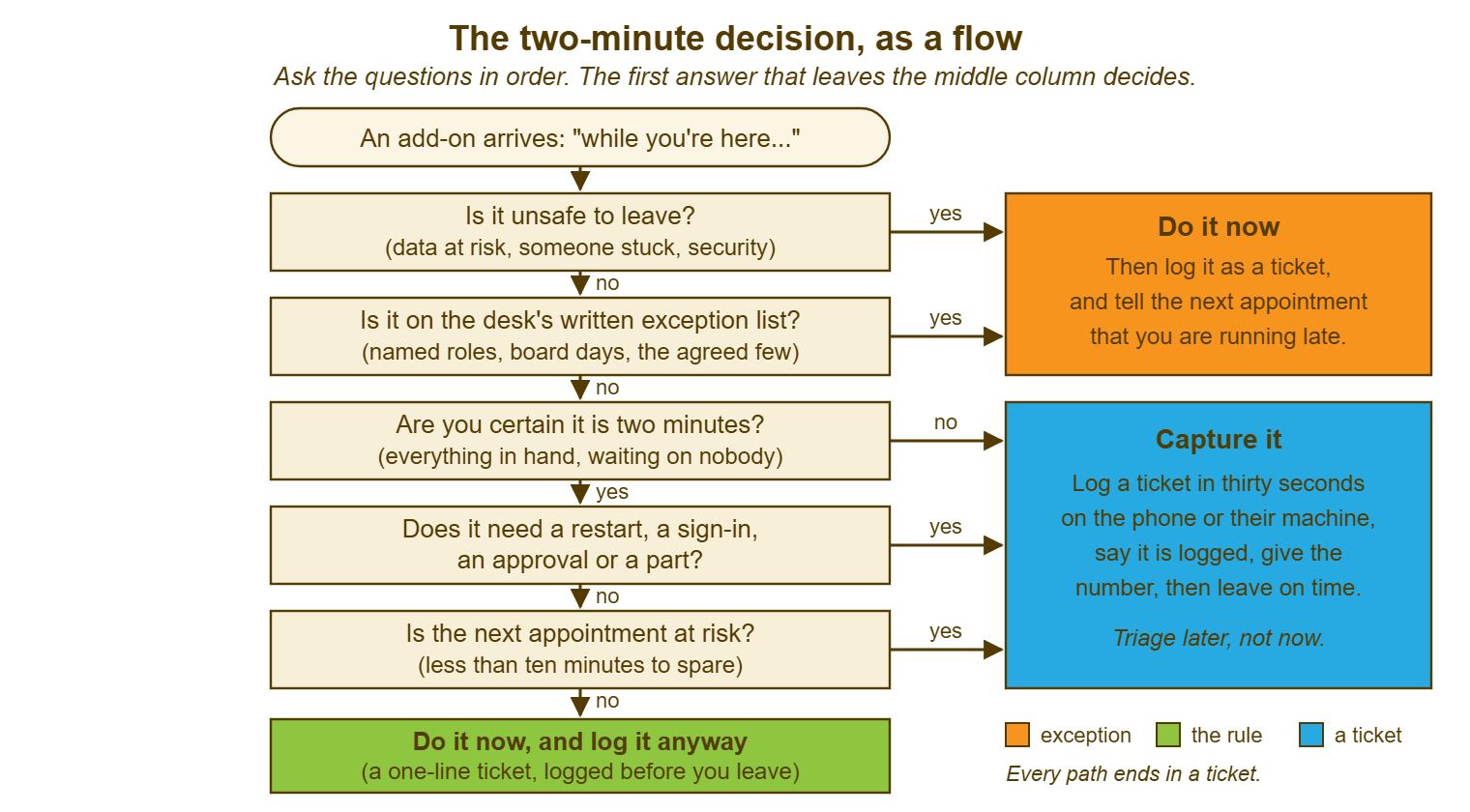
The order matters. The two exceptions come first so that the urgent thing is never captured and left because a technician was dutifully applying a rule about cables. The certainty question comes next because it fails most add-ons on its own. The restart and the schedule questions catch the ones that certainty lets through, which are the tasks that really are small but sit at the wrong moment. Most add-ons leave the flow at the third box. That is not the rule being harsh. That is the rule being accurate about what a technician can see from someone else's desk.
A Short War Story: The Mouse at Redbrook Engineering
At Redbrook Engineering, a technician called Dev was finishing a visit in the drawing office when a designer called Aisha asked him to re-pair her wireless mouse. It had stopped responding after she had changed the batteries. Dev had a visit to the test laboratory at two o'clock to help start a calibration run. He said the mouse would take two minutes. The mouse did not re-pair, so he reinstalled its driver. The driver wanted a restart, so he restarted. The restart picked up an update that had been waiting, which took eleven minutes with a progress bar nobody could hurry. When the machine came back the mouse paired on the second attempt, by which time it was 14:35. The laboratory's calibration run, which needed a technician present to start and had a fixed slot on the shared equipment, was missed. The lab lead rebooked it for the following afternoon. That cost the test team a day's waiting and the desk a conversation with the engineering director about why a mouse had outranked a laboratory. Dev's note on the original ticket was complete and his note on the mouse did not exist, because the mouse had never been a ticket. The lesson the desk wrote under its two-minute rule was that a task with a restart in it is never two minutes. "Probably" is the word that means capture. The person who pays for an optimistic estimate is never the person who made it.
The Two-Minute Decision Card
The card below is the flow in words, small enough to live on the back of the visit card or on a card in the toolkit. It is used in silence, before the technician moves. Read the top block first, because the exceptions come before the rule; then the three conditions, which all have to be ticked; then the schedule check. An add-on that reaches the bottom is done and logged. One that stops anywhere else is captured and logged. The last line is the one to say out loud either way. The card is joke-free and copyable. A desk that prints it should put the written rule from the scope page on the other side. That way, the technician can hand the user the reason as well as the number.
THE TWO-MINUTE DECISION CARD
Visit ticket: ________   Add-on, in the user's words: ______________________________

FIRST: THE TWO EXCEPTIONS (either one: do it now, log it after, tell the next appointment)
  [ ] Unsafe to leave: data at risk / a person unable to work at all / a security concern
  [ ] On the desk's written exception list (named roles or occasions only)

THEN: THE THREE CONDITIONS (all three, or it is a capture)
  [ ] I can see the whole task from here: start, end, nothing hidden in between
  [ ] Everything it needs is already in my hands: part, cable, right, sign-in
  [ ] Nothing and nobody has to be waited on: no restart, approval, download or colleague

  Words that mean "capture": probably / should / normally / unless / sometimes / just needs

THEN: THE SCHEDULE
  Next appointment at: ______   Minutes to spare right now: ______
  [ ] Ten or more minutes to spare (fewer: capture, whatever the task)

RESULT
  All boxes above ticked ....... DO IT NOW, then log it: "done at visit", linked to ________
  Any box not ticked ........... CAPTURE IT: one-line ticket, linked to ________, leave on time
  Second symptom appears ....... STOP, log the new symptom as its own ticket, leave on time

SAY, EITHER WAY
  "That's logged as ________; here is what happens next: ______________________."
Owen printed the card the following week and kept it in the lid of his toolkit, which was unnecessary after about a fortnight and useful for exactly that long. The next "could you just plug my screen back in" came from a different reception desk. He said, honestly, that the last one had taken him twenty-six minutes and a trip to the cupboard. So he had logged the new request as 5612 and someone would be along. The receptionist said that was fine, because the screen had been off for a week already and she mostly wanted it to be somebody's job. It was. The cable, this time, was the cable. It took the technician who came on Friday ninety seconds, which proves nothing, because nobody knew that on Thursday.
Frequently Asked Questions
Why log a fix that took ninety seconds? It feels like paperwork.
What if I start a two-minute task and it turns into twenty?
Can the desk choose a different number, say five minutes?
Who decides what goes on the written exception list?
The user is upset that I will not do something small. What do I say?
Does the rule apply to remote sessions too, or only in-person visits?
From the QuerySolv team: we build self-hosted help desk software for Windows. QuerySolv runs as one Windows service on your own network. It takes requests by web form, e-mail, live chat, social messages and REST API. It is licensed once per installation rather than per agent per month. The free trial runs the full product for 30 days.