
Shared Folders and the Permission Tangle
Tuesday, 10:15, at Stonebridge Insurance. Nadia has been on the desk for eight months. She has ticket 5102 open: "I can't open the Claims 2 folder but Rob can, and we're on the same team. Can you fix?" She opens the folder's permission list to see who can reach it. She finds twenty-three entries. Fourteen are individual people's names. Six of those people have left, one of them before Nadia was born, professionally speaking. Two entries are groups called Claims-Temp and Proj-Falcon that nobody on the floor can explain. One is "everyone, read", added, according to its date, on a Thursday four years ago, probably for an audit, probably for a day. Underneath, Claims 2 has forty subfolders, nine of which have been given lists of their own, and the requester needs the ninth. Nobody can tell Nadia who owns Claims 2. Rob can open it because Rob's name is on it, from a project in a year the folder's name does not mention.
A shared folder is a folder on the file service that more than one person can reach. Its permissions are the list on it of who can do what: read, change, or decide who else may. The permission tangle is what that list becomes when it is edited one name at a time for years. Nothing is removed or explained, and nobody is in charge of it. This article is part of our Access & Permission Requests series. It is about the tangle: how it forms and why groups rather than names are the way out. It covers how to read an inherited mess and what to do with the folder nobody owns. Then it explains how to untangle a file service one share at a time, without a weekend and without a big announcement.
It covers permissions in plain words and why groups and not people. Then come the folder nobody owns, the inherited mess, and the one-off exception that lasts forever. Next are the shape of a clean share and untangling one share at a time. "I can't see it" versus "it's gone" follows. A short war story and the folder ownership register to copy come last.
Permissions in Plain Words
Every folder on a file service carries a list of who may do what to it. Three verbs cover nearly everything. Read is opening and copying. Edit is changing, adding and deleting. Manage is changing the list itself, deciding who else may read or edit. Each entry on the list is a name, either a person or a group, with one of those levels beside it. When a person opens a folder, the file service reads the list. It finds every entry that applies to that person, directly or through a group they belong to. Then it adds the levels up. If nothing applies, the folder does not open. That is the entire mechanism, and every ticket about a shared folder is a question about that list.
Subfolders normally copy their parent's list, which is called inheritance. A folder created inside Claims 2 gets Claims 2's list automatically. A change to Claims 2's list flows down to everything inside it. Inheritance is what makes a share manageable, because one list at the top governs a thousand folders below. It can be switched off on any subfolder. That gives the subfolder a list of its own that the parent no longer governs. That is where tangles begin, because the file service does not keep a map of where inheritance was broken. It just stops flowing, silently, at the folder where somebody once needed it to.
Two more things, and then the vocabulary is complete. A list can carry a deny entry, which takes a level away from a person or group even if another entry grants it. Deny entries win. They are rare, powerful, and the first thing to look for when someone in the right group still cannot open a folder. And a person who has been removed from the list but still has the folder open keeps their access until they close it. So "I removed them and they can still see it" usually means "they have not disconnected yet". None of this needs a command. It needs a desk that knows, before it touches anything, what the list is and where it came from.
Why Groups and Not People
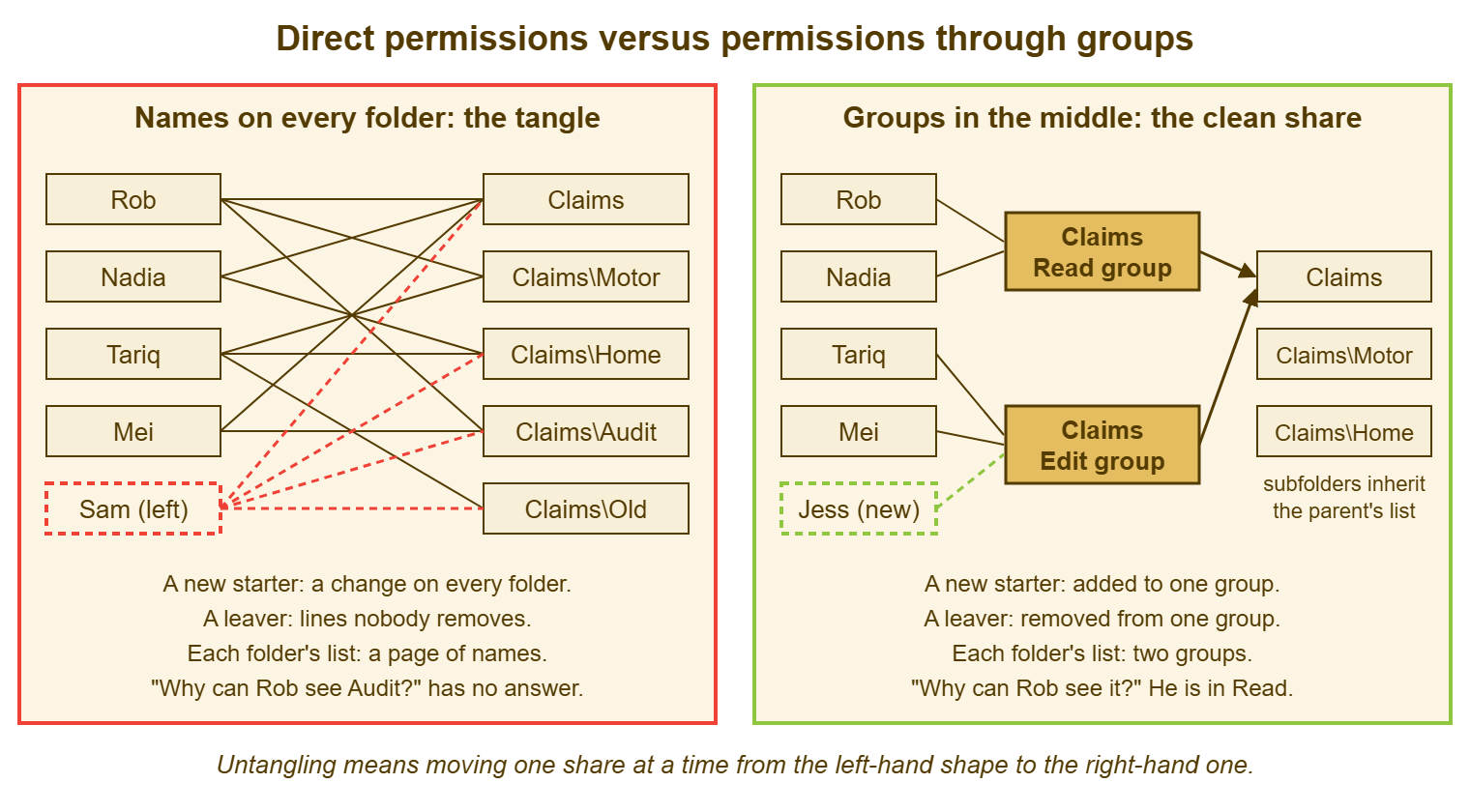
The way out of the tangle is to put a group between the people and the folder. That way, the folder's list names groups and the groups contain people. A group is a named set of accounts in the directory. When the folder's list says "Claims Edit group, edit", everyone in that group can edit the folder. Nobody then has to be named on the folder itself. A new starter in the claims team is added to the group, one change, and can reach every folder the group is on. A leaver is removed from the group, one change, and loses every one of them at once. The folder's list stays two or three entries long and can be read aloud. "Why can Rob see it?" has an answer. The answer is "because he is in the Claims Read group". That is a sentence a manager can confirm or deny.
The picture below draws the two shapes side by side. On the left, names are wired straight to folders, and the lines cross. A new starter means a change on every folder they need. A leaver means lines nobody removes. Every folder carries a page of names that nobody can explain. On the right, the same people sit in two groups, and only the groups appear on the folder. The subfolders inherit the list. A starter is one change, a leaver is one change, and each folder's list is two lines long. Untangling means moving a share from the left-hand shape to the right-hand one. The whole of the rest of this article is how to do that for one share at a time.
Groups cost one thing, which is naming. A group has to say what it is for in a way the desk will still understand in five years. That rules out Claims-Temp and Proj-Falcon and rules in "Claims Read" and "Claims Edit". A convention of share name, then level, written the same way every time, is enough. The desk keeps the convention in the knowledge base, visible to everyone. That way, a manager asking "which group do I want?" can read the answer rather than ask it. Groups named after a project or a person are tangles with extra steps. I have untangled enough of those to have an opinion about project code names on groups. (They were all called something like Falcon. They always are.)
The Folder Nobody Owns
Every shared folder at its top level has an owner, a named person who decides who may reach it. The folder nobody owns is the one where the tangle grows fastest. Every request for it is approved by nobody and therefore by the desk. The symptoms are easy to spot. There is a list with many individual names and no groups. Requests arrive as "my manager said I could have it". And there is a name on the folder, Claims 2, that nobody will claim. The thing it was named for has been reorganised twice. Nadia's ticket cannot be resolved properly until Claims 2 has an owner. Finding one is the first step of the ticket, not a separate project.
Find the owner by asking the people who use the folder most, starting with the most senior of them. "Who decides who can see Claims 2?" gets "I suppose it's me" from the claims manager more often than not. "I suppose it's me" is an owner, recorded on the ticket and on the register. Where the folder straddles two teams, the two managers pick one of themselves and the register records the other as deputy. Where nobody will own it, the folder has no reason to exist in its current form. In that case, the honest answer is to make it read-only. Announce that it will be archived on a date unless somebody claims it, and watch who complains. The complainers are the owners. (They are also, in my experience, the people who said it was not theirs.)
Ownership of a folder is the same idea as ownership of any resource. The approval design that depends on it, with a deputy and a timer, is in Approval Workflows That Do Not Stall. A shared mailbox has the same problem in the same shape. The way to find and keep mailbox owners is in Shared Mailboxes and Delegation. The folder register at the end of this article is where the answers go, one row per top-level share. A folder without a row on the register is a folder the desk has not yet found an owner for.
The Inherited Mess
The hardest tangles are not on the top-level folder but underneath it, in subfolders where inheritance was broken years ago for a reason nobody remembers. The ninth subfolder of Claims 2 has its own list. The requester is on the Claims 2 list through Rob's old project group. But the requester cannot open the ninth subfolder because that subfolder never heard about the group. Its list stopped listening to the parent when somebody broke inheritance to keep a contractor out of it. The symptom is always the same. "I can see the folder but not the thing inside it." Or: "I can see the thing inside it but not the folder it is in." The latter is the stranger case, where a subfolder grants access that its parent does not.
The diagnostic question for every entry on a tangled list is "where does this come from?" The file service will usually say, for each entry, whether it is inherited from a parent or set directly on this folder. Entries set directly on a folder deep in a tree are the ones to be suspicious of. Each one is a decision somebody made once, in a hurry, and never wrote down. Walk the tree from the top. Note each folder where inheritance stops. Write the list at each stop on the ticket before changing any of it. The map you draw is the one the file service never kept, and it is the first artefact of the untangling.
Restore inheritance only when you know what the subfolder's own list was keeping out, and only after the owner has agreed. A broken inheritance was usually broken to protect something: a pay file, a disciplinary folder, a client's confidential bundle. Switching it back on without looking gives the whole parent list access to it in one click. The safe version is to move the protected thing to its own top-level share, with its own owner and groups. Then restore inheritance on the subfolder that no longer needs to be special. Nine broken subfolders usually resolve into two that should have been shares of their own and seven that nobody can explain. The seven get inheritance back, and the two get a row on the register.
| What the ticket says | Likely cause | What to check first | The fix that lasts |
|---|---|---|---|
| "Rob can see it and I can't, same team" | Rob is named directly or via an old group; the team's group is not on the list | Where Rob's entry comes from | Put the team's group on the folder; take Rob's name off once he is in the group |
| "I can open the folder but not the subfolder" | Inheritance broken on the subfolder; its own list is older than the parent's | Whether the subfolder inherits | Owner decides: restore inheritance, or make the subfolder its own share |
| "I'm in the group and it still won't open" | A deny entry, or the group is nested in a group the folder does not grant | Deny entries; what the group is actually a member of | Remove the deny or flatten the nesting; record why it was there |
| "I removed them and they can still see it" | The person's session is still open; or a second entry grants it | Other entries that apply to them, including everyone-style groups | Find and remove the second route; wait for the session to end |
| "Everyone can see the finance folder" | An everyone-style group added for a one-off and never removed | Entries that grant to all users, and their dates | Replace with the right group; put the exception rule in place |
| "The folder's disappeared" | Usually a permission change, not a deletion; sometimes a move | Whether the folder exists and who can see it | Triage as a permission ticket first; a recovery ticket only if it is gone |
The One-Off Exception That Lasts Forever
Most entries on a tangled list were exceptions, each made for a day, and the way to tell is the date beside them. "Everyone, read" for the audit in a year nobody can name. A contractor's account for a three-month project was added to six folders. It is still there two years after the contractor left. The account was disabled at the leaver audit but the entries were not. Rob, for Project Falcon. The exception was reasonable on the day. What was missing was the day it ended. An exception on a folder's list is a grant like any other. And The Access Request, Done Properly applies to it in full: what, for whom, why, for how long, who approves, on a ticket, with an end.
The rule that stops the tangle re-forming is that no individual name goes on a folder's list, ever, including for a day. An exception is a group too, named for its purpose and its end: "Claims Audit Read, until the audit closes". It has the people in it and a ticket dated for its removal. When the audit closes the group is emptied and removed from the folder, and the folder's list has lost nothing but the exception. A desk that allows names on folders "just this once" has a list that will be twenty-three entries long in four years. Every "just this once" is a different once and nobody is counting them.
The contractor case deserves its own sentence because it is the commonest. The leaver audit, in Finding the Accounts Nobody Disabled, catches the account. It does not catch the entries the account left on folders. Those sit there harmlessly until the account is re-enabled for a returning contractor, or its name is reused. At that point the old entries come back to life. Groups fix this at the source, because a disabled account in a group is a disabled account and nothing more. The group's membership is reviewed at the access review. Entries on folders are reviewed by nobody. That is why they last forever.
Remember: a folder's list names groups, never people. Every subfolder inherits unless an owner has agreed, in writing, why it should not. Every exception is a group with an end date and a removal ticket. If a list breaks any of the three, the tangle is already growing.
The Shape of a Clean Share
A clean share has a shape you can describe in a paragraph, and the shape is what the untangling aims at. One top-level folder per team or function, with an owner and a deputy on the register. There are three groups per share, named for the share and the level: read, edit and manage. Manage is held by the owner and the desk and nobody else. Inheritance on from the top, so the three groups govern everything beneath, with a short written list of the subfolders that are exceptions and why. The depth stays shallow, because a share eight levels deep is a share where somebody will break inheritance at level five to solve a problem at level six. And there is a line in the knowledge base, visible to everyone, saying what the share is for and which group to ask for. That lets the access request name it. If you run QuerySolv, a knowledge base article can be visible to everyone rather than to the desk alone. That is the right audience for a share map, because the people who need it are the ones filling in the request.
The three-groups rule is the one most desks question, because many shares only ever need read and edit. The answer is to create all three anyway. A manage group with one member costs nothing. When the owner changes, that group means the change is a group membership. It is not a hunt through the list for the old owner's name. The read group with no members is rarer than you expect. Most shares have someone who should see and not change: an auditor, a manager from another team, a new starter in their first week. The group exists so that the request for them is a membership and not a name on a folder.
A share that cannot be made to fit the shape is usually two shares that grew together. In that case, the right move is to split it, rather than to carry an exception forever. The split needs a new top-level folder, its own groups and its own owner. Claims 2's ninth subfolder was the complaints bundle. The complaints lead owned it without knowing it. It became a share of its own with four people in its edit group and a read group containing the claims manager. The other eight exceptions were restored to inheritance over an afternoon with nobody noticing, which is the right amount of noticing.
Untangling One Share at a Time
Untangle one share at a time, starting with the one that generates the most tickets, and never attempt the whole file service in a weekend. The weekend version fails because every share has one exception somebody depends on. The Monday after a big-bang rebuild is a queue of a hundred "I can't open" tickets that nobody can triage. Everything changed at once. The one-share version takes a fortnight per share, most of it waiting. It produces a queue of three tickets. Each can be answered by looking at one list. A file service with thirty shares is untangled in a year this way, and the year is mostly uneventful, which is the point.
The method for one share has seven steps, each short. Find the owner, as above, and record them. List every entry on the top-level folder and on every subfolder where inheritance stops, on the ticket, with where each entry comes from. With the owner, map every entry to one of the three new groups, or to "remove", or to "this needs its own share". The owner decides; the desk proposes. Every leaver's name and every unexplained group goes to "remove" unless the owner objects. Create the groups, put the mapped people in them, and add the groups to the folder alongside the old entries. That way, for a fortnight both routes work. Announce, briefly, to the share's users that the folder's access is being tidied. Say that anyone who loses access should raise a ticket quoting the share name. Remove the old entries. Watch the queue for a fortnight, fix what arrives, and start the next share.
Treat the switch as a change, with a one-page record saying what was changed, when, by whom and how to reverse it. A permissions change on a shared folder is exactly the kind of change that looks small and affects forty people. The record itself is the subject of The One-Page Change Record. The reversal plan is simple, which is the merit of leaving the old entries in place for the fortnight. If the new groups are wrong, nobody has lost anything yet. The only share I have ever seen go badly was the one where the old entries were removed on day one, by a technician who was confident, on a Friday.
"I Can't See It" Versus "It's Gone"
A ticket saying "the folder has disappeared" is a permission ticket first and a recovery ticket second. The desk's first question is not "when did you last see it?" but "can anyone else see it?". A folder that one person cannot see and a colleague can has had its list changed. Usually that was an untangling, a leaver removal or a well-meant tidy. The fix is a permission. A folder that nobody can see, and that the file service does not list, has been moved or deleted. In that case, the fix is in the file service's version history, the recycle bin or the backup. That is a different workflow with its own article in The Recovery Request. The two are easily confused, and confusing them costs an hour of restore for a thing that was never gone.
The commonest cause of the "disappeared" ticket after an untangling is the person who was reaching the folder through an entry that mapped to "remove". They had left the team, come back, and never been put in the new group. The announcement covers it, if they read it, and the fortnight of both routes covers it if they did not. Either way the ticket takes five minutes, and the answer is a group membership, which is the whole promise of the right-hand side of the picture.
A Short War Story: The Nine Broken Subfolders at Northgate Retail
At Northgate Retail, the merchandising share had nine subfolders with inheritance broken by a previous administrator. A new buyer called Tariq could not open the one he needed. A technician called Ellis added Tariq's name directly to it. Then, over the following four months, Ellis added it to five more as Tariq's work spread. Each time it was on a one-line ticket that said "added Tariq". The same was done for eleven other buyers over two years. So the nine subfolders carried between them about seventy individual names and no groups at all. When the share was moved to a new file service, the move carried the groups across and dropped the individual names. Nobody had expected that because nobody had known the names were there. On the Monday morning forty-one people in merchandising could not open the folders they used every day. The desk spent three days, about sixty hours in all, rebuilding the lists from the tickets, which at least existed. Along the way, they discovered that four of the seventy names belonged to people who had left. Three belonged to a contractor whose account had been disabled, re-enabled for a different contractor, and so had quietly come back to life on the folders. A list built from individual names is a list that cannot be moved, reviewed, or explained. The ticket that says "added Tariq" has recorded the tangle without noticing it was one.
The Folder Ownership Register
The register below is the one Nadia started with Claims 2. It had thirty-one rows by the end of the year, one per top-level share. Each row names the share, its owner and deputy, and the three groups. It names the subfolders that do not inherit and the reason the owner gave. It also records when the row was last reviewed and how many tickets the share produced this quarter. That number decides which share is untangled next. The second block is the convention, written once so that every new share follows it. Keep the register where the whole desk can see it and bring it to the access review. There, the owner of each row answers keep or remove for the groups' members.
FOLDER OWNERSHIP REGISTER — ONE ROW PER TOP-LEVEL SHARE
Kept by: ______________   Last full review: ____________

Share name: ______________________   Path: ______________________________
  Owner (role / name): ______________________   Deputy: ______________________
  Purpose (one line): ______________________________________________________
  Groups:   read: ______________   edit: ______________   manage: ______________
  Inherits from the top:  [ ] yes   [ ] no; exceptions listed below
  Subfolders that do not inherit, and why (owner's words):
     1. __________________________  reason: __________________________
     2. __________________________  reason: __________________________
  Individual names still on any list:  [ ] none   [ ] ____ remaining, removal ticket: ________
  Untangled:  [ ] done on ________   [ ] scheduled ________   [ ] not yet
  Tickets about this share this quarter: ____      Last reviewed: ________

(repeat the block for each share)

THE CONVENTION (applies to every share)
  No individual name on a folder's list, including for a day.
  Groups named:  , levels read / edit / manage.
  Manage group holds the owner and the desk only.
  An exception is a group with a purpose and an end date and a removal ticket.
  Inheritance stays on unless the owner has agreed in writing why not.
  Every permission change is a one-page change record with a reversal.
  The share map is published where requesters can read it.
Claims 2 was untangled over the following fortnight. An owner was found in one conversation. Twenty-three entries were mapped to three groups and one new share. The "everyone, read" entry was removed without a single ticket arriving to say so. Rob's name was taken off the folder on the day he was put in the Claims Edit group. That was the first day anyone had been able to say why Rob could see it. Ticket 5102 was resolved on the first afternoon, though, by the oldest method there is. The requester was put in the right group. The ninth subfolder, for the first time in four years, listened to its parent.
Frequently Asked Questions
We have hundreds of shares. Where do we start?
A manager wants one person to have access to one subfolder only. Is that a broken inheritance?
Can we nest groups inside groups to keep the structure tidy?
What do we do with the folder called OLD that everyone still uses?
How long should the old entries and the new groups coexist?
The owner wants to keep three leavers' names on the list "in case they come back". Should we?
From the QuerySolv team: we build self-hosted help desk software for Windows. QuerySolv runs as one Windows service on your own network. It takes requests by web form, e-mail, live chat, social messages and REST API. It is licensed once per installation rather than per agent per month. The free trial runs the full product for 30 days.