
Maintenance That Removes Whole Categories of Work
Monday, 08:20, at Harbourview Clinic. Yusuf runs a desk of three for about 220 staff across a main clinic and two satellite sites. The weekend has left fourteen tickets in the queue. Five are "my computer is really slow" from the older reception machines, which he knows without opening them means the disk is full again. Three are from the satellite site's printer, the one model nobody else has. Two are docks that stopped seeing the second monitor. He has closed every one of these tickets before, some of them with the same user, and he will close them again by eleven. "I have closed this ticket before" is the sentence this article is about, because a ticket you have closed before is not a ticket. It is a category with a date on it.
Maintenance that removes a category is routine work done on a calendar, whose effect is that a whole type of ticket stops arriving. That is different from a fix that removes one ticket and leaves the type intact. Cleaning the disk on one reception machine is a fix. A monthly sweep that keeps every machine above the threshold is maintenance. And the "slow computer" ticket from a full disk stops being something the desk does. This article is part of our From Reactive to Proactive Support series. It is the one about the calendar: six items, each already taught in its own article elsewhere in this library and linked rather than rebuilt here. Each removes a category. We also cover the one-page calendar that keeps them running.
It covers the difference between a ticket removed and a category removed. It covers the six items in turn, starting with the update cadence in plain words, the printer fleet standard, and the password layer plan. Next come the dock standard, the storage clean-up, and the certificate calendar. We cover the calendar on one page, as a picture, then what disappeared from Harbourview's queue over a year, as a worked example. Next come keeping the calendar alive through a busy season and a short war story. We finish with the maintenance calendar to copy, in that order.
A Ticket Removed Against a Category Removed
A fix removes a ticket; maintenance removes the reason the ticket type exists, and the difference is whether the work has a date on it. When Yusuf clears the disk on reception machine four, machine four is fine for a month and machines one, two, three and five are a week behind it. When the desk runs a sweep on the first Friday of every month that finds every machine under the threshold and cleans it, no reception machine fills up. With that sweep, "slow computer, full disk" leaves the category list. The fix was the same. What changed is that it happens on the desk's calendar instead of the user's, and happens to every machine instead of the one that complained.
A category stays removed only while the maintenance runs, which is the thing that makes a calendar the mechanism rather than a nice-to-have. Prevention of the kind in the previous article, removing a cause for good, is done once. Maintenance is prevention that has to be repeated, because the cause is not a fault but a tendency. Disks fill, firmware ages, printers multiply, certificates expire, and passwords do what passwords do. Skip the sweep for two months and the category is back, with the same tickets and the same users, as if nothing had been learned. The calendar is the memory. Nothing else on the desk will remember that the sweep is due.
Most of the six items below are things the desk already does, badly, in the gaps. Updates get applied when someone remembers; the printer at the satellite site was going to be replaced "when the lease ends"; the certificate renewal is in somebody's inbox. Putting them on a calendar with an owner and a next-due date is not new work. It is the same work with a date on it. And the date is what turns it from a thing that happens eventually into a thing that happens before the ticket.
The Update Cadence in Plain Words
An update cadence is the fixed rhythm on which the desk applies the fixes that the operating system and the applications publish. And its job is to remove the wave of tickets about faults that already had a fix. Software suppliers release corrections for bugs and security holes on a steady schedule. A desk that applies them when it remembers is running a fleet where some machines have the fix for a fault and some do not. The ones that do not will raise tickets about a problem the desk could have made disappear. A cadence means every machine gets the fixes within a known window, every month, in the same order. That way, the category "a fault the supplier fixed last month" stops arriving.
The cadence has three parts and none of them is a command. The first is a pilot group: a handful of machines, including at least one from each kind of user, that gets the updates a week before everyone else. That way, an update that breaks something breaks it on five machines and not on two hundred. The second is the window: a known day and time, outside the busiest hours for the site, with the restart that most updates need announced in advance. The third is the record: a line that says what was applied, when, to whom, and what the pilot showed. In the change-management language of this library, this is a standard change, the kind that is pre-approved because it is routine and repeatable. That is described in what needs review and what does not. The record exists so that when a user says "it started on Tuesday" the desk can look at Tuesday.
Done badly, updates add a category rather than removing one, and the pilot group is the whole defence. An update that changes a printer driver's defaults, or breaks an old application the clinic still depends on, will generate tickets in proportion to how many machines got it before anyone noticed. A week in the pilot catches most of these, and the ones it does not catch are the reason the record exists. The mechanics of the tooling vary enormously between organisations and are not this article's business; the cadence is. Monthly, pilot first, in a window, with a record. Everything else is local.
The Printer Fleet Standard
The printer fleet standard is a short list of the printer models the organisation buys and supports, reviewed quarterly. What it removes is the odd-model ticket. That means the driver nobody has, the tray that is numbered differently, the default that resets, and the consumable that has to be ordered specially. The case for the standard, the generic managed-print arrangement, and what retiring personal desk printers saves are all in standardising the printer fleet, which this article leans on rather than repeats. Harbourview's satellite printer was the only one of its model in the organisation. It had a driver that behaved differently from the rest, and produced fourteen tickets a month, three of them every Monday from the same two receptionists.
The quarterly item is a review, not a purchase. Once a quarter the desk looks at the printer ticket count per device, the way measuring and reducing printer tickets describes. The desk asks which device is off the standard, which is the lemon, and which is due to be replaced by a standard model at the next opportunity. The odd model at the satellite site was replaced by a standard one in the second quarter, when its lease came up. The fourteen tickets became three. Nobody argued, because the count had been on the review sheet for two quarters, with its hours beside it.
The Password Layer Plan
The password layer plan is a set of settings and habits, each of which removes a slice of password and lockout tickets. And the quarterly item is a check that every layer is still in place. The layers themselves include the expiry policy set where the organisation's rules allow and single sign-on where it exists. They include self-service reset, sensible lockout thresholds and the line in every reset reply about phones and saved sessions. These are the subject of the layered plan to make them rare. What the plan removes is the expiry-day peak: the Monday when forty passwords expired over the weekend and twenty-two of their owners locked themselves out on a phone before nine.
Layers drift, which is why the check is quarterly rather than once. A policy gets changed by someone outside the desk. The self-service reset's take-up falls because the new starters were never shown it. The reset reply template gets edited and loses the sentence about the phone. The quarterly check reads the lockout count, compares it with the previous quarter, and walks the layers to see which one slipped. At Harbourview the second check found that the sentence about updating the tablet first had been dropped from the reply template when it was tidied. The tablet lockouts had crept back from six a month to fifteen. Putting the sentence back took a minute. Finding out it was gone took a calendar.
The Dock Standard and the Firmware Check
The dock standard is one dock model, with its firmware kept current and three spares on the shelf. What it removes is the dock disconnect ticket, which on most desks is the top peripheral ticket by a distance. The standard itself, and why one or two choices of monitor, dock and headset end a surprising number of arguments, are in standards that end the monitor debate. The troubleshooting of the dock that is already failing, the cable that is the real problem and the swap-first rule are in docks, cables and the things that break. The quarterly item is short. Is the firmware on the standard dock current? Has a new model crept in through someone's expenses claim? And are there spares?
Firmware is the part most desks skip, because a dock is a lump of plastic that does not look like it has software in it, and it does. A firmware update that fixes a known disconnect fault removes the tickets about that fault on every dock it reaches. A desk that applies it only to the docks that complained is back to fixing tickets instead of categories. Harbourview's two Monday dock tickets were both the same fault on the same firmware. The quarterly check, once it existed, applied the fix to all forty docks in an afternoon. The dock category went from nine a month to two.
The Storage Clean-Up Sweep
The storage sweep is a monthly pass over every machine, finding the ones under the free-space threshold and cleaning them before they slow down. What it removes is the full-disk slowdown, which arrives as "my computer is slow" and costs forty minutes of diagnosis before anyone looks at the disk. The sweep's thresholds, the cleanup that is safe, the notice to the user and the machine that fills every month regardless are all in disk space sweeps, which owns the runbook. This article's claim is only that the sweep belongs on the calendar as a monthly line with an owner. A sweep that runs "when things get bad" runs after the tickets, which is the thing it was meant to prevent.
The sweep also finds the machine that fills every month no matter what, and that machine is a problem record, not a sweep item. At Harbourview it was reception machine four, which had a scanning application writing temporary files it never removed. The sweep cleaned it monthly for a quarter while the problem record found the cause, and then a setting change removed it for good. The sweep is maintenance. The setting change was prevention. The calendar carried the first while the problem list carried the second. The ticket count did not care which was which, which is the right attitude for a ticket count.
The Certificate Calendar
A certificate is a file with an expiry date that a service uses to prove it is what it says it is. When it expires, every connection to that service fails at once, usually at about 08:10 on a weekday. The VPN's certificate, the wireless network's, the one on the internal web application, and the one on the mail service each have a date. Each date is a calendar entry or an incident. The renewal runbook, the morning everyone fails, and the communication beforehand are in certificates and the morning everyone fails. The calendar item here is the date, with a warning a quarter before it, in a place that outlives whoever set it.
The calendar is the whole mechanism for this item, because nothing else warns you. A disk gives signs before it fills and a dock disconnects a few times before it dies. A certificate works perfectly until the second it does not. The warning entry a quarter before is what turns the renewal into a scheduled change with a quiet window and a notice to users, instead of an incident with a bridge call. The same calendar should hold the other dated things that fail silently when nobody renews them. Those are the domain name, the licence that switches the application off, and the support contract on the firewall. One calendar, every expiry, a warning entry a quarter ahead, and an owner who is not the only person who can see it. The morning everyone fails has been removed from a great many desks by a single recurring reminder. It has been reinstated on a few by the departure of the person whose reminder it was.
The Calendar on One Page
Seen together, the six items make a one-page calendar, and the picture below draws it as a grid. Down the left are the six maintenance items with their cadence. The update cycle and the storage sweep are monthly. The printer standard, the password check and the dock check are quarterly. The certificate renewal is annual with its warning the quarter before. Across the top are the four quarters, with a mark in each where the item is done. Down the right, and this is the column that makes it a prevention calendar rather than a to-do list, is the ticket category each item removes. Every line has an owner and a next-due date on the real calendar; the picture is the summary, not the reminder.
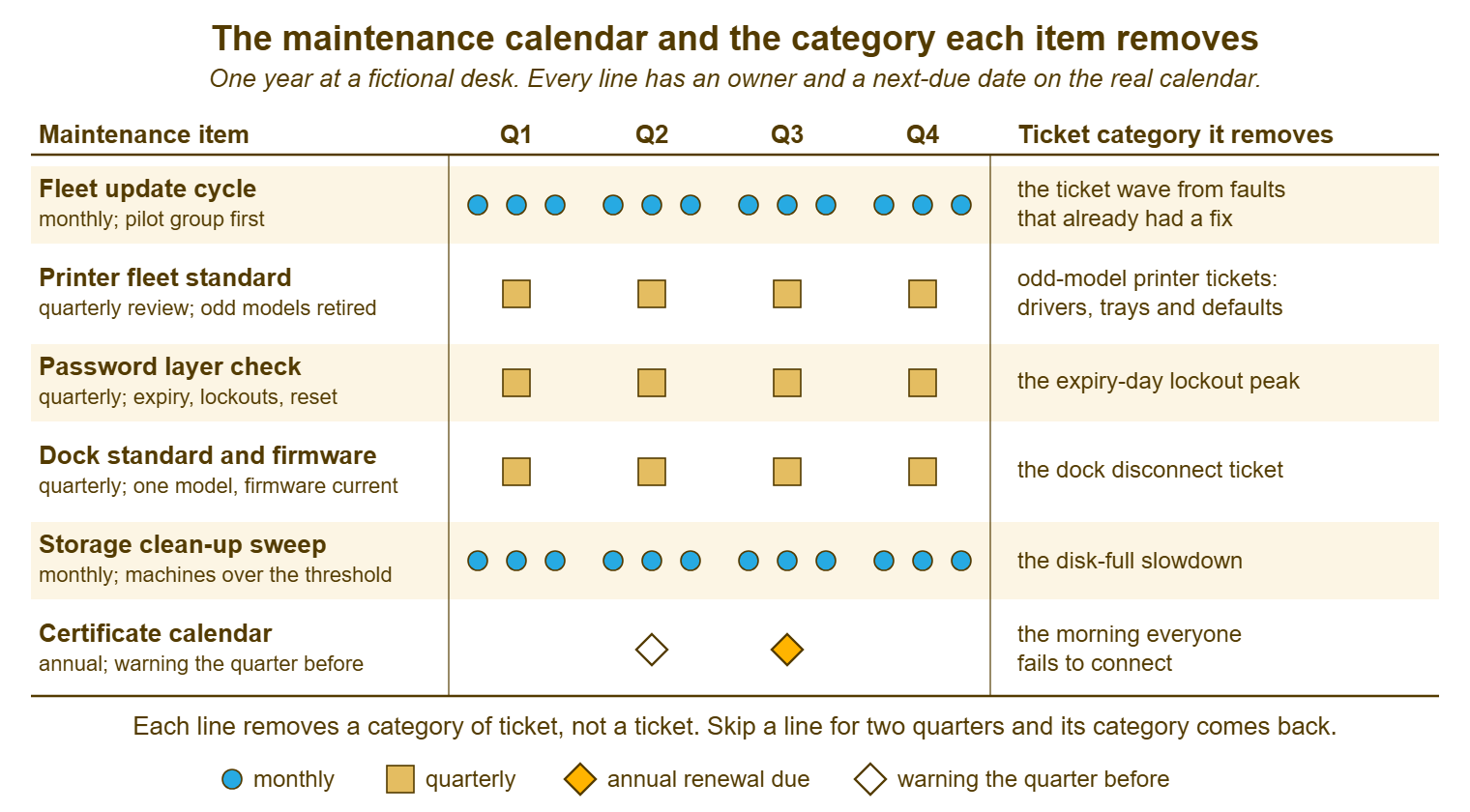
Read the right-hand column as the reason the calendar exists. A maintenance list without that column is a chore list, and chore lists lose to the queue every week for the reasons given in the first article of this series. A list whose every line says what it removes, with the count beside it, is a list the desk can defend at a review and the manager can defend against the queue. Harbourview's calendar had the count from the audit written in pencil beside each line. After a year the pencil numbers were the before and the pen numbers were the after.
What Disappeared From Harbourview's Queue
Harbourview's desk ran about 300 tickets a month before the calendar existed. The six items between them removed about fifty-five of those a month inside a year, plus one morning a year that had been an incident. The numbers are a worked example from a fictional desk and are given as such. The shape is what matters. Full-disk slowdowns went from eleven a month to one once the sweep ran monthly, at about fifty minutes each including the "slow computer" diagnosis. That is roughly eight hours a month returned. The odd-model printer tickets went from fourteen to three when the satellite printer was replaced on the standard, at half an hour each: about five and a half hours. The expiry-day lockout peak went from twenty-two a month to seven after the layer check, at a quarter of an hour each: nearly four hours. Dock disconnects went from nine to two after the firmware pass, at about thirty-five minutes each: four hours. The update wave, which had been irregular and averaged a dozen tickets a month at about forty minutes, settled to two. That returns seven hours. And the certificate renewal had been thirty-five tickets in one morning and most of a day for all three technicians the previous year. It became a scheduled change in a quiet window with a notice the day before, and produced no tickets at all.
That is about thirty technician hours a month returned, from six calendar lines, for a running cost of perhaps four hours a month of actual maintenance. The ticket count went from about 300 a month to about 245. And the ones that went were the dull ones, which is the kind of change the desk feels before the report shows it. Yusuf's Monday morning, a year on, had the same fourteen tickets in it; they were just different tickets, and none of them was one he had closed before. The method for counting the ones that never arrived, honestly, with the counterfactual stated and the control type checked, is in measuring the tickets that never arrived. And the last article in this series uses it for the whole programme.
Two things did not disappear, and they are worth naming so that nobody expects them to. Genuine printer faults continued: jams, a fuser, a dropped device. The printer standard removes the odd-model category, not printing. And new starters continued to lock themselves out in their first fortnight at about the same rate as before. That is because that category is about people learning a system, and the layer plan reduces it without removing it. A calendar that promises to remove a category should say which category, in the right-hand column. It should let the rest of the category list keep its tickets with a clear conscience.
Keeping the Calendar Alive
Every line on the calendar has one owner, one next-due date, and one place where both are visible to the whole desk. The line is reviewed at the monthly loop. The owner is a person, not "the desk", because a line owned by the desk is owned by whoever has the least to do that week, which is nobody. The next-due date is in the shared calendar the desk already looks at, not in a document, because documents are read at reviews and calendars are read on the day. If you run QuerySolv, each calendar line can also live as an ordinary ticket in a maintenance department of its own. That way, it sits in the same queue as the work it prevents and appears on the backlog-by-age report when it slips. A shared calendar with the desk's name on it does the same job in any tool. The review at the loop, which is the fifth article in this series, asks three questions of each line. Was it done? What did the category count do? And is the next date set?
Remember: a category stays removed only while its maintenance runs. Every line on the calendar has one named owner and a next-due date the whole desk can see. And the line is reviewed monthly: done, what the count did, next date set.
The busy season is the test, and the rule for it is shrink, never stop. When the clinic's winter rush arrives and the queue doubles, the monthly sweep can become a sweep of the machines nearest the threshold. During that rush, the quarterly printer review can become a ten-minute glance at the count, and the update window can be pushed a week. What cannot happen is the quiet decision to "pick it up again in spring", because that decision is never recorded and spring never has a date. A calendar line that has been skipped twice is, for practical purposes, deleted, and its category is on its way back. The manager who defends the prevention hour, in the next article, defends these lines with it.
Review the calendar itself once a year, and expect it to change. A line whose category has not produced a ticket in four quarters may have done its job so well that it can move to a lighter cadence. Or the thing it maintained may have been replaced. A new line arrives whenever the audit's section C turns up a cause that is a tendency rather than a fault. Six lines is a good number for a small desk; twelve is the most I have seen stay alive. (Twenty is a document, and we have covered what happens to documents.)
A Short War Story: The Paused Cycle at Fenwick Timber
Fenwick Timber's desk of two, run by a technician called Leo, had a monthly update cycle with a pilot group that had been working quietly for a year. In the autumn rush Leo paused it, reasonably, because the yard could not spare its machines for a restart during the busiest six weeks of the year. He meant to restart it in November. November had a new finance system going in, December had leave, and January had the stocktake. By the following summer the cycle had been paused for nine months and nobody had written that fact down anywhere. The tickets came back one category at a time. First came a wave of "the drawing application crashes when I export", which had been fixed by the supplier in the spring. Then came a printer driver fault the cycle had been quietly correcting, then a security scan from the insurer that failed every machine in the yard. Catching up took the two of them most of a fortnight, with a weekend. That was because nine months of updates applied at once break more things than nine monthly batches ever did. The drawing-application wave alone had been about forty tickets. The pause had been the right decision for six weeks and the wrong one for thirty-three. And the difference was that the restart had never been given a date. Maintenance that is not on a calendar with a next-due date is maintenance that has already stopped; it just has not told anyone yet.
The Maintenance Calendar
The calendar below is one page, rebuilt once a year and read once a month at the loop. Section A is the lines themselves, with the cadence, the owner, the category removed and the count that justifies the line. Section A is pre-filled with the six items this article described. A desk should delete the ones that do not apply and add its own. Section B is the quarter grid, ticked as each item is done, which is the record that answers "when did we last". Section C is the busy-season rule, written down in advance so that shrinking is a decision and stopping is not an option that happens by itself. Section D is the next-due dates, which must also be in the shared calendar; the sheet is the summary and the calendar is the reminder.
MAINTENANCE CALENDAR — ONE PAGE, ONE YEAR
Desk: ______________________   Year from: ____________   Reviewed monthly at the loop by: ______________

A. THE LINES
   Item                         Cadence      Owner          Category it removes                      Tickets/mo before   Hours/mo before
   Fleet update cycle           monthly      ___________    faults that already had a fix             ______              ______
     pilot group: ______________  window: ______________  record kept in: ______________
   Printer fleet standard       quarterly    ___________    odd-model printer tickets                 ______              ______
   Password layer check         quarterly    ___________    the expiry-day lockout peak               ______              ______
   Dock standard and firmware   quarterly    ___________    the dock disconnect ticket                ______              ______
   Storage clean-up sweep       monthly      ___________    the disk-full slowdown                    ______              ______
   Certificate calendar         annual       ___________    the morning everyone fails                ______              ______
     every certificate, licence, domain and contract with an expiry date is listed in D
   ___________________________  __________   ___________    ______________________________________    ______              ______
   ___________________________  __________   ___________    ______________________________________    ______              ______

B. THE QUARTER GRID (tick when done; write the date)
   Item                         Q1 ______   Q2 ______   Q3 ______   Q4 ______   Category count now
   Fleet update cycle           [ ][ ][ ]   [ ][ ][ ]   [ ][ ][ ]   [ ][ ][ ]   ______
   Printer fleet standard       [ ]         [ ]         [ ]         [ ]         ______
   Password layer check         [ ]         [ ]         [ ]         [ ]         ______
   Dock standard and firmware   [ ]         [ ]         [ ]         [ ]         ______
   Storage clean-up sweep       [ ][ ][ ]   [ ][ ][ ]   [ ][ ][ ]   [ ][ ][ ]   ______
   Certificate renewals         [ ]         [ ]         [ ]         [ ]         ______

C. THE BUSY-SEASON RULE (decided now, not then)
   When the queue exceeds ______ open tickets or the season is ______________:
     the sweep shrinks to .................... ______________________________
     the quarterly reviews shrink to ......... ______________________________
     the update window may move by ........... ______ at most
     nothing stops; a line skipped twice is reported at the loop as "category returning"

D. NEXT-DUE DATES (also in the shared calendar, with the warning entries)
   Item / certificate / licence / contract      Expires or due     Warning entry on     Owner
   ___________________________________________  ______________     ______________       ___________
   ___________________________________________  ______________     ______________       ___________
   ___________________________________________  ______________     ______________       ___________
   ___________________________________________  ______________     ______________       ___________

E. BEFORE THIS LEAVES THE DESK
   [ ] Every line has one named owner, not "the desk"
   [ ] Every line names the category it removes and the count before
   [ ] Every next-due date is in the shared calendar, not only on this sheet
   [ ] The busy-season rule is filled in
   [ ] Someone other than the owner can see every date
Yusuf's first calendar had the six lines and pencil counts beside each. By the fourth quarter the counts were in pen, and the satellite printer was a standard model. The certificate entry had a warning a quarter ahead with two names on it. That is one more than it had the year the clinic learned what a certificate was.
Frequently Asked Questions
We have no tool to push updates. Can we still have an update cadence?
How do we pick the pilot group?
Which of the six items should go on the calendar first?
What if an update breaks something after the pilot passed it?
How is maintenance different from the prevention in the previous article?
Who should be able to see the calendar?
From the QuerySolv team: we build self-hosted help desk software for Windows. QuerySolv runs as one Windows service on your own network. It takes requests by web form, e-mail, live chat, social messages and REST API. It is licensed once per installation rather than per agent per month. The free trial runs the full product for 30 days.