
The Phishing Triage Flow: Phishing, Spam or Legitimate
Thursday, 14:10, at Harbourview Clinic. Marcus is in his second month on a desk of two. In the last twelve minutes three reports have arrived about the same message. "Your mailbox is almost full. Sign in now to keep receiving messages", from "IT Support", with a large blue button. A fourth report, from the receptionist, is an invoice from the physiotherapy supplier. She thought it looked odd because it came from a name she did not recognise. Nobody has ever shown Marcus how to decide what a reported message is. He knows the desk did not send the first one. He checked the mailbox sizes last week and nobody is anywhere near full. He is not at all sure about the invoice, and the receptionist is waiting.
He does what this article describes, and it takes him eleven minutes for all four. The first three are one message, and it is phishing. The address behind "IT Support" belongs to nobody at the clinic. And the button points at a sign-in page that is not the clinic's. The invoice is real; the supplier has a new accounts person and the bank details match the ones on file. Three people get a thank-you and a warning not to click. The receptionist gets a thank-you and an apology for the delay. The security function gets one ticket with three reporters on it and the original attached. At Harbourview, that function is the practice manager and a contracted firm. Nobody clicked. Marcus goes back to the printer.
Phishing triage is the first look the desk gives a reported message to decide which of three things it is: phishing, spam or legitimate. The desk also decides what happens next. Triage is done in minutes, with nothing more specialised than the mail client, and without ever clicking anything to find out. Spam is unwanted bulk mail that is trying to sell you something; it is a nuisance rather than an attack. Legitimate means a real message from the person it claims to be from. Phishing, the third and the dangerous one, is a message pretending to be from someone it is not. The aim is for the reader to click, open, pay or type a password where they should not. This article is part of our Phishing Reports & Security Tickets series. And it is about reaching one of those three verdicts quickly, kindly and defensibly.
It covers why there are three verdicts and not two. Next come the three looks: at who really sent it, where the link really goes and what it asks for. The did-you-click question, asked kindly, follows, then three reports of one message and what happens on each verdict. Then it covers when to escalate and how, the flow on one page, a short war story, and the triage card to copy, in that order.
Three Verdicts, Not Two
The reason triage has three outcomes rather than "bad or fine" is that each one gets a different response. And the two mistakes you can make cost different things. Calling phishing "spam" means the reporter is told it is harmless. The other recipients are never warned, and the security function never hears. That is the dangerous mistake. Calling a real message "phishing" means a supplier is not paid, a customer is not answered, or a colleague's genuine request is ignored for a day. That is the embarrassing one. Spam itself needs nothing but a thank-you and a tip about the junk folder. Three verdicts, three responses, and the triager's job is to pick the right one in minutes.
A verdict from the desk is provisional, and that is a comfort rather than a weakness. The desk is deciding what to do in the next hour: warn people, or not; reset a password, or not; hand it over, or not. The security function can overrule later with better tools and more time. What the desk must not do is wait for certainty before acting, because certainty arrives after the clicks. When the three looks disagree or the triager cannot decide in ten minutes, the verdict is "phishing until someone who knows says otherwise". In that case, the message goes up. Nobody has ever been criticised for warning a department about a message that turned out to be a newsletter.
The First Look: Who Really Sent It
The first look is at the address the message actually came from, not the name shown in front of it. A mail client shows a display name, the friendly text the sender chose, such as "IT Support" or "Harriet Cole". Behind it is the actual address. Anyone can type any display name. The address is harder to fake convincingly, so the first look is to open it up and read the part after the @ sign slowly. Does it belong to your organisation, or to a supplier you know? Is it your organisation's domain exactly, or a near miss with a letter swapped or added? Is it a free webmail address wearing a colleague's name? Each of those is a strong signal. And the near miss is the one that fools tired people, because the eye reads what it expects.
Two refinements, both plain. First, a message can have a different reply-to address from its sending address. That sends a reply somewhere other than the place the message appeared to come from. If your mail client shows the reply-to, look at that too. Second, and more important, a message from a colleague's real address can still be phishing, because the colleague's account may have been taken over. When the address is genuinely right and the message is still odd, the first look has not cleared it. In that case, the third look, at what the message asks for, decides. "The address is fine" is where triage starts, not where it ends.
Your mail service may add a banner to messages from outside the organisation. If it does, the banner is a useful fast check. A message claiming to be from the IT desk with an "external sender" banner on it is wrong by definition. Where there is no banner, the address itself carries the load. Either way the triager is reading, not clicking. Nothing in this look requires any tool beyond what the reporter already used to send it in.
The Second Look: Where the Link Really Goes
The second look is at the real destination of any link, which is almost never the text the link shows. On a computer, resting the mouse pointer over a link without clicking shows the destination. It usually appears at the bottom of the window or in a small pop-up. On a phone, pressing and holding does the same. The question is whether the destination matches the claim. Suppose a button says "Sign in to your mailbox" but points at a sign-in page on a domain that is not your mail service's. That is a phishing message, whatever the sender look said. Shortened links, where the destination is hidden behind a short redirecting address, cannot be checked this way. They go to the security function if they matter to the verdict.
The rule for the triager is absolute: never click the link, never open the attachment, never scan the code, not "just to see where it goes". You are triaging, not testing. If a look beyond the hover is needed, the security function has a safe way to do it and the desk does not. I say this with feeling because I once clicked one to "check", on my own machine, at four in the afternoon. I spent the evening explaining to a contracted firm why their first incident of the week had come from the help desk.
Attachments get the same treatment as links. Suppose a file is one you were not expecting, from a sender the first look did not clear. Its name is designed to make you open it ("Invoice overdue", "Payslip correction", "Shared document"). The desk does not open that file to find out what it is. The desk records that there was an attachment, what it was called, and what type it claimed to be, and leaves it closed. A message may have no link and no attachment, and simply ask the reader to reply or to phone a number. That message is judged on the third look alone.
The Third Look: What It Asks You to Do
The third look is at the request, and it is the one that catches the messages the first two cannot. Phishing exists to make the reader do something, and the something is a short list. It starts with sign in here, open this, pay this, change these bank details. Then come buy these gift vouchers, reply with your mobile number, keep this between us. Urgency is the usual wrapper ("before noon", "or your account will be closed"), and secrecy is the second ("I'm in a meeting, don't call"). Suppose a message asks for one of those things, from a sender who would not normally ask that way, through a channel they would not normally use. That message is phishing until shown otherwise, even when the address is right and there is no link at all.
This is where the reporter's context earns its keep. Yusuf's "she never calls me Yusuf" is a third-look observation. So is "the supplier always sends invoices to accounts, not to me", and "the managing director has never once asked anyone to buy vouchers". The triager does not have that context and should ask for it. That is why the acknowledgement message in The User-Reported Suspicious Email leaves a line for "what they spotted". The reporter is usually right about what was wrong, even when they cannot say why in technical terms. Treat their itch as evidence.
The payment request, in any form, gets its own rule. Any message asking for money to be sent or bank details to be changed is confirmed by a phone call before anyone acts on it. That call is to the real person on a number the desk already holds, never on a number in the message. And the finance lead is told regardless of the verdict. That rule is cheap and it is the one that stops the expensive mistake. Most organisations that have lost money to a fake invoice had a filter, a policy and a training course. What they did not have was the phone call.
The Did-You-Click Question, Asked Kindly
Every reporter is asked whether they clicked, opened, replied or typed anything. And the way the question is asked decides whether the answer is true. The honest answer to "did you click it?" from a person who fears blame is "no". A false no is the most expensive word in this article. It means a stolen password stays live while the desk congratulates itself. So the question is asked plainly, with the reason attached and the blame removed: "Did you click the link, open the attachment, reply, or type anything in? No trouble either way; it just changes what I do next." Those two sentences, in that order, get honest answers from people who would otherwise have said nothing.
Ask it even when the reporter has already said "I didn't click", and ask it as a confirmation rather than a challenge: "And nothing typed in anywhere? Great, that makes it simple." People sometimes clicked a link, saw a sign-in page, closed it, and genuinely do not count that as clicking. Others typed a password, got an error, and assumed nothing happened. The follow-up catches both. Where the answer is yes in any form, the triage stops being the point and the clock starts. In that case, the next hour is described in When Someone Clicked: The First Hour. The triage ticket is then linked to the one that article creates.
The tone of the question matters more than the wording, and it is the tone of a colleague who is on the reporter's side. Nothing in it should sound like a form, a test, or a prelude to a conversation with their manager. If your desk has a style guide, this question belongs under its hardest heading, the one about tone in difficult moments. The thinking behind that heading is in Tone in Hard Moments. People tell the truth to people who clearly want to help them. They tell a comforting story to everyone else.
Three Reports of One Message
When a message reaches a department, the reports arrive in a cluster, and the cluster is itself a signal. Three reports in ten minutes means the message went to many more than three people and got past the filter in volume. It also means somewhere in the building someone who has not reported it is reading it now. The first thing the desk does with a cluster is recognise it: same subject, same display name, same ask, reported by different people. The second is to link the tickets, so that the first look is done once and the verdict is reached once. Each reporter still keeps their own thread and their own thank-you. If you run QuerySolv, linking the three tickets does exactly that. There is one verdict on a shared thread of linked tickets and three separate public replies. The complete history of who reported first and when is kept for the monthly count. Most tools can link or merge; use whichever keeps the reporters separate.
The third thing is to warn the people who have not reported it. The desk does not know who received the message. The mail administrator or the security function can find out, and that search is theirs to run. What the desk can do immediately is send a short note to the department. If the reporters are spread across the whole organisation, the note goes to everyone. It says what the message looks like and not to click it, and where to send it if they have it. That note is a two-sentence template, sent within the hour. And it is the single most effective containment step a desk has, because it turns forty potential clickers into forty people who know. Keep it short and keep it calm; it is a heads-up, not an incident bulletin.
Count the cluster as what it is: three reports and one campaign. A campaign is one distinct phishing message, however many people received it. The distinction matters for the monthly figures, which count both. Three people doing the right thing is three reports; the desk's workload was one message. Both numbers are true and both go on the ticket.
What Happens on Each Verdict
Each verdict has a fixed set of actions, and writing them down is what lets a second-month technician do the job without asking. The table below is the whole of it. Note that the legitimate verdict ends in a thank-you too, and that it is logged as a report and never as a mistake. The receptionist at Harbourview who reported a real invoice did something valuable: she paused before acting on a message that asked for money. The desk wants her to do it again.
| Verdict | What the desk does | What the reporter hears | Who else is told |
|---|---|---|---|
| Phishing, nobody clicked | Links duplicate reports; sends the department warning; attaches the original; records the three looks | Thank you, you were right about ___, it has been reported and blocked, nothing further to do | The security function, same day, with the original and the reporter list; the mail administrator to remove copies |
| Phishing, someone clicked | Starts the first-hour steps at once: reset, revoke, device check; then everything in the row above | Thank you for telling me, here is what I am doing now and what I need from you | The security function within the hour, by phone if that is faster; the person's manager only if the security function says so |
| Spam | Closes the ticket as a report; no escalation; keeps the count | Thank you, it was junk rather than an attack, here is how to mark it so the filter learns | Nobody, unless the volume suggests the filter needs tuning, which is a note to the mail administrator |
| Legitimate | Confirms with the real sender if money or data was involved; closes as a report; notes what made it look odd | Thank you, that one was real, sorry for the delay, please keep checking | The real sender, if the delay affected them; nobody else |
| Cannot decide in ten minutes | Treats it as phishing: warns, attaches, hands over with the three looks written up | Thank you, I am checking with the security team and will confirm by ___ | The security function, now, with a request for a verdict |
The spam row contains a link to an article many desks forget they have. Reporters who send spam are often also the people whose real mail is landing in junk. The two-minute guidance on marking messages so the filter learns is the same guidance as in Missing Mail and the Junk Folder. Send it with the thank-you. It saves a ticket next month.
When to Escalate, and How
Escalation here means handing the message to the security function with a request for a decision or an action. The criteria are short enough to pin above the desk. Anyone clicked, opened, replied, paid or typed. The message asks for money or a change of bank details. The message came from a real internal account. The message names the organisation, a real project, or a real colleague by name, which means it was built for you rather than sprayed. More than a handful of reports of the same message. The triager cannot reach a verdict in ten minutes. Any one of those, and the ticket goes up with everything the desk knows attached.
"Attached" is the operative word, and it is what separates a handoff from a dump. The security function should receive the original message as an attachment, plus the list of reporters and the times they reported. It should receive the three looks written out in one line each, and the did-you-click answers. It should also receive what the desk has already done, including the warning note if one went out. A handoff that says "looks like phishing, see ticket" sends the security function back to the desk for every fact and doubles the hour. The shape of a handoff that does not do that is in The Handoff That Does Not Dump. And a phishing escalation is the purest example of it. The desk has seen everything, the security function has seen nothing, and the ticket is the only bridge.
Escalation is not the end of the desk's involvement. The reporters are still the desk's, the outcome message is still the desk's to send, and the thank-you is still owed. What moves up is the verdict and the investigation. What stays is the person.
Remember: take three looks in order: sender, link, ask. Ask the did-you-click question kindly every time. Never click, open or scan anything to find out. And when in doubt, it is phishing until someone who knows says otherwise.
The Flow on One Page
The whole of this article fits in one picture, and the picture is what to pin up for the technician in their second month. The report arrives. The desk takes three looks, in order: at the sender's real address, at where the link really goes, and at what the message asks for. It reaches one of three verdicts. Phishing branches on the did-you-click question. A yes starts the first hour. A no means tell the security function, warn the others, and close with thanks. Spam gets junk guidance and a thank-you. Legitimate gets a thank-you and the truth. Every lane ends in a thank-you; only one lane goes to the security function.
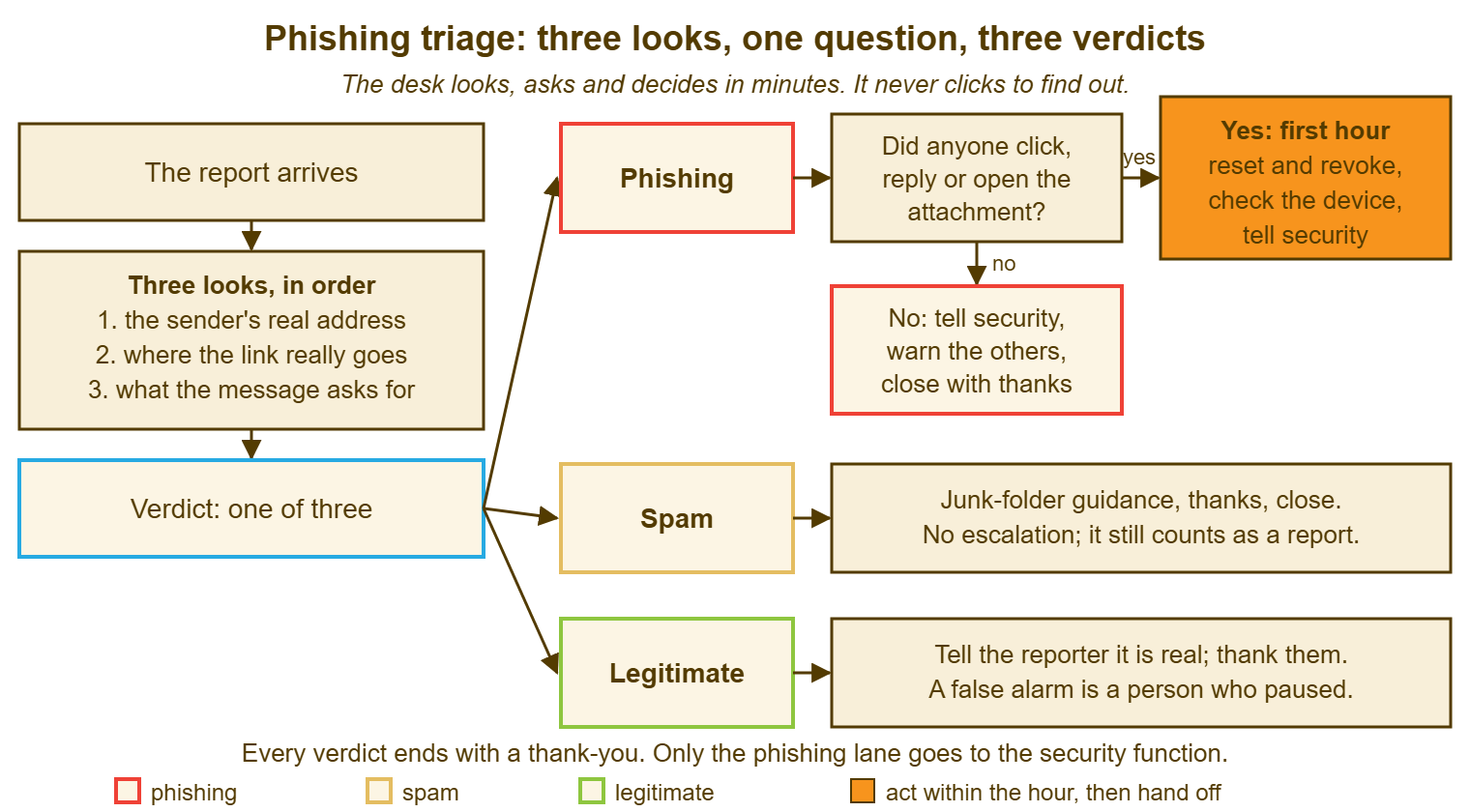
Notice what the picture does not contain. There is no step where the desk examines the message's technical headers, traces where it was sent from, or works out what the attachment would have done. Those steps exist, and they belong to the security function, with its tools and its authority. The desk's flow is deliberately shallow because it has to be fast and safe in the hands of someone who learned it this morning. Depth is for later, and for someone else.
A Short War Story: The Usual Invoice at Redbrook Engineering
Tom had worked the desk at Redbrook Engineering for three years and had closed several hundred spam reports with the same two-line reply. So when a report arrived from the accounts clerk about an invoice from a steel supplier "that looks a bit different", he glanced at it. He saw an invoice and sent the two lines. The invoice was from an address one letter off the supplier's real domain. It carried new bank details. The accounts clerk, reassured by the desk, paid it on the Friday payment run. The supplier rang three weeks later to ask where their money was. Recovering it took the finance director, the bank and Tom somewhere over thirty hours, with the money itself returned only in part. In the review Tom said, fairly, that nobody had ever told him a payment message got a phone call whatever it looked like. That was true. The rule became the first line on the triage card the following week. The lesson the desk lead wrote down was shorter: "spam" is a verdict you reach after three looks, not a default you reach for after three years.
The Triage Card
The card below is the one Marcus now keeps open beside the queue. It is filled in for every report, including the spam and the real ones. And the completed card is pasted into the ticket as an internal note. Section A is the three looks. B is the question, C is the verdict and the actions, and D is the escalation handoff if there is one. The card is deliberately short enough to finish in ten minutes. A triage card that takes longer than that is an investigation form, and the desk does not investigate.
PHISHING TRIAGE CARD — ONE REPORT, TEN MINUTES
Ticket: ________   Reporter: ______________   Reported at: ______   Looked at: ______
Subject line: ______________________________   Duplicates linked: ________

A. THREE LOOKS, IN ORDER (read, never click)
   1. Sender's real address: ____________________________
      [ ] ours exactly   [ ] known supplier   [ ] near miss   [ ] unknown   [ ] webmail
      External banner shown: yes / no        Reply-to differs: yes / no / not shown
   2. Link destination (hover or press-and-hold): ____________________________
      [ ] matches the claim   [ ] does not match   [ ] shortened, cannot check   [ ] no link
      Attachment present: no / yes, name and claimed type: ______________ (left closed)
   3. The ask: [ ] sign in   [ ] open file   [ ] pay / change bank details   [ ] buy vouchers
               [ ] reply with details   [ ] phone a number   [ ] keep it quiet   [ ] none
      Urgency or secrecy in the wording: yes / no
      What the reporter spotted: ____________________________________________

B. THE QUESTION (asked kindly, every time)
   "Did you click, open, reply or type anything in? No trouble either way."
   Answer: [ ] nothing   [ ] clicked only   [ ] typed credentials   [ ] opened attachment
           [ ] replied   [ ] paid or sent data
   Any yes -> first-hour ticket opened: ________ (linked)

C. VERDICT AND ACTIONS
   [ ] PHISHING   [ ] SPAM   [ ] LEGITIMATE   [ ] UNDECIDED -> treat as phishing
   Money or bank details involved: no / yes -> phone call to real sender on known number: done at ______
   Department warning sent: no / yes at ______ to ______________
   Security function told: no / yes at ______ by ______________
   Reporter outcome message sent: ______   Thank-you included: yes

D. HANDOFF (if escalated) — attach, do not summarise
   [ ] original message as attachment   [ ] reporter list with times
   [ ] the three looks, one line each    [ ] did-you-click answers
   [ ] what the desk has done so far     [ ] what decision is needed and by when
Marcus's card for the "mailbox almost full" message took four minutes and the verdict was phishing on the first look alone. The second and third looks agreed, which is usual, and the department warning went out at 14:19. His card for the invoice took longer. The real test was a phone call to the supplier's accounts office on the number already on file, and the new accounts person answered it. He wrote "legitimate, new contact at supplier, details match" on the card, and "thank you for checking, that one was real" to the receptionist. She has reported two more since, and one of them was not.
Frequently Asked Questions
The sender address is genuinely a colleague's. Can it still be phishing?
Is it ever acceptable for the desk to open the link or attachment to check?
What do we tell the whole department when three people report the same message?
The reporter says they did not click but the message asked them to sign in. Should I do anything?
How much of this triage should a brand-new technician do alone?
Our mail service already marks some messages as suspicious. Does that replace triage?
From the QuerySolv team: we build self-hosted help desk software for Windows. QuerySolv runs as one Windows service on your own network. It takes requests by web form, e-mail, live chat, social messages and REST API. It is licensed once per installation rather than per agent per month. The free trial runs the full product for 30 days.