
The User-Reported Suspicious Email: Your Best Early Warning
Tuesday, 09:40, at Meridian Parts. Dana runs a desk of three. A message from Yusuf in accounts payable has just landed with one line on top: "This came in from Harriet asking me to change the bank details on the Tollgate payment before noon. Probably fine, but she never calls me Yusuf, she calls me Yus." Harriet is the managing director. She is in a meeting until eleven. The queue has thirty-one tickets in it, two of them printers and one of them a laptop that smells of burning. Dana has to decide how much of her morning this message is worth.
She gives it twenty minutes. She tells Yusuf, in writing, within five of them, that he did the right thing and should not reply. She looks at the address behind the name "Harriet Cole" and finds a domain one letter away from the company's own. She tells the IT manager, who is as close to a security function as Meridian Parts has, and he phones the contracted firm. She warns the other two people in accounts payable, who both have the same message and had not got to it yet. Nobody changes any bank details. The laptop that smells of burning waits a little longer than it would like.
A user-reported suspicious email is a message that a person in your organisation thought was wrong and sent to the desk. They did that instead of deleting it, ignoring it, or doing what it asked. Most of them will be phishing: a message that pretends to come from someone it does not. It aims to get the reader to click a link, open a file, pay an invoice, or type a password somewhere it should not go. Some will be ordinary spam. A few will be real messages from real people that happened to look odd. All three deserve a ticket, and the first kind is the best early warning a help desk ever receives. This article is part of our Phishing Reports & Security Tickets series, which covers the security tickets a small desk actually gets. It is about the report itself: why it matters, how it arrives, and what the desk owes the person who sent it.
It starts with why the report beats every filter and what a report is worth, in hours. Next come the channel, one button or one mailbox, and what to say to the reporter within the hour. Then come the desk's role and the security function's, the ticket the report becomes, and the loop from report to thank-you. After that: the ways the channel fails, a short war story, and the reporter acknowledgement to copy.
Why the Report Beats Every Filter
Your mail filter sees every message before anyone does, and it is very good at catching the ones that look like yesterday's phishing. The mail filter is the service, run by your mail provider or on your own mail server, that scores each incoming message. It sends the bad ones to junk or drops them altogether. It works on patterns: known bad senders, known bad links, the words that scam messages use, attachments of the kinds that carry trouble. A message that matches gets stopped. A message built this morning, aimed at your organisation, using your managing director's name and your real supplier's name, matches nothing yet. So it gets through. That is not a failure of the filter. It is what "new" means.
The person who receives that message has something the filter does not, which is context. Yusuf knows Harriet calls him Yus. The receptionist knows the printer company does not send invoices on a Sunday. The warehouse lead knows there is no "updated shift rota portal" because he is the one who writes the rota. None of that is in the message, so no filter can score it. All of it is in the reader's head, where it produces a small itch of wrongness. The report is that itch, written down and sent to someone who can act on it. It is the earliest signal that a message got through, and on most small desks it is the only one.
The timing is the point. A phishing message that reaches forty people is a race between the first person who reports it and the first person who clicks it. The reporter usually wins by minutes rather than hours. Those minutes are when the desk can warn the other thirty-nine. It can have the message pulled from their mailboxes if the mail administrator can do that. It can also have the sign-in page it points to blocked. Found out at 09:40 from Yusuf, the message costs the desk twenty minutes. Found out on Thursday from the bank, it costs the finance team a week. (The filter, meanwhile, has learned about it and will catch the next copy. It is thorough that way.)
There is a second reason the report matters, and it is about the messages nobody reports. Every desk gets phishing it never hears of. The reader deleted it, or clicked it and said nothing, or did not know there was anyone to tell. The number of reports a desk receives is therefore not a measure of how much phishing arrives. It measures how many people know the desk wants to hear and believe something will happen when they say. A desk that receives no reports does not have a clean organisation. It has a silent one, and the difference between the two is the subject of Measuring Reports and Clicks Without Shaming Anyone.
What a Report Is Worth, in Hours
The quickest way to make a sceptical manager value the report channel is to put the two outcomes side by side in hours, using your own desk's figures. The worked example below is from Meridian's desk, which is fictional, and the figures are ranges because yours will differ.
For a phishing message reported within the hour, where nobody clicked, the desk acknowledges the reporter and takes a first look. It tells the security function and warns the other recipients. That costs somewhere between half an hour and two hours of desk time, most of it writing. The same message reported within the hour where one person did click costs the first-hour work described in When Someone Clicked: The First Hour: a password reset, a session check and a look at the device. On Meridian's desk, that runs to two or three hours for one account. These are small numbers, and that is the argument.
The same message is found a week later because nobody reported it. The first the desk heard was a supplier asking why their invoice had been paid to a different bank. That costs something between a long day and a long month. Meridian's one such case ran to roughly forty hours across the desk, finance and the IT manager before anyone counted the money. It was eventually recovered and is not the point. The arithmetic is not subtle. Every minute of reporting friction you remove is bought back many times over by the first report that arrives early instead of late.
The Channel: One Button or One Mailbox
A report channel is the one way everybody in the organisation sends a suspicious message to the desk, and the word that matters is "one". There are two good shapes. The first is a report button in the mail client. Many mail services offer one, or let an administrator add one. Pressing it sends the message, with its technical details intact, to an address you choose. It often moves the original to junk at the same time. The second is a plain mailbox address, something like report@example.com, that people forward the message to. The button is better, because it keeps the message whole and asks nothing of the reporter but a click. The mailbox is fine, and it is what most small desks start with.
If you use a mailbox, ask people to forward the message as an attachment where their mail client allows it, rather than as an ordinary forward. An ordinary forward rewrites the message under the reporter's name and drops the technical details about where it came from. Those details are what the security function uses to find the other copies and block the sender. Put that one instruction in the knowledge base, with a picture, and accept that half of your reports will arrive as ordinary forwards anyway. A report in the wrong format is still a report. Thank them, and ask for the attachment version only if the security function needs it.
Wherever the report lands, it has to land in a queue and not in an inbox. A queue is a list of tickets that somebody owns and that shows what is waiting and for how long; an inbox is a pile. The mechanics of turning a mailbox into a queue are in How a Mailbox Becomes a Queue, and they apply here exactly. If you run QuerySolv, the natural shape is a department of its own for security reports, with its own mailbox and its own form. That way, reports arrive in their own queue with their own service-level targets instead of taking a place in line behind the printers. Any help desk that can route one mailbox into one queue can do the same.
Publish the channel everywhere a person might look for it at the moment of doubt. Put it in the knowledge base article that everyone can read and the induction pack. Add it to the signature block on the desk's own messages and the card by the kitchen kettle. Use the banner your mail service adds to external messages if it does that. The address should be short enough to remember without looking it up. The moment of doubt is also the moment the reporter has a suspicious message open and does not want to go hunting for a web page. One address, everywhere, for good. Changing it later is possible and costs you a year of people using the old one.
What to Say to the Reporter Within the Hour
The reporter should hear from a human being within the hour. The message should do three things: thank them, tell them what not to do, and tell them what happens next. "Within the hour" is a working-hours promise, and it is deliberate. The reporter is sitting there wondering whether they have done something stupid, whether anyone is going to read it, and whether they should also tell their manager. One short reply from a person settles all three. An automatic "your ticket has been created" settles none of them. I have watched reporters receive one and conclude, reasonably, that the desk had not seen the message at all.
Thank them first, in the first sentence, every time, whatever the message turns out to be. Then the instructions: do not click anything in it, reply to it, or forward it to colleagues for a second opinion. Leave it where it is so the desk can see it. Then the question that decides everything afterwards, asked plainly and without edge: "Did you click the link, open the attachment, reply, or type anything in? No trouble either way; it just changes what I do next." The kind way to ask it, and why kindness is the only version that gets an honest answer, belongs to The Phishing Triage Flow. The acknowledgement is where it is asked first.
Then what happens next, with a time: "I'll take a look and tell you what it was by the end of the day." That second contact, the outcome message, closes the loop. It was phishing and it has been blocked; it was spam and here is how to junk the next one; it was real, sorry for the delay, and thank you for checking anyway. The outcome matters almost as much as the acknowledgement. A reporter who never hears what it was learns that reports vanish into the desk. The one who hears "you were right, the address was wrong" has just been trained better than any slide deck could manage. The thank-you, and the culture it builds, is the subject of Rewarding the Reporters.
Write the acknowledgement once, as a template, and send it with the reporter's name and one specific line added. A template that reads like a template is the second-worst reply after silence. The craft of one that does not is in Writing a Template That Does Not Sound Canned. The acknowledgement at the end of this article is built to that standard. The specific line is usually the thing they spotted. "You're right that Harriet wouldn't write to you that way" is ten seconds of typing and the reporter will remember it for a year.
The Desk's Role and the Security Function's
The security function is whoever in your organisation owns security decisions, and at a small organisation it is rarely a team. It may be a security officer, the IT manager wearing a second hat, a contracted firm with a phone number, or, honestly, the desk lead and a policy document. Whoever it is, name them in writing. The desk's job on a phishing report is bounded, and the boundary needs a person on the other side of it. The desk receives, acknowledges, takes the first look, contains the obvious, records, thanks and counts. The security function decides what the message was, finds who else received it, and adjusts the filters. It digs into what an attacker actually did and handles anything with a legal or regulatory edge.
The line between the two is "contain" against "investigate". The desk can tell the other recipients not to click, reset a password, end a signed-in session, and take a laptop off the network. Those are containment: they stop the thing getting worse, and any competent technician can do them in the first hour. Working out what an attacker did once inside, whether other accounts were touched, and what the organisation must report to whom is investigation. It needs tools, authority and skills the desk does not have and should not improvise. A desk that starts investigating is a desk that has stopped answering the queue, and the queue notices.
| Step | The desk | The security function |
|---|---|---|
| Receiving the report | Owns the channel; every report becomes a ticket; acknowledges within the hour | Is told of every confirmed phishing report the same day |
| The first look | Phishing, spam or legitimate, in minutes, from what the message shows | Confirms or overrules; decides what the message was and how far it reached |
| Containment | Warns the other recipients; resets and revokes if anyone clicked; takes a device off the network | Has the message removed from every mailbox; blocks the sender and the destination |
| Investigation | Does none; records facts and hands them over | Examines what was done, by whom, from where, and what else is affected |
| The reporter | Acknowledges, sends the outcome, thanks, every time | May ask the desk to relay a question; never approaches the reporter with blame |
| The record and the count | The ticket, linked to the security record; the monthly line | Its own record, holding the detail the desk should not keep |
| Training | The thank-you and the outcome message | The training programme, later, kindly, and never run through the desk |
At a great many organisations with a three-person desk, there is no security function at all. In that case, write down who the desk tells and what they will do. Do this even if the answer is "the IT manager, who will phone the contracted firm". The point of naming them is not that they will do more than the desk could. It is that the desk's containment has somewhere to stop. A desk with no named handoff keeps going, because stopping feels like negligence, and ends up doing forensics with a search box and a worried expression.
The Ticket the Report Becomes
Every report is a ticket, including the ones that turn out to be spam and the ones that turn out to be a real invoice. The reason is the count: the number of reports is the first and best measure of whether the channel is working. A report handled by reply and never logged is a report that never happened as far as next month's figures are concerned. Give the ticket a category of its own, something like "security: suspicious message", so that reports can be found and counted without anyone reading subject lines. One category for reports and one for confirmed incidents is enough to begin with.
Four things go on the ticket. First, attach the original message. Second, record the time the report arrived and the time the desk acknowledged it. Third, add the verdict with one line of reasoning. Fourth, record what the desk did about it. Two things never go on it in a form that could do harm. The link in the message is not pasted into a public reply, where a colleague reading the thread later might click it. No password or code that a reporter typed into the wrong page is ever written down anywhere. It is reset, and the note says it was reset. The internal note is for the desk's eyes and the public reply is for the reporter's, and the reasoning lives in the note. What not to write in a ticket in general is covered in What Not to Write in a Ticket; a phishing ticket simply has more of it.
When the same message is reported by three people, the three tickets are linked. Multiple reports arrive the moment a campaign reaches a whole department. Linking means the verdict is reached once and each reporter still gets their own thank-you in their own thread. The mechanics of that, and what three reports in ten minutes tells you, belong to the triage article. Here the rule is only that duplicates are never deleted or waved away as "we already know". Each one is a person who did the right thing and is waiting to hear so.
The Loop From Report to Thank-You
Put the pieces in order and they form a loop rather than a line, and the loop is the thing to remember. A person reports. The desk acknowledges within the hour. The desk triages the message as phishing, spam or legitimate. The desk responds: contains what it can, tells the security function if it needs telling, and tells the reporter what the message was. The desk thanks the reporter. Because they were thanked, heard the outcome, and were not blamed, they report the next one too, sooner. They also tell the colleague at the next desk where to send theirs. The picture below draws the loop with the handoff to the security function marked. The two bands beneath it show which parts of the work are the desk's and which are not.
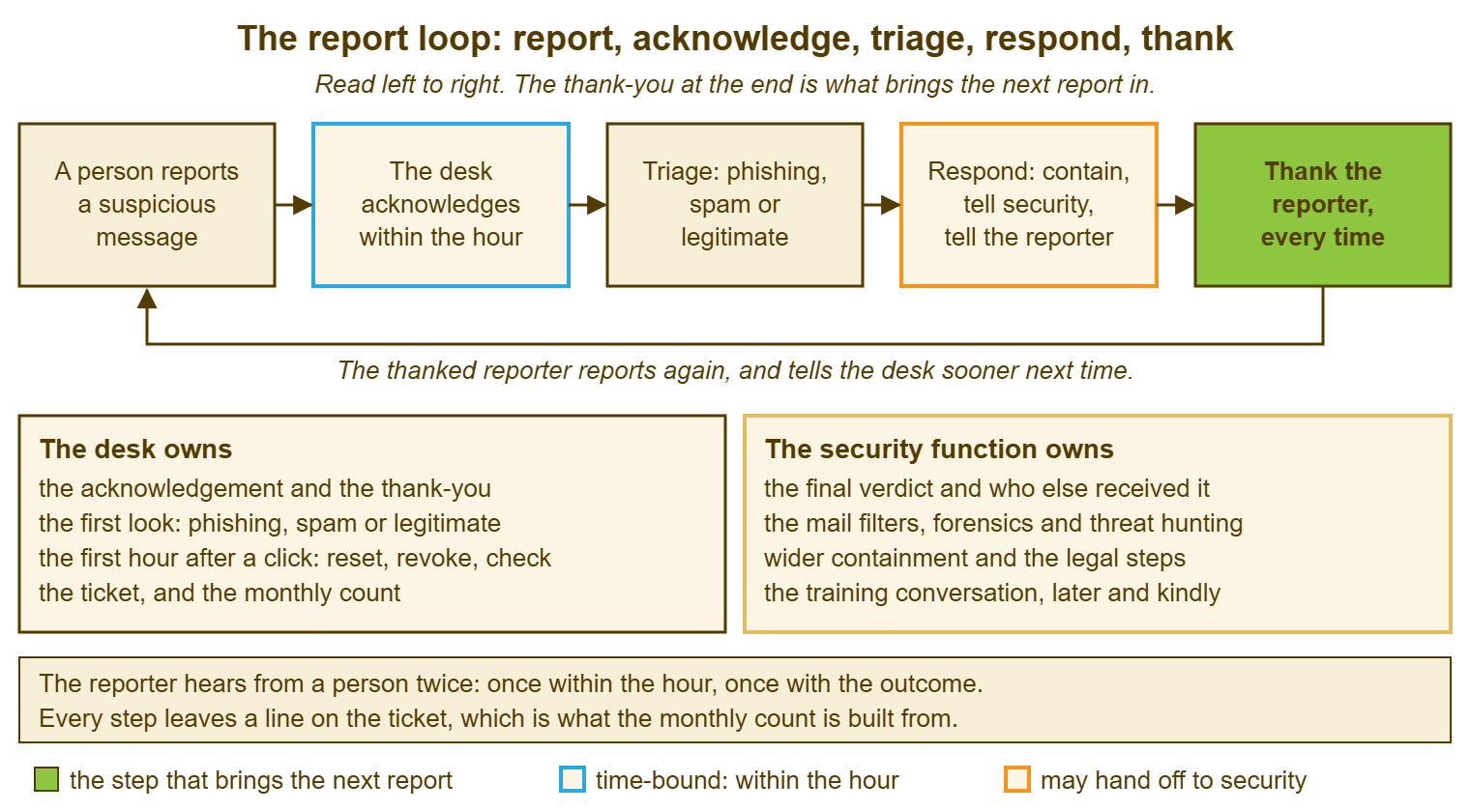
The step most desks skip is the last one, and it is the one that closes the loop. A desk that acknowledges, triages and contains but never says thank you has built four fifths of a machine and wonders why it does not run. The thank-you is not politeness. It is the fuel.
Remember: every report becomes a ticket. Every reporter hears from a person within the hour and hears the outcome the same day. The desk contains but never investigates. The security function is a named person or firm, written down, before the first report arrives.
The Ways the Channel Fails
I have seen the report channel fail in six ways, and none of them involved an attacker. The first is the mailbox nobody owns: report@example.com was created, forwarded to a technician's inbox, and the technician left. Reports arrive and die. The fix is a queue with an owner and a weekly check that it is being read, which is ordinary queue hygiene and nothing more exotic.
The second is the automatic reply that promises a response within three business days. It is honest, which is the worst thing about it; the reporter reads it, does the arithmetic, and reasonably concludes that the desk does not think this is urgent. If the service-level target on the reports queue is not an hour in working time, it is the wrong target. The third is the reply that says "that's just spam, you can delete those yourself", which is true and costs you that reporter for a year. The fourth is the channel nobody knows exists, because it was announced once, in a message that went to junk.
The fifth is the request to resend it "properly", as an attachment, with the headers, in the right format, to the right address, before anyone will look. Look first. Ask for the better copy afterwards, only if it is needed, and say why. The sixth is the quiet one: the desk handles the report well, contains the message, and never tells the reporter what it was. Nothing went wrong, except that the loop did not close, and the reporter now holds a small private theory that the desk ignores these. Four of the six fixes are a sentence in a template. The other two are a queue with an owner. None of them is expensive, which makes it odd how often they are missing.
A Short War Story: The Letterbox at Ashgrove Housing
Ashgrove Housing set up a report address with the best intentions and routed it to the inbox of Gareth, the senior technician. He read it every morning until the month he left for a job at a hospital. Over the next nine days the address received eleven reports, two of them about the same message. It was a very good imitation of the housing association's own rent-payment portal asking tenant support officers to "re-validate" their sign-in. A support officer named Marguerite, who had reported it on day two and heard nothing, decided it must be real after all. She signed in on day six. By day eight a rule in her mailbox was quietly forwarding every message containing the word "payment" to an address nobody at Ashgrove had heard of. The clean-up took the desk, the finance lead and a contracted security firm roughly fifty hours. There was also a difficult conversation with the data-protection officer and a letter to several hundred tenants. The desk lead's note in the review was one line: a report channel that is not a queue with an owner is a letterbox nailed to a wall with nobody living behind it.
The Reporter Acknowledgement
The first block below is sent by a person, within the hour, to every reporter, with their name and one specific line added. The second block is the outcome message sent later the same day, in one of three versions. The third is what goes on the ticket as an internal note. Keep all three where the desk keeps its templates, and keep the question in the first one exactly as it stands: it is the most useful sentence in this article.
REPORTER ACKNOWLEDGEMENT — SENT BY A PERSON WITHIN THE HOUR
Ticket: ________   Reporter: ________________   Received: ______   Sent: ______

Subject: Thanks for reporting that message (ticket ________)

Hi ________,

Thank you for sending this in. You did exactly the right thing, and
reports like yours are how we find out about these before anyone is hurt.

While I look at it, please:
  - do not click any link in the message or open any attachment
  - do not reply to it or forward it to colleagues
  - leave it where it is so we can see it

One quick question, and there is no trouble either way, it just changes
what I do next: did you click the link, open the attachment, reply, or
type anything in?

Specific line (what they spotted): __________________________________

I will tell you what it was by ________ today.

________ (name), IT desk


OUTCOME MESSAGE — SENT THE SAME DAY, ONE VERSION

[ ] PHISHING: "It was a fake. You were right about ________. It has been
    reported and blocked, and the other people who received it have been
    told. Nothing further for you to do. Thank you again."
[ ] SPAM: "It was ordinary junk rather than an attack, so no action needed.
    Marking it as junk in your mail client teaches the filter. Thank you
    for checking, and please keep sending anything that looks wrong."
[ ] LEGITIMATE: "That one was real, from ________. Sorry for the delay it
    caused. You were right to check, and we would far rather you asked.
    Thank you."


ON THE TICKET — INTERNAL NOTE, NEVER IN A PUBLIC REPLY
  Original attached: yes / no     Format: button / attachment / plain forward
  Clicked, opened, replied or typed: no / yes -> first-hour ticket ________
  Verdict: phishing / spam / legitimate     Reason, one line: ______________
  Security function told: ________ at ______   Other recipients warned: ____
  Acknowledged at: ______   Outcome sent at: ______   Linked tickets: ______
Dana's acknowledgement to Yusuf went at 09:46, six minutes after his report, and said that Harriet would never write to him that way. He already knew that and was glad to hear it from somebody else. Her outcome message went at 11:20, after the IT manager had confirmed the domain and the contracted firm had blocked it. It told him he had been the first of three to report it and the only one to say why. He has reported four more since. Two of them turned out to be real messages from real suppliers. He was thanked for all four, which is the whole point of the loop and the whole point of this article.
Frequently Asked Questions
We have no security team. Who is "the security function" for us?
Should people report ordinary spam too, or only things that look like attacks?
The reporter forwarded the message inline rather than as an attachment. Is it useless?
Should the report channel be a separate address or just the normal help desk address?
What if the reporter has already clicked before they reported it?
How fast do we really need to acknowledge a report?
From the QuerySolv team: we build self-hosted help desk software for Windows. QuerySolv runs as one Windows service on your own network. It takes requests by web form, e-mail, live chat, social messages and REST API. It is licensed once per installation rather than per agent per month. The free trial runs the full product for 30 days.