
One Portal for IT, Facilities and HR: One Front Door
Thursday, 08:20, at Greystone Council. Hannah, a planning officer, has a meeting in room 4 at nine and the projector is dead. No picture, no standby light, and the ceiling light above it is flickering, which may or may not be related. The council has three portals: IT's, the estates team's, which is called "Estates Helpdesk", and HR's, which is called "People Services". Hannah does not know whether a dead projector is IT, because it is a screen. Or is it estates, because it is bolted to the ceiling next to a light that is misbehaving? She e-mails both. Both open a ticket. By 08:50, IT has closed theirs with "facilities issue, not IT equipment" and estates has closed theirs with "AV equipment, refer to IT". Hannah has two closed tickets, a dark room and ten minutes.
A shared front door is one portal page from which anyone can ask for anything that any support department provides. The question of which department handles it is settled behind the page rather than put to the visitor. Each department keeps its own queue, its own mailbox, its own form fields, its own service levels and its own permissions. What they share is the page, the search and the knowledge base. The visitor sees one door. Hannah, with one door, would have typed "projector in room 4 dead, light flickering" once. The desk would have decided whose it was. That is a decision the desk is equipped to make and Hannah is not. This article is part of our Self-Service Portal Adoption series. It is about building that door.
It covers one front door and three counters, with a picture; and a department each behind the door. It covers how a request finds its department; and who answers what, including the grey areas, in a table. It covers the knowledge base that serves all three; and the new-starter request, where the three departments meet. It covers HR's special case, which is confidentiality; and governance without a committee. It ends with a short war story and the multi-department portal map to copy, in that order.
One Front Door, Three Counters
The visitor does not know whose problem it is, and should not have to. A dead projector is IT until it is bolted to the ceiling, at which point it becomes architecture. A new starter needs an account, a desk and a contract, from three departments, on the same day. A broken chair is facilities unless it is an ergonomic chair prescribed through HR. A payslip query is HR unless the payroll system is down, in which case it is IT, and the person asking cannot tell which. Every organisation with more than one support department has a long list of requests that belong to two of them. A visitor faced with three doors picks one, picks wrong about a third of the time, and is sent away.
Three portals and one visitor is a design, in the sense that somebody chose it, but nobody chose it on the visitor's behalf. Each department built its own door because each department had its own tool, or its own budget, or its own idea of what a request looks like. The result is three addresses to remember, three sets of credentials, and three places to check on a request. The result is also a visitor who learns within a month that the reliable path is to e-mail someone they know. Three doors produce less adoption than one door for any of the three, because the first thing each door does is make the visitor classify. Classifying is the thing they came to the desk to avoid.
The shared front door keeps everything that makes each department distinct and removes only the choice. The picture below shows it. There is one page on the left with one search box, one form, one ticket list and one knowledge base. There is a routing step in the middle that decides the department from what was asked, the mailbox it arrived at, or a triager's judgement. There are three departments on the right, each with its own queue, form fields, service levels and permissions, with examples of what each one answers. The strip along the bottom shows the request that touches all three, the new starter, becoming three linked tickets behind one status.
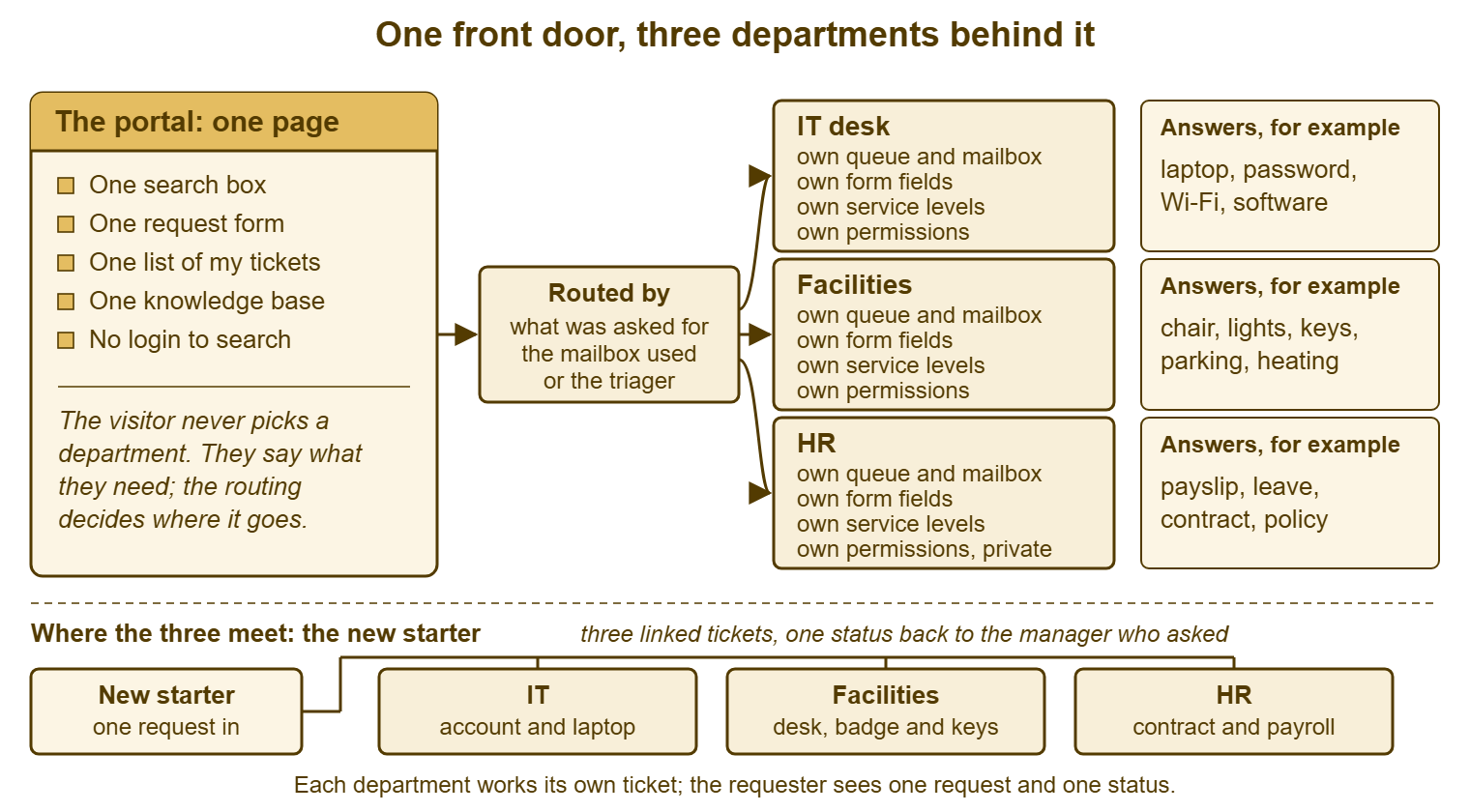
The page itself is the one described in Designing a Portal People Return To: a search box, the top questions, a short form and the visitor's tickets, on one screen. Nothing about a shared front door changes that design. The top questions simply include facilities and HR questions alongside IT's, in one list ordered by how often they are asked. The visitor's ticket list shows their estates request next to their laptop request, because to the visitor they are both just things they asked for.
A Department Each Behind the Door
Behind the page, nothing is shared that does not need to be. Each department has its own queue, which is the list of tickets its people work from. Nobody in IT sees the estates queue in their daily view unless they go looking. Each has its own mailbox, so that estates@example.com and it-help@example.com both still work and both create tickets in the right department without anyone redirecting them. Each has its own form fields, asked after the visitor has said what they need. That way, an estates request can ask which building and an IT request can ask which device without either question appearing on the front page. Each has its own service levels, because a flickering light and a dead payroll system do not deserve the same clock. And each has its own permissions, which matters most for HR and gets its own section below.
The shared pieces are the page, the search, the knowledge base and the ticket number sequence. The last one is more useful than it sounds. One sequence means a visitor's tickets can be listed together. A technician can link an IT ticket to an estates ticket about the same room. A manager can ask "what is the status of 7731" without first establishing which department's 7731. Three tools produce three sequences and three of everything else. One tool with departments produces one of each shared thing and three of each separate thing. If you run QuerySolv, one installation can serve several departments, so a shared front door does not have to mean a shared queue.
The resistance to this usually comes from the departments, not the visitors, and it is worth hearing. Estates fear being measured against IT's response times. HR fear IT seeing their tickets. Both fear losing the tool they know. The design answers each: separate service levels mean separate measurement. Separate permissions mean separate visibility. The thing being replaced is three front doors, not three teams. The teams keep their counters. The building gets one entrance.
How a Request Finds Its Department
A request reaches the right department by one of three routes, and a well-run front door uses all three. The first is what the visitor asked for. The form may offer one optional, plain choice, "Is this about: my computer or software / the building or my workspace / my employment or pay". A visitor who knows picks, while a visitor who does not leaves it and types. Most tools can route on that choice, and the words a visitor types are a second signal. "Projector", "chair", "payslip" each point somewhere. The choice is optional for a reason. A required choice is three doors again, inside the one door, and the visitor who cannot classify is back where they started.
The second route is the mailbox. Requests still arrive by e-mail, and will for years, and each department's address creates a ticket in that department. The front door does not retire the addresses; it adds a path that does not need them. Where one address has historically received everything, which is common where IT's address was the only one anyone knew, that address becomes the general intake. Its tickets are sorted by the third route. The mechanics of routing by form choice and mailbox, and the rules that go wrong when nobody reviews them, are the subject of Routing by Department, Form and Mailbox.
The third route is a person, and it is the one that makes the other two safe. Somebody in each department reads that department's new tickets at fixed times and asks "is this ours?" When the answer is no, that person moves it to the department whose it is, within the hour, with a one-line note. The visitor is told once: "This has gone to the estates team, who will reply by 11:00." Not closed. Never closed with "not ours". A request that arrives at the wrong counter is walked to the right one. The walking is a job someone owns, as described in Transferring a Ticket Between People or Departments. Hannah's two closed tickets were two departments each declining to walk.
Who Answers What
Most requests belong plainly to one department, and the grey areas are a short list that the three departments agree once and write down. The agreement is not about who is right. It is about who moves first, so that a request in a grey area is never closed by both. The rule for each grey area names the department that takes the ticket first and what they do before passing anything on. The table gives the usual list. Every organisation adds a few of its own. The way to find them is to pull three months of tickets that were transferred between departments or closed as "not ours" and read the subjects.
| Request | Plainly belongs to | Grey area rule, where there is one |
|---|---|---|
| Laptop, password, software, Wi-Fi, e-mail | IT | None |
| Chair, desk, lights, heating, keys, parking, cleaning | Facilities | An ergonomic chair or desk prescribed through HR: HR confirms, facilities fulfils, one linked ticket each |
| Payslip, leave, contract, policy, grievance | HR | Payroll system not working for everyone: IT takes it as an incident and tells HR |
| Projector, meeting-room screen, conference phone | IT | IT takes it first; if it is power, mounting or cabling in the fabric of the room, IT raises the facilities ticket and keeps the visitor's ticket open until the room works |
| Door badge or access card | Facilities | Badge not opening a door: facilities first; account or directory problem behind it: facilities raises the IT ticket |
| Desk phone | IT | Cabling to the desk: IT raises the facilities ticket |
| Printer | IT | Toner and paper supplies: whichever department holds the contract, written here: ____________ |
| New starter, leaver, internal move | HR starts it | HR owns the parent request; IT and facilities each own a linked child ticket; the hiring manager sees one status |
| Something that is "just broken" with no clue which | The general intake triager | Reads it, picks the likeliest department, moves it within the hour, never closes it |
Two patterns in the table do most of the work. "Takes it first and raises the other ticket" means the visitor's ticket stays open with the department that received it until the thing works, however many other departments are involved. The visitor talks to one department and the departments talk to each other. And "never closes it" is the rule for the general intake. That is because a ticket closed as "not ours" by a department that could have moved it is the single commonest way a shared front door loses a visitor's trust. A grey area with no rule is a ticket that will be closed twice.
The Knowledge Base That Serves All Three
One search box means one knowledge base. One knowledge base with three departments' articles in it works if two things are true. Every article has an owner in the department that knows the answer. Every title is written in the visitor's words rather than the department's. "How do I book annual leave?" sits beside "Connect a laptop to the Wi-Fi" and "Report a broken light". The visitor who searches "leave" finds the HR article without knowing or caring that HR wrote it. The search does not route; it simply finds, and a visitor who finds the answer has no department to be routed to.
Ownership keeps it from rotting. An article about the leave policy is HR's to keep current. HR must know it is theirs. That means a name on it and a review date. That is the argument of Ownership: Every Article Has a Name on It. That argument applies three times over when three departments publish into one place. The failure mode without it is predictable: IT, who usually run the tool, end up as the default owner of articles about parking permits. The parking article is wrong for two years because nobody in IT knows it is wrong and nobody in facilities knows it exists.
The top-questions list on the front page is one list, drawn from all three departments' tickets, ordered by how often the question is asked. That means the list will be mostly IT and HR with a facilities entry or two. That is correct, because it reflects what visitors ask. Resist the request for three lists, one per department. I once allowed that, and the front page carried thirty questions in three fonts. The HR list began with "How do I raise an IT ticket?". One list, ten questions, from the tickets, refreshed quarterly, whoever owns the answers.
Remember: the visitor says what they need; the desk decides whose it is. A request that lands at the wrong counter is walked to the right one within the hour and never closed as "not ours". That one rule is most of what makes a shared front door work.
Where the Three Meet: The New Starter
The new starter is the request that touches all three departments on the same day. It is where a shared front door earns its keep or shows its seams. The hiring manager raises one request: "Lucas starts on the 3rd as a duty manager, reporting to me, based at the front desk." Behind the door, that becomes three linked tickets: HR's, for the contract and payroll; IT's, for the account, the mailbox and the laptop; facilities', for the desk, the badge and the keys. The manager sees one request and one status. The departments each see their own ticket, with a link to the others. That way, IT can see HR has confirmed the start date without e-mailing HR to ask.
The parent request has an owner, and the owner is HR, because HR knows the start date first and because HR's part gates the others. An account cannot sensibly be created for someone whose contract is not signed. The owner's job is not to do the other departments' work but to watch the three tickets and tell the hiring manager when all three are done or when one is stuck. Most tools can link tickets to each other, and some can make one ticket the parent of others. Where neither exists, three tickets with the same first line of text and a cross-reference in each note do the job. In that case, a search for the starter's name finds all three. The request-and-fulfilment pattern behind this, including who approves and who delivers, is in Requests, Approvals and Fulfilment.
Test the new-starter route before the front door goes live, by raising one for a fictional starter and following the three tickets through to a laptop on a desk with a badge beside it. The test finds the gaps. It finds the facilities form that requires a cost code the hiring manager does not know. It finds the IT ticket that waits on a start date that is in HR's ticket and visible only to HR. It finds the badge that needs a photograph nobody asked for. Each gap is a day lost on a real starter's first week. The first week is when a new employee forms their opinion of how the place works.
HR's Special Case: Confidentiality
HR's tickets are different from IT's and facilities' in one respect that overrides every convenience: they must be seen only by HR. A grievance, a sickness record, a pay query or a contract negotiation is a conversation between an employee and HR. A technician who can open it because the tool shows everyone everything has breached a confidence, whether or not they read it. A shared front door is only acceptable to HR, and only lawful in many places, if HR's department is sealed. Its queue, its tickets, its notes and its attachments must be visible to HR's people and to nobody else, including the people who administer the tool unless that has been explicitly agreed and written down.
Test the seal rather than trusting the setting. Create a test HR ticket with a distinctive word in it. Then, as an IT technician, search for the word in the ticket search and in the knowledge base search. Open the visitor's ticket list as the requester and confirm the HR ticket shows to them and not to others. Try to move a ticket into HR as a technician and confirm what happens. Then ask who holds the administrator role for the tool and whether that role can see HR's tickets, because in most tools it can. That is a decision HR must make knowingly. Usually they do so by nominating one named administrator and writing down that the administrator may see HR's queue only when asked.
The same seal, in a lighter form, usually suits facilities and IT too. Each sees its own queue by default and can look at the others' when there is reason to. The difference is that for IT and facilities the seal is a convenience and for HR it is a condition. Agree it before the first HR ticket arrives, write it into the map, and re-test it whenever the tool is upgraded or a new administrator is appointed. An HR department that trusts the seal will publish its top questions on the shared page and route its requests through it. One that does not will keep "People Services" as a fourth door, and the visitor is back to guessing.
Governance Without a Committee
One front page needs one owner, and the owner is a person, not a group. Someone decides what is on the page, keeps the top ten honest, holds the grey-area list, and says no to the fourth tab. The owner is usually whoever runs the tool, which is usually IT. The other departments accept that more readily when the owner's job is defined as keeping the page small rather than deciding what the other departments do. The page owner does not own facilities' queue or HR's articles. They own the door.
The three departments meet for fifteen minutes a month, one person each, with the transferred-ticket list in front of them. Every ticket that moved between departments last month, or was closed as "not ours", gets a glance: did the grey-area rule cover it, and if not, what is the new rule? New rules go on the list; nothing else is on the agenda. Fifteen minutes is enough, because the list is short once the first few months have found the common cases. A meeting with one agenda item ends when the item does. Committees do not resolve grey areas; they schedule them. Three people with a list resolve them before the coffee cools.
The one standing rule is that nobody adds anything to the front page without the owner, and the owner's default answer is no. Every department will, at some point, want a banner, a notice, a link to its own system or a third list, each for a good reason. Each addition is one more thing between the visitor and the search box. The place for departmental news is the intranet. The place for the department's forty-item catalogue is a small link under the form. The front page stays one screen with four things on it, which is what made the visitor come back. The owner's job is to protect that against three departments' worth of good intentions.
A Short War Story: Three Doors at Pennant Hotels
Pennant Hotels, a group of four hotels with a shared head office, ran three separate portals for IT, maintenance and HR. When a new duty manager called Lucas was hired for the harbour hotel, his hiring manager, Sophie, dutifully raised three requests on three portals a fortnight before his start. HR's request was completed in two days. IT's sat in a status of "waiting for confirmation of start date", because the start date was in HR's ticket, which IT could not see. The technician had e-mailed HR's shared mailbox and received nothing back. The maintenance portal's request was never received at all, because its form required a cost code that Sophie did not have. When she left the field blank the form would not send. She took that to mean it had sent. Lucas arrived on the Monday to no badge, no account and no keys. He spent two shifts shadowing a colleague using that colleague's login. The shared login was picked up three months later by an audit as a finding against the hotel. The cost was two shifts of a duty manager's pay for a manager who could not manage, and an audit finding about shared credentials. There was also Sophie, who said "never again". From then on she hired people by e-mailing three colleagues she knew by name. That was the shadow channel the three portals had been built to prevent. One request to three doors is only as complete as its weakest door, and nobody standing at any one of them can see the whole.
The Multi-Department Portal Map
The map below is the shared front door on one page, for the three departments to agree before the page is built and to keep afterwards as the record of what was agreed. It names the owner of the door, what each department keeps separate, the three routes a request can take, and the grey-area rules. It names the knowledge base ownership, the linked-request pattern, the confidentiality seal and the monthly fifteen minutes. Fill it in with the three departments in the room, in one sitting, and treat the grey-area section as the living part. It grows by a line a month for the first year and then mostly stops.
MULTI-DEPARTMENT PORTAL MAP — ONE PAGE
Portal address: ______________________   Door owner (one person): ______________
Departments behind the door: ______________  ______________  ______________

THE FRONT PAGE (shared)
  [ ] One search box, across all departments' articles
  [ ] One top-ten list, from all departments' tickets, ordered by frequency
  [ ] One request form, three fields; optional plain choice:
      "my computer or software / the building or my workspace / my employment or pay"
  [ ] One list of the visitor's tickets, all departments together
  [ ] One ticket number sequence
  [ ] Opens without a login

EACH DEPARTMENT KEEPS (separate)
  Department        Own queue  Own mailbox            Own form fields     Service levels   Seen by
  ______________    [ ]        ____________________   ________________    ______________   __________
  ______________    [ ]        ____________________   ________________    ______________   __________
  ______________    [ ]        ____________________   ________________    ______________   __________

HOW A REQUEST FINDS ITS DEPARTMENT
  1. What was asked for: form choice and the visitor's words      configured by ________
  2. The mailbox it arrived at: each address above creates a ticket in its department
     General intake address (sorted by a person): ____________________
  3. A person: each department reads its new tickets at ____:____ and ____:____
     Mis-routed ticket moved within the hour, with one line to the visitor  [ ]
     NEVER closed as "not ours"                                             [ ]

GREY-AREA RULES (who takes it first; who raises the other ticket)
  ______________________________  first: __________  then: ______________________________
  ______________________________  first: __________  then: ______________________________
  ______________________________  first: __________  then: ______________________________
  ______________________________  first: __________  then: ______________________________
  Source: last three months of transferred or "not ours" tickets, reviewed on ________

KNOWLEDGE BASE
  Every article has a named owner in the department that knows the answer  [ ]
  Titles in the visitor's words                                            [ ]
  Default owner for articles with no department named: ______________

LINKED REQUESTS (new starter, leaver, move)
  Parent owned by: ______________   Child tickets: ______________  ______________
  Requester sees one status  [ ]    Tested with a fictional starter on ________  [ ]

CONFIDENTIALITY SEAL (HR, and any other sealed department)
  HR tickets, notes and attachments visible to HR only                     [ ] tested ________
  Ticket search and knowledge base search do not surface HR tickets        [ ] tested ________
  Tool administrators who can see HR's queue: ______________  agreed by HR on ________
  Re-test after every upgrade or change of administrator                    [ ]

GOVERNANCE
  Monthly fifteen minutes, one person per department:  ______________  ______________  ______________
  Agenda: transferred and "not ours" tickets; new grey-area rules. Nothing else.
  Nothing added to the front page without the door owner. Default answer: no.
Greystone built the map in one afternoon with one person from each of IT, estates and HR. The longest argument was over projectors. It took twenty minutes and ended with IT taking them first and raising the estates ticket when the fault was in the room rather than the equipment. Hannah's next dead projector, a month later, went in as one request through one door at 08:15. It was a working projector at 08:40, with one ticket, one status and no closures. She did not know, and did not need to know, that two departments had touched it. That is the entire design: the visitor sees one door, and the building sorts itself out behind it.
Frequently Asked Questions
Facilities and HR already have their own tools. Do they have to give them up?
Who should own the shared portal when three departments use it?
Should the request form ask the visitor which department they want?
How do we handle a request that genuinely needs two departments at once?
Can IT administrators see HR's tickets in a shared tool?
What happens to the old department addresses and portals?
From the QuerySolv team: we build self-hosted help desk software for Windows. QuerySolv runs as one Windows service on your own network. It takes requests by web form, e-mail, live chat, social messages and REST API. It is licensed once per installation rather than per agent per month. The free trial runs the full product for 30 days.