
Spotting Security Incidents Early From the Help Desk Queue
Thursday, 08:50, at Meridian Parts. Three tickets sit near the top of the morning queue. Ticket 6120 is Hana in purchasing, locked out, which happens to Hana about once a month. Ticket 6124 is Luis, a warehouse supervisor. He has had an alert saying his account signed in from a city he has never visited and wants to know if it matters. Ticket 6131 is Tom in finance, forwarding an e-mail about an overdue invoice with the single line "is this real?". By 09:30 three different technicians have resolved all three: Hana unlocked, Luis told to change his password to be safe, Tom told not to click. Three tickets, three fixes, three satisfied requesters.
Nobody put the three side by side, because nothing on the desk was built to. By the following Tuesday the security contractor Meridian uses two days a month was asking, with some patience, why nobody had mentioned them. They had been, in order, the first, second and third sign that somebody outside had spent the weekend trying doors. The desk had held the only view in the building where all three were visible at once. It had been looking at them one at a time.
A security incident, in plain words, is an event where somebody who should not have access has it or is trying to get it. Or information has gone somewhere it should not. An early-warning signal is a ticket that, on its own, looks like an ordinary Thursday. Beside one or two others like it, it is the beginning of an incident. The desk sees these signals first, because people bring their odd mornings to the desk before any tool notices. This article is part of our The Helpdesk's Role in Security Culture series. This article is about spotting the pattern across tickets and passing it on, early, to whoever handles the rest. The desk spots and reports. It does not investigate, and this article is careful to stay on that side of the line.
It covers why the desk sees it first, then the signals in the order they appear. It covers the odd sign-in alert, the cluster of lockouts, and the three reports of one e-mail. Then comes the account doing things its owner did not do. Next come seeing the pattern across tickets, the route to the security function, and what the desk does not do. It ends with a short war story and the early-warning signals sheet to copy, in that order.
Why the Desk Sees It First
Security tooling sees logs; the desk sees people, and people notice things before logs are read. The sign-in system recorded Luis's odd sign-in the moment it happened. And that record sat in a log that somebody might review at the end of the month. Luis rang the desk within the hour, because it felt wrong, and "it felt wrong" is the most sensitive detector most organisations own. Every security function I have worked with would rather hear about a feeling on Thursday than read about a fact next month.
The desk is also the only place the whole organisation reports to. Hana's lockout came by phone, Luis's alert by chat, Tom's invoice by e-mail, from three departments on two floors. No department manager could have seen all three; no security tool was watching the purchasing phone line. The queue is the one view in the building where a lockout, an alert and a forwarded e-mail sit in the same list. They are in time order, with names on them. That is a remarkable instrument, and most desks use it as a to-do list.
The cost of noticing is small and the cost of not noticing compounds by the day. A signal spotted on Thursday morning is a note, a tag and a short message to one person. The same signal found the following Tuesday, after the weekend, is a reset for everyone, a very long meeting and a contractor's invoice. The desk cannot stop the incident; that is not its job. It can shorten the time between the first sign and the first person who can act. And that interval is where most of the damage lives.
The Signals, in the Order They Appear
The signals arrive in a rough order, and the order is useful because it tells the desk how much time it has. Weeks before anything is declared, the queue holds singles: one odd sign-in alert, one reset request from somebody who could not pass verification. Days before, the singles become patterns: lockouts on several unrelated accounts in an hour, the same e-mail reported by three people in a morning. Hours before, the account itself starts behaving. Somebody's mailbox sends messages they did not write. An access request arrives under a name whose owner, when asked, denies making it. The picture below lays the signals on a line by how early they appear, with the colour saying how urgently the desk passes each one on.
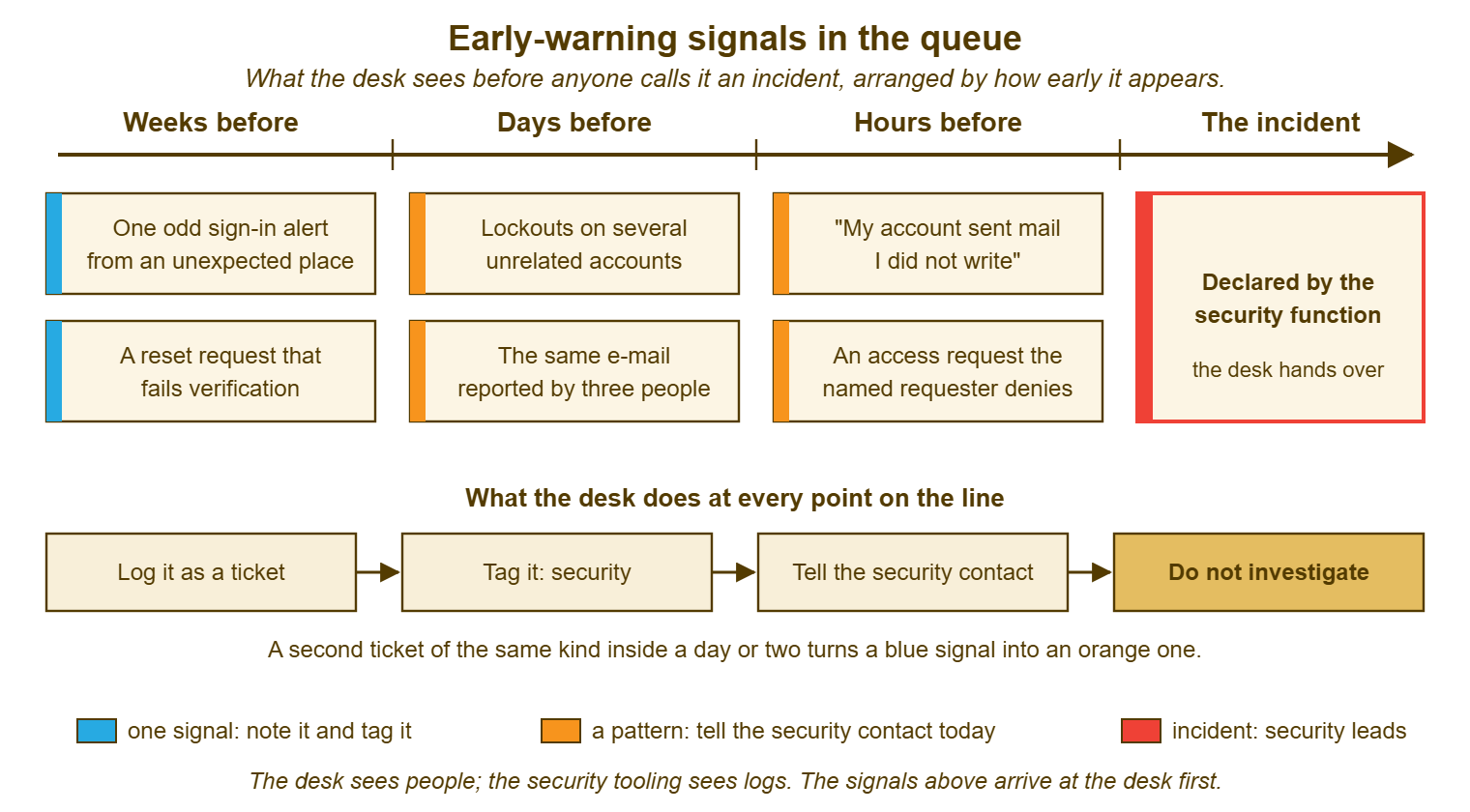
The shape to hold in mind is one versus several. One of anything is a ticket: handle it, note it, tag it, move on. Several of the same thing inside a day or two is no longer several tickets. It is one event seen from several desks, and the desk is the only place that can see the join. Every section that follows applies that test to one signal.
The Odd Sign-In Alert
The odd sign-in alert is the earliest and the most often dismissed. The sign-in service tells Luis his account was used from a city he has never been to, or from a new device at three in the morning. Luis asks the desk whether it matters. Most of the time there is an innocent explanation. It might be a phone that routes through a data centre somewhere unexpected. Or it might be a laptop that was asleep in a bag and woke up, or a colleague who borrowed a screen. Handling the single alert includes confirming with the person through a contact detail already on file rather than by replying to whatever raised the ticket. The handling is covered in Other Security Tickets the Desk Will See.
What this article adds is the second alert. One person with an unexplained sign-in is a ticket with a tag on it. Two people in different departments with unexplained sign-ins in the same week is a pattern. It goes to the security contact that day, with both ticket numbers, whether or not either person has changed their password since. The explanation might still be innocent; a new mail app that half the company installed over the weekend produces exactly this. The security function would still rather know, and would much rather know on Thursday.
Tag the single alert even when the user says "oh, that was me, I was on holiday". The explanation goes in the note, the tag stays on, and the ticket is closed as normal. The tag is not an accusation. It is the thing that lets the desk find the ticket again when the second one arrives. A ticket you cannot find again is a signal you never had.
The Cluster of Lockouts
A lockout is the account refusing to sign in because too many wrong passwords were tried against it. And the ordinary lockout is one person, repeatedly, with a stale password remembered by a phone or a mapped drive. The diagnostic order for that person is in The Lockout That Keeps Coming Back, and it is a Tuesday. The cluster is different in kind: four or five people in different departments, none of whom has changed a password, all locked out inside an hour. Somebody, somewhere, is trying passwords against accounts, and the lockouts are the sound of the doors holding.
The desk's job with a cluster is three things and no more. Unlock the people, because they have work to do and the lockout has done its job. Tag every ticket in the cluster and link them, so that they read as one event rather than four. Then tell the security contact today, with the account names, the times, and the sentence "none of these people changed a password". What the desk does not do is raise the lockout threshold or lengthen the reset interval to make the tickets stop. The lockouts are the alarm. Turning down an alarm because it is noisy is a decision for the people who own the alarm, after they have looked.
The cluster is easy to miss precisely because each lockout is routine. Three technicians each unlock one or two, each ticket is resolved in minutes, and nobody is wrong. The pattern only appears to somebody looking at the queue as a whole, which is why the daily glance described later in this article exists. Lockouts do not announce that they have company. They arrive one at a time and let you draw your own conclusions.
Three Reports of One E-mail
The user-reported suspicious e-mail is the best early-warning signal the desk has. Its triage, from reading the sender to the kind question about whether anything was clicked, belongs to The Phishing Triage Flow. The signal in this article is the count. One report is a ticket. The same message reported by a second person is interesting. The third report, inside a morning, means the message went to a lot of people. And the reports the desk has are the ones who noticed. For every person who forwarded it, there are others who deleted it, ignored it, or opened it.
The third report changes what the desk does. Link the three tickets so they read as one event. Tell the security contact that morning, with the subject line, the number of reports so far and the time of the first. The people who can do something about a message that reached the whole company are not on the desk and need to start now. They can do things such as removing it from mailboxes or blocking the sender. Then keep counting, since the fourth and fifth reports will arrive while the message is still out there. The count is the first thing the security function will ask for.
Thank every reporter, including the third, exactly as warmly as the first. The reporters are the reason the desk knows anything, and the article on Rewarding the Reporters is about keeping them reporting. A desk that sighs at the fifth report of the same e-mail will receive four next time, and two the time after that. The count only works if the people doing the counting are glad of it.
The Account Doing Things Its Owner Did Not Do
The latest signal, and the one closest to an incident already underway, is the account that acts on its own. The forms are distinct and the desk sees all of them. "My colleagues are getting e-mails from me that I did not send." "There is a rule in my mailbox I did not create." A request for access to a folder, apparently from Dana in finance, where Dana, asked by phone, has never heard of it. A password reset request that cannot pass the verification standard in Verifying Identity Before You Reset Anything, from somebody who gets irritated at being asked. Each of these is a ticket the desk must take seriously on its own, and together they are the hours-before band of the timeline.
The desk's response is containment by runbook and an immediate message, not investigation. The runbook is the one in When Someone Clicked: The First Hour. It covers the reset, the session revocation in plain words, the device check and the kind conversation, applied whether or not anybody clicked anything. Tell the security contact now, not at the end of the day. An account that is sending mail is an account somebody else is using, and every hour it stays usable it sends more. The request that the named requester denies is refused, recorded with both the request and the denial, and reported the same way.
Resist the urge to look around. The technician who finds the strange mailbox rule will want to open the sent items, check the forwarding, see what else was touched. Do not. Those are facts the security function needs to find in a certain order and preserve in a certain way. And a technician clicking through them changes the record. The desk's note says what the user reported, what the desk did, and when. The rest is somebody else's job, and they will thank you for leaving it alone.
Seeing the Pattern Across Tickets
The pattern is only visible if the tickets can be found together, so the first mechanism is a tag. Agree one word, "security" will do, and put it on every ticket that carries any signal in this article, resolved or not, explained or not. A tag costs nothing on the ticket where the explanation was innocent and is the whole difference on the day the second ticket arrives. If the tool has no tags, a category or a prefix in the title serves; what matters is that one search finds all of them.
The second mechanism is the daily glance. Once a day, at a fixed time, somebody looks at every security-tagged ticket from the last two days. They ask one question: is anything here the same thing twice? Two sign-in alerts from different people. Lockouts on more than one account with no password change behind them. The same subject line in two reports. It takes five minutes on a quiet day. The pattern, when there is one, is usually obvious the moment the tickets are side by side. The glance is the only part of this article that needs a rota. And it needs one because a glance nobody owns does not happen.
The third mechanism is linking. When the glance finds a pattern, link the tickets so they are read as one event, and name the event in a note on each. If you run QuerySolv, every door into the desk lands in the same queue. In that case, Hana's phone call, Luis's chat and Tom's e-mail are already in one list. Linking the three is a moment's work rather than a search across three inboxes. Most tools can link tickets somehow. If yours cannot, a shared note with the three numbers in it does the job less elegantly and just as well.
| The signal | One of them is | Several are | What the desk does with several |
|---|---|---|---|
| Odd sign-in alert | A ticket; confirm with the person through a detail on file; tag | Two or more people, different departments, inside a week | Link; message the security contact today with the ticket numbers |
| Lockout with no password change behind it | A stale credential; diagnose and unlock | Lockouts on several unrelated accounts inside an hour or two | Unlock; link; message today with names and times; do not change the lockout policy |
| Suspicious e-mail reported | Triage; thank the reporter | The same message from three people in a morning | Link; message that morning with subject, count and first time; keep counting |
| Reset request that fails verification | Refuse politely; record; tag | Two in a week, or one for a privileged account | Message today; the security contact may want the account watched |
| Account acting on its own | Already a pattern: run the clicked runbook | Any second account the same day | Message now; expect the security function to lead from here |
| Access request the named requester denies | Refuse; record the request and the denial | Any second one | Message now; keep the original request untouched |
Remember: one of anything is a ticket. Several of the same thing inside a day or two is one event, and the desk is the only place that can see the join. Tag every signal, glance at the tagged tickets once a day, link what matches, tell the security contact, and investigate nothing.
The Route to the Security Function
Every desk needs to know, by name, who it tells. And that name needs to be written down somewhere the newest technician can find it at eight in the morning. In a larger organisation it is a security team with a mailbox and a phone number. In a mid-sized one it is a person with two hats, or a contractor on a retainer. In a small one there is nobody with the title, and the desk tells the person who owns IT and does the basics itself. That situation is the subject of Working With the Security Function, later in this series. That article also sets out who does what once the message is sent. This article only needs the route to exist.
The message itself is short and factual, and the sheet at the end gives its shape. Ticket numbers. Who reported what, and when. What the desk did, with times. The sentence that makes it a pattern: "none of these people changed a password", "same subject line, three reporters, first at 08:52". What the desk has not done, which is anything beyond the runbook. No theory about who is behind it, because the desk does not know and a guess in writing is the kind of thing that gets quoted later. If the message takes longer than five minutes to write, it has too much in it.
Send it before you are sure. The desk's instinct is to confirm the pattern first, ask the users a few more questions, wait for the fourth lockout so the message is not embarrassing. The security function does not want certainty from the desk; it wants the earliest plausible signal. And it would rather receive five messages that turned out to be nothing than miss the one that was not. Agree in advance that false alarms are welcome, and then believe it. A desk that is embarrassed to be wrong will be late to be right.
Mark the handoff on the ticket so it is visible without reading the notes. Use an escalation flag, a status, a note that begins "told security 09:40", whatever the tool offers. The point is that the next technician who opens the ticket can see that it has already been passed on and to whom. When the desk-caused outage and the security incident overlap, which they sometimes do, the declaration and the first quarter of an hour belong to What Makes an Incident Major. The security function decides whether its incident is also one of those.
What the Desk Does Not Do
The desk does not investigate, and the line is worth stating plainly because every technician will feel the pull to cross it. It does not sign in as the user to look around. It does not read a mailbox beyond what the ticket needs to contain the problem. It does not run scanning or forensic tools on its own initiative, change logging settings, or pull reports from systems it does not normally touch. Each of those is work that has an order and a method. Done out of order by a well-meaning technician, it can destroy the one piece of evidence that mattered.
The desk does not tell the user they have been hacked, because it does not know that. It says what it knows: "we have seen a sign-in we cannot explain, we have secured your account, and the people who look into these things will take it from here". It does not reassure prematurely either; "I am sure it is nothing" is a sentence that reads badly in a review. Calm, specific and honest about the limit of what the desk can say is the tone, and Tone in Hard Moments has the rest of it.
The desk does not tidy up. The tickets stay as they were. The strange rule stays in the mailbox until the security function says otherwise. The request that was denied stays in the queue with its denial attached. The desk's contribution to an incident is a clean, timed record of what people reported and what the desk did about it. That record is worth more to the people investigating than any amount of helpful poking. And it is the one thing only the desk can provide.
A Short War Story: The Four Unlocks at Redbrook Engineering
On a Monday morning at Redbrook Engineering, Kwame unlocked four accounts in forty minutes, one each from drawing, purchasing, the machine shop and reception. He resolved four tickets with the same note: user confirmed by phone, unlocked, back in. None of the four had changed a password, which Kwame noticed and thought mildly odd. The fifth, at 10:20, was the finance director, whom he also unlocked. Nobody tagged anything, because the desk had no tag, and nobody told anybody, because there was nobody written down to tell. On the Wednesday the part-time security consultant was reviewing sign-in records for an unrelated audit. The consultant found that somebody outside had spent Sunday night trying passwords against about sixty accounts. The five lockouts had been the sound of it. The cost was three days of the consultant's time and a forced password change for the whole company that produced ninety-odd tickets in a week. It included a meeting long enough to need a second pot of coffee. The lesson Redbrook wrote on the wall was short: five lockouts on unrelated accounts in an hour is one ticket, not five. And the desk had been holding the only clock that could have said so.
The Early-Warning Signals Sheet
The sheet below is the one Redbrook's desk wrote the following week and taped beside the second monitor. Fill the header with a real name and a real way to reach them. A sheet that says "tell security" without a name is a sheet that tells nobody. The rule at the top is the whole method; the signal list is the reminder. The message skeleton is there so nobody has to compose one at 08:50 with a queue behind them.
EARLY-WARNING SIGNALS SHEET — ONE PAGE BESIDE THE QUEUE
Desk: ______________________   Security contact: ______________________   Reach them by: ______________
Fallback contact if no reply within ______ : ______________________   Daily glance owner today: ____________

THE RULE
  One of anything .......... a ticket: handle it, note the explanation, TAG it, close it as normal
  Several inside a day or two ... one event: LINK them, message the contact TODAY
  An account acting on its own, or a request its named owner denies ... message NOW, run the clicked runbook

THE SIGNALS                                   ONE IS                       SEVERAL IS
  Odd sign-in alert ........................ confirm via a detail on file   2+ people in a week
  Lockout, no password change behind it .... diagnose, unlock, tag          2+ accounts in an hour or two
  Suspicious e-mail reported ............... triage, thank, tag             same message from 3 people
  Reset request that fails verification .... refuse politely, record, tag  2 in a week, or 1 privileged account
  "My account sent mail I did not write" ... already several: runbook, message now
  Access request the named requester denies  refuse, record both, message now

THE DAILY GLANCE (five minutes, same time every day)
  [ ] Open every ticket tagged security from the last two days
  [ ] Ask once: is anything here the same thing twice?
  [ ] Link anything that matches and write the event name in a note on each
  [ ] Message the contact if anything was linked, even if it looks explained

THE MESSAGE (under five minutes to write)
  Tickets: ____, ____, ____
  What was reported, by whom, when: ________________________________________________
  What the desk did, with times: ___________________________________________________
  Why it reads as a pattern (one sentence): _________________________________________
  What the desk has NOT done: anything beyond the runbook; nothing opened, changed or deleted

THE DESK DOES NOT
  Sign in as the user. Read beyond what containment needs. Run tools on its own initiative.
  Change the lockout policy. Tell the user they were hacked. Tidy anything up. Wait to be sure.
Meridian's three tickets would have met the sheet on the first line. A sign-in alert, a lockout with no password change and a reported e-mail on one Thursday morning are three singles, each tagged. And the daily glance at 09:30 would have seen them together and sent a message that took four minutes to write. The contractor would have had the weekend's story on Thursday instead of Tuesday. Nothing about the desk's skill would have changed. Only the order in which it looked.
Frequently Asked Questions
How do we tell a real signal from a user who was simply on holiday?
Will we not flood the security function with false alarms?
We have no security function at all. Who does the desk tell?
Should the desk raise the lockout threshold so the cluster of lockouts stops?
The user asks "have I been hacked?". What does the desk say?
How far back should the daily glance look?
From the QuerySolv team: we build self-hosted help desk software for Windows. QuerySolv runs as one Windows service on your own network. It takes requests by web form, e-mail, live chat, social messages and REST API. It is licensed once per installation rather than per agent per month. The free trial runs the full product for 30 days.